What is a Windows 11 Activation Key?

What is a Windows 11 Activation Key?
A Windows 11 activation key is a unique 25-character alphanumeric code (e.g., XXXXX-XXXXX-XXXXX-XXXXX-XXXXX) used to verify that your copy of Windows 11 is genuine and properly licensed.
This key ensures you're running a legitimate version of the operating system, granting access to all features, updates, and security enhancements.
To learn more about the different activation methods and key types, check out the comprehensive windows 11 activation guide on Codesforever.
Key Benefits of Windows 11 Activation
Full Feature Access
Activating Windows 11 with a valid digital license or product key helps confirm that your copy of Windows is properly licensed. Activation also removes activation-related restrictions and allows you to use Windows personalization options normally. Availability of individual features can vary by Windows edition and hardware.
Security and System Updates
Activation and updates are separate processes, but keeping Windows properly licensed makes it easier to maintain a supported Windows installation. Windows Update delivers security updates, quality improvements, and bug fixes when your device and Windows version are supported. Regularly installing these updates helps protect your system and maintain reliability.
Genuine and Licensed Software
Using a genuine Windows license helps you comply with Microsoft's software licensing terms. A valid product key or digital license verifies that your Windows installation is properly licensed and reduces the risks associated with unauthorized or counterfeit software.
Windows 11 Activation Methods
Method 1: Activate Using a Product Key
- Open Settings.
- Select System.
- Click Activation.
- Find Change product key and select it.
- Enter your valid 25-character Windows product key.
- Click Next and then select Activate.
- Wait for Windows to verify the key and complete activation.
Method 2: Activate Using a Digital License
If your PC already has a digital license:
- Connect your computer to the internet.
- Open Settings > System > Activation.
- Check the Activation state.
- If the device has a valid digital license for the installed edition, Windows may activate automatically.
- Sign in with the Microsoft account associated with your digital license if required.
Method 3: Troubleshoot Activation
If Windows is not activating:
- Go to Settings > System > Activation.
- Select Troubleshoot if the option is available.
- Follow the instructions displayed by Windows.
- Check that your internet connection is working.
- Confirm that the Windows edition installed on your PC matches your license.
How to find your Windows 11 Activation Key
You can retrieve your existing key using several built-in tools:
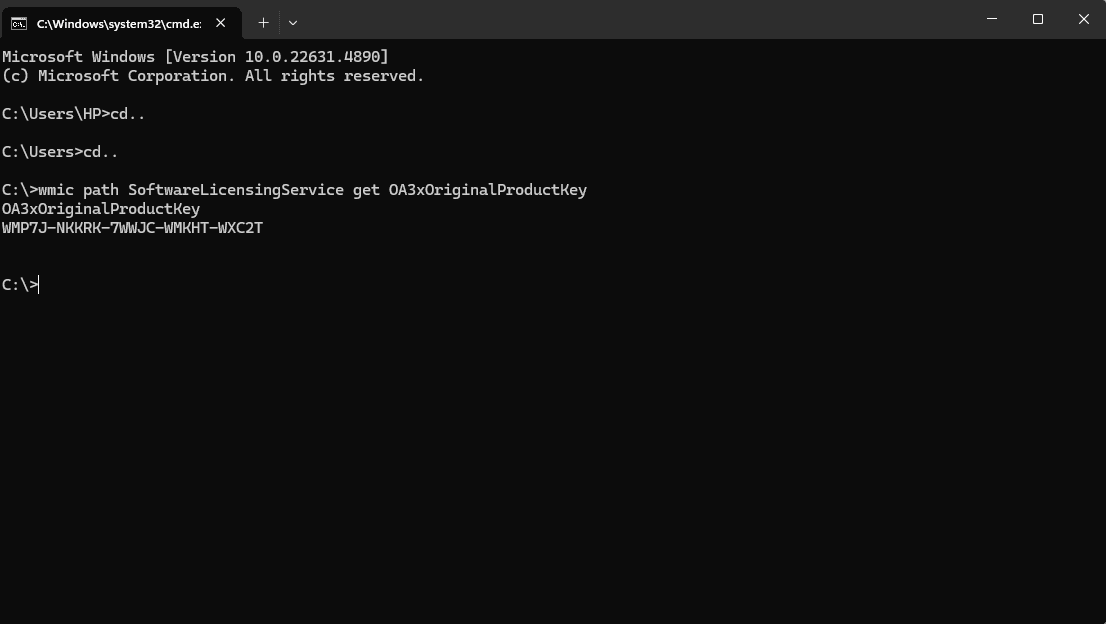
1. Using Command Prompt
Open Command Prompt as an administrator.
Enter:
wmic path SoftwareLicensingService get OA3xOriginalProductKey
2. Using PowerShell
Open PowerShell as an administrator.
Enter:
(Get-WmiObject -query 'select * from SoftwareLicensingService').OA3xOriginalProductKey
3. Through the Windows Registry
Press Win + R, type regedit, and press Enter.
Navigate to:
HKEY_LOCAL_MACHINE\SOFTWARE\Microsoft\Windows NT\CurrentVersion\SoftwareProtectionPlatform
Look for BackupProductKeyDefault.
Where to Purchase a Windows 11 Activation Key
Trusted Retailers
- Microsoft Store – Official and most reliable source.
- Authorized Third-Party Resellers like Codesforever – Trusted marketplace for genuine activation keys at competitive prices.
Why Choose CodesForever?
- Authenticity Guaranteed – Direct from Microsoft.
- Instant Delivery – No waiting for your key.
- SSL Secure Checkout – Peace of mind with every transaction.
- 5-Star Rated Support – Real humans, real help.
Risks of Using Unlicensed or Pirated Activation Keys
There are major drawbacks to using fraudulent or cracked keys -
- Security Flaws: Possibility of data leaks, ransomware, and malware.
- Lacking Features: Few personalisation choices and limited use.
- Legal Issues: Violates Microsoft licensing policy and could face fines.
- Bad System Performance: False activations frequently lead to instability.
Frequently Asked Questions (FAQs)
Conclusion
A genuine Windows 11 activation key is your ticket to a secure, feature-rich, and legally compliant Windows experience. It’s more than just a code — it’s a license to use Microsoft’s cutting-edge OS with confidence.
By following best practices and purchasing from trustworthy sources like Codesforever, you’re setting yourself up for long-term success and system stability. Ready to activate Windows 11 the right way?