Digital License vs Product Key

Introduction
This expert-crafted guide leverages Microsoft standards, community consensus, and direct experience—building excitement and trust in every recommendation. You’ll find clear explanations, step-by-step activation walkthroughs, honest comparisons
What is a Product Key?
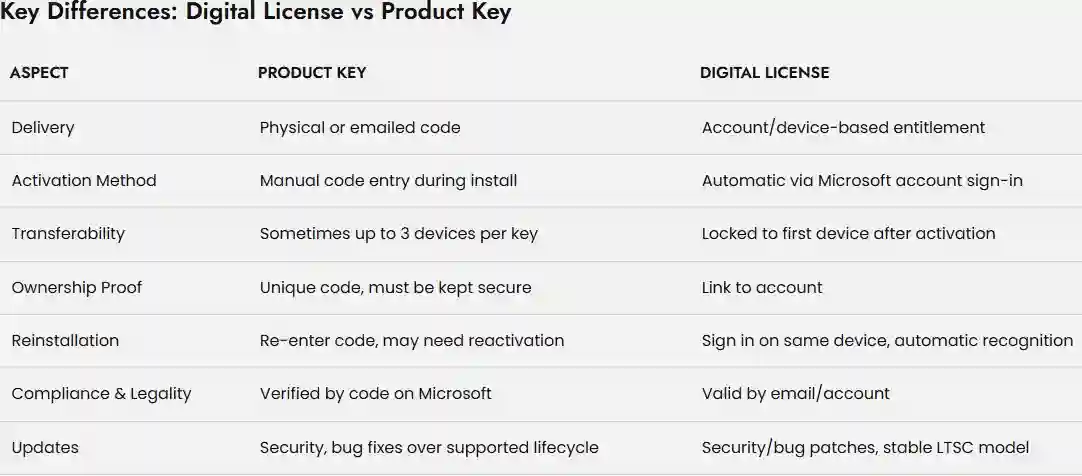
A product key is the classic method of software activation. It's a unique, 25-character alphanumeric code that you manually enter during the installation or initial setup of your software. You've likely seen these on a sticker on your computer, on a card inside a software box, or in an email confirmation after a digital purchase. Think of it as a physical key to a digital lock; you hold the key, and you're responsible for keeping it safe.
What is a Digital License?
A digital license is a more modern, hardware-based method of activation. Instead of a key you have to remember or write down, the license is linked to your device's hardware or your account. Once your device is activated with a digital license, the license is stored on activation servers. If you reinstall the software or even the entire operating system, it will automatically reactivate once you connect to the internet, as long as no significant hardware changes have been made. It's a "set it and forget it" approach that is tied to your digital identity and your physical device.
Both methods validate your purchase, unlock full features, and protect you from legal or support issues. Product keys offer physical proof and are often more flexible; digital licenses provide convenience, enhanced security, and instant email delivery.
Features: Unlocking the Best of Office 2024 Professional Plus
Breakthrough Productivity Apps
Word: AI-based writing assistant, enhanced templates, dark mode, advanced formatting
Excel: Dynamic arrays, new charts, predictive analytics, quick data sharing
PowerPoint: AI slide designer, Cameo video, multimedia-enhanced presentations
Outlook: Smarter email prioritization, robust phishing protection, calendar upgrades
Access/Publisher/OneNote: Fast database work, industry-grade desktop publishing, integrated notes
Intelligent Automation
Copilot AI and built-in workflows boost data management, writing, and presentation quality with minimal manual input.
Collaboration & Accessibility
Real-time co-authoring, threaded comments, advanced OneDrive integration
Improved accessibility tools and custom themes for diverse users
Robust Security
Automated malware/phishing protection
Five years of critical security updates with compliant data handling
Lifetime Ownership & Offline Reliability
Works fully after activation, no recurring fees or forced upgrades
Ideal for privacy-centric, cost-conscious users in business, education, and home settings
Benefits: Why Genuine Activation Delivers Maximum Value
Flexible Installation & Restoration
Reinstall and reactivate easily using your Microsoft account or by safely storing your product key
Hassle-free transitions for device upgrades or replacements
Comprehensive Support
Only activated products qualify for Microsoft help, upgrades, and bug fixes
Community support via trusted sites like CodesForever adds expert troubleshooting to your toolkit
Ownership & Peace of Mind
Avoid reduced mode (view-only) limitations and restore full document and editing control
Secure data handling with certified updates for five years
Scalable Management for Businesses
Volume licensing through KMS/MAK keys offers streamlined, secure deployments across multiple PCs and users
Security, Legitimacy & Lifetime Value
Both options, when purchased from authorized sources, guarantee legitimacy. Activation transforms your trial software into official, fully supported Office 2024, ensuring regular patches, compliance, and resistance to piracy or malware risks.
Digital License Security: Device/account, shielding against unlawful use.
Product Key Security: Must be stored securely to avoid illegal copying or loss.
Buying from trusted sources and activating promptly is essential. Counterfeit or invalid keys/digital licenses open major risks: deactivation, data loss, legal problems, and lack of support from Microsoft.
Who Benefits Most from Each Model?
Product Key
IT professionals managing multiple deployments
Users needing flexibility to transfer between computers
Legacy system operators (offline installations)
Those preferring physical or recorded ownership
Digital License
Businesses seeking instant, compliance-guaranteed deployments
Users with cloud connectivity, prioritizing speed and convenience
Purchasers via authorized online retailers or direct from Microsoft.
Frequently Asked Questions (FAQs)
Digital License offers better recovery, easier deployment, and seamless transfers. Businesses with large deployments may prefer KMS/product keys for bulk automation.
Only if the Microsoft account is compromised or misused; it is much safer than a physical key.
Yes, but buy from trusted vendors and check license region specifics.
Usually on the same device; transfers may be restricted unless using a digital license or volume agreement
Office enters reduced mode—no saving or editing. Contact support for activation recovery.
Conclusion: Activate Smarter, Own with Confidence
Activating Office 2024 Professional Plus with a Digital License or Product Key is not just a technical necessity—it's your shield against cyber-risks, your guarantee of lifetime features, and your ticket to reliable, future-proof productivity. With expert guidance and powerful resources, every user can make a secure, informed decision and maximize their Microsoft investment for years to come.