Retail vs Volume Licensing

Introduction
Choosing the right licensing path for Office 2024 Professional Plus shapes your organization’s productivity, budget, legal compliance, and future support. Whether you’re a solo user, small business, IT manager, or enterprise leader, this comprehensive article—created and reviewed by licensing specialists—clarifies every difference and empowers your next step with excitement and trust.
What is Retail Licensing?
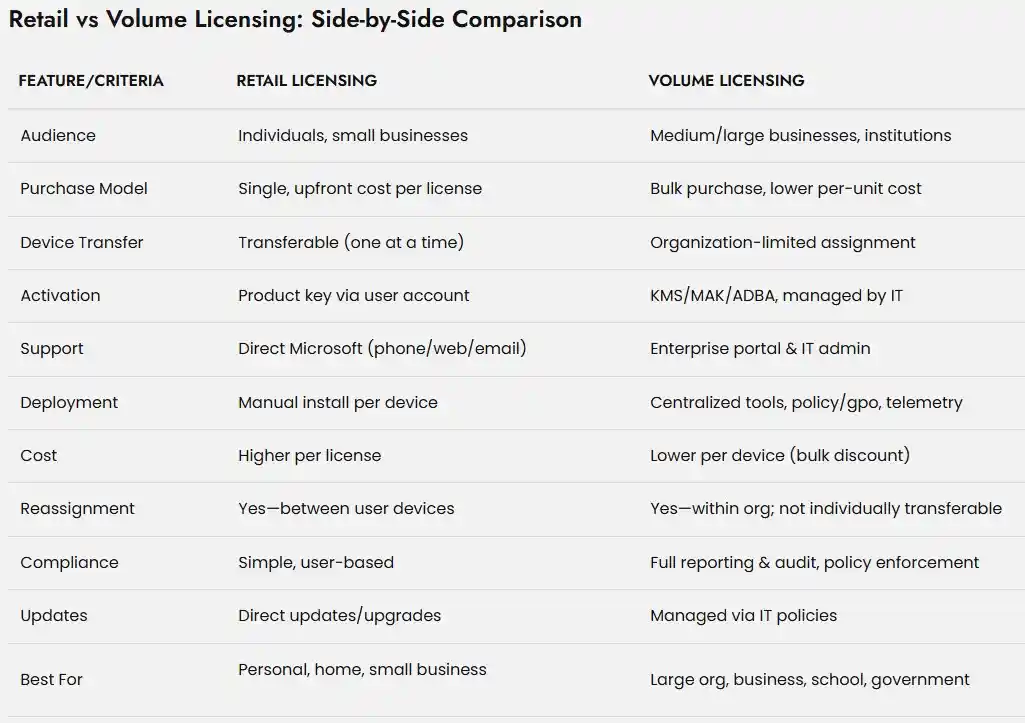
Retail Licensing for Office 2024 is designed for individuals, small businesses, and home users. Retail licenses are purchased from online marketplaces, or resellers, typically as “boxed” products or digital license.
Key Features:
Single Purchase, Lifetime Ownership: Buy once, own forever—no recurring fees.
Transferability: You can uninstall Office from one device and reinstall on another you own.
Full Microsoft Support: Direct access to Microsoft’s support channels for issues, updates, and migration.
Activation: Requires a product key binding to your Microsoft account for secure and legal use.
What is Volume Licensing?
Volume Licensing is engineered for organizations needing multiple activations across many devices—businesses, schools, government agencies, and enterprise IT environments.
Key Features:
Bulk Purchase: Acquire a set number of licenses (often at a discount per unit).
Centralized Deployment: Designed for network admins and IT teams; supports streamlined distribution.
Activation via KMS/MAK: Managed by Key Management Service (KMS), Multiple Activation Key (MAK).
Management & Reassignment: Licenses can be reassigned to machines within the organization.
Who Should Choose Retail?
Retail Licensing: Advantages
Flexibility: Move software between PCs with ease (within license terms).
Upgrades and Support: Direct access to Microsoft’s patch cycles, feature upgrades, and help-desk support.
User Control: Ideal for freelancers, consultants, families, or anyone not needing mass deployment.
Retail Licensing: Disadvantages
Cost: Upfront price is higher per license than volume alternatives.
Management: Manual install/update process; not ideal for teams of more than a handful of devices.
Limited Activation: Generally locks to a single device at a time until transferred.
Who Should Choose Volume?
Volume Licensing: Advantages
Scaling and Savings: Deploy hundreds or thousands of seats for less per device; best for organizations.
Centralized IT Management: IT teams can centrally activate, monitor, and report on compliance.
Reassignment Rights: Move software between many devices as staff changes, hardware upgrades, etc..
Advanced Features: Includes telemetry, app management, remote desktop support, and integration with business productivity servers.
Volume Licensing: Disadvantages
Complexity: Activation and deployment require IT skills and ongoing license management.
Limited Transferability: Licenses are tied to the organization, not the individual or home user.
Support Model: Primarily handled by the organization’s administrators, not direct retail customer support.
Licensing Activation Explained
Activating Office 2024 Professional Plus is the critical step linking your software to your device (retail) or managed domain (volume licensing). Errors and compliance issues often arise due to mismatched license types, improper activation, or non-genuine keys.
How Licensing Impacts Activation, Features & Support
Retail licenses activate via individual product keys or through your Microsoft account—perfect for quick installs and flexible movement. Volume licenses activate through either MAK (Multiple Activation Key) or KMS (Key Management Service), allowing mass deployment from a central IT dashboard.
Activation ensures:
Legal use and compliance
All apps and features are available
You receive updates, support, and troubleshooting
Data and business protected from piracy audits
Benefits: Choosing Licensing That Fits Your Needs
Retail License Benefits
Immediacy and ease: Install and go without IT involvement
Always-up-to-date: Regular feature releases, security patching
Responsive support: Access to consumer Microsoft Help
Flexibility: Use on a new device with simple activation transfer
One-time payment: No annual fees or contracts
Volume Licensing Benefits
True cost savings: Save up to 30–70% with bulk discounts
Centralized control: Easy compliance, reporting, and device replacement
Long-term stability: LTSC ensures minimal disruptions, with critical only updates
Enterprise support: Dedicated helpdesk, tailored resources, priority service
Scalable management: Add/remove users, devices, and features as business changes
Frequently Asked Questions (FAQs)
Yes, but you must re-purchase for new seats; plan ahead for savings
Yes—feature and security updates are included
IT admins can reassign licenses using VLSC tools for compliance
Enterprise-grade support and resources are provided, including direct help and documentation
Generally no—volume is reserved for organizations, but some resellers may offer 'pre-owned' seats for groups.
Contact your vendor or representative for a license increase or reassignment within your org.
Conclusion: Own Your Office Suite with Confidence
Making the right licensing choice for Office 2024 Professional Plus secures your workflow, your investment, and your long-term peace of mind. Whether you’re activating a single device or deploying across an entire enterprise, every tool, guide, and expert-backed recommendation is here to guarantee your success.
Start every licensing, activation, and compliance journey at our pillar resource:
Office 2024 Professional Plus Licensing Explained
Empower your digital productivity—choose smart licensing, activate with confidence, and build a future-proof workspace today!