

How to Activate Microsoft Excel 2024: Complete Beginner to Advanced Guide

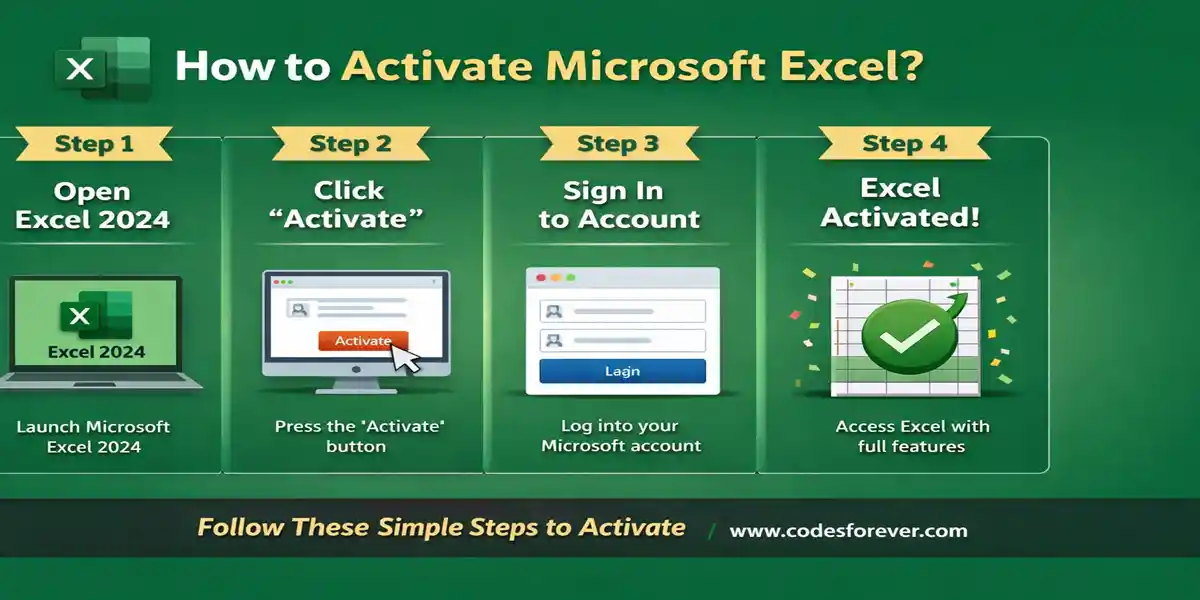
Introduction to Microsoft Excel 2024
Microsoft Excel has been the world’s leading spreadsheet software for decades, transforming the way individuals, students, professionals, and organizations manage data, perform calculations, and conduct analysis. With Microsoft Excel 2024, the latest version of Excel as part of Microsoft Office 2024, users gain access to improved performance, enhanced analytical features, and a modern, user-friendly interface.
Excel 2024 is designed for students, professionals, data analysts, accountants, and businesses. It allows users to create complex formulas, charts, pivot tables, dashboards, and detailed reports with ease. Whether you are performing financial analysis, tracking project timelines, or managing large datasets, Excel 2024 is optimized to meet the demands of modern productivity environments.
This guide will cover step-by-step activation, explore Excel 2024’s key features, explain installation and common activation errors, and highlight why CodesForever is a trusted provider for genuine licenses.
What Is Microsoft Excel 2024?
Microsoft Excel 2024 is an advanced spreadsheet application used for:
- Organizing, analyzing, and storing data
- Creating interactive and dynamic workbooks
- Performing complex calculations using formulas and functions
- Generating reports, charts, and dashboards
- Collaborating with teams efficiently
Key improvements in Excel 2024 include:
Enhanced data visualization
Interactive charts, graphs, and sparklines make data easy to understand
Improved calculation speed
Optimized performance for large datasets and complex formulas
Expanded formula library
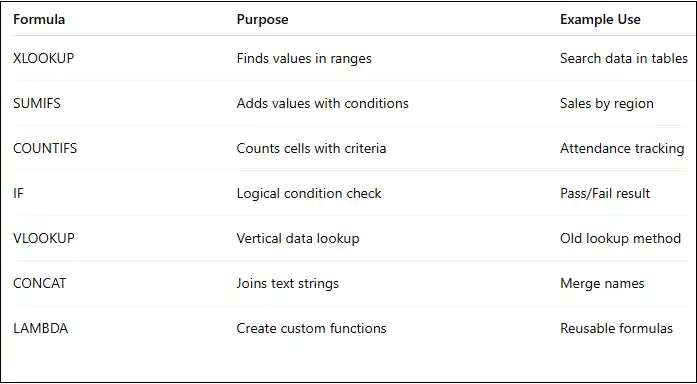
New functions such as XLOOKUP, LAMBDA, and dynamic arrays
Seamless Office integration
Works smoothly with Word, PowerPoint, Outlook, and Teams
Excel 2024 works offline after activation, but users can also connect to cloud services to share workbooks, collaborate in real-time, and access files from multiple devices.
Key Features of Microsoft Excel 2024: Advanced Data Analysis, Formulas & Charts for a One-Time Purchase
1. Modern Fluent Design Interface and Customizable Ribbon
Excel 2024 brings the refreshed Fluent Design look used across Office 2024, with a clean ribbon that helps both beginners and power users find tools quickly.
- Quick Access Toolbar for the commands you use most
- Customizable ribbon tabs so you can build a workflow around your own tasks
- Streamlined menus that cut clutter
- A dedicated Accessibility ribbon in the LTSC edition
2. Advanced Data Analysis Tools
Excel 2024 keeps the analysis toolkit that makes it a standard for data analysis, reporting, and business intelligence:
- PivotTables to summarize and explore large datasets
- Power Query (Get & Transform) to import, clean, and reshape data from multiple sources
- Analysis ToolPak for statistical and engineering calculations
- What-If Analysis (Scenario Manager, Goal Seek, Data Tables) to model outcomes from changing inputs
3. Expanded Formula and Function Library
Excel 2024 offers hundreds of built-in Excel formulas and functions that automate repetitive calculations:
- Dynamic arrays that return multiple results from one formula
- XLOOKUP for flexible lookups
- LET to name intermediate results, making long formulas readable and faster
- 14 new text and array functions for splitting, stacking, and reshaping data
- LAMBDA for reusable custom functions. Availability can vary by build, so confirm it in your installed version.
4. Enhanced Charts and Data Visualization
- Dynamic charts that resize automatically when their underlying arrays grow or shrink
- 3D Maps for geospatial analysis
- Conditional formatting to highlight trends and outliers
- Sparklines for compact in-cell trend lines
- The new IMAGE function to pull pictures into cells from a URL
These tools suit dashboards, reports, and presentations.
5. Collaboration Tools: What's Included and What Isn't
Excel 2024 supports comments and notes for clear feedback inside a workbook. It does not include real-time co-authoring or live multi-user editing, which are Microsoft 365 features. You can save workbooks to OneDrive or a shared drive for backup and access, but simultaneous editing isn't part of this one-time purchase. If your team needs live co-authoring, Microsoft 365 is the better fit.
6. Security and Data Protection
- File encryption and password protection
- Protected sheets and workbooks to prevent unwanted edits
- Macro security controls that reduce exposure to malicious files
7. True Offline Excel: No Subscription Required
As a perpetual-license Excel, Excel 2024 runs fully offline after activation, which suits regulated, remote, and air-gapped environments. You pay once, with no monthly or annual fees.
System Requirements for Microsoft Excel 2024
Before installing Excel 2024, ensure your system meets the following requirements:
- Windows 10 or Windows 11
- Minimum 4 GB RAM (8 GB recommended)
- At least 4 GB of free disk space
- Internet connection required for activation
- Latest supported macOS version
- Intel or Apple Silicon processor
- Internet connection required for activation
Meeting these requirements ensures smooth installation and optimal performance.
Installation Guide for Microsoft Excel 2024
Step 1: Purchase a Genuine Excel 2024 License
Buy from a trusted source like CodesForever to ensure authenticity, avoid activation errors, and gain long-term support.
Step 2: Sign in to Microsoft Account
Visit the Microsoft Office setup portal and sign in with your account. This links your Excel license permanently to your Microsoft account.
Step 3: Redeem the Product Key
Enter your 25-character product key to associate Excel 2024 with your account.
Step 4: Download Excel 2024 Installer
Download the Excel installer for Windows or Mac. It is usually part of the Office suite.
Step 5: Install Excel 2024
Run the installer and follow on-screen prompts. Installation may take a few minutes depending on system performance.
How to Activate Microsoft Excel 2024
Method 1: Activation Using Microsoft Account (Recommended)
- Open Excel 2024
- Click Activate when prompted
- Sign in using the Microsoft account linked to your license
- Excel activates automatically
This method is secure, official, and error-free.
Method 2: Activation Using Product Key
- Open Excel 2024
- Go to File → Account → Change Product Key
- Enter your 25-character key
- Restart Excel to complete activation
This method works if you prefer manual key entry.
Common Microsoft Excel 2024 Activation Errors and Solutions
Error 1: “Product Not Activated”
- Cause: License not linked to Microsoft account
- Solution: Sign out and sign in with correct account
Error 2: “This Product Key Has Already Been Used”
- Cause: Key registered to another account
- Solution: Use original account or request license transfer
Error 3: “Cannot Connect to Activation Server”
- Cause: Internet/firewall issues
- Solution: Check connectivity, disable VPN temporarily, allow Excel through firewall
Error 4: Conflicting Previous Office Versions
- Cause: Older installations interfere
- Solution: Uninstall old Office versions and use Microsoft Support and Recovery Tool
Error 5: Invalid Product Key
- Cause: Mistyped or non-genuine key
- Solution: Verify key or contact seller for confirmation
Why Choose CodesForever for Microsoft Excel 2024?
1.Authentic Licenses
CodesForever guarantees 100% genuine Microsoft Excel 2024 licenses. Every key is legally valid, officially recognized by Microsoft, and fully compatible with Excel and the Office 2024 suite. This means you won’t face issues like invalid product keys, limited functionality, or unexpected deactivation. Using authentic licenses ensures that you receive all updates, security patches, and full software features without interruption, giving you peace of mind for long-term productivity.
2.Instant Digital Delivery
With CodesForever, there’s no waiting time for your product key. After completing your purchase, your Microsoft Excel 2024 license is delivered instantly via email or your account dashboard. This means you can download, install, and activate Excel immediately, minimizing delays in starting your projects. Instant delivery is perfect for professionals, students, and businesses that need quick access to Office tools without administrative delays.
3.Affordable Pricing
CodesForever offers competitive and cost-effective pricing compared to standard Microsoft retail stores. You get the same genuine Microsoft Excel 2024 license at a fraction of the cost, making it accessible for individuals, freelancers, and small businesses. Lower pricing does not compromise authenticity or support, meaning you still enjoy full Microsoft benefits at a more affordable rate.
CodesForever provides dedicated expert support for installation and activation. If you encounter errors during setup, activation, or linking your Microsoft account, their team is available to guide you step by step. This professional support ensures that even beginners can activate Excel 2024 smoothly, avoiding common issues like “Product Not Activated” or “Product Key Already Used.”
Many freelancers, corporate teams, IT administrators, and businesses rely on CodesForever for secure, reliable Microsoft licensing. The platform’s reputation for authenticity, instant delivery, and responsive customer support makes it a preferred choice for professionals who need dependable software without risking pirated or counterfeit keys.
Conclusion
Microsoft Excel 2024 is a robust, feature-rich spreadsheet application designed for professionals, students, and businesses requiring powerful data management and analysis capabilities. Its offline functionality, advanced formulas, visualization tools, and collaboration features make it a reliable choice for modern productivity.
Activating Excel 2024 correctly is essential to unlock its full potential. Using genuine licenses from trusted providers like CodesForever ensures seamless activation, access to updates, and professional support. Understanding common activation errors and solutions further guarantees a smooth experience.
Whether you are managing personal finance, conducting professional data analysis, or designing corporate dashboards, Microsoft Excel 2024 is the ultimate tool to organize, visualize, and analyze your data efficiently.
Microsoft Excel 2024 Activation Commands
If you have a genuine Microsoft Excel 2024/Office 2024 license, you can use the following commands to check the installation and licensing status. These commands are intended for legitimate activation and troubleshooting.
1. Check the Office Installation
Open Command Prompt as Administrator and navigate to the Office installation directory:
cd /d "%ProgramFiles%\Microsoft Office\root\Office16"
For 32-bit Office installed on 64-bit Windows, try
cd /d "%ProgramFiles(x86)%\Microsoft Office\root\Office16"
2. Check the Current Office License
Run:
cscript ospp.vbs /dstatus
This displays information about the installed Office license, including the license status and partial product key.
3. Install a Genuine Product Key
If your Office 2024 license requires product-key activation, install your valid 25-character key:
cscript ospp.vbs /inpkey:XXXXX-XXXXX-XXXXX-XXXXX-XXXXX
Replace the placeholder with your legitimate product key.
4. Activate Microsoft Office
After installing the key, run:
cscript ospp.vbs /act
Office will attempt to activate using the available Microsoft activation service.
5. Verify Activation
Run the license-status command again:
cscript ospp.vbs /dstatus
Look for the license status indicating that the product is licensed.
6. Check Office Licensing Information
You can also run:
cscript ospp.vbs /dstatusall
This can display licensing information for multiple installed Office products.
7. Remove an Incorrect Product Key
If an old or incorrect key needs to be removed, first use /dstatus to identify the last five characters of the installed key. Then run:
cscript ospp.vbs /unpkey:XXXXX
Replace XXXXX with the last five characters reported by the licensing information.
Frequently Asked Questions (FAQs)
Yes, after activation, Excel 2024 works fully offline.
Yes, it is a perpetual license included in Office Home & Business 2024.
Yes, using the same Microsoft account linked to your license.
Yes, Excel 2024 supports XLS, XLSX, CSV, and other legacy formats.
Yes, CodesForever is known for genuine keys, instant delivery, and professional support.
Yes, real-time collaboration is possible with cloud-enabled files.
Sign out and sign back in with your Microsoft account or enter a valid product key.