How to Easily Activate Windows Server 2025 Standard – Step-by-Step Guide

Introduction
As businesses and IT environments continue to evolve, the need for robust, secure, and scalable server solutions becomes increasingly important. Windows Server 2025 Standard is the latest iteration of Microsoft’s powerful server operating system designed to meet the demands of modern enterprises. With its improved security features, enhanced performance, and seamless integration into the cloud, Windows Server 2025 Standard provides organizations with the tools needed to build a resilient and future-proof infrastructure.
In this comprehensive guide, we’ll explore the features, benefits, common activation errors and fixes, methods to activate, and provide answers to frequently asked questions. Finally, we’ll conclude with a summary of why Windows Server 2025 Standard should be your go-to solution for enterprise server management.
Features of Windows Server 2025 Standard
Windows Server 2025 Standard is packed with a range of new features and improvements that make it an invaluable tool for businesses. Below are some of the key features of the new version:
1. Enhanced Security Features
One of the most significant updates to Windows Server 2025 Standard is the enhanced security capabilities. With the rise in cyber threats, Microsoft has focused on providing robust security measures that keep your data safe and secure.
Advanced Threat Protection (ATP): Windows Server 2025 Standard includes improved security features such as advanced threat protection, which helps detect and block malicious activity on the server.
Shielded Virtual Machines (VMs): Shielded VMs provide an additional layer of security for virtualized environments by encrypting VM data and ensuring that unauthorized access is prevented.
Windows Defender: Integrated with Windows Defender, the server now offers enhanced malware protection that helps safeguard your infrastructure from evolving threats.
2. Improved Hyper-V Virtualization
Hyper-V, the virtualization technology from Microsoft, has been significantly enhanced in Windows Server 2025 Standard. This feature allows businesses to create and manage virtual machines (VMs) with ease.
Nested Virtualization: Now you can run Hyper-V inside a virtual machine. This feature is particularly useful for developers and IT admins who need to run multiple layers of virtualized environments.
Dynamic Memory: The dynamic memory feature automatically adjusts the memory allocation for virtual machines based on workload demands, providing greater flexibility.
Live Migration: Windows Server 2025 Standard enables live migration of virtual machines, ensuring minimal downtime during VM moves.
3. Enhanced Storage and Data Management
Windows Server 2025 Standard provides improved storage solutions that simplify data management and increase efficiency.
Storage Spaces Direct (S2D): This feature enables the creation of highly available storage systems with low-cost hardware.
ReFS (Resilient File System): ReFS has been further improved to provide better performance, reliability, and resilience for enterprise data.
Storage Migration Service: This tool simplifies the process of moving data and workloads to new servers, reducing complexity and downtime during data migrations.
4. Cloud Integration
As businesses increasingly adopt cloud-based infrastructures, Windows Server 2025 Standard allows for seamless cloud integration with hybrid cloud environments.
Azure Hybrid Benefits: Windows Server 2025 Standard comes with built-in support for Azure, allowing businesses to leverage the benefits of cloud computing and extend on-premises workloads to the cloud.
Cloud Witness: The Cloud Witness feature allows businesses to use Microsoft Azure as a storage solution for Failover Clustering, enhancing the ability to run critical applications across hybrid environments.
5. Modern Server Management
The management tools in Windows Server 2025 Standard have been updated to provide a more user-friendly and efficient management experience.
Windows Admin Center: This centralized management platform allows IT administrators to manage Windows Server environments from a single dashboard, providing deep insights into server health, performance, and configuration.
Server Core: The Server Core installation option has been improved for faster performance and reduced resource consumption.
PowerShell 7: PowerShell is integrated into the system, allowing IT professionals to automate and script various server management tasks.
Benefits of Windows Server 2025 Standard
Windows Server 2025 Standard offers many advantages for enterprises, large and small. Below are the key benefits:
1. Scalability and Flexibility
Windows Server 2025 Standard is designed to grow with your business. It allows businesses to scale server operations without encountering performance bottlenecks.
Flexible Licensing: Windows Server 2025 Standard comes with flexible licensing options, allowing businesses to scale their server infrastructure based on their needs.
Workload Consolidation: With the improved virtualization capabilities, businesses can consolidate multiple workloads onto fewer physical servers, resulting in reduced hardware costs and increased efficiency.
2. Improved Security
With the increasing threats in the cybersecurity landscape, security is a top priority for any IT environment. Windows Server 2025 Standard offers advanced security features that help protect sensitive data and workloads.
Advanced Threat Protection: Real-time protection against evolving cyber threats keeps your data safe from malicious actors.
Secure Boot: Secure Boot ensures that only trusted software is loaded during the boot process, reducing the risk of bootkit attacks.
BitLocker Encryption: BitLocker ensures that data is encrypted and inaccessible without proper authentication.
3. Enhanced Productivity
By improving server management and reducing downtime, Windows Server 2025 Standard allows IT teams to spend less time on maintenance and more time on innovation.
Hybrid Cloud Support: Hybrid cloud integration ensures seamless business operations across on-premises and cloud environments.
Windows Admin Center: This intuitive interface provides a more productive experience for administrators by streamlining tasks such as monitoring server health, configuring roles, and deploying updates.
Efficient Virtualization: The enhanced Hyper-V capabilities allow for better resource utilization and the ability to deploy virtual machines more quickly.
4. Cost-Effectiveness
Windows Server 2025 Standard provides a cost-effective solution for businesses that need high-performance infrastructure without the overhead.
Optimized Resource Usage: With its improved resource management, Windows Server 2025 Standard enables businesses to get more from their hardware investments.
Reduced Downtime: The ability to perform live migrations and advanced failover clustering ensures minimal downtime, which ultimately translates to cost savings.
Common Errors and Fixes for Windows Server 2025 Standard Activation
Activation errors can occur for various reasons, and addressing them promptly ensures your server environment remains operational. Below are common activation errors and solutions:
1. Error: ‘Activation Failed – Invalid License’
Cause: This error occurs when Windows Server cannot verify the product key.
Fix:
Verify that the correct license key is entered during installation.
Check if your subscription or product key has expired.
If you’re using a network license, ensure your network is configured correctly.
2. Error: ‘Activation Code Not Valid’
Cause: This occurs when the activation code is either expired or entered incorrectly.
Fix:
Double-check the activation code you’ve entered.
Ensure you’re using the correct product version and code.
If the issue persists, contact Microsoft support to replace the code.
3. Error: ‘Product Key Already Used’
Cause: This error occurs when the product key has already been activated on another machine.
Fix:
Check for multiple activations with the same key and deactivate the key on the older device.
Consider using a different key if the issue continues.
4. Error: ‘License Expired’
Cause: This error appears when the license has expired or the subscription needs renewal.
Fix:
Log in to your Microsoft account and check the status of your subscription.
Renew the license via the Microsoft Store or authorized resellers.
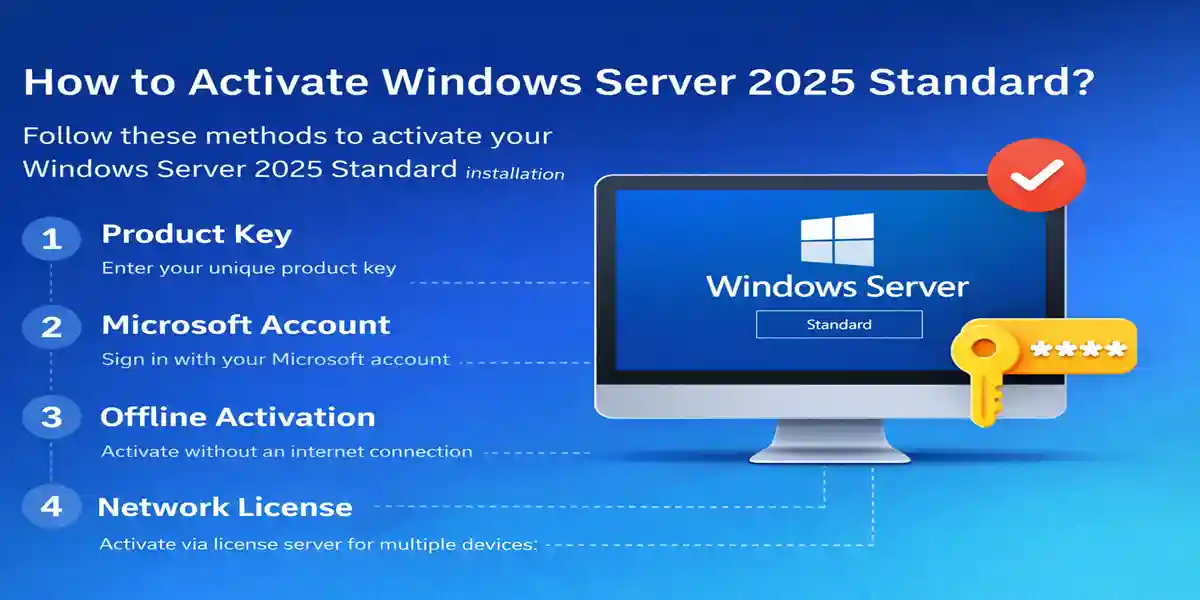
Methods to Activate Windows Server 2025 Standard
Windows Server 2025 Standard offers several activation methods to suit different deployment scenarios.
1. Activation via Product Key
Open the Settings window and go to System > About.
Click on Change Product Key and enter the product key.
Follow the on-screen instructions to complete activation.
2. Activation via Microsoft Account
Sign in with your Microsoft account during the installation process.
Windows Server will automatically activate the license linked to your Microsoft account.
3. Offline Activation
If you don’t have internet access during installation, you can activate Windows Server 2025 Standard offline:
Choose Activate Offline during installation.
Enter the activation code when prompted.
4. Network License Activation
For businesses with multiple servers, Windows Server 2025 Standard offers network license activation, which allows IT departments to manage and distribute licenses efficiently.
Conclusion
Windows Server 2025 Standard helps businesses build a robust IT foundation that will serve their needs for years to come. By taking full advantage of its features—such as its comprehensive security suite, virtualization capabilities, and cloud connectivity—organizations can ensure a future-proof IT environment. Moreover, the flexibility and scalability offered by Windows Server 2025 enable businesses to stay agile, innovate faster, and drive long-term growth.
In conclusion, Windows Server 2025 Standard is not just a server operating system; it is a powerful platform that empowers businesses to build modern IT infrastructures, improve productivity, and secure their digital environments. By leveraging its advanced features and ensuring proper activation, businesses can maximize the value of their server environment and ensure a competitive edge in an increasingly digital world.
Windows Server 2025 Standard Activation Commands
For a properly licensed installation of Windows Server 2025 Standard, you can use the built-in Software Licensing Management Tool (slmgr.vbs) from an elevated Command Prompt.
1. Check the Current Activation Status
Open Command Prompt as Administrator and run:
slmgr /xpr
This displays whether Windows Server is permanently activated or shows the current activation expiration status.
2. Display Detailed License Information
slmgr /dlv
This provides detailed information about the installed Windows Server license, including the activation status and license channel.
3. Install a Valid Product Key
Replace XXXXX-XXXXX-XXXXX-XXXXX-XXXXX with your legitimate Windows Server 2025 Standard product key:
slmgr /ipk XXXXX-XXXXX-XXXXX-XXXXX-XXXXX
If successful, Windows will confirm that the product key was installed.
4. Activate Windows Server
After installing the key, run:
slmgr /ato
The command attempts to activate Windows Server using Microsoft's activation service.
5. Verify Activation Again
After activation, verify the status:
slmgr /xpr
You can also use:
slmgr /dlvto review the detailed license information.
Frequently Asked Questions (FAQs)
Windows Server 2025 Standard is the latest version of Microsoft’s server operating system, offering enhanced security, virtualization, storage, and cloud integration features.
Windows Server 2025 Standard can be activated using a product key, Microsoft account, or offline activation methods.
Yes, with its enhanced Hyper-V capabilities, Windows Server 2025 Standard is ideal for running multiple virtual machines and workloads.
The system requirements include Windows 10/11 (64-bit), a multi-core processor, minimum 16GB of RAM, 4GB GPU, and 30GB of SSD storage.
Yes, you can upgrade from Windows Server 2019 or other earlier versions to Windows Server 2025 Standard using the Windows Server Upgrade tool.
The "License Expired" error typically occurs when your Windows Server 2025 Standard license reaches its expiration date or if your subscription has not been renewed. This prevents the system from functioning properly until the license is updated or extended.