AutoCAD Architecture | For Windows | 1year Student License

(85 customer reviews)

Price range: US$29 through US$50

AutoCAD Architecture  is architectural design software. It helps users design and draft industry-specific designs. its features include architectural renovations; wall, door and window design documentation, and room document.

43 Items sold in last 3 minutes
393 People watching this product now!
Description
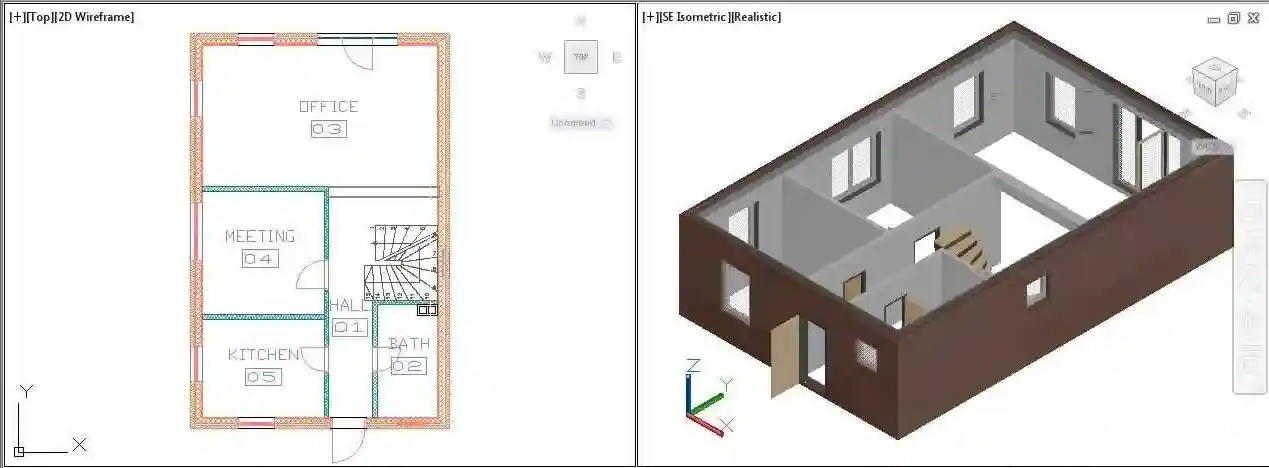
The most important design tool for budding architects and design professionals is Autodesk® AutoCAD Architecture 2024 for Windows 1-Year Student License. You can study and hone your professional skills in architectural drafting and design with this student edition, which gives you complete access to industry-standard software. An authentic product provided via instant digital download is guaranteed when you use a legitimate activation code and license key from Codesforever. As a result, you can begin working on projects immediately, obtaining practical experience and quickly becoming proficient in design processes. AutoCAD Architecture 2024 gives you the strong tools you need to be successful, whether you're developing intricate construction designs, illustrating intricate structures, or experimenting with sophisticated 3D modeling.

AutoCAD Architecture

Features

All-inclusive Design Tools
Precise Drafting: Produce intricate sections, floor plans, elevations, and 3D models with accuracy. The program provides automated dimensioning, annotation features, and sophisticated drawing tools.

Efficient Workflow: Use capabilities like object snapping, layer management, and reusable blocks to streamline your design process. By reducing physical labor, these tools free up your time to concentrate on your ideas.

Integrated Libraries: Get access to a vast collection of architectural symbols, parts, and templates that can help you standardize your designs and make sure they meet industry requirements.

Improved 3D Visualization and Modeling
Realistic Rendering: To create photorealistic visuals that aid in project visualization, make use of sophisticated rendering characteristics. Better presentations and project approvals are facilitated by this.

Dynamic 3D Environment: Construct and alter 3D models to ensure precise and effective workflows by analyzing spatial correlations and design consequences.

Integration with BIM: Take advantage of integrations that improve project management and collaboration with Building Information Modeling (BIM) technologies.

Easy-to-use Interface
Easy Navigation: The learning curve is reduced by the sleek, contemporary UI. Menus and tools are arranged logically to make it easy to reach key features.

Configure your workspace to meet the demands of your project by setting up panels, toolbars, and shortcuts to maximize productivity.

Interactive Help Resources: Contextual assistance and built-in tutorials facilitate your learning process and guarantee that you pick up new features and methods fast.

Advanced Data Management and Collaboration
Data Integration: Use industry-standard file formats and other Autodesk applications to import, export, and exchange designs with ease. Collaboration with teachers and classmates is made possible as a result.

Cloud Connectivity: Work together in real time while making sure your project data is backed up and available from any location by using cloud storage and sharing capabilities.

Automated Reports: To support your design proposals and presentations, automatically create comprehensive project reports, material lists, and documentation.

AutoCAD Architecture

Installation Guide

Purchase and download Step 1: Protect Your License Start by going to Codesforever's AutoCAD Architecture 2024 Student License website.

Instant Digital Delivery: A secure download link for the installer and a legitimate activation code and license key will be sent to you via email after your purchase.

Step 2: Installer download
Get to the Installer: Click the download link in the email you received for confirmation. Make sure your PC satisfies Autodesk's minimal system requirements.

Step 3: Launch the Wizard for Installation
Launch the installation: To start the installation procedure, open the installer file and adhere to the on-screen directions.

Observe the prompts: After accepting the End-User License Agreement (EULA), select the target folder and installation options that you want.

Step 4: Start Your Software Activation 2024 AutoCAD Architecture: When the installation is finished, launch the application.

Put in your code of activation: When prompted, enter the license key and activation code that Codesforever provided. After confirming your information, the program will unlock all of its capabilities.

Step 5: Set Up Your Work Area
Adjust Your Preferences: Customize your project settings, toolbars, and workspace to meet the needs of your workflow.

Execute a Test Project: Make a prototype design to confirm that your system is configured appropriately and that all features are operating as intended.

Why Choose Codesforever?

Assurance of Authenticity
100% authentic Autodesk licenses are offered by Codesforever. Every license key and activation code is thoroughly checked for authenticity, guaranteeing that you will receive a safe, fully working product free from the dangers of counterfeiting.

Competitive Rates
We provide top-notch Autodesk software at incredibly affordable prices. It is a cost-effective investment for your education and professional development because of our clear pricing, which guarantees you get the best deal possible with no additional costs.

Immediate Digital Delivery
You can install and activate AutoCAD Architecture 2024 right away with Codesforever because your activation code is sent to you via email as soon as you make a purchase. Take pleasure in a hassle-free purchasing process with prompt dispatch.

Outstanding Customer Service
Our committed support staff is on hand around-the-clock to assist you with any technical problems, including installation and activation. From the time of purchase until the completion of your project, we are dedicated to making sure that everything runs smoothly and dependably.

Constant Updates and Future Benefits
Your software will stay current and able to tackle contemporary design issues thanks to your student license, which grants access to all upcoming upgrades and security patches. Your professional development and learning path are improved by this long-term investment.

FAQ

Is the Autodesk activation code genuine?

Yes, every activation code and licence key from Codesforever is 100% genuine and verified.

How quickly will I receive my activation code?

Your activation code is delivered instantly via email after purchase.

Can I install AutoCAD Architecture 2024 on multiple devices?

This student licence is intended for use on one PC only. Contact our sales team for multi-device options.


What if I encounter installation issues?

Our support team is available 24/7. Please visit our Support Page for troubleshooting assistance.

Students can learn architectural design and drafting with the help of AutoCAD Architecture 2024 for Windows. It is an industry-standard solution for managing complicated projects and fostering professional skill development because of its extensive toolkit, user-friendly interface, and strong performance. With rapid digital delivery, affordable pricing, and exceptional customer service, buying your authentic activation code and license key from Codesforever ensures a safe and economical investment.

AutoCAD Architecture 2024 can help you improve your design skills and expedite your learning process. Purchase your student license from Codesforever right now to begin producing architectural designs of the highest caliber right now.

Please note here in above article term "activation code , license key" means email license i.e (we will assign license to your email id) will be given . For more detail refer "Must Read" Tab

Additional information
Select Year1 Year, 2 Year
Select Autodesk Version2023, 2024, 2025
Reviews (85)

85 reviews for AutoCAD Architecture | For Windows | 1year Student License

1-5 of 85 reviews
  1. I had purchased CORELDRAW . when i done installation i had faced issues so I contacted with support they replied and resolve all issues .Finally product get activated. As I am not so technical sounded so I am not know how to do ? But you guy did it for me. Thank you . God bless you

  2. Their support to their products and clients is first class.

  3. Soy de España, habíamos comprado la licencia de Windows 10 Pro y Office 2019 Pro, después de 1 año mi disco duro se estropeó y lo reemplacé con SSD. También perdí el código de activación. Me puse en contacto con ellos y me ayudaron a través de WhatsApp para recuperar mi licencia y reactivarlos, altamente los recomiendo

  4. A promising product, worth trying

  5. I needed good CAD at a good price and found these guys, Then managed to make a mistake on ordering but got in touch and was sorted out very kindly by the team which takes time and patience on their side to end up with the right product. I have not been with them before so can honestly say they are very good.

Add a review
Currently, we are not accepting new reviews
Must-Read Before Purchasing Our Software
  • If you have any questions, feel free to contact us by WhatsApp or Write to us at: [email protected] delivery all details are sent via Email Only. No physical delivery.
    The product is for one (1) device only. This is a 100 % Original Product.Delivery may take Up 0 to 24Hrs time Maximum, but generally, we deliver in less time .
    Read Our Product Delivery Policy, Refund & Return Policy at the Bottom of the Page.For any Query Regarding the Previous  Edition (OLD version)
    ( 2023,2022,2021,2020 Etc. ) for all Products of Autodesk ( AutoCAD, Revit,3Dmax etc. ).kindly WhatsApp or Email.It is educational version, complete with full functionality .all feature unlock
    The product has no brand name watermark, with no reference to the educational wording of the documents.For Commercial Version Click here - https://codesforever.com/autodesk-commercial/