Buy GETCID Credit to Get Confirmation ID

(16 customer reviews)

Original price was: Rs 1,711.Current price is: Rs 171.

Buy GETCID Credit to Get  Confirmation ID (CID). For all Microsoft Office and Windows to reactivate or transfer a license.

50 Items sold in last 3 minutes
585 People watching this product now!
Description
 Confirmation ID for Microsoft Products: Office and Windows

Obtaining a Confirmation ID (CID) is a critical step for activating Microsoft Office and Windows products. Whether you are activating Office 2021, 2019, 2016, 2013, 2010, or Windows 11, 10, 8, 7, or Server editions, the process is straightforward with the right guidance and tools. This guide will help you understand how to get a Confirmation ID using  a fast, hassle-free online alternative.

Microsoft Office

Features

Activation for Microsoft Office 2024 ,2021,2019,2016 with Confirmation ID:

Microsoft Office requires activation to unlock its features. Here's how to get a CID for various Office versions:

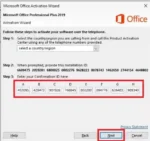
  1. Launch the Activation Wizard:
  • Open any Office application, such as Word or Excel.
  • Navigate to File > Account > Change Product Key and enter your product key.
  • The Activation Wizard will prompt you to activate the product.
  1. Select Telephone Activation:
  • Choose "I want to activate the software by telephone."
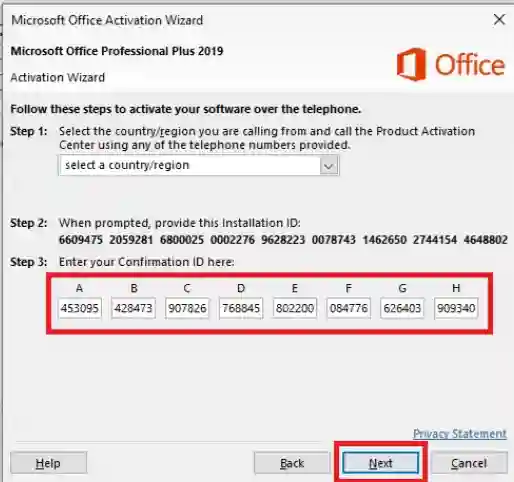
  • The wizard will display a unique installation ID (IID).

Get the Installation ID:
The wizard will display an IID. Write it down or take a screenshot.

Get the Confirmation ID:

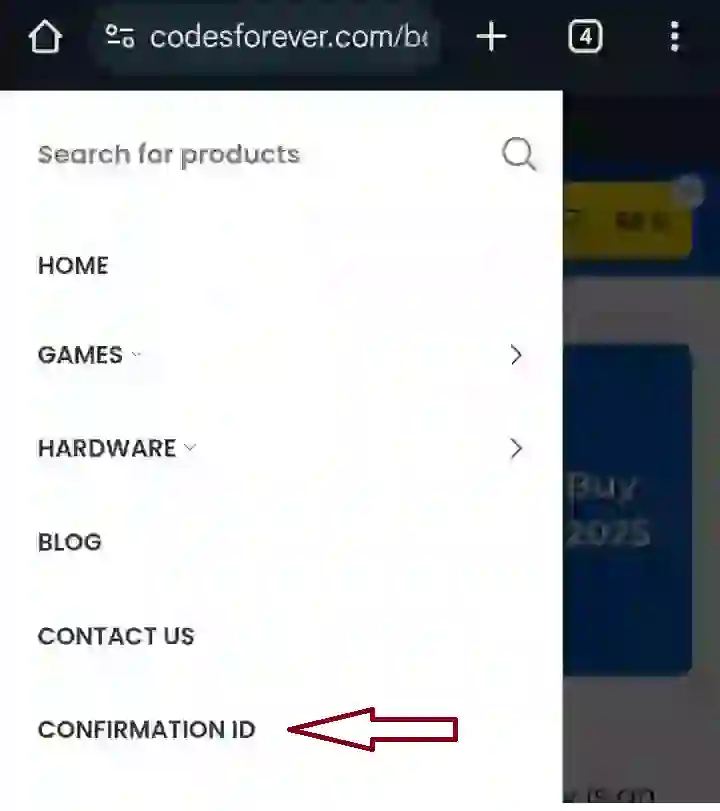
Click on the *Confirmation Id tab* on Codesforever  Website Home Page beside *the Contact Us tab* after buying GETCID Credit .

Enter the Confirmation ID:
Input the Confirmation ID back into the wizard and click Next to complete the activation process

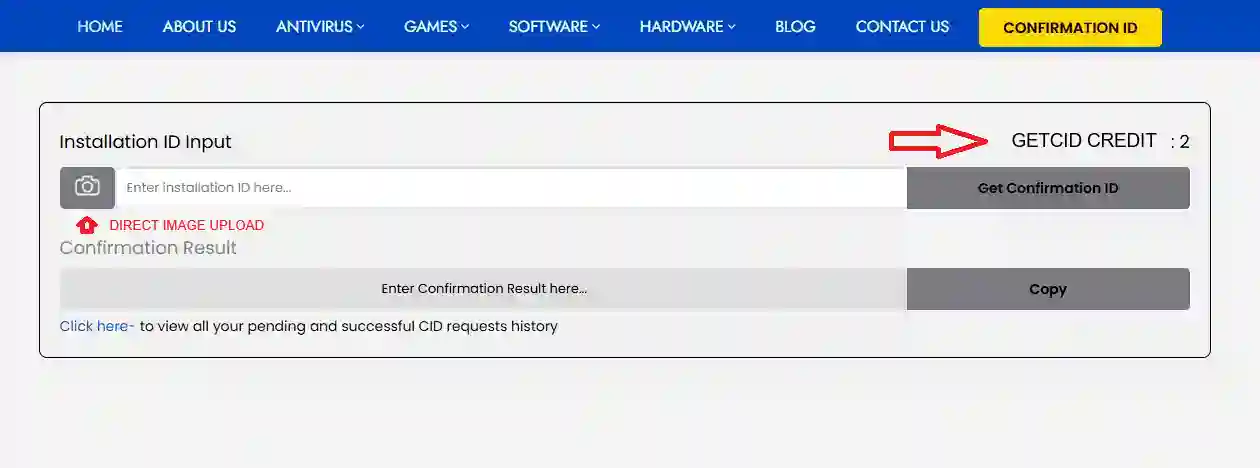
In desktop you will see here -

GETCID for desktop

In mobile you will see here -


GetCid Mobile


( Note—Make sure you have already logged in to codesforever and have already bought *GETCID CREDIT* to see the credit balance before clicking to get confirmation ID after entering the installation ID on the panel.).

Using a fast online Get Conformation id tab is a more efficient option. Simply enter your IID into the tab or upload the image and it will generate a Conformation id within seconds, saving your time and hassle of support.

GETCID CREDIT

Activation for Windows -

Open the Activation Wizard:
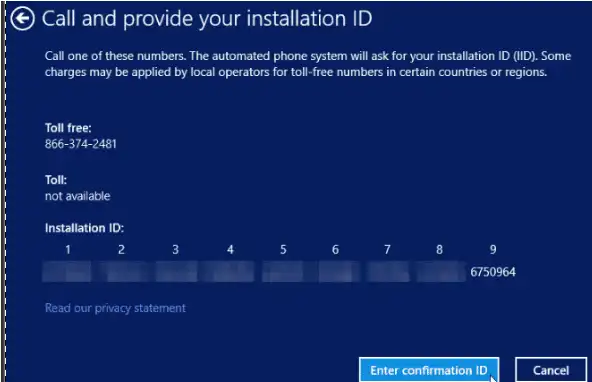
Press Windows + R, type slui 4, and press Enter to launch the Telephone Activation Wizard.

Select Your Country/Region:
Choose your location to get the relevant phone number for activation.

Get the Installation ID:
The wizard will display an IID. Write it down or take a screenshot.

Get the Confirmation ID:
Enter the Confirmation ID:
Input the Confirmation ID back into the wizard and click Next to complete the activation process.

WINDOWS
Reviews (16)
5
16 reviews
16
0
0
0
0

16 reviews for Buy GETCID Credit to Get Confirmation ID

Clear filters
  1. Faisal Ali (verified owner)

    I was able to buy the software in just a few clicks. Great user experience!

  2. Paola Herrera (verified owner)

    The best software I’ve ever purchased. It’s fast, intuitive, and powerful.

  3. Ariella Cohen (verified owner)

    Incredibly smooth purchase process. I didn’t encounter any hiccups.

  4. Liam O’Connor (verified owner)

    Incredible performance! The software has improved my workflow tremendously.

  5. Geoffrey Blackwood (verified owner)

    Buying was quick, and I could easily find what I needed without any confusion.

  6. Carmen Rodriguez (verified owner)

    I’ve been using this for weeks, and I’m thoroughly impressed by its performance.

  7. Karla González (verified owner)

    Simple process, instant access, and a great product. Very pleased.

  8. Pablo García (verified owner)

    The price is more than reasonable for all the features and functionality it offers.

  9. Carlos Torres (verified owner)

    I appreciated the smooth transaction and clear instructions on how to get started.

  10. Natalie Davis (verified owner)

    A truly exceptional software with great features and ease of use.

  11. Jacqueline Martin (verified owner)

    I had a question, and the support team was incredibly fast and helpful.

  12. Svetlana Ivanova (verified owner)

    Excellent quality, very responsive, and has all the advanced features I need.

  13. Daniela Vargas (verified owner)

    I can’t believe how much I got for the price. Truly a great investment.

  14. Nina Kowalska (verified owner)

    Best purchase I’ve made in a long time. It’s been exactly what I needed.

  15. Katarina Ivanova (verified owner)

    This is the best software in its category by far. I am beyond satisfied!

  16. Adam Kaminski (verified owner)

    The payment was processed swiftly, and I was up and running within minutes.

Add a review
Must Read Before Purchasing

Buy GETCID Credit to get Confirmation  ID.

After buying GETCID Credit , click on the Confirmation Tab to see the credit count .

Fast, reliable and hassle free activation Solution.

Supported Microsoft Products

The Confirmation ID process is applicable for a wide range of Microsoft products, including:

  • Office Versions: 2024 ,2021, 2019, 2024, 2016, 2013, and 2010.
  • Windows Versions: 11, 10, 8, 7, and Windows Server.
  • Other Products: MS Project, Visio, and more.