

How to Activate Microsoft Office 2024 Home and Business (Office 2024 HB): Complete Step-by-Step Guide

Introduction to Microsoft Office 2024 Home and Business
Microsoft Office has been the backbone of productivity for individuals, professionals, and businesses for decades. With the release of Microsoft Office 2024 Home and Business, Microsoft continues its tradition of delivering powerful, reliable, and user-friendly productivity software designed for modern work environments.
Office 2024 Home and Business (Office 2024 HB) is built for users who want a one-time purchase version of Microsoft Office without recurring subscription fees. It is ideal for small business owners, freelancers, home offices, students, and professionals who need core Office applications with long-term stability.
What Is Microsoft Office 2024 Home and Business?
Microsoft Office 2024 Home and Business is a one-time purchase (perpetual license) productivity suite designed for small businesses, professionals, entrepreneurs, and home users who want reliable Microsoft applications without recurring subscription fees. It delivers the classic Office experience with updated performance, modern UI refinements, and enhanced security—while allowing users to pay once and use the software indefinitely on a single PC or Mac.
This edition is ideal for users who prefer ownership over subscriptions and need essential tools for documents, spreadsheets, presentations, and professional email communication.
Included Applications in Office Home and Business 2024
Microsoft Word 2024
Word 2024 is the industry-standard word processing application used for creating professional documents, reports, letters, proposals, and contracts.
It includes improved formatting tools, enhanced collaboration features, better accessibility support, and stronger security for sensitive documents. Word 2024 is suitable for both personal writing tasks and formal business documentation.
Microsoft Excel 2024
Excel 2024 is a powerful spreadsheet and data analysis tool used for budgeting, accounting, financial modeling, data visualization, and reporting.
It offers improved performance, refined formulas, enhanced charts, and better handling of large datasets, making it ideal for business analytics and everyday number-based tasks.
Microsoft PowerPoint 2024
PowerPoint 2024 helps users create visually engaging presentations for meetings, training sessions, pitches, and educational use.
With modern templates, smoother animations, improved design tools, and better multimedia support, it enables users to communicate ideas clearly and professionally.
Microsoft Outlook 2024
Outlook 2024 is a professional email and productivity management tool that combines email, calendar, contacts, and task management in one interface.
It is especially valuable for business users who rely on structured communication, meeting scheduling, and organized workflows.
OneNote (Windows)
OneNote allows users to capture, organize, and manage notes in digital notebooks.
It is useful for meeting notes, research, planning, brainstorming, and personal organization, syncing easily across supported devices.
Key Difference from Microsoft 365
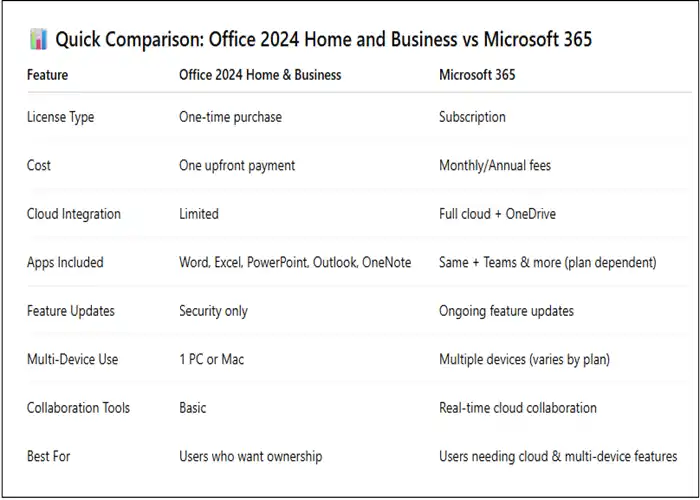
Unlike Microsoft 365, Office Home and Business 2024 does not require monthly or yearly subscription payments. Instead:
- You make a single upfront payment
- The license is valid permanently
- It is installed on one PC or one Mac
- Security updates are still provided during Microsoft’s support lifecycle
This makes Office 2024 Home and Business a cost-effective and predictable solution for users who do not need cloud-based services or frequent feature changes.
Key Features of Office 2024 Home and Business
1.One-Time Purchase (No Subscription)
One of the most significant advantages of Office Home and Business 2024 is its perpetual licensing model. You pay once and own the software permanently, with no monthly or annual subscription fees. This makes it a cost-effective solution for small businesses and individuals who want predictable expenses and long-term use without recurring payments. It is especially beneficial for users who prefer stable software versions rather than frequent feature changes.
2.Enhanced Performance and Stability
Microsoft has optimized Office 2024 to deliver smoother and more reliable performance across all applications. Key improvements include:
- Faster launch times, allowing users to start work quickly
- Improved memory usage, ensuring better system responsiveness
- Optimized handling of large Excel files, reducing lag when working with complex datasets
These enhancements help professionals work more efficiently, even on mid-range hardware.
3.Modern User Interface
Office 2024 Home and Business features a refined and modernized interface that balances the familiar Office layout with updated design elements. Cleaner visuals, improved iconography, and better spacing enhance readability and reduce eye strain, making daily tasks more comfortable and productive while minimizing the learning curve.
4.Advanced Excel Features
Excel 2024 introduces performance and usability upgrades that benefit business users, including:
- Improved data analysis tools for faster insights
- Better chart rendering for clearer visual reports
- Enhanced formula calculation performance, especially in large spreadsheets
These features make Excel more powerful for finance, accounting, and data-driven decision-making.
5.Outlook 2024 for Business Communication
Outlook 2024 strengthens professional communication with:
- Improved email filtering to reduce clutter
- Enhanced calendar and scheduling tools for better time management
- Better integration with Microsoft services, improving productivity across workflows
6.Offline Productivity
After activation, Office 2024 Home and Business works fully offline, allowing users to create, edit, and save files without an internet connection—ideal for travel or secure environments.
7.Long-Term Support
Microsoft provides ongoing security updates and bug fixes, ensuring Office 2024 HB remains stable, secure, and reliable throughout its supported lifecycle.
System Requirements for Microsoft Office 2024 Home and Business
Before installing Microsoft Office 2024 Home and Business, it is important to ensure that your device meets the minimum system requirements. Meeting or exceeding these specifications guarantees smooth performance, faster load times, and a stable user experience across all Office applications.
Windows System Requirements
- Operating System:
Microsoft Office 2024 Home and Business is supported on Windows 10 and Windows 11. Using an up-to-date operating system ensures compatibility, improved security, and access to the latest performance optimizations provided by Microsoft. - Memory (RAM):
A minimum of 4 GB RAM is required to run Office applications effectively. However, 8 GB RAM is recommended for multitasking, handling large Excel spreadsheets, and running multiple Office apps simultaneously without slowdowns. - Storage Space:
At least 4 GB of free disk space is needed for installation. Additional space may be required over time for updates, temporary files, and document storage, so having extra free space improves long-term performance. - Internet Connection:
An internet connection is required for initial activation, license verification, and downloading updates. Once activated, most Office applications can be used offline.
macOS System Requirements
- Operating System:
Office 2024 Home and Business supports the latest compatible versions of macOS, ensuring smooth operation and strong security integration with Apple systems. - Processor:
Compatible with both Intel-based Macs and Apple Silicon (M1, M2, and later) processors. Office is optimized to run efficiently on Apple’s latest hardware architecture. - Internet Connection:
An internet connection is required for activation, license validation, and updates. After activation, users can work offline without interruption.
Installation Guide: Office 2024 Home and Business
Installing Microsoft Office 2024 Home and Business is a straightforward process when completed step by step. Following the correct procedure ensures smooth installation, proper license linking, and hassle-free activation.
Step 1: Purchase Office 2024 Home and Business License
Begin by purchasing a genuine Office 2024 Home and Business product key from a trusted and authorized seller. A valid license guarantees full functionality, long-term security updates, and access to Microsoft support. Avoid unauthorized sources, as counterfeit keys may lead to activation errors or license suspension.
Step 2: Sign In to Your Microsoft Account
Visit the official Microsoft Office setup portal and sign in using your Microsoft account. If you do not already have one, create a new account. This account is crucial because your Office 2024 Home and Business license will be permanently linked to it, allowing easy reinstallation in the future without re-entering the product key.
Step 3: Redeem the Product Key
Enter your 25-character Office 2024 Home and Business product key on the setup portal. Once redeemed, the license is securely associated with your Microsoft account. This step confirms ownership and enables software downloads at any time.
Step 4: Download Office 2024 Home and Business
After successful key redemption, download the Office 2024 installer compatible with your operating system (Windows or macOS). Ensure you have a stable internet connection to avoid download interruptions.
Step 5: Install the Software
Run the installer and follow the on-screen instructions. The installation process may take several minutes depending on system performance. Once complete, Office applications such as Word, Excel, PowerPoint, and Outlook will be ready to use.
How to Activate Microsoft Office 2024 Home and Business
Method 1: Activation via Microsoft Account (Recommended)
This is the most secure and reliable activation method:
- Open any Office application (Word, Excel, or Outlook)
- Click Activate when prompted
- Sign in with the Microsoft account used during purchase
Activation completes automatically, confirming your Office 2024 Home and Business license.
Method 2: Activation Using Product Key
If required, you can activate manually:
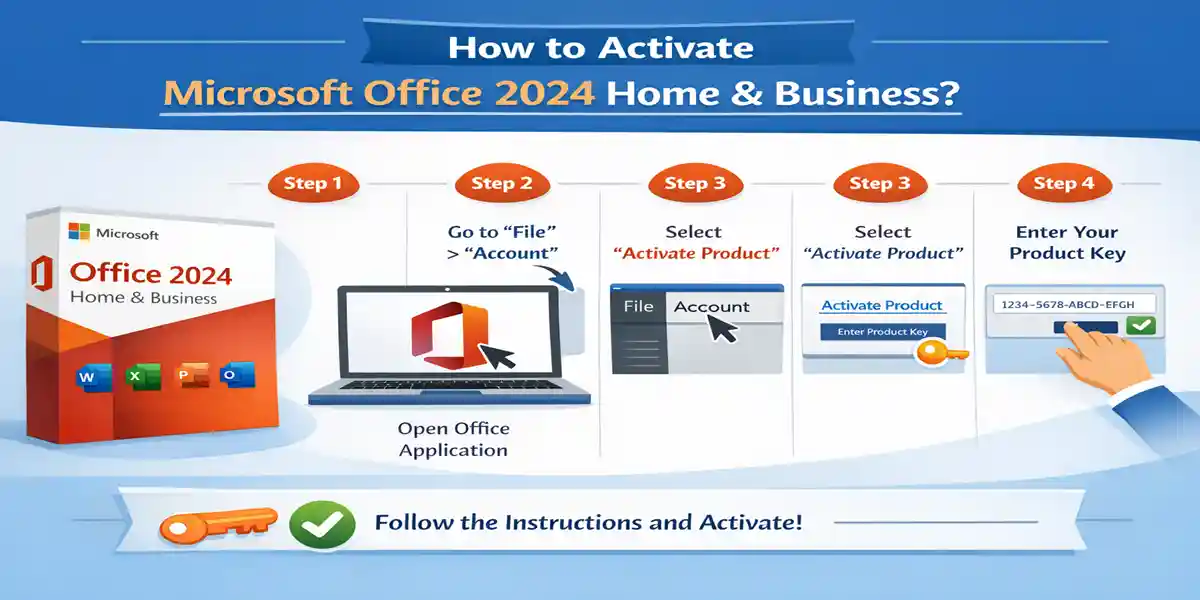
- Open an Office application
- Go to File → Account
- Select Change Product Key
- Enter your 25-character Office 2024 HB key
- Restart the application to complete activation
Common Activation Errors and How to Fix Them
Error 1: “This Product Key Has Already Been Used”
Cause: The product key is linked to another Microsoft account.
Solution:
- Sign in with the original Microsoft account
- Transfer the license if Microsoft allows it
Error 2: “Cannot Reach Microsoft Activation Servers”
Cause: Network, firewall, or VPN restrictions.
Solution:
- Verify internet connectivity
- Temporarily disable VPN or proxy
- Allow Office through firewall settings
Error 3: Office Stuck in Unlicensed Mode
Cause: Activation process did not complete successfully.
Solution:
- Sign out of all Office applications
- Restart your system
- Sign back in using your Microsoft account
Error 4: Installation Conflict with Older Office Versions
Cause: Previous Office installations causing conflicts.
Solution:
- Uninstall older Office versions completely
- Use the Microsoft Support and Recovery Tool to clean remnants
Why Choose Codes Forever for Office 2024 Home and Business?
Choosing the right vendor for your Microsoft Office license is just as important as choosing the software itself. Codes Forever stands out as a reliable and cost-effective option for purchasing Office 2024 Home and Business, offering trust, value, and long-term support.
1.Genuine Microsoft Licenses
Codes Forever supplies 100% authentic Microsoft Office 2024 Home and Business product keys. Each license is legally issued and eligible for activation directly through Microsoft’s official activation servers. This ensures you receive a fully functional Office suite with long-term security updates and complete access to all included applications such as Word, Excel, PowerPoint, and Outlook—without the risk of license deactivation or compliance issues.
2.Instant Delivery
One of the biggest advantages of CodesForever is instant digital delivery but sometime it takes 0-24 hour to dispatch. kindly wait 24 hours. As soon as your purchase is completed, your Office Home and Business 2024 product key is delivered via email or account dashboard. There’s no waiting period, no shipping delays, and no physical packaging—allowing you to install and activate Office within minutes.
3.Affordable Pricing
Compared to official Microsoft retail pricing, CodesForever offers significant cost savings. This makes it an excellent choice for freelancers, small businesses, students, and professionals who want premium Office tools without paying subscription fees or high upfront costs. You get the same genuine software at a much more budget-friendly price.
4.Lifetime Activation Support
CodesForever provides lifetime activation assistance, ensuring your Microsoft Office 2024 Home and Business activates smoothly. If you encounter issues such as key redemption errors, activation prompts, or reinstallation concerns, their dedicated support team is available to help—giving you peace of mind long after purchase.
5.Secure and Trusted Platform
With encrypted checkout, secure payment processing, and verified licensing, CodesForever is a trusted and safe platform for purchasing Microsoft software. Customer data is protected, transactions are secure, and every license is verified for authenticity—making CodesForever a dependable choice for Office 2024 Home and Business buyers.
Conclusion
Microsoft Office 2024 Home and Business is an excellent productivity solution for users who prefer ownership over subscriptions. With powerful applications, long-term support, and offline usability, office home and business 2024 meets the needs of professionals, freelancers, and small businesses alike.
By following the correct installation and activation steps, you can enjoy a smooth experience with Microsoft 2024 Home and Business. Choosing a trusted provider like CodesForever ensures genuine licensing, instant delivery, and dependable support.
Frequently Asked Questions (FAQs)
Q1. What is Office 2024 HB?
Office 2024 HB stands for Office 2024 Home and Business, a one-time purchase version of Microsoft Office.
Q2. Is Microsoft Office 2024 Home and Business lifetime?
Yes, it’s a perpetual license for one device.
Q3. Can I reinstall Office 2024 Home and Business?
Yes, using the same Microsoft account.
Q4. Does Office 2024 HB include OneDrive?
No subscription storage is included, but basic OneDrive access is available via Microsoft account.
Q5. Can I activate Office 2024 Home and Business offline?
Internet is required for initial activation.
Q6. Is Office Home and Business 2024 suitable for small businesses?
Yes, it’s designed specifically for business productivity.
Q7. Does Microsoft 2024 Home and Business receive updates?
Yes, security and stability updates are provided.