

How to Activate Microsoft PowerPoint 2024: Complete Beginner to Advanced Guide

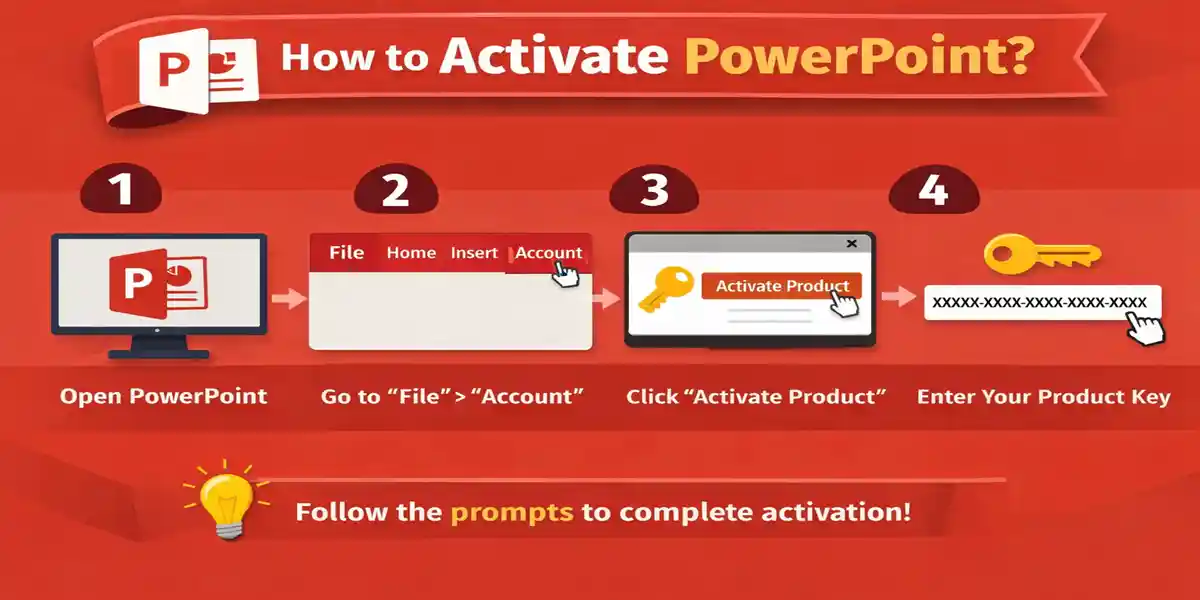
Introduction to Microsoft PowerPoint 2024
Microsoft PowerPoint 2024 is the latest version of Microsoft’s industry-standard presentation software, designed to help students, professionals, and organizations create, edit, and deliver compelling presentations. As part of the Office 2024 suite, PowerPoint 2024 integrates seamlessly with other Microsoft tools like Excel, Word, and Teams, enabling collaborative workflows and cloud-based storage through Microsoft 365.
With enhanced AI-powered design suggestions, smoother animations, and expanded multimedia capabilities, PowerPoint 2024 makes it easier than ever to design professional presentations. It caters to a wide audience, including business executives, educators, marketers, and content creators. This guide will help you activate PowerPoint 2024, explore its key features, install the software correctly, resolve common errors, and choose a trusted provider for genuine licenses.
What Is Microsoft PowerPoint 2024?
PowerPoint 2024 is a presentation creation and editing software that allows users to:
- Design visually appealing slides for meetings, lectures, and events
- Incorporate multimedia elements like audio, video, and 3D models
- Collaborate in real-time with colleagues using cloud-based tools
- Automate slide designs with AI-driven suggestions
Key improvements in PowerPoint 2024:
- Modernized interface for enhanced usability
- AI-powered slide design suggestions
- Expanded support for multimedia and animations
- Real-time collaboration via Microsoft 365 integration
Key Features of Microsoft PowerPoint 2024
User-Friendly Interface
PowerPoint 2024 introduces a streamlined ribbon interface with customizable quick-access menus, which helps both beginners and professionals find tools quickly. Users can personalize ribbons and toolbars to prioritize frequently used features, improving productivity and workflow efficiency.
PowerPoint 2024 offers professional-grade tools to enhance slide creation:
- Slide Master and Layouts: Ensure consistent formatting and branding across all slides.
- Transitions and Animations: Smooth, customizable transitions and animations bring slides to life.
- Designer AI: Automatically generates slide designs and layout suggestions based on your content.
- Presenter Coach: Provides real-time feedback on pacing, filler words, and overall clarity during practice sessions.
Multimedia Integration
PowerPoint 2024 supports rich multimedia elements, allowing users to create engaging presentations:
- Embed images, vector graphics, and icons
- Insert and edit audio/video clips directly in slides
- Include 3D models for interactive demonstrations
- Integrate charts and graphs for data visualization
Collaboration and Cloud Integration
PowerPoint 2024 enables real-time collaboration and cloud connectivity:
- Multiple users can co-author slides simultaneously
- Integration with OneDrive and SharePoint for cloud storage
- Version history allows restoration of previous edits
- Supports easy sharing and teamwork across remote or hybrid environments
PowerPoint 2024 offers robust protection and compliance features:
- Password-protected presentations to secure sensitive content
- Permissions management for editing and viewing
- Accessibility checkers to ensure compliance with ADA standards
- Safe handling of embedded media and external files
Offline and Online Capabilities
PowerPoint 2024 works fully offline after activation, allowing uninterrupted workflow. When online, it integrates with Microsoft 365 for cloud storage, real-time collaboration, and access to shared presentations from any device.
System Requirements for PowerPoint 2024
Windows:
- Windows 10 or Windows 11
- Minimum 4 GB RAM (8 GB recommended)
- 4 GB free storage space
- Internet connection required for activation
macOS:
- Latest supported macOS versions
- Intel or Apple Silicon processor
- Internet required for initial activation
Installation Guide for Microsoft PowerPoint 2024
Step 1: Purchase a Genuine License
Obtain Microsoft PowerPoint 2024 from a trusted provider like CodesForever. Genuine licenses ensure smooth activation, access to updates, and long-term support.
Step 2: Sign in to Microsoft Account
Visit the Microsoft Office setup portal and sign in using your Microsoft account. Linking your account stores the license permanently, making future reinstallation or device transfers simple.
Step 3: Redeem Product Key
Enter the 25-character product key provided after purchase. This links your license to your Microsoft account.
Step 4: Download PowerPoint 2024
Download the installer from Microsoft. For Windows, PowerPoint is included in the Office suite installer; Mac users download the version compatible with their operating system.
Step 5: Install PowerPoint 2024
Run the installer and follow on-screen prompts. Installation time varies depending on system performance.
How to Activate Microsoft PowerPoint 2024
Method 1: Activation via Microsoft Account (Recommended)
- Open PowerPoint 2024
- Click Activate when prompted
- Sign in using your Microsoft account linked to the license
- Activation completes automatically
Method 2: Activation via Product Key
- Open PowerPoint 2024
- Navigate to File → Account → Change Product Key
- Enter your 25-character product key
- Restart PowerPoint to complete activation
Common Microsoft PowerPoint 2024 Activation Errors and Fixes
Error 1: “Product Not Activated”
- Cause: License not linked to Microsoft account
- Fix: Sign out, sign back in with the correct account, and retry activation
Error 2: “Product Key Already Used”
- Cause: Key already registered on another account
- Fix: Use the original account or request license transfer
Error 3: “Cannot Connect to Activation Server”
- Cause: Internet issues, firewall, or VPN interference
- Fix: Check internet connection, disable VPN, allow PowerPoint through firewall
Error 4: Conflicting Office Versions
- Cause: Old Office installations interfere
- Fix: Uninstall older versions and use Microsoft Support and Recovery Assistant
Error 5: Invalid Product Key
- Cause: Incorrect or non-genuine key
- Fix: Verify the key with the seller and re-enter accurately
Why Choose CodesForever for Microsoft PowerPoint 2024?
Genuine Product Keys
CodesForever provides 100% authentic Microsoft PowerPoint 2024 licenses, ensuring smooth activation, full features, and ongoing support from Microsoft.
Instant Delivery
Receive product keys immediately after purchase, allowing you to activate PowerPoint 2024 without delays.
Affordable and Flexible Pricing
CodesForever offers competitive pricing for students, professionals, and organizations without compromising authenticity, making PowerPoint 2024 accessible to everyone.
Reliable Activation Support
Dedicated experts provide step-by-step help for installation, activation, and troubleshooting, ensuring even beginners can activate PowerPoint without issues.
Trusted by Professionals
Freelancers, corporate teams, and IT administrators worldwide rely on CodesForever for secure, genuine Microsoft licenses and responsive customer support.
Conclusion
Microsoft PowerPoint 2024 is a professional-grade presentation software offering advanced multimedia tools, AI-powered slide suggestions, cloud collaboration, and robust offline capabilities. Activating PowerPoint 2024 correctly is essential for accessing its full functionality.
Using genuine licenses from trusted providers like CodesForever ensures smooth activation, professional support, and access to updates. Whether you are delivering business presentations, academic lectures, or creative projects, PowerPoint 2024 is the ultimate solution for creating impactful, engaging, and visually stunning presentations.
Frequently Asked Questions (FAQs)
Q1. Can PowerPoint 2024 be used offline?
Yes, after activation, PowerPoint 2024 works fully offline.
Q2. Is it a one-time purchase?
Yes, PowerPoint 2024 included in Office Home & Business 2024 is a perpetual license.
Q3. Can it be installed on multiple devices?
Yes, using the same Microsoft account within license limits.
Q4. Does it support older PPT formats?
Yes, PPT, PPTX, and other legacy formats are supported.
Q5. How do I fix “Product Not Activated” errors?
Sign out and sign back in, or enter the correct product key.
Q6. Can I collaborate with others in real-time?
Yes, cloud-enabled collaboration is fully supported.
Q7. Is CodesForever a reliable seller?
Yes, CodesForever provides genuine keys, instant delivery, and professional support.