


SolidWorks 2026 Student License | Full CAD Suite
Original price was: Rs 24,643.Rs 9,241Current price is: Rs 9,241.
Unlock complete 3D CAD engineering, simulation, and manufacturing capabilities with the SolidWorks 2026 Advanced License. Ideal for students, educators, and academic researchers, this complete software installation package includes a genuine activation serial number along with a full suite of professional engineering add-ins.
Accelerate your engineering studies, coursework, and academic projects with the SolidWorks 2026 Advanced Student License. Designed specifically for students, this complete software installation package comes with a genuine activation serial number and unlocks industry-standard 3D CAD design, simulation, rendering, and manufacturing tools.
System Compatibility
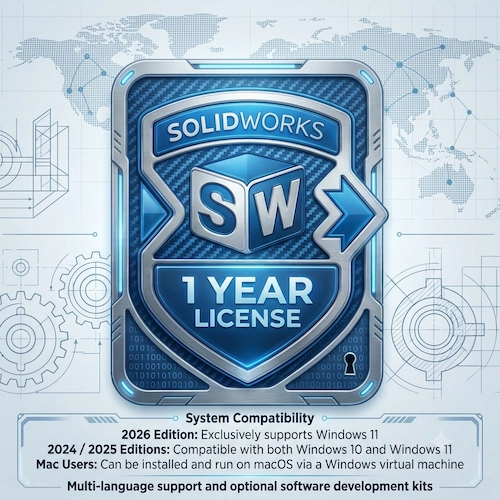
2026 Edition: Exclusively supports Windows 11
2024 / 2025 Editions: Compatible with both Windows 10 and Windows 11
Mac Users: Can be installed and run on macOS via a Windows virtual machine
Included Software & Add-Ins This student installation package includes the full SolidWorks engineering suite:
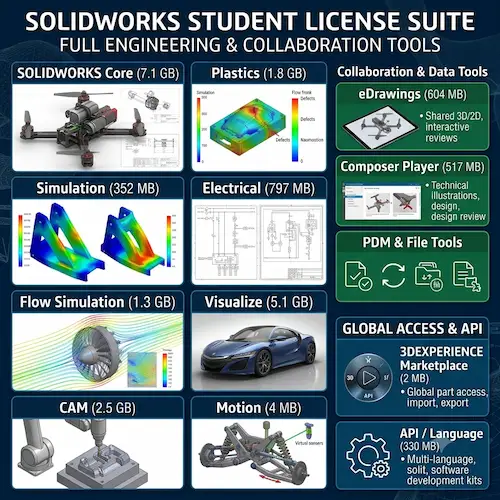
SOLIDWORKS Core (7.1 GB): Complete 3D CAD software to build parts, complex assemblies, and detailed engineering drawings
SOLIDWORKS Simulation (352 MB): Structural and thermal analysis tools to test and refine designs under real-world loads and heat transfer conditions
SOLIDWORKS Flow Simulation (1.3 GB): Computational Fluid Dynamics (CFD) software to simulate internal and external fluid and gas flows
SOLIDWORKS CAM (2.5 GB): Parametric, knowledge-based CNC tool kit (developed by CAMWorks) for automated CNC toolpath generation
SOLIDWORKS Plastics (1.8 GB): Predict and prevent manufacturing defects in injection molds during the earliest stages of part and mold design
SOLIDWORKS Electrical (797 MB): Single-line and multi-line schematic tools for designing embedded electrical systems
SOLIDWORKS Visualize (5.1 GB): Create photorealistic renders, animations, and 3D visual presentations for student portfolios and projects
SOLIDWORKS Motion (4 MB): Virtual prototyping using motors, gravity, and physical forces to simulate assembly kinematics before building prototypes
Collaboration & Data Management Tools:
eDrawings (604 MB): View, customize, animate, and share interactive 3D models and 2D drawings
SOLIDWORKS Composer Player (517 MB): Interactive viewer to present and understand 3D product designs
PDM Client (904 MB) & Manage Client (684 MB): Product data and project management tools
SOLIDWORKS File Utilities (31 MB): Rename, replace, copy, and move CAD files while keeping assembly references intact
3DEXPERIENCE Marketplace (2 MB) & Exchange (2 MB): Access customizable 3D parts from global manufacturers and import/export
.sldpkgfilesLanguage Pack (330 MB) & Optional API Tools: Multi-language support and optional software development kits
Installation & Activation Method (Delivery & Setup)
Digital Delivery: After purchase, you will receive a direct download link for the full SolidWorks 2026 installation package along with your Genuine Student Activation Serial Number.
System Preparation: Confirm your PC is running Windows 11 (or a Windows virtual machine on Mac) and ensure enough free disk space for the core software, selected add-ins, and required system components (336 MB).
Launch Installation Manager: Extract the downloaded files and run
setup.exeas Administrator.Enter Student Serial Number: When prompted during installation, input your 24-digit Genuine Student Activation Code to unlock SolidWorks 2026 and all included student add-ins.
Select Add-Ins & Install: Check the desired modules (Simulation, CAM, Visualize, Electrical, etc.) on the product selection screen and complete the installation.
Activate Online: Open SolidWorks 2026, complete the quick online SOLIDWORKS Product Activation wizard with an active internet connection, and start designing immediately.
- All feature unlock work same as commercial Edition
Related products


Autodesk Commercial License all 100+ Products | 6 month subscription
Autodesk Commercial License all Products | 1 Year Subscription
CorelDRAW Graphics Suite 2026 (PC & Mac) | Genuine License Key

Gemini Advance- 1 year Subscription

Microsoft Office Home & Business for Mac | Lifetime Validity


Nitro PDF Pro 14 Lifetime license Online Activation Code

SQL Server 2022 Standard | Lifetime License

Reviews
There are no reviews yet