Understanding Office 2024 Professional Plus Activation

Introduction
Microsoft Office 2024 remains a popular choice for users who want powerful desktop productivity applications without moving entirely to a subscription-based Microsoft 365 plan. For commercial organizations, the relevant perpetual edition is Office LTSC Professional Plus 2024, which is designed for volume-licensed environments and includes core applications such as Word, Excel, PowerPoint, Outlook, OneNote, and Access for Windows.
For individual users and small businesses, Microsoft also offers Office 2024 Home and Office Home & Business 2024 as one-time purchase editions. These are separate from Office LTSC Professional Plus 2024 and should not be treated as identical products.
This guide explains what Office 2024 offers, how Office LTSC Professional Plus 2024 differs from Microsoft 365, what features are new, how licensing works, and which commands administrators can use when deploying a properly licensed volume edition.
Understanding Office 2024 Professional Plus
When people search for Microsoft Office 2024 Professional Plus, they are often referring to Office LTSC Professional Plus 2024, Microsoft's commercial volume-licensed edition.
Office LTSC 2024 is designed primarily for organizations that need a stable, locally installed Office environment and do not want feature changes introduced continuously after deployment. Microsoft describes Office LTSC 2024 as an on-premises release for commercial and government customers.
Unlike Microsoft 365 Apps, Office LTSC 2024 does not receive new features after launch. It continues to receive supported security and quality updates throughout its lifecycle. Microsoft currently lists October 10, 2029 as the mainstream support end date for Office LTSC 2024.
What is included in Office LTSC Professional Plus 2024?
The Windows edition includes:
- Microsoft Word
- Microsoft Excel
- Microsoft PowerPoint
- Microsoft Outlook
- Microsoft OneNote
- Microsoft Access
Skype for Business can also be installed as an optional component in supported deployments. Access is available on Windows, not macOS.
Important: Office LTSC Professional Plus 2024 is a commercial volume-licensing product. Consumer Office 2024 editions such as Office Home and Office Home & Business 2024 have different licensing and application bundles.
Why Choose Office 2024 Professional Plus?
Key Features of Office 2024 Professional Plus: Performance, Privacy & Powerful Productivity Tools
1. Enhanced Performance and Rock-Solid Stability
Office 2024 Professional Plus is engineered for faster load times and dependable, crash-resistant performance — built for professionals who can't afford mid-task interruptions.
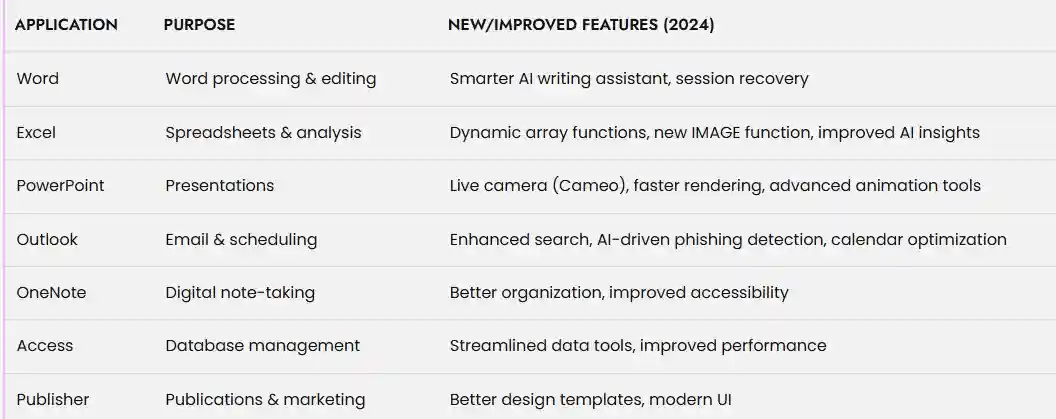
- A new full session recovery feature restores every document that was open at the time of a crash — not just the active one — dramatically cutting down on lost work during Word, Excel, and PowerPoint sessions.
- Fully optimized for both Windows 10 and Windows 11, with a refreshed Fluent Design interface that's most striking on Windows 11 but improves usability on Windows 10 as well.
- Targeted workbook and application performance improvements make a noticeable difference when working with large, formula-heavy, or otherwise complex files.
2. Offline-First Document Control — Built for Privacy, Not Cloud Dependency
As a perpetual license Office suite, Office 2024 Professional Plus is architected offline-first, which shapes how its document and collaboration tools actually work compared to a subscription product:
- Files are created, edited, and stored locally or on your organization's own infrastructure — with no mandatory OneDrive sync or forced cloud backup, a meaningful advantage for regulated industries, government use, and privacy-conscious teams evaluating Office 2024 vs. Microsoft 365.
- OpenDocument Format (ODF) 1.4 support across Word, Excel, and PowerPoint strengthens interoperability with LibreOffice and other ODF-based document ecosystems used by external partners and clients.
- A dedicated Accessibility Ribbon in Word, Excel, PowerPoint, and Outlook surfaces accessibility tools directly in the interface, rather than requiring users to dig through nested menus.
An honest trade-off worth knowing before you buy: if your organization specifically needs real-time co-authoring, live cursor tracking, or cross-device cloud-synced files, that functionality belongs to Microsoft 365, not Office 2024 Professional Plus. This one-time purchase Office license trades continuous cloud connectivity for offline reliability, data control, and zero recurring subscription fees — which is exactly the appeal for buyers searching for a lifetime Office license in the first place.
3. Smarter, Formula-Driven Excel and Outlook Tools — Real Upgrades, Accurately Described
Excel 2024 brings genuine analytical improvements — grounded in formulas and functions, not cloud-based AI:
- 14 new text and array functions, alongside dynamic arrays referenced directly in charts, so a chart automatically resizes the moment its underlying data range grows or shrinks.
- The new IMAGE function, letting users pull pictures directly into spreadsheet cells from a URL or clipboard — a small but genuinely time-saving addition for reporting and data visualization work.
- Measurable workbook performance improvements, especially valuable for large, formula-dense spreadsheets used in financial modeling and business reporting.
Outlook 2024 adds enhanced search across email, contacts, and calendar from a single search action, plus expanded meeting creation options — practical organizational upgrades, kept distinct here from any AI-driven spam or phishing detection claims that actually belong to Microsoft's cloud-connected services rather than this perpetual license edition.
Intelligent AI-Powered Enhancements
At the heart of Office 2024 Professional Plus is a suite of smart AI features that radically improve workflow and reduce manual effort:
AI Writing Assistant: Word’s new assistant refines your grammar, tone, clarity, and style, enabling you to produce more polished, persuasive documents in minutes.
Excel AI Analytics: Get instant insights, spot anomalies, and generate advanced visualizations with minimal input.
Copilot Integration: Use Copilot to draft emails, summarize data, or create reports—saving precious time and boosting team output.
These tools don’t just streamline work—they empower you to achieve new creative heights.
A Bold New Design Experience
Fluent Design Principles
Office 2024 introduces an elegant, cohesive new interface. Microsoft has seamlessly blended accessibility and aesthetics by applying
Fluent Design principles.
Improved contrast, intuitive menus, and modern icons help users of all backgrounds find features quickly.
The theme adapts beautifully to both Windows 10 and 11, supporting customization and focus modes.
Accessibility improvements ensure everyone—including users with disabilities—has an optimized experience.
Powerful Visual Upgrades
PowerPoint takes center stage with dynamic slides, Cameo (live video) support, and instant professional templates.
Publisher offers beautiful, modern layouts that help your printed and digital content stand out.
Security, Privacy, and Compliance
Uncompromising Protection
Office 2024 Professional Plus is built around Microsoft’s latest security architecture, fusing proactive protection with user privacy:
Advanced Threat Detection: Outlook blocks phishing, malware, and suspicious links.
Data Protection: Enhanced settings help ensure that private and sensitive files remain secure—critical for compliance with global standards (GDPR, HIPAA, and more).
Local Control: By running applications locally, users aren’t at the mercy of cloud-only outages or unexpected Internet issues.
Flexible Licensing: The Power of Perpetual Ownership
One-Time Payment, Lifetime Use
Unlike subscription-based competitors, Office 2024 Professional Plus is a one-time purchase—no unexpected fees, no renewals, and no risk of being locked out of essential tools if you miss a payment.
Lifetime License: Install once, and your software is yours to use with full support for five years.
Fits Regulated Environments: Especially valuable in highly regulated sectors, where devices may not have constant Internet access or where data must stay on-premises.
This model rewards stability, budgeting clarity, and user empowerment.
Seamless Collaboration and the Modern Workplace
Designed for Teams, Students, & Individual Visionaries
Real-time sharing, instant commenting, and integrated chats break down barriers to teamwork—no more “version confusion”.
Cloud synchronization and mobile access allow for true freedom and flexibility, remote or on-site.
Students and educators benefit from advanced research, note-taking, and sharing tools, making group projects and digital learning effortless.
Does Office 2024 Professional Plus Include AI and Copilot?
This is one area where many Office 2024 articles become misleading.
Office 2024 should not be described as having the same AI and Copilot capabilities as Microsoft 365.
Microsoft states that Microsoft 365 Apps continues to receive intelligent capabilities and modern cloud-based features that are not included in Office 2024 and Office LTSC 2024.
Microsoft Copilot is associated with supported Microsoft 365 plans and services. Therefore, businesses looking specifically for extensive Copilot functionality should evaluate the relevant Microsoft 365 offering rather than assuming it is included with a perpetual Office license.
Collaboration: Office 2024 vs Microsoft 365
Office 2024 can work with Microsoft services and files, but it should not be presented as equivalent to Microsoft 365's cloud-first collaboration experience.
Microsoft explains that Microsoft 365 provides ongoing access to modern collaboration features, cloud services, intelligent capabilities, and other features beyond the fixed Office 2024 release.
For organizations that require extensive cloud collaboration, continuous feature updates, and integrated Microsoft 365 services, a Microsoft 365 subscription may be more appropriate.
For organizations that prioritize a fixed desktop application set and controlled deployment, Office LTSC 2024 may better match those requirements.
Security, Privacy, and Compliance
Office 2024 benefits from Microsoft's supported security and quality updates during its lifecycle.
However, it is important not to claim that every Office 2024 installation automatically provides enterprise-level security or compliance capabilities associated with Microsoft 365 cloud services.
Security depends on factors such as:
- Windows security
- Microsoft Defender
- Device management
- Identity controls
- Network security
- Organization policies
- Data protection configuration
- Microsoft 365 services, where applicable
For highly regulated environments, organizations should evaluate the complete Microsoft security and compliance architecture rather than relying on the Office application alone.
Office 2024 and Offline Use
One reason organizations consider Office LTSC is the need for a controlled, locally installed environment.
Microsoft states that after the Office LTSC 2024 installation files have been downloaded, internet connectivity is not required to install the software. MAK activation requires internet connectivity, while KMS activation does not.
This makes Office LTSC particularly relevant to certain restricted or regulated environments.
However, this should not be confused with saying that every Office 2024 edition is completely independent of the internet. Consumer Office 2024 products have their own installation, activation, and servicing requirements.
Office 2024 Professional Plus Licensing
Licensing depends on the edition you are using.
Consumer Office 2024
Microsoft offers one-time purchase editions such as:
- Office Home 2024
- Office Home & Business 2024
These are intended for different user groups and include different application bundles.
Office LTSC Professional Plus 2024
Office LTSC Professional Plus 2024 is a volume-licensed commercial edition designed for organizational deployment.
Therefore, anyone purchasing Office should verify that the license type matches the intended use.
Office 2024 Support Lifecycle
Office 2024 is not supported forever.
Microsoft's current lifecycle information lists October 10, 2029 as the retirement date for Office 2024 consumer editions.
Office LTSC 2024 follows the Fixed Lifecycle Policy, with mainstream support ending in October 2029.
This is why the term “perpetual license” should not be interpreted as “perpetual updates.”
A perpetual license generally means that the licensed version does not require a recurring subscription to continue using that version, subject to the applicable license terms.
Office LTSC 2024 System Requirements
Microsoft lists the following minimum requirements for Office LTSC 2024:
- 1.1 GHz or faster two-core processor
- 4 GB RAM
- 4 GB available disk space
- 1280 × 768 display resolution
- Supported Windows operating system
Supported environments include Windows 11, Windows 11 LTSC 2024, Windows 10 LTSC 2021, Windows 10 LTSC 2019, Windows Server 2025, and Windows Server 2022.
A 64-bit version is required for 4K and higher resolutions.
Office 2024 Deployment for IT Administrators
Organizations deploying Office LTSC Professional Plus 2024 can use Microsoft's Office Deployment Tool and configuration XML files.
A typical deployment configuration can specify the Office edition, architecture, language, and update channel.
For example, a supported volume deployment can use the PerpetualVL2024 channel.
<Configuration>

  <Add OfficeClientEdition="64"

       Channel="PerpetualVL2024">

    <Product ID="ProPlus2024Volume">

      <Language ID="en-us" />

    </Product>

  </Add>

</Configuration>
The actual deployment configuration should be prepared according to the organization's licensing agreement and Microsoft deployment documentation.
Office LTSC 2024 Administrative Commands
For properly licensed volume installations, administrators can use Microsoft's Office licensing scripts for status and activation management.
Check Office Activation Status
cscript ospp.vbs /dstatus
Display Detailed License Information
cscript ospp.vbs /dstatusall
Install a Volume License Key
cscript ospp.vbs /inpkey:XXXXX-XXXXX-XXXXX-XXXXX-XXXXX
Activate Office
cscript ospp.vbs /act
Remove an Existing Product Key
cscript ospp.vbs /unpkey:XXXXX
Configure an Authorized KMS Host
cscript ospp.vbs /sethst:KMS-HOST-NAME
Remove the Configured KMS Host
cscript ospp.vbs /remhst
These commands are intended for authorized volume-licensed Office deployments. They should not be used with unauthorized KMS servers, cracked installations, or license-bypass methods.
Office Deployment Tool Commands
Administrators can use the Office Deployment Tool to prepare and configure supported Office installations.
Download Installation Files
setup.exe /download configuration.xml
Install Office
setup.exe /configure configuration.xml
Remove Office
setup.exe /configure remove-office.xml
The configuration file should correspond to the licensed Office product and the organization's deployment requirements.
Windows Commands for Office Troubleshooting
Check Windows Version
winver
Check System Architecture
(Get-CimInstance Win32_OperatingSystem).OSArchitecture
Check Whether Word Is Installed
where winword
Check Whether Excel Is Installed
where excel
These commands can help IT administrators identify the Windows version, system architecture, and Office executable locations during troubleshooting.
Common Office 2024 Activation Problems
If Office does not activate correctly, check the following:
1. Verify the License Type
Make sure the installed edition matches the license that was purchased or assigned.
A consumer Office license should not be confused with an Office LTSC volume license.
2. Check Internet Connectivity
Some activation methods require internet connectivity. Microsoft specifically notes that MAK activation requires internet connectivity, while KMS activation can work through an authorized KMS infrastructure.
3. Check for Previous Office Installations
Older Office versions can interfere with deployment or licensing.
Microsoft recommends removing incompatible previous installations when deploying Office LTSC 2024.
4. Verify the Product Edition
Confirm whether the installation is:
- Office Home 2024
- Office Home & Business 2024
- Office LTSC Standard 2024
- Office LTSC Professional Plus 2024
- Microsoft 365 Apps
The activation process depends on the edition and licensing model.
Who Should Consider Office 2024?
Office 2024 may be suitable for users who:
- Prefer a one-time purchase
- Want traditional desktop Office applications
- Do not require continuous feature updates
- Need a stable Office environment
- Work primarily with locally installed applications
- Prefer predictable software versions
Office LTSC Professional Plus 2024 is particularly designed for organizations with volume licensing requirements and environments where controlled software updates are important.
Who Should Consider Microsoft 365 Instead?
Microsoft 365 may be more appropriate for users who need:
- Continuous Office feature updates
- Extensive cloud services
- Modern collaboration capabilities
- Cloud storage integration
- Microsoft 365 Copilot where supported
- Continuously updated applications
- Broader Microsoft 365 ecosystem integration
Microsoft explicitly distinguishes Microsoft 365 Apps from the fixed Office 2024 and Office LTSC 2024 releases.
Final Thoughts
Microsoft Office 2024 Professional Plus is best understood in the context of Microsoft's different Office licensing models.
For commercial volume-licensed environments, Office LTSC Professional Plus 2024 provides a stable, locally installed suite containing Word, Excel, PowerPoint, Outlook, OneNote, and Access. It is designed for organizations that want a fixed feature set and controlled deployment rather than the continuous feature cycle of Microsoft 365 Apps.
Office 2024 also introduces meaningful improvements, including a refreshed Fluent Design experience, Excel enhancements, improved accessibility, Word session recovery, PowerPoint presentation tools, ODF 1.4 support, and performance improvements.
The most important consideration is choosing the correct edition and license model. A consumer Office 2024 license, Office LTSC Professional Plus 2024 volume license, and Microsoft 365 subscription are different products designed for different requirements.
Before purchasing or deploying Office, verify the edition, licensing terms, supported operating system, activation method, and support lifecycle.
Frequently Asked Questions (FAQ)
Office 2024 Professional Plus is a one-time-purchase, perpetual license with no feature updates after installation. Microsoft 365 is subscription-based and offers continuous new features, cloud-first tools, and expanded cloud storage
Yes, this suite includes full versions of Word, Excel, PowerPoint, Outlook, OneNote, Access, and Publisher. Skype for Business is available via separate installation for commercial users
Office 2024 Professional Plus is designed for Windows 10 and 11. Mac users should consider Office Home & Business 2024
It comes with five years of official support and security updates from Microsoft
No. Once installed and activated, you can use all applications without an Internet connection, making it ideal for secure, offline environments
You get robust OneDrive integration for saving, accessing, and sharing files across devices, but deep cloud collaboration features remain exclusive to Microsoft 365