Can I Reuse an Activation Key?


Introduction
Choosing, installing, and managing your Office 2024 license is an investment in productivity and peace of mind. Whether you’re upgrading devices, rebuilding your system, or handing down software to someone else, you’re bound to ask: Can I reuse my activation key? This expert guide brings together consensus rules, legal context, troubleshooting, and actionable tips—all directly referenced to our pillar resource Office 2024 Professional Plus Licensing Explained, so you’re supported at every step.
What Is an Activation Key and Why Is It Important?
The activation key is a 25-character alphanumeric code issued with legitimate Office 2024 licenses—your ticket to full software functionality. Activation:
Links the software to your device or Microsoft account.
Confirms you have a legal, original copy.
Prevents piracy and unauthorized use.
Unlocks updates, security patches, and support.
Always treat your activation key as a valuable asset—store it securely and never share it online.
Licensing Models Explained: Retail, OEM, Volume, Digital
Understanding your license type is essential for legal and technical compliance:
Retail License: Purchased individually, often transferable between devices but only used on one at a time. Suited for users who upgrade devices or need flexibility.
OEM License: Pre-installed by device manufacturers, strictly bound to original hardware, non-transferable and non-reusable on other devices.
Volume License: Purchased by organizations for multiple seats, activated by MAK (Multiple Activation Key) or KMS. MAK keys can be reused within the activation count purchased; KMS licenses are managed centrally.
Digital License: assign directly to your account or device, allowing reinstallation on the same device.
Each model comes with specific rules—learn more with our comprehensive pillar content: Office 2024 Professional Plus Licensing Explained
Can You Reuse an Office 2024 Activation Key? Scenarios and Rules
1. Retail Version Key Reuse
Reinstalling on the Same Machine: Yes, you can reuse the key after a hardware upgrade or clean OS installation on the same device, provided you’ve uninstalled your previous Office copy.
Transferring to a New Device: Yes, but only after uninstalling from the old device. Most retail licenses allow this per Microsoft’s policy.
Multiple Devices at Once: No. Retail keys typically activate Office on one device at a time, unless your license specifically covers multiple devices (e.g., 3 PCs for Professional Plus).
Version Matching: The key is only valid for the Office 2024 version you bought—not usable on previous or newer versions.
2. OEM Version Key Reuse
Same Device After Format or Repair: Yes, as long as the hardware is essentially unchanged.
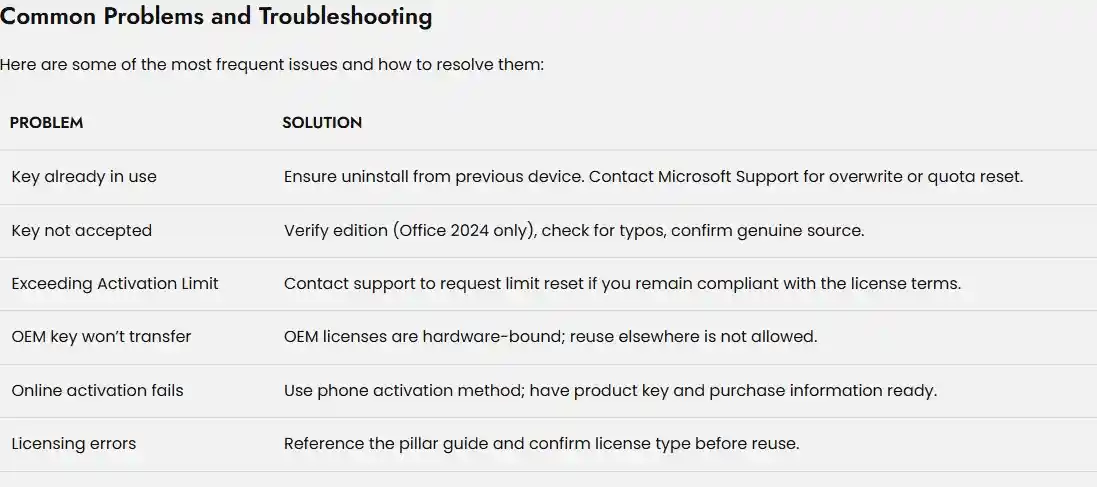
Transferring to New Device: No; OEM keys are locked to original hardware and cannot be transferred or reused elsewhere.
3. Volume License Key Reuse (MAK/KMS)
MAK Key: Reusable on multiple devices up to the total activation quota purchased. When moving devices, ensure you deactivate the old installation.
KMS Key: Not directly entered; activation managed by your organization’s central KMS server. Reuse is managed at IT administrator level.
Contacting Vendor: If activation limit is reached, Vendor may reset the quota after verifying compliance.
4. Digital License Reuse
Same Machine: Easily reused after a format or OS upgrade.
Transfer Between Machines: Allowed if the license terms explicitly permit and you follow proper deactivation steps.
Subscription Licenses: Microsoft 365 (or similar) subscriptions allow simultaneous use on multiple devices according to your plan.
Cautions on Reuse:
Attempting to reuse a key in violation of the license terms can trigger deactivation, legal issues, or permanent software lock-out. Always check your product’s licensing documentation.
Transferring Your License: Best Practices for Reuse
If you intend to use your activation key on a new computer, follow these steps:
For Retail and Volume Licenses:
Uninstall Office on the Old Device: Remove all Office software.
Install Office on the New Device: Download from your Microsoft account or vendor given link.
Enter Your Activation Key: During installation, enter your key to activate.
Online Activation: Complete Microsoft’s verification process.
Phone Activation (if needed): If the online process fails or max activations reached, contact vendor support .
For Digital Licenses:
Uninstall on the old device.
Setup Microsoft account on the new device—license follows your account rules.
Legal Transfers in the EEA:
Under European law, transfer of perpetual licenses between individuals is allowed, but always coordinate with Microsoft or vendor Support and document the process.
Explore more on license transfer in our deep-dive guide: Office 2024 professional plus Licensing Explained
Staying Compliant and Secure
Always check your product’s end-user license agreement (EULA): Using the key outside those terms risks deactivation and legal consequences.
Buy from trusted sources: Counterfeit or pirated keys can cause ongoing activation failures.
Track your key usage: Mark each activation, especially if you manage multiple licenses.
Contact Microsoft or your volume licensing admin (vendor) : For activation limits, device changes, and compliance.
Never share your key online or by email: Protect against piracy and unauthorized reuse.
Your key is personal—defend your investment and data by staying within best practices.
Key Features Unlocked By Legitimate Licensing
Flagship Productivity Tools
Word, Excel, PowerPoint, Outlook, Access, Publisher, OneNote—plus modern Teams integration.
Enhanced AI-powered automation, new Excel functions, improved accessibility, and better recovery.
Fully updated interface for Windows 11 and optimized for high-performance hardware.
Security & Reliability
Ongoing security patches, ransomware and malware defense, robust compliance for privacy and audits.
Activation guarantees feature access and eligibility for Microsoft support and troubleshooting.
Collaboration and Mobility
Real-time co-authoring, OneDrive cloud sync, seamless device transitions via digital licensing.
Benefits: Why Key Reuse and Transfer Maximize Value
For Individuals
Avoid buying new licenses after upgrades.
Transfer ensures continuity of work and easy migration.
Protects long-term investment in Office.
For Businesses/IT
Efficient asset management—reuse and transfer licenses within device change cycles.
Scale and audit compliance—use central management for all license moves (volume programs).
Maintain full workforce productivity while minimizing software costs.
Legal Compliance
Using keys within license terms preserves eligibility for Microsoft support and legal software status.
European law (EEA) allows for legitimate license transfer between individuals when following prescribed steps.
Frequently Asked Questions (FAQs)
Only if licensed (bundles, volume). Retail is generally one device at a time.
Uninstall Office from the old device and ensure the new device matches version requirements.
No—keys are version-specific. Office 2024 keys do not work on earlier or later releases
Contact your vendor for quota review/reset based on compliance.
Contact vendor from where you had buyer the product . they will assist you .
Yes, always uninstall before reusing your activation key—otherwise activation may fail.
Conclusion: Reuse and Activation Made Confident
Reusing your Office 2024 Professional Plus activation key—within the proper license framework—saves money, maximizes value, and safeguards compliance. Whether reformatting, upgrading, or transferring, following these rules ensures legal, secure, and flexible productivity for years to come.