

How to Activate Microsoft Office 2024 Home and Business (Office 2024 HB): Complete Step-by-Step Guide

Introduction
Microsoft Office remains the global benchmark for professional productivity. With the release of Microsoft Office 2024 Home and Business, users gain access to a powerful, modern, and reliable desktop suite designed specifically for standalone productivity.
Unlike subscription-based models, Office 2024 Home and Business provides a perpetual license (one-time purchase). It is the ideal productivity suite for small business owners, freelancers, home offices, students, and corporate teams who require core desktop applications, long-term stability, and zero recurring fees.
What Is Microsoft Office 2024 Home & Business?
Microsoft Office 2024 Home and Business is a classic desktop productivity suite built for PC and Mac. Paid once upfront, this edition grants you full ownership rights to essential business applications installed on a single computer.
It combines refreshed user interface aesthetics, under-the-hood performance optimizations, and enhanced security protections—giving users a dependable workplace environment without being tied to an ongoing monthly subscription.
Key Included Applications
Microsoft Word 2024: Industry-standard document creation software featuring refined formatting options, accessibility support, and document security.
Microsoft Excel 2024: Advanced spreadsheet software built for accounting, dynamic array formulas, financial analysis, and large data visualization.
Microsoft PowerPoint 2024: Modern presentation software packed with dynamic slide templates, smooth transitions, and rich media tools.
Microsoft Outlook 2024: Desktop email manager and calendar system designed for email management, scheduling, and contact organisation.
OneNote (Windows): Digital note-taking software for organized task lists, project brainstorming, and meeting records.
Core Features and Key Benefits
1. One-Time Purchase with Long-Term Value
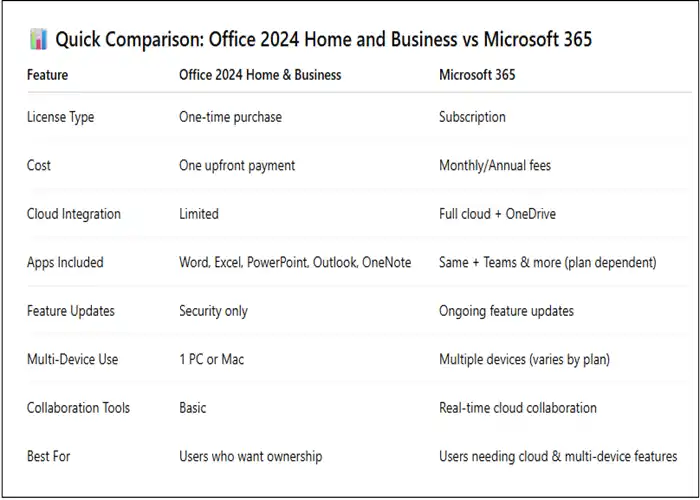
Microsoft Office 2024 provides a one-time purchase licensing model, giving users access to classic desktop applications such as Word, Excel, PowerPoint, and OneNote. Office Home & Business 2024 also includes Outlook. This model can simplify budgeting for users and small businesses that prefer purchasing a fixed Office release rather than maintaining a recurring Microsoft 365 subscription.
Unlike Microsoft 365 subscriptions, a one-time Office 2024 purchase does not include ongoing feature upgrades to future major Office releases. Security updates are provided, but new major-version upgrades require a separate purchase.
2. Faster and More Stable Excel Workflows
Office 2024 introduces performance and stability improvements across its applications, with particularly useful enhancements in Excel.
Excel 2024 can handle complex workbooks more efficiently, including scenarios where multiple workbooks containing independent calculations are open simultaneously. Microsoft specifically highlights improvements that reduce delays and hang-ups during these workflows.
These improvements are valuable for:
- Financial models
- Business reports
- Inventory management
- Sales analysis
- Large spreadsheets
- Research datasets
- Administrative reporting
3. Advanced Dynamic Array and Data Analysis Tools
Excel 2024 introduces 14 new text and array functions designed to make it easier to extract, split, combine, reshape, resize, and analyze data.
Dynamic arrays can also be referenced by charts, allowing visualizations to automatically adjust when the underlying array changes. This creates more flexible dashboards and reporting workflows without requiring users to manually redefine chart ranges every time the dataset changes.
4. IMAGE Function for Visual Data Management
Excel 2024 adds the IMAGE function, allowing users to incorporate pictures directly into workbooks.
This opens up useful possibilities for:
- Product catalogs
- Inventory databases
- Employee directories
- Visual dashboards
- Asset tracking
- Product comparison sheets
- Business reports
Images can also be moved, resized, sorted, and filtered within Excel tables without behaving like conventional floating objects.
5. Modernized Office Interface
Office 2024 features a refreshed visual experience based on Microsoft's Fluent Design principles.
The updated interface creates a more consistent appearance across Word, Excel, PowerPoint, Outlook, OneNote, and other Office applications. It is designed to maintain familiar workflows while providing a cleaner and more modern visual environment.
This can be particularly useful for users moving from older Office editions who want a familiar interface without completely changing how they work.
6. Enhanced Word Session Recovery
Word 2024 includes improved session recovery.
If Word unexpectedly closes before recent changes have been saved, it can reopen the documents that were active when the application closed. This can help users resume their work more quickly after an unexpected application shutdown.
This is especially valuable when working on:
- Business proposals
- Contracts
- Academic papers
- Long reports
- Technical documentation
- Research documents
- Marketing materials
7. Smarter Outlook Search and Email Management
Outlook 2024 includes improved search capabilities for emails, attachments, contacts, and calendar entries.
Search suggestions are designed to surface relevant information more effectively, helping users locate important communications without manually browsing through large mailboxes.
Outlook 2024 also includes additional meeting-management options, including features that can help create breaks between meetings by shortening meeting durations depending on their length.
8. Advanced PowerPoint Presentation Capabilities
PowerPoint 2024 introduces features designed to make presentations more engaging and professional.
Cameo allows users to place a live camera feed directly onto a presentation slide. Users can then apply formatting, styles, transitions, and other visual effects to the camera feed.
This can be useful for:
- Online presentations
- Training sessions
- Educational lectures
- Product demonstrations
- Corporate communications
- Video-based presentations
9. Built-In Presentation Recording
PowerPoint 2024's Recording Studio enables users to record presentations while capturing narration, ink gestures, and video presence.
The completed recording can be exported as a video, allowing presentations to be shared with audiences who cannot attend the original session.
This provides a practical workflow for creating:
Presentation → Narration → Camera → Recording → Video
10. Improved Accessibility
Accessibility improvements are integrated across Office 2024, helping users create documents, spreadsheets, presentations, and emails that are easier for a wider range of people to access.
Microsoft has expanded accessibility-related tools and features across Office 2024 and Office LTSC 2024.
For businesses, educational institutions, and professional teams, these capabilities can make accessibility considerations a more natural part of everyday document creation.
11. OpenDocument Format 1.4 Support
Office 2024 supports OpenDocument Format (ODF) 1.4, improving compatibility with applications that use the OpenDocument standard.
This is particularly useful when users exchange Word, Excel, or PowerPoint content with other productivity platforms that support ODF.
12. Mobile Device Image Integration
Office 2024 introduces more convenient ways to bring images from mobile devices into Office documents.
For example, Microsoft highlights the ability in supported Office LTSC 2024 scenarios to insert pictures from an Android device directly into Word, Excel, and PowerPoint content.
This can simplify workflows involving:
- Receipts
- Product photographs
- Whiteboards
- Printed documents
- Physical notes
- Reference images
13. Professional Email and Calendar Management
For users who choose Office Home & Business 2024, Outlook is included alongside Word, Excel, PowerPoint, and OneNote. Outlook brings email, calendars, tasks, and contacts together within the desktop productivity environment.
This makes the suite particularly useful for professionals and small businesses that need both document-production and communication tools in one desktop package.
14. Offline Productivity After Setup
Office 2024 desktop applications can be used offline after installation and activation, making them suitable for situations where continuous internet access is unavailable.
This can be useful when working:
- While traveling
- In locations with unreliable connectivity
- During flights
- In remote offices
- On local documents that do not require cloud services
However, Office 2024 still requires internet connectivity for initial setup and activation, and certain online-connected features and services are not included with the one-time-purchase edition.
15. Single-PC or Single-Mac Installation
Office 2024 one-time-purchase editions are designed for installation on one PC or one Mac, depending on the product and licensing terms.
For example, Microsoft lists Office Home & Business 2024 as including classic desktop versions of Outlook, Word, Excel, PowerPoint, and OneNote for installation on one PC or Mac.
This straightforward licensing structure can make Office 2024 suitable for individual professionals, families, freelancers, and small businesses that need a fixed desktop Office installation.
16. Compatibility Across Modern Office Workflows
Office 2024 brings improvements across the applications users commonly rely on every day:
Word → document creation, recovery, accessibility, and collaboration
Excel → dynamic arrays, new functions, charts, images, and performance
PowerPoint → Cameo, Recording Studio, presentation design, and media
Outlook → enhanced search, email management, and meeting tools
OneNote → digital notes, organization, and drawing capabilities
Together, these improvements create a comprehensive desktop productivity environment for professional, educational, and personal workflows.
17. Designed for Users Who Prefer a Fixed Office Version
Office 2024 is designed for users who want a traditional one-time-purchase Office experience rather than a Microsoft 365 subscription.
This means users receive a specific Office release instead of automatically receiving every new major feature introduced to Microsoft 365.
For users who prioritize a fixed feature set and straightforward ownership model, this can provide a predictable way to maintain desktop productivity software.
18. Professional Productivity Without a Mandatory Subscription
Office 2024 provides access to core desktop productivity applications without requiring a recurring Microsoft 365 subscription.
Depending on the edition, users can work with Word, Excel, PowerPoint, OneNote, and Outlook while maintaining a traditional desktop-based workflow.
This makes Office 2024 relevant for:
- Freelancers
- Students
- Consultants
- Accountants
- Entrepreneurs
- Small-business owners
- Office professionals
- Home users
19. Stronger Document and Presentation Workflows
The combination of Excel's enhanced data tools, Word's session recovery, PowerPoint's recording capabilities, and Outlook's improved search creates a more capable productivity workflow.
A typical professional workflow might look like:
Collect Information → Analyze Data in Excel → Prepare Documents in Word → Create Presentation in PowerPoint → Communicate Through Outlook
Office 2024 brings improvements to each stage of this workflow while maintaining the familiar desktop Office environment.
20. A Balanced Desktop Productivity Suite
The major strength of Office 2024 is the combination of classic desktop applications with targeted productivity, performance, accessibility, compatibility, and usability improvements.
Rather than simply changing the appearance of Office, Microsoft has introduced practical enhancements across Word, Excel, PowerPoint, Outlook, and other applications.
For users who want a modern desktop Office suite through a one-time purchase, Office 2024 provides a focused collection of productivity tools while remaining distinct from the continuously updated Microsoft 365 subscription model.
System Requirements
Before downloading, ensure your system meets these minimum hardware and software prerequisites:
Windows Hardware Requirements
Operating System: Windows 11 or Windows 10
Processor: 1.6 GHz or faster, 2-core processor
Memory (RAM): 4 GB minimum (8 GB recommended for complex spreadsheets)
Storage Space: 4 GB available disk space
Graphics: DirectX 10 capable graphics card for hardware acceleration
macOS Hardware Requirements
Operating System: Supports the three most recent versions of macOS
Processor: Intel Processor or Apple Silicon (M1, M2, M3, M4 chips)
Memory (RAM): 4 GB minimum (8 GB recommended)
Storage Space: 10 GB available disk space (APFS formatted)
How to Install Office 2024 Home & Business
Purchase a Product Key: Acquire a genuine 25-character Office 2024 Home & Business product key from a certified retailer.
Access Microsoft Setup: Navigate to setup.office.com on your browser and sign in with your official Microsoft Account.
Redeem Your Key: Input your 25-character key. This step permanently binds the software license to your Microsoft Account for easy re-installation.
Download the Installer: Select your preferred language and operating system architecture (64-bit recommended), then click Download.
Run Setup: Launch the downloaded installer package (.exe for Windows or .pkg for Mac) and follow the onscreen setup wizard.
Activation Methods and Troubleshooting
Recommended Method: Microsoft Account Activation
Launch any Office app (e.g., Word 2024).
Click Sign In when prompted by the activation wizard.
Enter the credentials of the Microsoft Account used during key redemption. Activation will bind automatically.
Manual Method: Product Key Activation
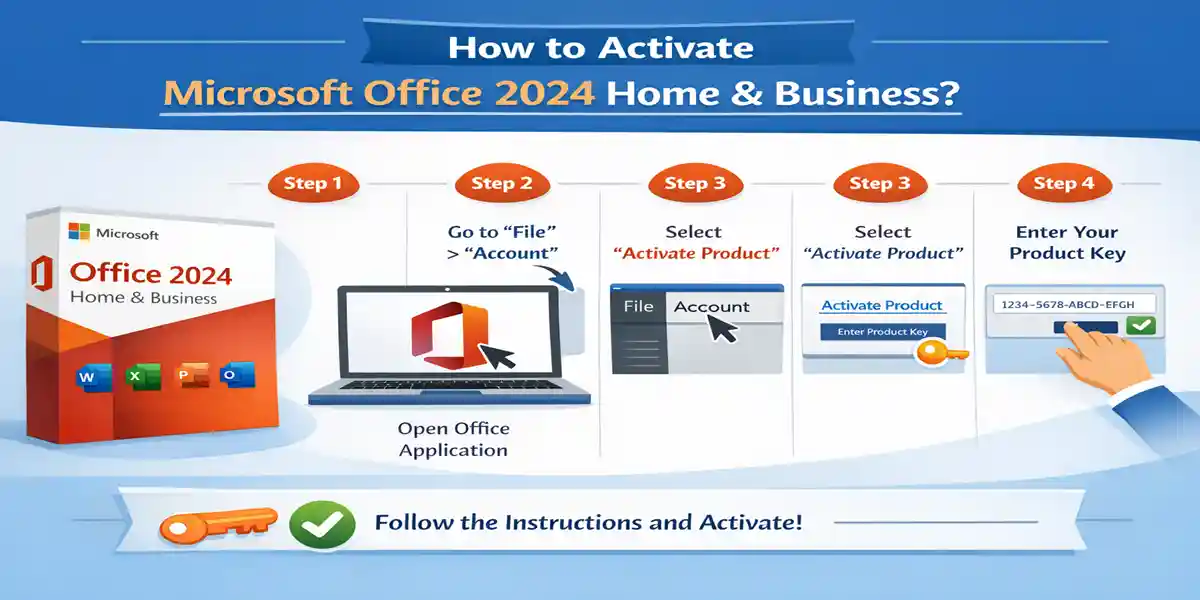
Open Word or Excel and navigate to File $\rightarrow$ Account.
Click Change Product Key.
Enter your 25-character key and restart the application.
[File] -> [Account] -> [Change Product Key] -> [Enter 25-Digit Key] -> [Restart App]
Common Fixes for Activation Errors
Key Already Used: Verify you are logged into the exact Microsoft Account used during initial registration at setup.office.com.
Server Unreachable: Temporarily disable active VPN connections, proxy servers, or strict network firewalls during the initial handshake.
Unlicensed Product Warning: Fully sign out of all Office applications, reboot your operating system, and log in again.
Legacy Software Conflicts: Remove older versions of Office before installation using the official Microsoft Support and Recovery Assistant (SaRA) tool.
Advanced Functions, VBA, and IT Admin Commands
1. Dynamic Cost Evaluation (Excel Formula)
Evaluate cost differences between a perpetual license vs. a yearly subscription model over $t$ years:
$$f(t) = C_{\text{perpetual}} - (S_{\text{annual}} \times t)$$Excel
=IF(249.99 < (99.99 * A2), "Office 2024 Perpetual is cheaper", "Microsoft 365 Subscription is cheaper")
2. XLOOKUP Inventory Query
Locate assigned activation keys by device name across IT inventory records:
Excel
=XLOOKUP(E2, A2:A100, C2:C100, "Device Not Found", 0)
3. Dynamic Array Filtering
Extract active deployment records using combined SORT and FILTER functions:
Excel
=SORT(FILTER(A2:D100, D2:D100="Active", "No Active Licenses"), 1, 1)
4. VBA Macro: Email Dispatch Script
Automate dispatch of installation receipts directly through Outlook 2024:
VBA
Sub SendActivationEmail()

    Dim OutlookApp As Object

    Dim OutlookMail As Object

    Set OutlookApp = CreateObject("Outlook.Application")

    Set OutlookMail = OutlookApp.CreateItem(0)


    With OutlookMail

        .To = "[email protected]"

        .Subject = "Office 2024 Home & Business Activation Confirmation"

        .Body = "Hello," & vbCrLf & vbCrLf & _

                "Your Microsoft Office 2024 Home & Business installation has been successfully activated."

        .Send

    End With


    Set OutlookMail = Nothing

    Set OutlookApp = Nothing

End Sub
5. Windows OSPP Command-Line Diagnostics
Run Windows Command Prompt as Administrator to inspect or activate Office manually:
DOS
:: Navigate to Office 2024 installation directory

cd "C:\Program Files\Microsoft Office\Office16"


:: Display current license status and last 5 characters of key

cscript ospp.vbs /dstatus


:: Install a new product key manually

cscript ospp.vbs /inpkey:XXXXX-XXXXX-XXXXX-XXXXX-XXXXX


:: Trigger immediate online activation

cscript ospp.vbs /act
6. macOS Terminal License Verification
Check licensing plist files or verify Word version details on Apple Silicon and Intel Macs:
Bash
# Verify local licensing payload existence

ls -la /Library/Preferences/com.microsoft.office.licensingV2.plist


# Read installed Microsoft Word version details

defaults read /Applications/Microsoft\ Word.app/Contents/Info.plist CFBundleShortVersionString
Why Buy from CodesForever?
When purchasing software licenses online, choosing a reputable vendor ensures genuine products and lifetime reliability. CodesForever is a trusted platform for acquiring official Microsoft licenses:
100% Genuine Licenses: Fully authentic keys that register directly with Microsoft servers (setup.office.com).
Rapid Digital Delivery: Receive your license key quickly via email or dashboard without shipping delays (standard delivery instantly up to 24 hours).
Affordable Pricing: Exceptional value compared to standard retail pricing, ideal for budget-conscious professionals and businesses.
Lifetime Activation Assistance: Dedicated customer support to assist with licensing, system transfers, or activation queries.
Secure Payment Environment: Encrypted checkout process protecting user privacy and transactional safety.
Conclusion
Microsoft Office 2024 Home & Business stands as the definitive solution for users seeking top-tier productivity tools without the burden of ongoing subscription fees. By combining a predictable one-time investment with modern performance upgrades, offline capability, and enterprise-grade tools like Excel and Outlook, it offers an optimal balance of feature stability and long-term value.
When paired with proper deployment, genuine licensing, and straightforward activation protocols, Office 2024 provides small businesses, freelancers, and professionals with a secure, reliable workspace tailored for years of seamless operation.
Frequently Asked Questions (FAQs)
Office 2024 HB stands for Office 2024 Home and Business, a one-time purchase version of Microsoft Office.
Yes, it’s a perpetual license for one device.
Yes, using the same Microsoft account.
No subscription storage is included, but basic OneDrive access is available via Microsoft account.
Internet is required for initial activation.
Yes, it’s designed specifically for business productivity.
Yes, security and stability updates are provided.