

Visual Studio License Keys: How to Get, Apply, and Check

To get Visual Studio license keys, start with your version. Visual Studio 2026 needs key, because you sign in with the account your subscription is assigned to. For 2022 and 2019, claim a key on the Product Keys page of the Visual Studio subscriber portal, or buy a standalone key. Then enter it in the IDE under Help > Register Product.
The confusion is understandable. Microsoft changed the model for 2026, and keys are tied to a specific version and edition, so a Professional key will not unlock Enterprise.
This guide walks through four steps: working out which version needs a key, finding your key in a subscription, buying a standalone key if you have none, and applying and checking it. Codesforever sells genuine Visual Studio keys.
Which Visual Studio versions need a license key
Visual Studio 2026 does not use a product key. Visual Studio 2022 and 2019 Professional and Enterprise accept a key or a subscription sign-in. Match your version to the table before you look for anything.
Key requirements by version
| Version | Product key? | How it activates |
|---|---|---|
| Visual Studio 2026 Professional or Enterprise | No | Sign in with the account your subscription is assigned to |
| Visual Studio 2022 Professional or Enterprise | Yes, or sign-in | Product key, or subscription sign-in |
| Visual Studio 2019 Professional or Enterprise | Yes, or sign-in | Product key, or subscription sign-in |
One exception applies to 2026. Organizations that use Volume Licensing for offline or managed deployments may still get 2026 keys through their Volume Licensing administrator. If your employer or school provides your license, ask that admin first. They also control whether you can see downloads and keys at all.
Check your version before you hunt for a key, because 2026 has none to find.
Where a legitimate key comes from
A real key comes from one of three places: your Visual Studio subscription, your Volume Licensing admin, or a reseller selling standalone keys. Everything else is a risk. A paid license costs less than cleaning up a compromised developer machine.
Step 1. Find your key in your subscription
If you hold an active Visual Studio subscription, your keys are free and already assigned to you.
Claim a key in the portal
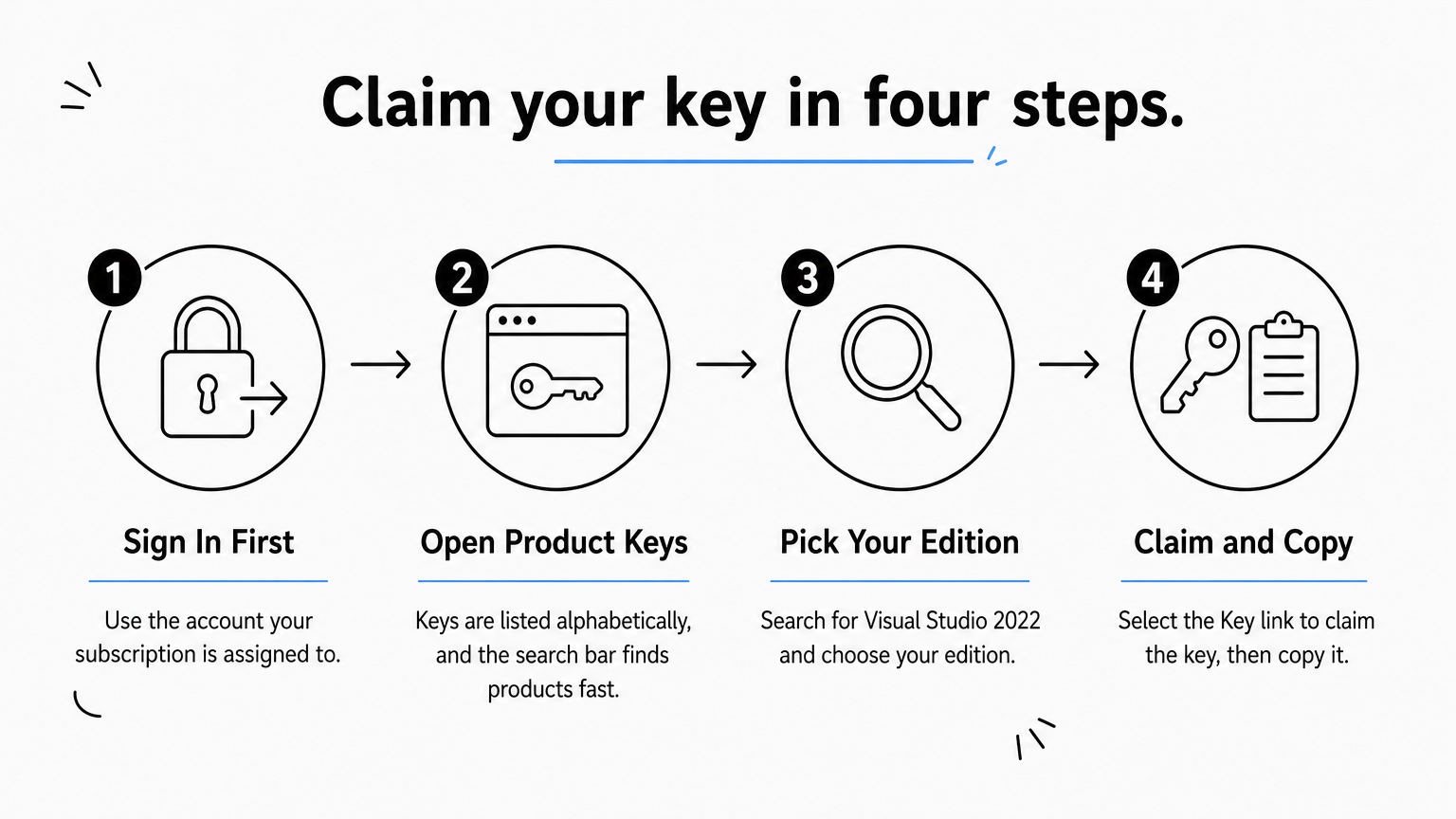
- Sign in to the Visual Studio subscriber portal with the account your subscription is assigned to.
- Open the Product Keys tab. Keys are listed alphabetically, and the search bar finds a product fast.
- Search for “Visual Studio 2022” and pick your edition. You can also select the blue key icon next to a product on the Downloads page.
- Select the Key link to claim the key, then copy it.
Some keys, called static keys, are claimed for you automatically and work on any number of installs. If several keys exist for one product, read the Notes column to see which one fits. Visual Studio 2026 will not appear in this list at all, since it activates through sign-in.
Export your keys and know the limits
Use Export all keys at the right of the Product Keys page to download a KeysExport.xml file. Excel opens it as a read-only workbook. Do this while your subscription is active, because an expired subscription blocks both new claims and exports.
Microsoft also caps how many keys you can claim per subscription each day. Most people never hit the cap. If you do, contact Visual Studio Subscriptions customer service, which reviews extra requests case by case.
Claim and export your keys while your subscription is active, because an expired one locks you out.
Step 2. Buy a standalone key if you have no subscription
If you have no subscription, buy a standalone key for the exact version and edition you installed. A standalone key is a one-time purchase, so you skip the recurring subscription. Microsoft’s own subscription prices are on its Visual Studio pricing page if you want to compare.
What to check before you buy
Run through this list before you pay anyone:
- Version and edition. 2022 Professional and 2022 Enterprise use different keys. Confirm both.
- Operating system. Some keys have limits. For example, Codesforever’s Visual Studio Professional 2019 key is for PCs running Windows 10 only.
- Delivery method. sellers deliver the key by email, with an activation guide.
- Replacement or refund terms. Read what happens if a key is invalid.
- A “2026 product key” listing. Treat it with suspicion. 2026 licenses through sign-in, so a seller promising a key needs to explain exactly what you receive.
Buying from Codesforever
Codesforever offers a Visual Studio 2022 license key with instant email delivery, and Visual Studio Professional 2019 as a lifetime activation at US$30. Most products arrive within 5 minutes, and a select few within 24 hours. Free 24/7 support covers activation problems, and invalid keys are replaced or refunded under the store’s guarantee. Read the terms on the product page before you order.

Buy only for the version and edition you installed, because keys are not interchangeable.
Step 3. Apply the key to your installation
Apply the key from the IDE for one machine, or run StorePID.exe from a script for many. Both need the full 25-character key, with its dashes, in five groups of five.
Enter the key in the IDE
- Install your edition and open Visual Studio.
- Go to Help > Register Product.
- Choose the option to unlock with a product key and paste the key with its dashes.
- Select Apply, then restart Visual Studio if it asks you to.
The dialog should now show your edition as licensed. If it shows a different edition than you bought, the key and the installed edition do not match.
Apply the key by script with StorePID.exe
For repeatable deployments, use StorePID.exe, a utility that ships with Visual Studio. Run it from an elevated prompt with the key and the Microsoft Product Code (MPC) for your edition. The 2022 path looks like this, with a placeholder key:
"C:\Program Files\Microsoft Visual Studio\2022\Enterprise\Common7\IDE\StorePID.exe" AAAAA-BBBBB-CCCCC-DDDDD-EEEEE 09660
For 2026, the install folder is named 18 instead of 2022. Pick the MPC from this table:
| Edition | MPC |
|---|---|
| Visual Studio Enterprise 2022 | 09660 |
| Visual Studio Professional 2022 | 09662 |
| Visual Studio Enterprise 2026 | 09860 |
| Visual Studio Professional 2026 | 09862 |
Include the dashes and use the right MPC, or the key will not apply.
Step 4. Check your license and fix key errors
Check your license in Help > Register Product, which shows the licensed edition and the account or key in use. For subscription status and expiry, sign in to the subscriber portal. Most failures come down to a wrong edition, a typo, or a key that has run out of activations.
Check status and expiry
Open Help > Register Product to see which edition is active and whether it runs under a sign-in or a key. If it is a subscription license, the portal tells you whether the subscription is active. Check it before renewals, because an expired subscription stops new key claims and exports.
People often ask how to recover a key from the Windows registry. Do not count on it. Free key-finder tools are unreliable and are another route for malware. The dependable record is the Product Keys page for a subscription key, or your purchase email for a bought one.
Decode StorePID.exe errors
StorePID.exe returns an exit code, so a script can catch failures. A 0 means success.
| Code | Meaning | What to try |
|---|---|---|
| 1 | Not installed | Confirm Visual Studio is installed in that folder |
| 2 | Invalid | Recheck the key, dashes, and MPC |
| 3 | Expired | Get a current key or renew the subscription |
| 4 | In use | The key is out of activations. Request more or buy another |
| 5 | Failure | Rerun with elevated rights, then contact support |
| 6 | No upgrade | The key does not cover the installed edition |
An invalid-key error usually means a mismatched edition or MPC, not a bad key.
Get your Visual Studio license sorted
Check your version first. 2026 needs only a subscription sign-in. For 2022 and 2019, claim a key from the portal or buy a standalone one for your exact edition. Then apply it through Help > Register Product, or with StorePID.exe for several machines. Avoid generators and shared keys.
If you have no subscription and need a one-time license, get a Visual Studio 2022 license key with instant email delivery and activation support.