

How to Activate Microsoft Office 365 E5 200 Users 1 Year License (Complete Guide)

Introduction
Microsoft Office 365 E5 is one of the most advanced enterprise productivity solutions designed for organizations that require powerful collaboration, security, compliance, and cloud management capabilities. A Microsoft Office 365 E5 200 Users 1 Year License provides businesses with access to premium Microsoft services for up to 200 users, allowing employees to work efficiently with enterprise-grade applications and cloud-based tools.
Unlike basic Microsoft 365 plans, the E5 subscription includes advanced features such as enhanced security protection, compliance management, enterprise analytics, cloud communication, and intelligent productivity solutions. It is designed for large businesses, enterprises, government organizations, and professional teams that require scalable IT infrastructure.
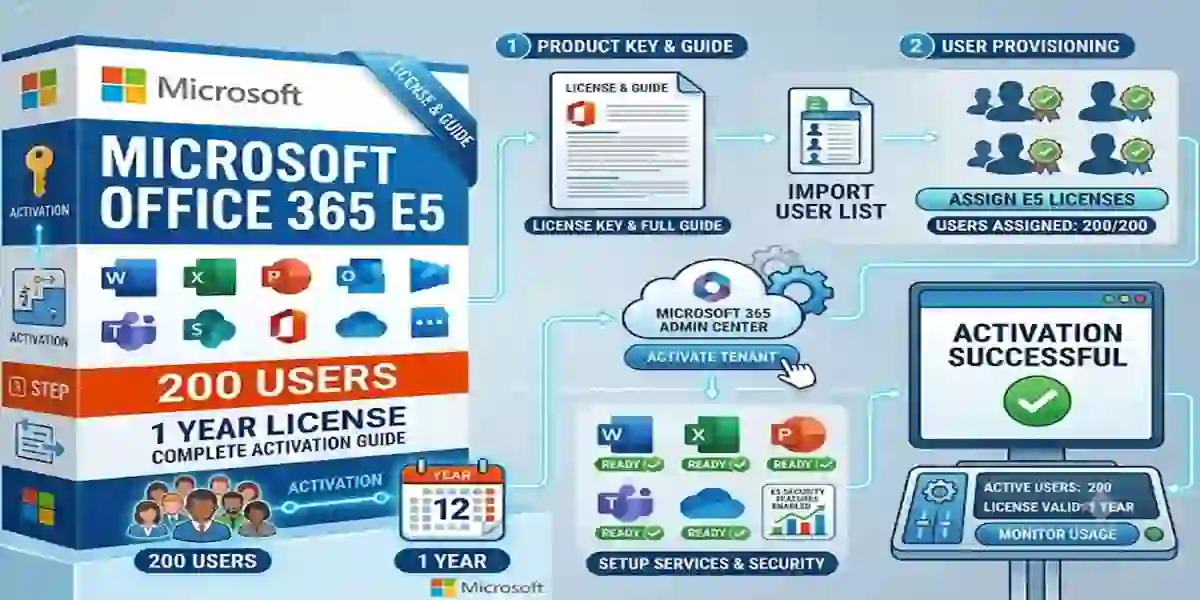
Activating Microsoft Office 365 E5 requires proper license assignment, administrator configuration, and user management through the Microsoft 365 Admin Center. A successful activation ensures users can access applications such as Microsoft Word, Excel, PowerPoint, Outlook, Teams, OneDrive, SharePoint, and advanced security services.
What is Microsoft Office 365 E5 200 Users 1 Year License?
Microsoft Office 365 E5 is an enterprise subscription plan that provides premium cloud productivity and security services for organizations.
The 200 Users 1 Year License means:
- License access for 200 individual users
- Subscription validity for 12 months
- Centralized administration
- Enterprise application access
- Cloud collaboration tools
- Advanced security and compliance features
The administrator manages all user licenses through the Microsoft 365 Admin Center.
Organizations can:
- Add users
- Remove users
- Assign licenses
- Configure security settings
- Monitor service usage
- Manage applications
Key Features of Microsoft Office 365 E5 200 Users License
The Microsoft 365 E5 200 Users License is designed for organizations that need enterprise-grade productivity, collaboration, security, compliance, identity management, and business analytics in a single subscription environment. Microsoft 365 E5 combines premium Office applications with services such as Exchange Online, Microsoft Teams, OneDrive, SharePoint, Microsoft Defender, Microsoft Entra, Microsoft Intune, Microsoft Purview, and Power BI Pro.
For an organization deploying the license to 200 users, administrators can provide employees with a comprehensive Microsoft ecosystem for document creation, communication, cloud storage, security, device management, and data analysis.
1. Complete Microsoft 365 Office Application Suite
Microsoft 365 E5 provides desktop, web, and mobile versions of core productivity applications, including Word, Excel, PowerPoint, and Outlook.
Microsoft Word
Microsoft Word provides professional document creation and editing capabilities for business users.
Key capabilities include:
- Professional document formatting
- Templates and styles
- Advanced editing and reviewing
- Comments and collaboration
- Cloud-based document storage
- Real-time co-authoring
- Accessibility tools
Businesses can use Word to create:
- Business reports
- Contracts
- Proposals
- Policies
- Technical documentation
- Internal communications
Microsoft Excel
Excel provides advanced spreadsheet and data-analysis functionality for organizations.
Key capabilities include:
- Advanced formulas and functions
- PivotTables
- Data visualization
- Charts and dashboards
- Financial analysis
- Data organization
- Business reporting
Excel can support sales analysis, budgeting, forecasting, inventory management, financial reporting, and operational planning.
Microsoft PowerPoint
PowerPoint provides tools for creating professional business presentations and visual reports.
Users can create:
- Corporate presentations
- Training materials
- Marketing presentations
- Sales proposals
- Executive briefings
- Project presentations
Microsoft 365 also provides collaboration capabilities that allow supported Office documents to be shared and edited across teams.
Microsoft Outlook
Outlook combines business email, calendars, contacts, and scheduling tools.
Organizations can use Outlook for:
- Professional email
- Calendar management
- Meeting scheduling
- Contact management
- Task organization
- Business communication
Exchange Online provides the underlying enterprise email and calendaring service in Microsoft 365 E5.
2. Microsoft Teams for Enterprise Collaboration
Microsoft Teams provides a centralized environment for chat, meetings, calling, collaboration, and file sharing. Microsoft lists Teams as part of the Microsoft 365 E5 enterprise experience.
Business Chat and Messaging
Teams allows employees to communicate through:
- One-to-one conversations
- Group chats
- Team channels
- @mentions
- Shared files
- Collaborative discussions
Online Meetings and Webinars
Teams can support:
- Video meetings
- Online presentations
- Team meetings
- Webinars
- Screen sharing
- Remote collaboration
File Collaboration
Teams works with Microsoft 365 services so employees can access and collaborate on supported documents and files within their organizational environment.
Teams Phone
Microsoft 365 E5 also includes capabilities for a cloud-based phone system through Microsoft Teams, allowing organizations to extend Teams beyond chat and meetings into business calling, subject to configuration and licensing requirements.
3. OneDrive Cloud Storage and File Access
OneDrive for Business provides cloud storage for individual users, allowing employees to save, access, edit, and share files across supported devices.
Microsoft's enterprise plan information lists 1 TB to 5+ TB of cloud storage per user, depending on eligibility and configuration.
Key benefits include:
- Cloud-based file storage
- File synchronization
- Secure sharing
- Document collaboration
- Remote file access
- Version management
Employees can access their work files from supported office computers, home devices, browsers, and mobile devices while following organizational security policies.
4. SharePoint Online for Enterprise Content Management
SharePoint Online provides organizations with a platform for team sites, document libraries, internal content, and collaborative information management.
Organizations can use SharePoint to create:
- Department portals
- Project sites
- Document libraries
- Knowledge bases
- Internal websites
- Collaboration workspaces
Advanced SharePoint capabilities can help organizations manage permissions, organize business documents, automate workflows, and provide controlled access to corporate information.
5. Exchange Online for Enterprise Email
Microsoft 365 E5 includes Exchange Online Plan 2, providing enterprise email and calendaring capabilities. Microsoft's licensing guidance lists Exchange Online Plan 2 as included with Microsoft 365 E5.
Key capabilities include:
- Business email
- Calendar management
- Contacts
- Mailbox management
- Email archiving
- Spam and malware protection
- Integration with Outlook
Exchange Online provides the foundation for professional email communication across large organizations.
6. Advanced Microsoft Defender Security
Security is one of the major differentiators of the E5 platform. Microsoft describes Microsoft 365 E5 as providing protection across identities, endpoints, email, collaboration services, and SaaS applications.
Advanced security capabilities include:
- Email and collaboration protection
- Endpoint security
- Identity threat protection
- Threat detection
- Extended detection and response (XDR)
- Phishing protection
- Malware protection
- Ransomware protection
- Cloud application security
Microsoft Defender for Office 365 also provides advanced protection for email and collaboration environments, including supported Microsoft Teams, SharePoint, and OneDrive workloads.
7. Microsoft Entra ID and Advanced Identity Protection
Microsoft 365 E5 provides advanced identity and access management through Microsoft Entra.
Organizations can use identity security capabilities to help protect employee accounts and control access to corporate resources.
Advanced capabilities include:
- Risk-based Conditional Access
- Identity threat detection
- Authentication controls
- Least-privilege access
- Risk-based sign-in assessment
- User and device access policies
These controls help organizations implement a Zero Trust security strategy by evaluating identity, device, and access conditions before allowing access to protected resources.
8. Microsoft Intune and Endpoint Management
Microsoft 365 E5 includes advanced device and endpoint management capabilities through Microsoft Intune.
IT administrators can use Intune to help:
- Manage corporate devices
- Configure security policies
- Protect business applications
- Control access to organizational resources
- Monitor device compliance
- Manage Windows endpoints
Microsoft also lists Intune Advanced Analytics as included with Microsoft 365 E3 and E5, providing insights into device health and endpoint performance.
This can be particularly useful for organizations managing large numbers of employee computers and mobile devices.
9. Microsoft Purview for Data Security and Compliance
Microsoft Purview provides advanced capabilities for data governance, information protection, compliance, and data security.
Microsoft states that Microsoft 365 E5 includes premium Purview capabilities designed to help protect sensitive data and manage regulatory requirements.
Organizations can use Purview capabilities for areas such as:
- Data Loss Prevention (DLP)
- Information protection
- Data governance
- Insider risk management
- eDiscovery
- Audit
- Compliance management
- Sensitive-data protection
These capabilities are valuable for organizations handling confidential business information, regulated data, financial records, customer information, and intellectual property.
10. Power BI Pro for Advanced Business Analytics
Microsoft 365 E5 includes Power BI Pro, Microsoft's business analytics platform for turning organizational data into interactive reports and dashboards.
Organizations can use Power BI to analyze:
- Sales performance
- Financial information
- Marketing data
- Operational metrics
- Customer trends
- Business KPIs
- Workforce information
Interactive dashboards can help business users transform large datasets into visual reports that are easier to understand and share.
Methods to Activate Microsoft Office 365 E5 200 Users License
Method 1: Microsoft 365 Admin Center Activation
This is the recommended official method.
Steps:
- Sign in to Microsoft 365 Admin Center
- Open Billing Section
- Select Your Products
- Locate Microsoft 365 E5 License
- Assign licenses to users
- Confirm activation
After assignment, users can access Microsoft services.
Method 2: User License Assignment Method
Steps:
- Open Microsoft Admin Center
- Go to Users
- Select Active Users
- Choose user account
- Click Licenses and Apps
- Enable Microsoft 365 E5
- Save changes
Repeat for required users.
Method 3: Bulk Activation Using PowerShell
Administrators can activate multiple accounts using PowerShell.
Install Microsoft Graph Module
Command:
Install-Module Microsoft.Graph
Connect to Microsoft 365
Command:
Connect-MgGraphView Available Licenses
Command:
Get-MgSubscribedSkuAssign License to User
Command:
Set-MgUserLicenseCheck User License Status
Command:
Get-MgUserLicenseDetailMethod 4: Microsoft Office Desktop Application Activation
After license assignment:
Steps:
- Install Office applications
- Open Word or Excel
- Select Sign In
- Enter Microsoft account
- License activates automatically
Useful Microsoft 365 Admin Commands
Check Tenant Information
Get-MgOrganizationList Users
Get-MgUserCheck License Usage
Get-MgSubscribedSkuRemove License
Set-MgUserLicense Common Microsoft Office 365 E5 Activation Errors and Fixes
Error 1: License Assignment Failed
Cause:
- User limit reached
- License unavailable
- Permission issue
Fix:
- Check available licenses
- Verify admin permissions
- Remove unused accounts
Error 2: Unable to Sign In
Causes:
- Incorrect password
- MFA issue
- Account lock
Fix:
- Reset password
- Verify MFA settings
- Check account status
Error 3: Office Shows "Unlicensed Product"
Causes:
- License not assigned
- Wrong account signed in
Fix:
- Open Office application
- Sign out
- Sign in with licensed account
- Restart Office
Error 4: Activation Server Unavailable
Causes:
- Network issue
- Microsoft service outage
Fix:
- Check internet connection
- Restart application
- Check Microsoft service health
Error 5: User Cannot Access Teams
Causes:
- Teams license disabled
- Permission restrictions
Fix:
- Enable Teams service
- Reassign license
Licensing Overview
Microsoft Office 365 E5 licensing includes:
Subscription License
- Monthly or yearly payment
- Continuous updates
- Cloud-based services
Enterprise License
Designed for:
- Large companies
- Government organizations
- Educational institutions
User-Based Licensing
Each user requires an assigned license.
Example:
200 employees = 200 assigned licenses
Benefits of Microsoft Office 365 E5 200 Users License
Increased Productivity
Employees access complete Microsoft tools.
Better Collaboration
Teams and SharePoint improve communication.
Enhanced Security
Advanced protection reduces cyber risks.
Centralized Management
Administrators control all services from one dashboard.
Scalability
Organizations can easily add more users.
Conclusion
Microsoft Office 365 E5 200 Users 1 Year License provides organizations with a complete enterprise productivity platform combining powerful applications, advanced security, cloud collaboration, and centralized administration.
Proper activation ensures that all 200 users can access premium Microsoft services including Word, Excel, PowerPoint, Outlook, Teams, OneDrive, SharePoint, and enterprise security features.
Using the Microsoft 365 Admin Center or PowerShell-based management tools, administrators can efficiently assign licenses, configure users, and maintain a secure cloud environment.
For businesses looking for a scalable solution, Microsoft 365 E5 delivers advanced productivity, compliance, and security features required for modern digital workplaces.
Frequently Asked Questions (FAQ)
It is an enterprise subscription that provides Microsoft 365 services for 200 users for one year.
Activation is completed through Microsoft Admin Center by assigning licenses to users.
Yes, administrators can use PowerShell or bulk assignment tools.
Yes, it includes Word, Excel, PowerPoint, Outlook, and more.
A valid license, admin account, and internet connection are required.