

How to Activate Microsoft Office Professional Plus LTSC 2021 Successfully | Complete Step-by-Step Guide

Introduction
Microsoft Office Professional Plus LTSC 2021 is a powerful productivity solution designed for businesses, enterprises, government organizations, educational institutions, and professional users who require a stable and dependable Office environment.
Unlike Microsoft 365, which follows a subscription-based model with continuous feature updates, Office LTSC (Long-Term Servicing Channel) 2021 focuses on reliability, security, and long-term performance. It is specifically developed for environments where organizations need predictable software functionality without frequent changes.
Office Professional Plus LTSC 2021 provides essential productivity applications including:
- Microsoft Word 2021
- Microsoft Excel 2021
- Microsoft PowerPoint 2021
- Microsoft Outlook 2021
- Microsoft Access 2021
- Microsoft Publisher 2021
- Microsoft OneNote
These applications help users perform daily professional tasks such as:
- Creating business documents
- Managing financial data
- Preparing presentations
- Handling emails
- Creating databases
- Managing organizational workflows
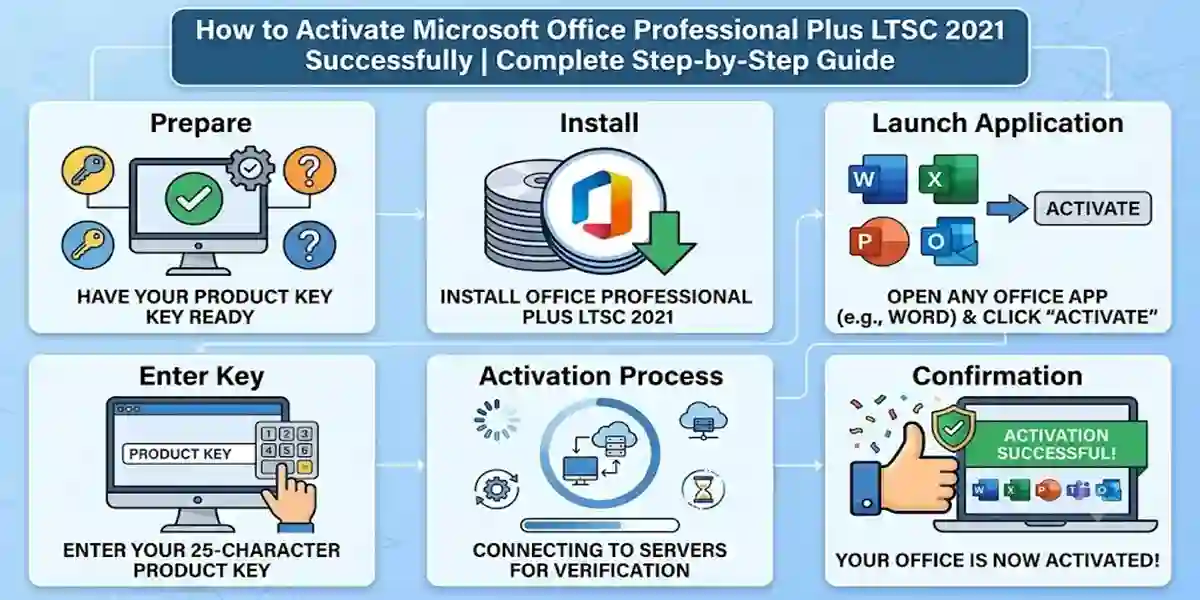
To use all available features of Office Professional Plus LTSC 2021, proper activation is required. Activation verifies that the software installation is connected with a valid license and allows users to access the full capabilities of the Office suite.
A successful activation provides:
- Genuine software verification
- Improved security
- Stable application performance
- Access to licensed features
- Professional deployment support
Many users experience activation problems due to:
- Incorrect license information
- Product key mismatch
- Network connectivity issues
- Office installation conflicts
Incorrect Office edition
What Is Microsoft Office Professional Plus LTSC 2021?
Microsoft Office Professional Plus LTSC 2021 is an enterprise-focused, volume-licensed edition of Microsoft Office designed for organizations, businesses, government departments, educational institutions, and professional users who require a stable, reliable, and predictable productivity environment.
The term LTSC (Long-Term Servicing Channel) refers to a Microsoft servicing model that focuses on long-term stability rather than continuous feature updates. Unlike Microsoft 365, which regularly receives new features, interface changes, and cloud-based improvements, Office Professional Plus LTSC 2021 provides a fixed feature set with security updates and quality improvements throughout its support lifecycle.
Office LTSC 2021 is designed for environments where consistency and reliability are more important than having the newest features. It allows organizations to maintain a standardized Office setup without frequent changes that may affect workflows, compatibility, or employee productivity.
With Office Professional Plus LTSC 2021, users get access to essential professional applications including:
Microsoft Word 2021
Microsoft Excel 2021
Microsoft PowerPoint 2021
Microsoft Outlook 2021
Microsoft Access 2021
Microsoft Publisher 2021
Microsoft OneNote
These applications provide complete solutions for:
Professional document creation
Data analysis and reporting
Business presentations
Email and communication management
Database development
Project documentation
Workplace productivity
Understanding Microsoft Office LTSC 2021
Microsoft Office Professional Plus LTSC 2021 is different from traditional retail Office editions because it is primarily created for organizations that purchase licenses through Microsoft's volume licensing programs.
The main purpose of Office LTSC editions is to provide a dependable software platform for environments where frequent updates are unnecessary or difficult to manage.
Organizations often choose Office LTSC 2021 because:
Employees need a consistent user experience
Business applications require stable Office versions
IT teams need controlled software deployment
Systems operate in regulated or restricted environments
Frequent feature changes may create compatibility issues
Office LTSC 2021 delivers professional Office applications with a focus on:
Reliability
Security
Performance
Controlled updates
Long-term usability
Who Uses Microsoft Office Professional Plus LTSC 2021?
1. Businesses and Companies
Businesses across different industries use Office Professional Plus LTSC 2021 to manage daily productivity tasks and professional operations.
Companies use Office applications for:
Documentation
Microsoft Word helps organizations create:
Business reports
Agreements
Policies
Manuals
Professional documents
Financial Analysis
Microsoft Excel supports:
Budget management
Financial calculations
Data analysis
Sales tracking
Business forecasting
Business Presentations
PowerPoint helps companies create:
Client presentations
Training materials
Marketing presentations
Project proposals
Communication Management
Outlook provides tools for:
Business emails
Calendar scheduling
Meetings
Contact management
2. Government Organizations
Government departments often require highly stable software platforms because their systems must operate reliably for long periods.
Office Professional Plus LTSC 2021 is suitable for government environments because it provides:
Controlled software changes
Predictable performance
Improved security features
Easier IT management
Government users can maintain standardized Office installations across departments while reducing compatibility issues caused by frequent software updates.
3. Educational Institutions
Schools, colleges, and universities use Office LTSC 2021 to support academic and administrative activities.
Educational users benefit from applications designed for:
Teaching materials
Research papers
Student reports
Presentations
Administrative documentation
Teachers and students can use Word, Excel, and PowerPoint for creating educational content and managing academic information.
4. Enterprise Environments
Large organizations often prefer LTSC editions because they require centralized software management and predictable performance.
Enterprise benefits include:
Long-term stability
Controlled deployment
Simplified IT administration
Reduced software compatibility issues
Standardized Office environments
IT departments can deploy Office LTSC 2021 across multiple devices while maintaining control over configurations and updates.
Key Features of Microsoft Office Professional Plus LTSC 2021
1. Complete Office Productivity Suite
Microsoft Office Professional Plus LTSC 2021 includes a complete collection of professional applications required for modern workplace productivity.
It provides tools for:
Creating documents
Managing business data
Designing presentations
Handling communication
Managing databases
Organizing information
Microsoft Word 2021 Features
Microsoft Word 2021 is a professional document creation application designed for creating high-quality documents.
It provides advanced tools for writing, editing, formatting, and managing professional content.
Key Features:
Improved Document Editing
Word 2021 includes enhanced editing capabilities that help users create and modify documents efficiently.
Users can:
Edit complex documents
Apply professional formatting
Manage large files
Create structured reports
Enhanced Formatting Options
Word provides tools for:
Styles
Tables
Templates
Page layouts
Professional designs
Better Collaboration Tools
Users can review and manage documents with improved collaboration features.
Accessibility Improvements
Word 2021 includes accessibility features that make documents easier to read and use.
Common Uses of Word 2021:
Business reports
Contracts
Research documents
Project documentation
Proposals
Official letters
Microsoft Excel 2021 Features
Microsoft Excel 2021 is a powerful spreadsheet application used for data management, calculations, reporting, and analysis.
It helps professionals convert complex data into meaningful information.
Key Features:
Advanced Formulas
Excel provides powerful formulas and functions for:
Financial calculations
Data analysis
Statistical operations
Automated reporting
Data Visualization
Users can create:
Charts
Graphs
Dashboards
Visual reports
PivotTables
PivotTables allow users to summarize and analyze large amounts of data quickly.
Dynamic Arrays
Dynamic arrays improve data processing by allowing formulas to automatically return multiple results.
Improved Calculation Tools
Excel 2021 provides better calculation performance for professional workloads.
Common Uses of Excel:
Financial reports
Sales analysis
Inventory management
Business forecasting
Data processing
Microsoft PowerPoint 2021 Features
Microsoft PowerPoint 2021 helps users create professional and visually attractive presentations.
Key Features:
Improved slide design tools
Enhanced animations
Better presentation controls
Media improvements
Professional templates
Used For:
Business presentations
Educational content
Marketing materials
Training sessions
Project proposals
PowerPoint helps professionals communicate ideas clearly through engaging visual presentations.
Microsoft Outlook 2021 Features
Microsoft Outlook 2021 provides professional email and communication management tools.
Features:
Email organization
Calendar scheduling
Contact management
Meeting management
Improved search functionality
Outlook helps businesses maintain efficient communication and manage daily schedules effectively.
Microsoft Access 2021 Features
Microsoft Access 2021 is a database management application used to create and manage structured data solutions.
Features:
Database templates
Data organization tools
Query creation
Forms development
Reporting features
Access helps organizations create customized databases for:
Customer management
Employee records
Inventory tracking
Business applications
Microsoft Publisher 2021 Features
Microsoft Publisher 2021 helps users create professional layouts and marketing materials.
Users can design:
Brochures
Flyers
Newsletters
Business cards
Promotional documents
Publisher is useful for businesses that need simple desktop publishing solutions.
2. Long-Term Stability
One of the biggest advantages of Microsoft Office Professional Plus LTSC 2021 is its focus on stability.
Unlike Microsoft 365, which continuously changes with new features, Office LTSC 2021 provides a consistent experience.
Benefits of Stability:
Predictable Performance
Organizations can maintain the same Office environment for longer periods without major changes.
Reduced Workflow Disruptions
Employees do not need to adapt frequently to redesigned features or interfaces.
Controlled Updates
IT administrators can manage updates according to organizational requirements.
Reliable Operation
Office LTSC 2021 is suitable for mission-critical environments where reliability is important.
3. Improved Security Features
Security is an important aspect of professional software environments.
Microsoft Office Professional Plus LTSC 2021 includes security improvements designed to protect business documents and user information.
Security Benefits Include:
Secure Document Handling
Helps protect sensitive files and professional documents.
Better Threat Protection
Provides improved protection against security risks.
Enhanced Authentication Support
Supports modern authentication technologies.
Safer File Management
Helps organizations manage documents more securely.
4. Offline Productivity
Unlike cloud-based solutions, Office Professional Plus LTSC 2021 allows users to work efficiently with desktop applications without requiring continuous internet connectivity.
This makes it useful for:
Secure environments
Restricted networks
Offline workplaces
Organizations with limited internet access
Users can create documents, analyze data, and prepare presentations locally.
5. Professional Deployment Support
Office Professional Plus LTSC 2021 provides enterprise deployment options for organizations managing multiple devices.
IT teams can use deployment tools to maintain consistent Office installations.
Deployment Benefits:
Centralized Installation
Administrators can install Office across multiple systems efficiently.
Controlled Configuration
Organizations can customize installation settings according to requirements.
Standardized Deployment
All users can work with the same Office version and configuration.
Methods to Activate
Microsoft Office Professional Plus LTSC 2021 activation is an important process that verifies the authenticity of the installed Office suite and enables users to access all available features. The activation method depends on the type of license purchased and the deployment environment.
Organizations generally use approved volume licensing solutions, while individual users activate Office through valid licensing credentials provided by authorized sources.
Below are the commonly used activation approaches for Office Professional Plus LTSC 2021.
Method 1: Activate Office Professional Plus LTSC 2021 Using Volume Licensing
Office Professional Plus LTSC 2021 is primarily designed for organizations that use volume licensing.
Volume licensing allows businesses and institutions to deploy Office across multiple devices while managing licenses centrally.
Activation Process:
- Install Microsoft Office Professional Plus LTSC 2021.
- Confirm that the correct Office edition is installed.
- Configure the organization's licensing settings.
- Connect the device according to the organization's activation environment.
- Verify activation status.
Organizations usually manage activation through their official Microsoft licensing infrastructure.
Method 2: Activate Through Microsoft Office Deployment Tools
The Office Deployment Tool helps administrators install and configure Office LTSC products in managed environments.
It allows organizations to:
- Download Office installation files
- Select Office editions
- Configure deployment settings
- Manage installation options
General Process:
- Download the Office Deployment Tool from Microsoft's official resources.
- Create a configuration file.
- Select Office Professional Plus LTSC 2021.
- Install Office using the configured settings.
- Complete license configuration.
This method is commonly used by IT administrators managing multiple computers.
Method 3: Activate Using Organization Licensing Account
Organizations with Microsoft licensing agreements can activate Office through their assigned licensing accounts.
Steps:
- Install Office Professional Plus LTSC 2021.
- Sign in or connect using authorized organizational credentials.
- Verify license assignment.
- Complete activation.
This method ensures proper license management and compliance.
Method 4: Verify Office Activation Status
After activation, users can check the current license status.
Open Command Prompt as Administrator and run:
cscript "%ProgramFiles%\Microsoft Office\Office16\OSPP.VBS" /dstatus
This command displays:
- Office edition
- License status
- Activation information
- License details
Office Professional Plus LTSC 2021 Activation Commands
Check License Status
cscript "%ProgramFiles%\Microsoft Office\Office16\OSPP.VBS" /dstatus
Purpose:
Displays current Office licensing information.
Activate Office
cscript "%ProgramFiles%\Microsoft Office\Office16\OSPP.VBS" /act
Purpose
Attempts Office activation after proper licensing configuration.
Remove Existing License Information
cscript "%ProgramFiles%\Microsoft Office\Office16\OSPP.VBS" /unpkey:XXXXX
Purpose:
Removes an existing Office product key entry when required during license management.
Common Microsoft Office Professional Plus LTSC 2021 Activation Errors and Fixes
Error 1: "Office Activation Failed"
Causes:
- Incorrect licensing information
- Network problems
- Damaged Office installation
- Wrong Office edition
Fixes:
✔ Verify license information
✔ Check internet connection
✔ Repair Office installation
✔ Confirm correct Office version is installed
Error 2: "Product Key Cannot Be Used"
Causes:
- Invalid license information
- Incorrect Office edition
- Already-used license
Fixes:
- Confirm the license matches Office LTSC 2021
- Check licensing details
- Remove conflicting Office versions
Error 3: "Unlicensed Product" Message
Causes:
- Activation incomplete
- License verification failure
- Expired authorization
Fixes:
- Open Office application.
- Check account/license information.
- Restart Office.
- Verify activation status.
Error 4: Office Installation Conflict
Causes:
Multiple Office versions installed together.
Example:
- Office 2019
- Microsoft 365
- Office LTSC 2021
Fix:
Remove previous Office versions before installing Office LTSC 2021.
Error 5: Activation Server Unavailable
Causes:
- Temporary server issues
- Network restrictions
- Firewall settings
Fixes:
✔ Check internet connection
✔ Try activation again later
✔ Verify firewall settings
Error 6: Office Software Protection Platform Error
Causes:
- Licensing service problems
- Corrupted Office files
Fixes:
Restart licensing services and repair Office installation.
Error 7: Office Application Opens in Reduced Functionality Mode
Causes:
- Activation incomplete
- License verification problem
Fix:
Complete activation using valid licensing information.
Error 8: Incorrect Office Edition Installed
Causes:
The installed Office version does not match the license.
Fix:
Install the correct Office Professional Plus LTSC 2021 edition.
Error 9: Internet Connectivity Problem
Causes:
- Weak network connection
- Proxy restrictions
- Firewall blocking activation
Fix:
- Check network settings
- Disable unnecessary restrictions
- Retry activation
Error 10: Previous Office License Conflict
Causes:
Old Office licenses remain registered.
Fix:
Remove previous Office license information and configure the correct license.
Conclusion
Microsoft Office Professional Plus LTSC 2021 is a reliable productivity solution designed for businesses, organizations, and professionals who require a stable and secure Office environment. With powerful applications such as Word, Excel, PowerPoint, Outlook, Access, and Publisher, it provides the essential tools required for modern workplace productivity.
Successful activation of Office Professional Plus LTSC 2021 ensures that users can access the complete functionality of the Office suite while maintaining a genuine and secure software environment. Proper activation helps prevent licensing interruptions, improves reliability, and allows organizations to confidently deploy Office applications across their systems.
The activation process depends on the licensing method used. Organizations typically manage Office LTSC 2021 through approved volume licensing solutions, deployment tools, and centralized IT management systems. Following the correct activation procedure helps avoid common problems such as product key errors, unlicensed product messages, installation conflicts, and license verification failures.
Users who experience activation issues can usually resolve them by checking licensing information, verifying the installed Office edition, repairing Office installation files, removing conflicting versions, and ensuring proper system configuration.
Frequently Asked Questions (FAQ)
Microsoft Office Professional Plus LTSC 2021 is a long-term servicing version of Office designed for organizations that require stable and reliable productivity applications.
Activation verifies that your Office installation is properly licensed and enables full access to Office features.
It includes:
- Word 2021
- Excel 2021
- PowerPoint 2021
- Outlook 2021
- Access 2021
- Publisher 2021
No. Office LTSC 2021 uses different licensing methods from Microsoft 365 subscriptions.
Use:
cscript "%ProgramFiles%\Microsoft Office\Office16\OSPP.VBS" /dstatus