

How to Activate Microsoft Office Professional Plus LTSC 2024 Without Errors | Full Activation Methods Explained

Introduction
Microsoft Office Professional Plus LTSC 2024 is a powerful enterprise-grade productivity suite developed for organizations and professionals who need a reliable, secure, and stable Office experience without frequent changes to features or user interfaces. It is specifically designed for businesses, government departments, educational institutions, and industries where long-term stability, compliance, and predictable software performance are more important than receiving continuous feature updates.
The LTSC (Long-Term Servicing Channel) edition of Microsoft Office follows a different approach compared to subscription-based versions such as Microsoft 365. While Microsoft 365 continuously receives new features, interface changes, and cloud-focused improvements, Office Professional Plus LTSC 2024 provides a fixed feature set with regular security updates and quality improvements throughout its supported lifecycle. This makes it an ideal solution for organizations that require consistency, controlled software environments, and minimal disruptions to daily workflows.
Many professional environments depend on stable software platforms where frequent changes can affect productivity, compatibility, or internal processes. With Office Professional Plus LTSC 2024, users can maintain a familiar working environment while benefiting from enhanced performance, improved security features, and compatibility with modern Windows systems.
What Is Microsoft Office Professional Plus LTSC 2024?
Microsoft Office Professional Plus LTSC 2024 is the latest perpetual-license Office suite designed for users who prefer a one-time licensing model instead of a recurring subscription. Unlike Microsoft 365, where users pay ongoing subscription fees to continue accessing the applications, Office LTSC 2024 provides a traditional licensing approach where organizations purchase a license for a specific version of Office.
This edition is built to support professional workloads that require advanced productivity tools, including document preparation, financial analysis, presentations, communication management, database operations, and collaboration tasks.
Office Professional Plus LTSC 2024 includes a complete collection of business applications that help professionals manage everyday tasks efficiently:
Creating professional documents and reports
Managing complex spreadsheets and business calculations
Designing impactful presentations
Handling professional emails and calendars
Organizing databases and business information
Taking digital notes and managing ideas
The suite is optimised for users who need dependable desktop applications with powerful features while maintaining control over software updates and deployment.
Applications Included in Office Professional Plus LTSC 2024
Microsoft Office Professional Plus LTSC 2024 comes with a complete range of productivity applications designed for professional and enterprise requirements.
Microsoft Word 2024
Microsoft Word 2024 is a professional document creation tool that allows users to create, edit, format, and manage documents efficiently. It includes advanced formatting options, improved accessibility features, better document collaboration capabilities, and enhanced tools for creating professional reports, proposals, manuals, and business documents.
Businesses use Word 2024 for:
Creating contracts and official documents
Preparing reports and proposals
Designing templates
Writing business communications
Managing large documents efficiently
Microsoft Excel 2024
Microsoft Excel 2024 is a powerful spreadsheet application designed for data analysis, calculations, reporting, and business intelligence tasks. It provides advanced formulas, improved data management tools, charts, tables, and analytical features that help professionals convert raw data into meaningful insights.
Excel 2024 is widely used for:
Financial calculations
Budget planning
Sales analysis
Inventory management
Data visualization
Business reporting
Professionals can analyze large datasets, automate calculations, and create detailed reports to support better decision-making.
Microsoft PowerPoint 2024
Microsoft PowerPoint 2024 helps users create professional presentations with advanced design tools, templates, animations, and presentation features. It allows businesses, educators, and professionals to communicate ideas effectively through visually engaging slides.
PowerPoint 2024 is useful for:
Business presentations
Training materials
Marketing presentations
Project proposals
Educational content
With improved design capabilities, users can create presentations that look professional and communicate information clearly.
Microsoft Outlook 2024
Microsoft Outlook 2024 provides professional email management, calendar organization, and communication tools. It helps users manage emails, schedules, contacts, and meetings from a single application.
Outlook 2024 supports:
Professional email communication
Calendar scheduling
Meeting management
Contact organization
Task planning
Organizations rely on Outlook to improve communication efficiency and maintain better workflow management.
Microsoft Access 2024
Microsoft Access 2024 is a database management application designed for creating, managing, and analyzing structured data. It allows users to build customized databases without requiring advanced programming knowledge.
Access 2024 is commonly used for:
Customer databases
Inventory systems
Employee records
Business applications
Data tracking solutions
It provides tools for creating forms, queries, reports, and database solutions according to business requirements.
Microsoft Publisher 2024
Microsoft Publisher 2024 is a desktop publishing application that helps users create professional marketing and communication materials.
Users can design:
Brochures
Flyers
Newsletters
Business cards
Promotional materials
It is useful for organizations that need simple but effective graphic layout and publishing tools.
Microsoft OneNote
Microsoft OneNote provides a digital workspace for collecting, organizing, and managing information. Users can create notes, save ideas, organize projects, and maintain digital notebooks.
OneNote is useful for:
Meeting notes
Research organization
Project planning
Personal productivity
Team information management
Essential and universal keyboard shortcuts for the core applications included in Microsoft Office Professional Plus LTSC 2024 (Word, Excel, and PowerPoint) are organized below to help optimize your productivity.
1. Universal Office Shortcuts (Works across Word, Excel, PowerPoint)
These core navigation and clipboard commands apply universally to almost all Office 2024 desktop applications:
Open Document / Workbook: Ctrl + O
Create New File: Ctrl + N
Save File: Ctrl + S
Print: Ctrl + P
Undo Action: Ctrl + Z
Redo Action: Ctrl + Y
Cut Selection: Ctrl + X
Copy Selection: Ctrl + C
Paste Selection: Ctrl + V
Select All: Ctrl + A
Find: Ctrl + F
Replace: Ctrl + H
2. Microsoft Word 2024 (Text Formatting & Editing)
Bold: Ctrl + B
Italic: Ctrl + I
Underline: Ctrl + U
Align Left / Center / Right: Ctrl + L / Ctrl + E / Ctrl + R
Increase Font Size (+1pt): Ctrl + ]
Decrease Font Size (-1pt): Ctrl + [
Insert Hyperlink: Ctrl + K
Paste as Plain Text: Ctrl + Shift + V
3. Microsoft Excel 2024 (Spreadsheets & Data)
Open Format Cells Dialog Box: Ctrl + 1
Edit Active Cell: F2
Insert Current Date: Ctrl + Semicolon (;)
Insert Current Time: Ctrl + Shift + Colon (:)
Toggle Formulas / Values View: Ctrl + Grave Accent (``)
Select Entire Worksheet: Ctrl + A (or Ctrl + Shift + Spacebar)
Select Entire Column: Ctrl + Spacebar
Select Entire Row: Shift + Spacebar
AutoSum (Insert SUM formula): Alt + Equals (=)
4. Microsoft PowerPoint 2024 (Presentations)
Start Slide Show from Beginning: F5
Start Slide Show from Current Slide: Shift + F5
Insert New Slide: Ctrl + M
Group Selected Objects: Ctrl + G
Ungroup Objects: Ctrl + Shift + G
Black / Unblack Screen during Show: Press B
White / Unwhite Screen during Show: Press W
Why Activation Is Important for Office Professional Plus LTSC 2024
Activation is a necessary step after installing Microsoft Office Professional Plus LTSC 2024 because it confirms that the software installation is associated with a genuine and valid license. Without proper activation, users may experience limitations in functionality and may not be able to access the complete features of the Office applications.
A properly activated Office installation provides:
Full access to all Office features
Better security and reliability
Verification of genuine licensing
Continued software support
A complete professional productivity experience
Activation helps ensure that organizations and users are using licensed software while maintaining a secure and reliable working environment.
Who Should Use Microsoft Office Professional Plus LTSC 2024?
Office Professional Plus LTSC 2024 is designed for users who need a stable and predictable productivity environment. It is particularly suitable for:
Businesses and Enterprises
Companies that require consistent software deployment across multiple systems can benefit from LTSC editions because they reduce workflow interruptions caused by frequent feature changes.
Government Organizations
Government departments often require stable software platforms that meet security and compliance requirements. LTSC editions provide a controlled environment suitable for long-term operations.
Educational Institutions
Schools, colleges, and training organizations can use Office LTSC 2024 to provide students and staff with professional productivity applications while maintaining consistent software versions.
Professional Users
Individuals who need advanced Office applications for business operations, documentation, financial analysis, and communication can benefit from the reliability of Office Professional Plus LTSC 2024.
Microsoft Office LTSC 2024 vs Microsoft 365
The main difference between Office Professional Plus LTSC 2024 and Microsoft 365 is the update and licensing model.
Office Professional Plus LTSC 2024 focuses on:
One-time licensing
Long-term stability
Controlled updates
Offline desktop applications
Predictable performance
Microsoft 365 focuses on:
Subscription-based access
Continuous feature updates
Cloud-based collaboration
Regular application improvements
Organizations choose LTSC when they need stability and control, while Microsoft 365 is preferred by users who want the newest features and cloud-connected services.
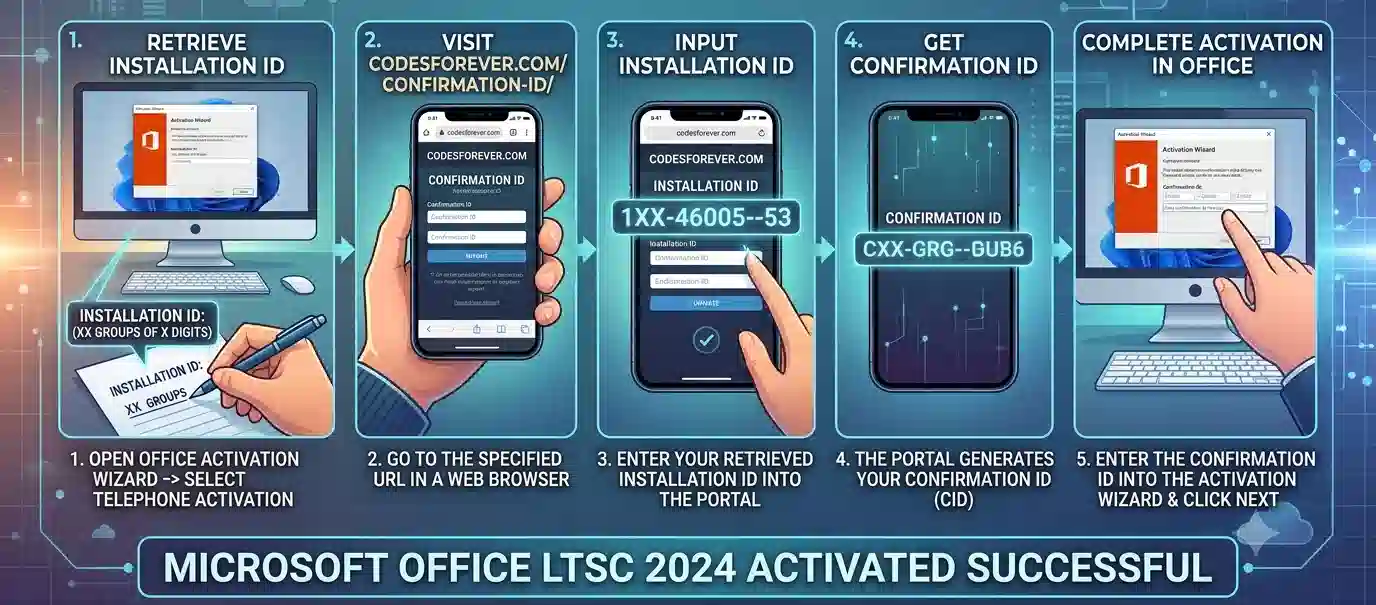
To activate Office keys using this method:
- Open any Office application (e.g., Word, Excel).
- Go to File > Account (or Help in older versions).
- Click on Activate Product.
- Enter your product key when prompted.
- Choose the option to activate by telephone.
- Select your country/region from the dropdown list.
- You can use codesforever.com/confirmation-id to get the confirmation ID automatically by entering the installation ID.
- Enter the Confirmation ID into the fields provided in the activation wizard.
- Complete the wizard to activate your Office product.
Troubleshooting Activation Issues
If Office Professional Plus LTSC 2024 activation fails, users should check the following:
Verify Internet Connection
Some activation methods require communication with Microsoft activation services. Ensure that the device has a stable internet connection.
Check Date and Time Settings
Incorrect system date and time can interfere with license verification.
Confirm Correct Office Edition
Activation problems can occur when the installed Office edition does not match the purchased license.
Run Office Repair
Users can repair Office installation through:
Control Panel → Programs → Programs and Features → Microsoft Office → Change → Repair
Remove Previous Office Versions
Older Office installations may create conflicts. Removing unused versions can improve activation success.
Conclusion
Microsoft Office Professional Plus LTSC 2024 provides a stable and professional productivity environment for organisations that require long-term reliability and controlled software management. Activation ensures that Office applications operate with a valid license and provide complete functionality.
Useful Commands for Microsoft Office Professional Plus LTSC 2024
IT administrators can use Command Prompt and the Office Deployment Tool to install, configure, and verify Office Professional Plus LTSC 2024.
1. Check the Office Installation
To determine whether Word is installed and locate its executable:
where winword
For Excel:
where excel
For PowerPoint:
where powerpnt
2. Open the Office Licensing Directory
For a typical 64-bit Office installation:
cd /d "%ProgramFiles%\Microsoft Office\root\Office16"
For 32-bit Office installed on 64-bit Windows:
cd /d "%ProgramFiles(x86)%\Microsoft Office\root\Office16"
3. Check Office License Status
Administrators can check the current Office volume-license status with:
cscript ospp.vbs /dstatus
For more detailed licensing information:
cscript ospp.vbs /dstatusall
These commands can help identify the installed license type and activation status.
4. Install a Genuine MAK License Key
Organizations with an authorized Multiple Activation Key can enter the assigned key with:
cscript ospp.vbs /inpkey:XXXXX-XXXXX-XXXXX-XXXXX-XXXXX
Replace the placeholder with the organization's legitimate Microsoft volume-license key.
5. Activate the Office Installation
After entering a valid license key:
cscript ospp.vbs /act
Administrators can then verify the result:
cscript ospp.vbs /dstatus
6. Configure an Authorized KMS Host
Organizations using their own authorized Key Management Service infrastructure can specify the KMS host:
cscript ospp.vbs /sethst:KMS-HOST-NAME
Then attempt activation:
cscript ospp.vbs /act
To remove a previously configured KMS host:
cscript ospp.vbs /remhst
7. Remove an Existing Product Key
For legitimate licensing troubleshooting, an administrator can remove an installed product key by using its last five characters:
cscript ospp.vbs /unpkey:XXXXX
Run /dstatus first to identify the relevant installed key.
8. Office Deployment Tool — Download Installation Files
The Office Deployment Tool can be used for controlled enterprise deployment. After creating the appropriate XML configuration:
setup.exe /download configuration.xml
9. Install Office LTSC 2024 Using XML
After downloading the required installation files:
setup.exe /configure configuration.xml
This approach allows administrators to define the Office edition, architecture, language, and deployment settings.
10. Example LTSC 2024 Configuration
A basic deployment configuration can use the following structure:
<Configuration>

  <Add OfficeClientEdition="64"

       Channel="PerpetualVL2024">

    <Product ID="ProPlus2024Volume">

      <Language ID="en-us" />

    </Product>

  </Add>

</Configuration>
The configuration should be adapted to the organization's Microsoft volume-licensing requirements before deployment.
11. Remove Office Through the Deployment Tool
If an organization has prepared a valid removal configuration:
setup.exe /configure remove-office.xml
12. Check Windows Version
To identify the Windows version before deployment:
winver
Administrators can also check system architecture with PowerShell:
(Get-CimInstance Win32_OperatingSystem).OSArchitecture
13. Check Office Activation After Deployment
After installation and activation, run:
cscript ospp.vbs /dstatus
A properly licensed installation should report the appropriate licensing state.
Frequently Asked Questions (FAQ)
Microsoft Office Professional Plus LTSC 2024 is a long-term servicing edition of Microsoft Office designed for organisations and professionals who need a stable productivity environment. It includes applications such as Word, Excel, PowerPoint, Outlook, Access, and Publisher with a focus on reliability, security, and long-term deployment.
Activation verifies that your Office Professional Plus LTSC 2024 installation is properly licensed and genuine. It ensures that users can access the complete functionality of Office applications while maintaining a secure and supported software environment.
Office Professional Plus LTSC 2024 can be activated using approved licensing methods based on your licence type.
Common activation problems include:
- Invalid licence information
- Product key mismatch
- Incorrect Office edition installed
- Internet connectivity problems
- Licensing service errors
- Installation conflicts
These issues can usually be resolved by verifying licensing details, repairing Office installation, checking connectivity, and ensuring the correct Office version is installed.
Office applications may install successfully, but activation is required to use the software according to licensing requirements. An unactivated installation may have limited functionality and display activation notifications.
Proper activation ensures a complete and reliable Office experience.