

Microsoft Office 2021 Hacks | Expert Tips to Work Smarter

Introduction
In today’s fast-paced digital world, Microsoft Office 2021 remains a must-have for professionals, students, and businesses. With the latest Office 2021 Professional Plus, users can access new features designed to enhance workflow, improve collaboration, and increase efficiency. This guide explores expert tips and tricks for Microsoft Office 2021 to help you maximize its potential.
Understanding Microsoft Office 2021
Before exploring the tips, it’s important to understand what Office 2021 offers. Compared to previous versions, it provides enhanced tools for data analysis in Excel, improved collaboration in Word, and advanced features in PowerPoint. Fully compatible with Windows 11, it ensures a smooth, modern, and productive experience.
Key Features of Microsoft Office 2021
- Real-Time Collaboration: Work with multiple users simultaneously on the same document, ideal for hybrid teams.
- Data Analysis in Excel: New Power Query functions and advanced formulas simplify complex calculations.
- Visual Refresh: Clean, modern interface matching Windows 11 style.
- Advanced Presentation Tools: PowerPoint 2021 improves Presenter Coach, Morph transitions, and slide designs.
- Security Enhancements: Stronger data protection measures to safeguard sensitive information.
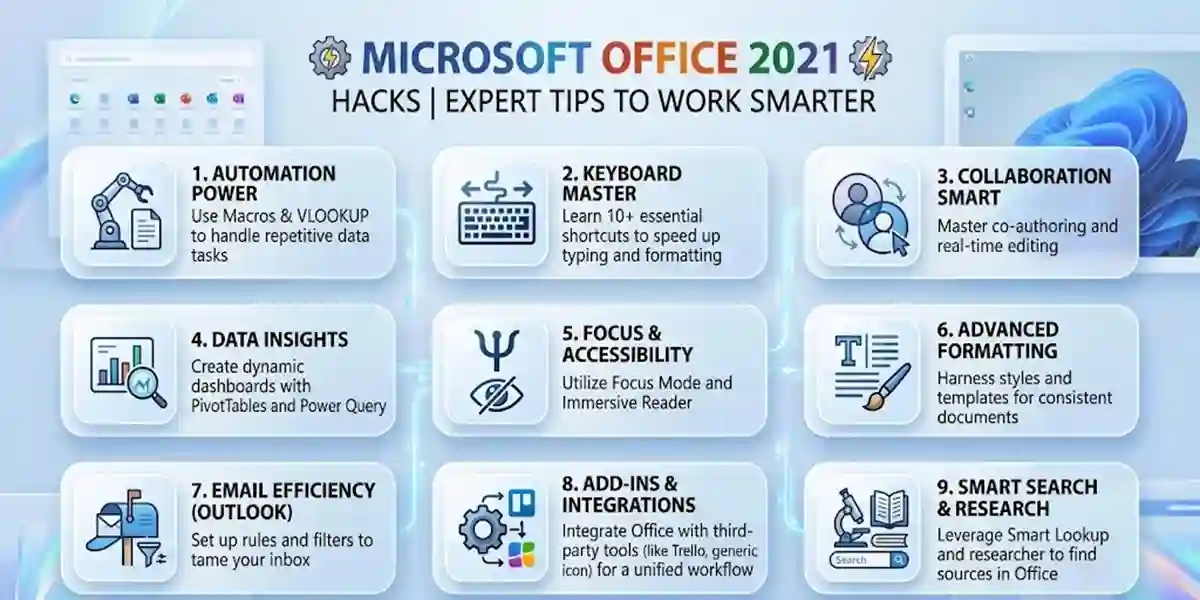
Top Tips & Tricks for Mastering Microsoft Office 2021
Word 2021: Boost Document Productivity
- Focus Mode: Hide distractions for better concentration.
- Dictation: Convert speech to text seamlessly.
- Editor Tool: Grammar and style suggestions for professional writing.
- Keyboard Shortcuts: Quickly format text with Ctrl+B/I/U.
- Navigation Pane & Headings: Easily navigate long documents.
- Themes & Templates: Apply polished designs instantly.
- Advanced Table Customization: Organize data efficiently.
Excel 2021: Advanced Data Analysis
- Dynamic Arrays: Simplify complex calculations.
- LET Function & XLOOKUP: Streamline formulas and data lookup.
- Flash Fill: Automate repetitive data entry.
- Pivot Tables & Conditional Formatting: Summarize and highlight key data.
- Power Query: Transform and merge datasets from multiple sources.
PowerPoint 2021: Create Stunning Presentations
- Presenter Coach: Improve speaking and delivery skills.
- Morph & Ink Replay: Add professional animations and drawing effects.
- Design Ideas & Slide Master: Create visually consistent slides quickly.
- Hyperlinks & Comments: Enhance interactivity and collaboration.
Outlook 2021: Manage Emails Efficiently
- Custom Swipe Gestures & Focused Inbox: Organize emails smartly.
- Quick Steps & Rules: Automate repetitive tasks.
- Smart Search & Scheduled Emails: Access important messages and plan communications effectively.
- Calendar Management: Color-coded events and recurring meetings for better scheduling.
Purchasing and Setting Up Office 2021 Professional Plus
How to Acquire
You can purchase Office 2021 Professional Plus through codesforever as a one-time license for individual or business use, giving full access to Word, Excel, PowerPoint, and Outlook.
Installation and Setup
- Follow step-by-step instructions for smooth installation.
- Customize ribbon layout, theme, and settings for your workflow.
- Ensure system compatibility with Windows 11 for optimal performance.
Learn more about downloading, installing, and activating Office 2021 Professional Plus on codesforever.
Conclusion
Microsoft Office 2021 is a game-changer in digital productivity. By leveraging its tools and following these tips and tricks, users can save time, work smarter, and achieve professional results. From writing documents in Word, analyzing data in Excel, to delivering impactful PowerPoint presentations, Office 2021 Professional Plus equips you to succeed in 2026 and beyond.
Embrace the power of Microsoft Office 2021 with codesforever, and transform your productivity today.
Frequently Asked Questions (FAQ)
Q1: What applications are included in Office 2021 Professional Plus?
A: Office 2021 Professional Plus includes Word, Excel, PowerPoint, Outlook, Access, Publisher, and OneNote, providing a complete suite for productivity, data management, presentations, and communication.
Q2: Is Office 2021 Professional Plus compatible with Windows 11?
A: Yes, it is fully compatible with Windows 11 as well as Windows 10, ensuring smooth performance and modern UI integration.
Q3: Can I use Office 2021 Professional Plus offline?
A: Yes, you can use all Office apps offline after installation. Internet is only required for initial activation, updates, or cloud features such as OneDrive.
Q4: How do I purchase Office 2021 Professional Plus?
A: You can buy it from codesforever as a one-time license for personal, business, or educational use. This ensures you receive a legal license and full access to all Office apps.
Q5: Can I install Office 2021 Professional Plus on multiple devices?
A: The license purchased from codesforever is typically for one PC per license. For multiple devices, you may need additional licenses depending on the terms.
Q6: How do I activate Office 2021 Professional Plus?
A: Activation can be completed using a product key, through your Microsoft account, or via authorized methods such as Phone Key with CID. Full instructions are provided with your purchase.