

How to Activate Microsoft Windows Server: All Methods Explained (Step-by-Step SEO Guide)

Introduction
Microsoft Windows Server is a robust operating system designed for enterprise IT environments, data centres, and business networks. To ensure full functionality, security updates, and compliance, activating Microsoft Windows Server properly is essential.
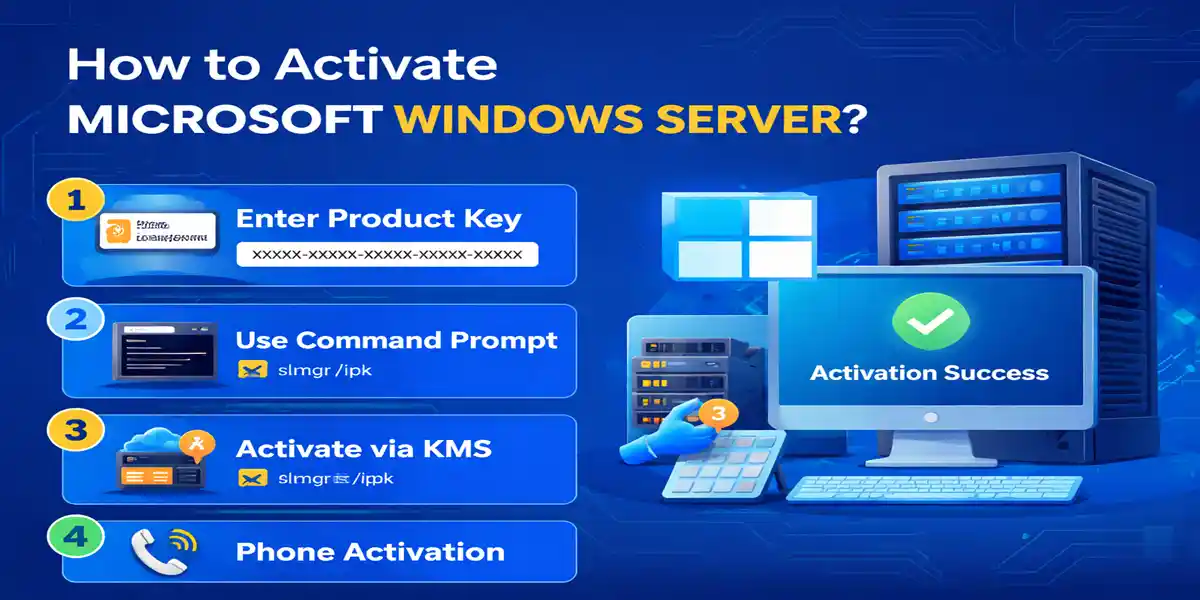
Step-by-step guide explains how to activate Microsoft Windows Server using all available methods, including product key activation, Active Directory–based activation, and command-line methods.
What Is Microsoft Windows Server?
Microsoft Windows Server is a server operating system used to manage:
- Network resources and user access
- File and storage services
- Virtual machines (Hyper-V)
- Active Directory and domain services
- Web hosting and enterprise applications
Common versions include:
- Windows Server 2016
- Windows Server 2019
- Windows Server 2022
- Windows Server Datacenter & Standard editions
Prerequisites Before Activating Windows Server
Before starting activation, ensure:
- A valid Windows Server license key
- Internet access (for online activation)
- Administrator privileges
- Correct Windows Server edition installed
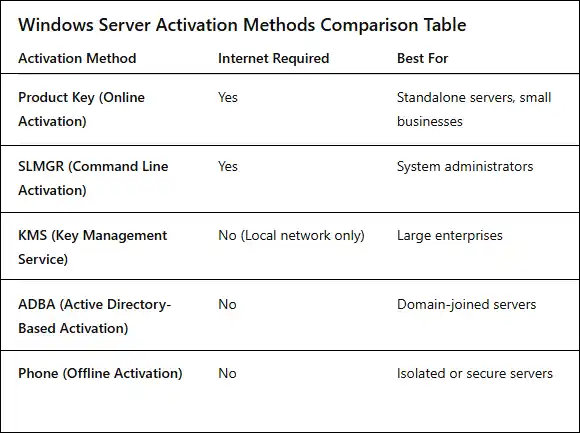
Method 1: Activate Microsoft Windows Server Using a Product Key (Online Activation)
This is the most common activation method for standalone servers.
Steps:
- Press Windows + R, type slui 3, and press Enter
- Enter your 25-character Windows Server product key
- Click Activate
- Wait for confirmation
✔️ Windows Server activates automatically if the key is valid.
Method 2: Activate Windows Server Using Command Prompt (SLMGR)
This method is widely used by system administrators.
Steps:
- Open Command Prompt as Administrator
- Run the following commands:
slmgr /ipk YOUR-PRODUCT-KEY
slmgr /ato
- Wait for the activation success message
✔️ Activation completes via Microsoft servers.
Method 3: Activate Windows Server Using KMS (Key Management Service)
KMS is used in large organizations for centralized activation.
Steps:
- Configure a KMS host on your network
- Install a KMS client key on the server
- Run:
slmgr /ipk KMS-CLIENT-KEY
slmgr /ato
✔️ Server activates automatically when connected to the KMS host.
Method 4: Activate Windows Server Using Active Directory–Based Activation (ADBA)
This method is ideal for domain-joined servers.
Steps:
- Ensure the server is joined to an Active Directory domain
- Install a volume license key in AD
- Activation occurs automatically during domain authentication
✔️ No manual activation required
Method 5: Offline Activation Using Phone Method
Useful when internet access is unavailable.
Steps:
- Press Windows + R, type slui 4, press Enter
- Select your country
- Call the vendor support.
- Enter the confirmation ID
✔️ Server activates successfully offline.
How to Check Windows Server Activation Status
Run the following command in Command Prompt:
slmgr /xpr
If activated, it will display The machine is permanently activated.
Common Windows Server Activation Errors & Fixes
Error: Windows Server Not Activated
- Verify correct edition and key
- Check internet connectivity
- Ensure system date and time are correct
Error: Product Key Invalid
- Confirm key matches Server edition
- Contact license provider for support
Best Practices for Windows Server Activation
- Use genuine Microsoft licenses
- Match product key with Server edition
- Keep activation records
- Avoid frequent reactivations
Final Thoughts
Activating Microsoft Windows Server is a critical step to ensure security, stability, and compliance. Whether you activate using a product key, command line, MKS , Active Directory, or offline phone method, following the correct process ensures smooth server operations.
For businesses and IT professionals, choosing the right activation method depends on infrastructure size, licensing model, and deployment
Frequently Asked Questions (FAQs)
1. Is Windows Server activation mandatory?
Yes. Activating Windows Server is mandatory to unlock full functionality, receive security updates, and remain compliant with Microsoft licensing terms. Without activation, the server may display persistent warnings and restrict certain features.
2. How long does Windows Server activation take?
In most cases, activation completes within a few minutes after entering a valid product key and connecting to Microsoft’s activation servers. KMS and Active Directory–based activation occur automatically once conditions are met.
3. Can I activate Windows Server without internet access?
Yes. You can use offline phone activation by running slui 4. This method is ideal for secure or isolated environments where internet access is restricted.
4. What is the difference between KMS and Active Directory–Based Activation (ADBA)?
KMS requires periodic renewal by connecting to a local KMS host, while ADBA activates servers automatically when they join an Active Directory domain. ADBA is simpler and requires no manual intervention after setup.
5. Can I use the same product key on multiple servers?
No. Retail keys are limited to a specific number of activations. KMS is designed for multiple systems but requires proper configuration and licensing compliance.
6. How do I check if Windows Server is activated?
Run the following command in Command Prompt (Admin):
slmgr /xpr
If activated, you will see: “The machine is permanently activated.”
7. Why does Windows Server say “Not Activated”?
Common reasons include:
Incorrect product key
Edition mismatch (Standard vs Datacenter)
Internet connectivity issues
Incorrect system date and time
Correcting these usually resolves the issue.
8. What happens if Windows Server is not activated?
An unactivated server continues running but may:
Display activation warnings.
Miss important updates
Limit personalization and administrative options
Activation is strongly recommended.
9. Can I change the product key after installation?
Yes. You can change the key anytime using:
slmgr /ipk NEW-PRODUCT-KEY
Follow it with:
slmgr /ato
10. Does Windows Server need reactivation after hardware changes?
Major hardware changes (CPU, motherboard) may trigger reactivation. This ensures the license remains tied to the correct system.