How to Activate QuillBot: A Step-by-Step Guide to Unlock AI-Powered Paraphrasing and Content Enhancement

Introduction
Activating QuillBot is your first step toward revolutionizing your writing process. Whether you're a student, content creator, or business professional, QuillBot is an advanced AI-powered tool that can significantly improve the quality of your content. This comprehensive guide will walk you through the simple steps to activate QuillBot, explore its powerful features, and provide solutions for common activation issues.
What is QuillBot?
QuillBot is an innovative AI-driven paraphrasing and writing tool that helps you rephrase, simplify, or enhance your content. With features like natural language processing (NLP), grammar checking, and summarization, QuillBot enables users to create high-quality, unique content effortlessly. Whether you’re writing blog posts, academic papers, or SEO-optimized content, QuillBot empowers you to generate polished text in minutes.
QuillBot is perfect for:
Academic Success: Use the Citation Generator to format APA/MLA instantly.
Professional Emails: Integrate with Outlook to ensure your tone is always professional.
SEO Content: Pair QuillBot with AutoCAD 2026 or other technical tools to describe complex designs in simple terms.
How to Activate QuillBot: Quick and Easy Steps
Activating QuillBot is a hassle-free process, whether you are using the free version or upgrading to the premium plan. Follow these easy steps to get started:
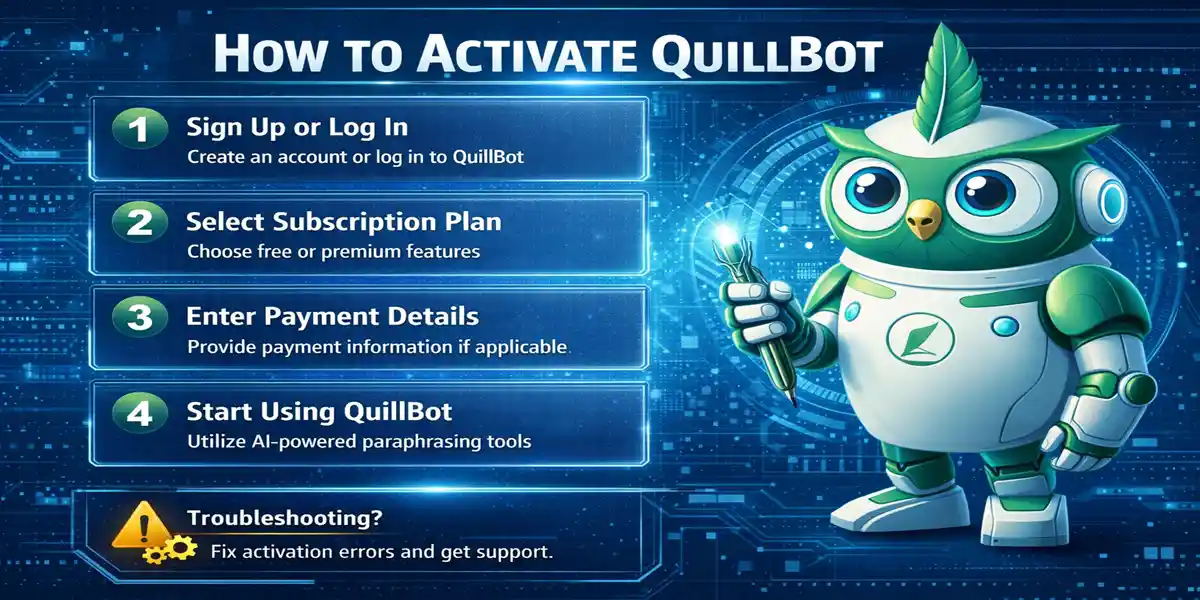
Step 1: Sign Up for a QuillBot Account
Visit the official QuillBot website.
Click on the "Sign Up" button located at the top-right corner of the page.
Provide your email address and create a secure password, or sign up directly with Google or Facebook for quicker access.
Check your inbox for a confirmation email and follow the instructions to verify your account.
Step 2: Choose Your Subscription Plan
QuillBot offers two main subscription options:
Free Plan: Access essential features with a limited word count.
Premium Plan: Unlock advanced features with no word count restrictions, unlimited modes, and more.
To activate QuillBot Premium, go to the Pricing page, select the premium plan, and enter your payment details. Upon successful payment, your QuillBot Premium features will be activated.
Step 3: Log In and Start Using QuillBot
Log in to your account using the credentials you created.
Once logged in, you’ll have access to the Paraphrasing Tool, Summarizer, Grammar Checker, and more.
Begin using QuillBot for content creation, rephrasing, or writing enhancements based on your needs.
Key Features of QuillBot
Here are some standout features of QuillBot that make it an invaluable tool for writers:
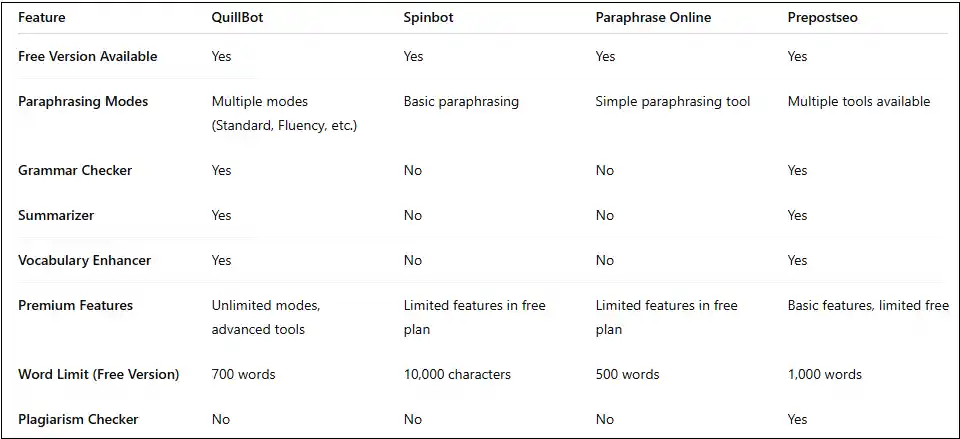
Advanced Paraphrasing Tool: Rephrase sentences, paragraphs, or entire articles with ease. Choose from different modes like Standard, Fluency, Formal, and Creative to suit your writing style.
Grammar and Spell Checker: Automatically detect and correct grammar errors, spelling mistakes, and punctuation issues to ensure your content is flawless.
Summarizer: Quickly summarize large texts into shorter, more concise versions, helping you extract key insights and save time on research.
Customizable Writing Modes: Tailor your output based on the level of complexity, fluency, or creativity needed for your content.
Vocabulary Enhancement: Suggest synonyms and better word choices to improve the quality and readability of your writing.
Citation Generator: Automatically generate accurate citations in various formats like APA, MLA, and Chicago.
Integration with Google Docs: Seamlessly integrate QuillBot with Google Docs to paraphrase and improve your content directly within your document.
Benefits of Using QuillBot
Boosts Writing Productivity: With its fast paraphrasing capabilities, QuillBot helps you write content quickly without sacrificing quality.
Improves Content Quality: Enhance the clarity, readability, and uniqueness of your text using QuillBot’s advanced AI-powered tools.
Saves Time on Content Creation: Whether it’s rewording, summarizing, or editing, QuillBot speeds up your writing process significantly.
Optimized for SEO: Use QuillBot to create SEO-friendly content by rephrasing articles and incorporating keywords effectively.
Affordable Subscription Plans: With both free and premium options, QuillBot offers flexible pricing for every budget.
No Software Installation Needed: QuillBot is cloud-based, meaning there’s no need to install any software to access its powerful tools.
Common Activation Errors and Fixes
While activating QuillBot is generally straightforward, users may encounter a few common issues. Here are some fixes:
Error: "Invalid Product Key"
Cause: Incorrect or expired product key.
Fix: Verify the product key entered and check your email for the correct details. If the issue persists, contact QuillBot support.
Error: "Subscription Expired"
Cause: Your premium subscription has ended.
Fix: Visit the QuillBot website and renew your subscription to continue using premium features.
Error: "Unable to Log In"
Cause: Incorrect login credentials or account verification issues.
Fix: Check your email for the verification link, or use the "Forgot Password" option to reset your login details.
Error: "Slow Performance"
Cause: High server load or large content input.
Fix: Wait for the tool to process your request or reduce the word count for faster results.
Error: "No Internet Connection"
Cause: QuillBot requires an internet connection for activation.
Fix: Ensure you have an active internet connection and check your firewall or network settings.
Methods to Activate QuillBot
Online Activation:
Simply log in to your QuillBot account and enter your product key or subscription details for activation.
Phone Activation:
If you're having trouble with online activation, reach out to QuillBot customer support for assistance with phone activation.
Offline Activation:
If you work in an offline environment, contact QuillBot support to receive an offline activation file.
Conclusion
QuillBot is a powerful AI tool that enhances writing by offering features like paraphrasing, summarizing, grammar checking, and more. With both free and premium plans, QuillBot is accessible to everyone, from students to professional writers. Follow the activation steps outlined above, and start using QuillBot today to improve your writing productivity, quality, and efficiency. Whether you're creating content, rephrasing text, or generating SEO-friendly articles, QuillBot will help you achieve your goals faster and more effectively.
Frequently Asked Questions (FAQs)
1. How do I activate my QuillBot account?
To activate your QuillBot account, sign up for an account on the QuillBot website, verify your email, and choose a subscription plan (free or premium). Once your account is set up, log in to start using QuillBot’s features.
2. How do I upgrade to QuillBot Premium?
To upgrade to QuillBot Premium, log into your account, go to the Pricing page, and choose the premium subscription plan (monthly, yearly, or lifetime). Enter your payment information to activate your premium features.
3. How do I get a QuillBot product key?
QuillBot does not require a traditional product key for activation. After purchasing the premium plan, the features are automatically activated in your account, and you can start using them immediately.
4. Why is QuillBot not accepting my product key?
If you’re facing issues with your product key, it’s possible that it was entered incorrectly or expired. Double-check the details provided in your confirmation email or reach out to seller support for assistance.