

Microsoft 365 Enterprise E3 in 2026: Is It Still Worth It After AI?

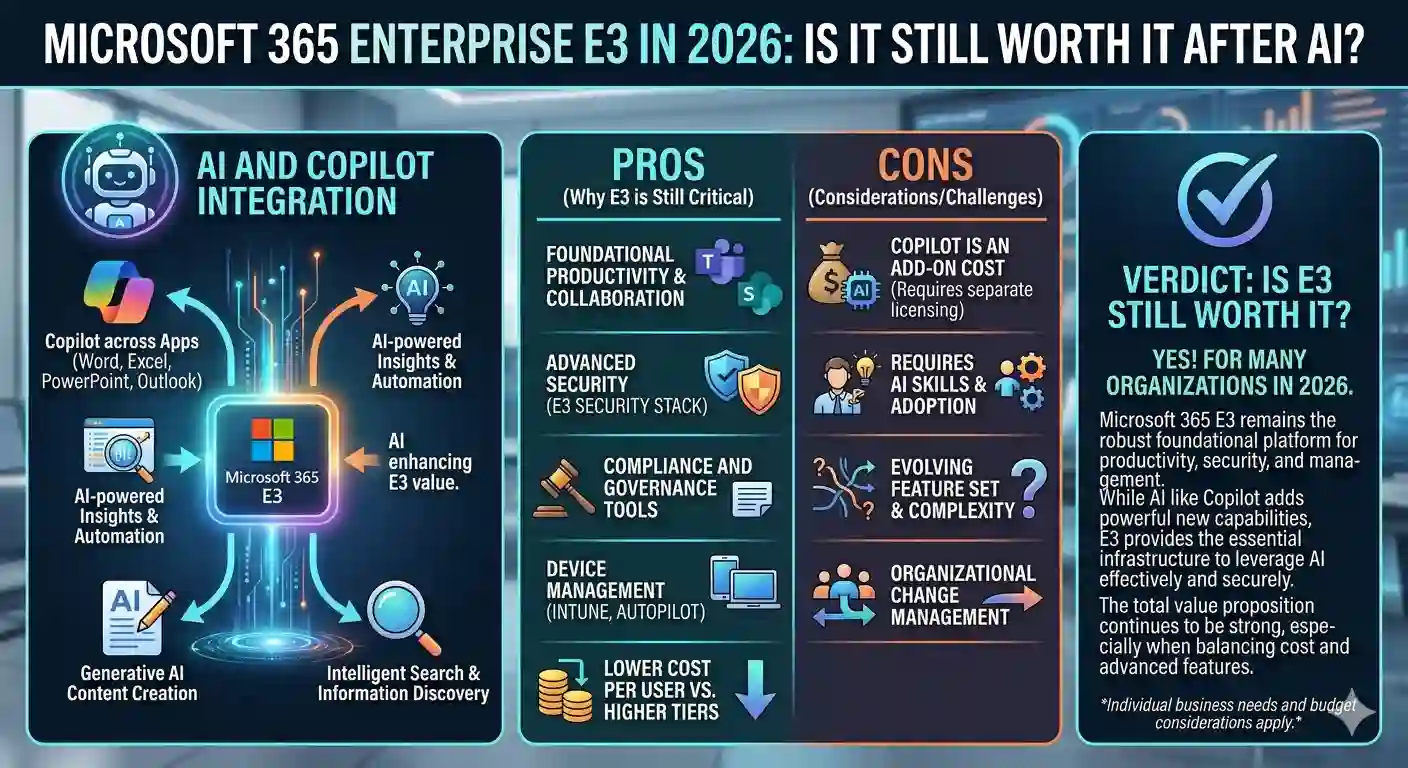
Is Microsoft 365 Enterprise E3 Worth It in 2026?
Artificial intelligence (AI) is transforming workplace productivity in 2026. Modern organizations now expect tools that do more than store files—they demand intelligent automation, predictive insights, and seamless collaboration.
This raises an important question: Is Microsoft 365 Enterprise E3 still worth it in the AI-driven era?
With new AI solutions flooding the market, IT leaders are evaluating whether Microsoft’s enterprise plan delivers the right balance of productivity, security, and ROI.
In this guide, we’ll explore what Microsoft 365 Enterprise E3 offers in 2026, its AI-enhanced features, and why it remains a top choice for businesses seeking a future-ready productivity suite.
What Is Microsoft 365 Enterprise E3?
Microsoft 365 Enterprise E3 is a cloud-based productivity suite designed for organizations of all sizes—from small teams to large enterprises. Unlike consumer plans such as Microsoft 365 Family, E3 provides:
- Full access to Office apps: Word, Excel, PowerPoint, Outlook, OneNote
- Advanced collaboration tools: Microsoft Teams, SharePoint, Exchange Online, OneDrive for Business
- Centralized administration for users and devices
- Enterprise-grade identity and access management via Azure Active Directory
- Advanced data-loss prevention (DLP) and compliance tools
In essence, E3 combines productivity, cloud efficiency, and security into one intelligent platform, making it ideal for modern hybrid workplaces.
Microsoft 365 E3 in 2026: AI-Enhanced Productivity
Microsoft continues to evolve E3 to meet the demands of AI-driven workflows, hybrid teams, and cloud-first organizations.
Key 2026 Updates
- AI-Powered Tools – Deeper integration with Microsoft 365 Copilot allows users to:
- Summarize meetings and email threads instantly
- Generate professional documents in seconds
- Analyze data with AI-driven insights
- Enhanced Hybrid Security – Advanced identity management, endpoint protection, and compliance policies keep business data secure across devices and locations.
- Seamless Cloud Collaboration – Teams, OneDrive, and SharePoint work together more efficiently, enabling real-time co-authoring, file sharing, and streamlined communication.
These features make Microsoft 365 E3 more than a software license; it is a connected, intelligent platform designed to maximize productivity in the post-AI workplace.
Why the Post-AI Era Matters
AI is no longer optional—it’s integral to modern workflows. Companies now expect tools to automate repetitive tasks, provide actionable insights, and support intelligent decision-making.
A Forrester Total Economic Impact study revealed that organizations using Microsoft 365 E3 with Teams and Copilot achieved up to 197% ROI, thanks to faster collaboration and reduced administrative workload.
Microsoft 365 Enterprise E3 embeds AI into tools employees already use, making it a strategic investment for digital transformation.
5 Key Features of Microsoft 365 E3
1. AI-Powered Productivity and Collaboration
Microsoft 365 Copilot brings intelligent assistance to core apps:
- Word: Drafts summaries, reports, and polished documents in seconds
- Excel: Converts raw data into insights using natural-language prompts
- Outlook & Teams: Summarizes emails, meetings, and highlights actionable tasks
Benefit: Teams can focus on strategic goals rather than repetitive tasks, improving overall efficiency.
2. Enterprise-Grade Security and Compliance
E3 delivers advanced security tools that protect sensitive data:
- Microsoft Purview – Compliance and data classification
- Information Protection & DLP Policies – Embedded in Office apps
- Azure Active Directory (Entra ID) – Secure access management
- Microsoft Intune – Device and policy management
Benefit: Supports a zero-trust security model, protecting information across all devices.
3. Cloud Collaboration and File Management
OneDrive for Business and SharePoint Online enable:
- Real-time document co-authoring
- Secure internal and external file sharing
- Centralized version control
When integrated with Microsoft Teams, E3 creates a unified workspace for team communication and collaboration.
4. Simplified Licensing and Cost Efficiency
E3 consolidates multiple tools into one subscription, reducing the need for third-party apps.
CodesForever offers:
- Predictable annual pricing
- Options for small teams or large organizations
- Easy deployment and management for IT
- Full access to Microsoft’s enterprise apps and cloud services
Benefit: Simplifies IT administration while lowering overall costs.
5. Future-Ready Platform
Microsoft 365 E3 evolves alongside Microsoft’s AI roadmap:
- Integrates with Loop and Viva for modern workflows
- Supports hybrid and remote work environments
- Continuous updates ensure your organization stays current without disruption
Considerations Before Choosing E3
Although E3 is powerful, organizations should evaluate:
- Optional add-ons: Copilot, Viva Insights, and analytics tools may require extra licensing
- Team size: Small businesses may benefit from lighter Microsoft 365 plans
- Adoption & training: Value depends on employee engagement with AI and collaboration tools
With proper planning, E3 can deliver measurable ROI and long-term efficiency.
Is Microsoft 365 E3 Worth It for Your Business?
Choose E3 if you:
- Have 100+ employees or multiple departments
- Operate a hybrid or remote workforce
- Plan to leverage AI tools like Microsoft 365 Copilot
- Require advanced compliance and centralized IT management
Consider other plans if you:
- Run a small business with minimal security needs
- Prefer a lower-cost subscription
- Are not yet ready to adopt AI-driven workflows
How to Maximize Value from Microsoft 365 E3
- Encourage AI adoption with employee training on Copilot
- Strengthen governance with Azure AD and Intune
- Consolidate redundant tools to reduce costs
- Track adoption and usage metrics
- Renew annually with CodesForever to maintain access to the latest features
Final Thoughts
Microsoft 365 Enterprise E3 is well-positioned for 2026 and beyond. With AI-enhanced productivity, advanced security, and continuous innovation, it enables businesses to adapt, collaborate, and grow.
Organizations that leverage E3 fully gain a future-proof, high-ROI platform, making it one of the most valuable enterprise solutions available today.
Frequently Asked Questions (FAQs)
A1: Full Office apps (Word, Excel, PowerPoint, Outlook, OneNote), Teams, SharePoint, Exchange Online, OneDrive for Business, advanced security, compliance, and centralized management.
A2: E3 offers enterprise-grade security, identity management, device control, and DLP, plus deeper Teams and SharePoint integration, while Family is for personal use.
A3: Copilot is optional. It integrates AI into Word, Excel, Outlook, and Teams for drafting, analyzing, and summarizing content.
A4: One year. After expiration, you can renew through CodesForever to continue uninterrupted access.
A5: Yes. Studies show companies achieve up to 197% ROI with E3 and AI integration. It’s a strategic investment for productivity, security, and collaboration.