

Autodesk 3ds Max 2020 Ultimate Guide | Everything You Need to Know About 3D Design Software


Introduction
In the world of professional 3D design, animation, visual effects, and architectural visualization, Autodesk 3ds Max has remained one of the most powerful and widely used software solutions. Developed by Autodesk, 3ds Max is a complete 3D modeling, rendering, and animation platform used by architects, game developers, product designers, engineers, and visual artists worldwide.
Autodesk 3ds Max 2020 is one of the most popular releases in the 3ds Max product family. It introduced several workflow improvements, enhanced rendering capabilities, better performance optimization, and advanced tools that help professionals create realistic 3D environments, characters, animations, and visual effects.
Whether you are a beginner learning 3D modeling or a professional working in architecture, gaming, filmmaking, or product visualization, 3ds Max 2020 provides a complete set of tools to transform creative ideas into high-quality digital experiences.
This ultimate guide covers everything about Autodesk 3ds Max 2020, including its features, benefits, system requirements, comparison with Autodesk 3ds Max 2021, activation methods, common errors with solutions, and frequently asked questions.
What is Autodesk 3ds Max 2020?
Autodesk 3ds Max 2020 is a professional 3D computer graphics software designed for creating detailed models, realistic animations, advanced simulations, and high-quality renders.
It provides artists with powerful modeling tools, realistic material creation, lighting systems, animation controls, and rendering engines to produce professional-level content.
The software is widely used in industries such as:
- Architectural visualization
- Interior design
- Game development
- Film production
- Television animation
- Product design
- Industrial visualization
- Virtual reality experiences
3ds Max 2020 supports advanced workflows that allow users to create everything from simple objects to complex environments with millions of polygons.
Why Choose Autodesk 3ds Max 2020?
Autodesk 3ds Max 2020 offers a combination of speed, flexibility, and professional tools that make it suitable for both individuals and large production studios.
Some major reasons to choose 3ds Max 2020 include:
1. Professional 3D Modeling
The software provides advanced polygon modeling, spline modeling, and procedural modeling tools that allow artists to create accurate and detailed 3D objects.
Users can design:
- Buildings
- Vehicles
- Characters
- Furniture
- Industrial products
- Game assets
2. Powerful Rendering Capabilities
3ds Max 2020 includes integration with Arnold Renderer, which helps artists create realistic images with accurate lighting, shadows, reflections, and materials.
Rendering features include:
- Physically accurate lighting
- Realistic materials
- GPU rendering support
- Interactive rendering
- Advanced shading
3. Enhanced Animation Tools
Animation professionals can create realistic movements using:
- Keyframe animation
- Character rigging
- Motion controllers
- Particle systems
- Simulation tools
The software provides precise control over every movement and animation sequence.
Features
1. Arnold Renderer Integration
One of the biggest improvements in 3ds Max 2020 is enhanced Arnold rendering support.
Arnold helps users create cinematic-quality renders with:
- Realistic lighting
- Global illumination
- Advanced shaders
- GPU acceleration
- Faster previews
It is widely used in film production and visual effects industries.
2. Advanced Modeling Tools
3ds Max 2020 provides powerful modeling tools including:
Editable Poly
Allows detailed control over:
- Vertices
- Edges
- Polygons
- Surface details
Editable Spline
Used for creating:
- Curves
- Architectural shapes
- Decorative designs
- Motion paths
Boolean Modeling
Allows designers to combine and subtract objects for faster modeling workflows.
3. Improved Chamfer Modifier
The Chamfer Modifier allows artists to create realistic edges and corners.
Benefits include:
- Better edge control
- Improved realism
- Faster modeling workflow
- Professional product visualization results
4. Data Channel Modifier
The Data Channel Modifier allows users to create procedural effects and automate complex modeling processes.
It can control:
- Object properties
- Vertex information
- Animation data
- Material effects
5. Enhanced Viewport Performance
3ds Max 2020 provides improved viewport performance for handling large scenes.
Benefits:
- Faster navigation
- Better scene management
- Improved GPU usage
- Smooth object interaction
6. Physical Material System
The Physical Material system helps artists create realistic surfaces.
Materials include:
- Metal
- Glass
- Wood
- Plastic
- Fabric
- Ceramic
7. Particle Flow System
The Particle Flow system allows creation of complex effects such as:
- Smoke
- Fire
- Rain
- Explosions
- Dust
- Environmental effects
8. Python Scripting Support
Developers can automate tasks using Python scripting.
Advantages:
- Custom tools creation
- Workflow automation
- Faster production processes
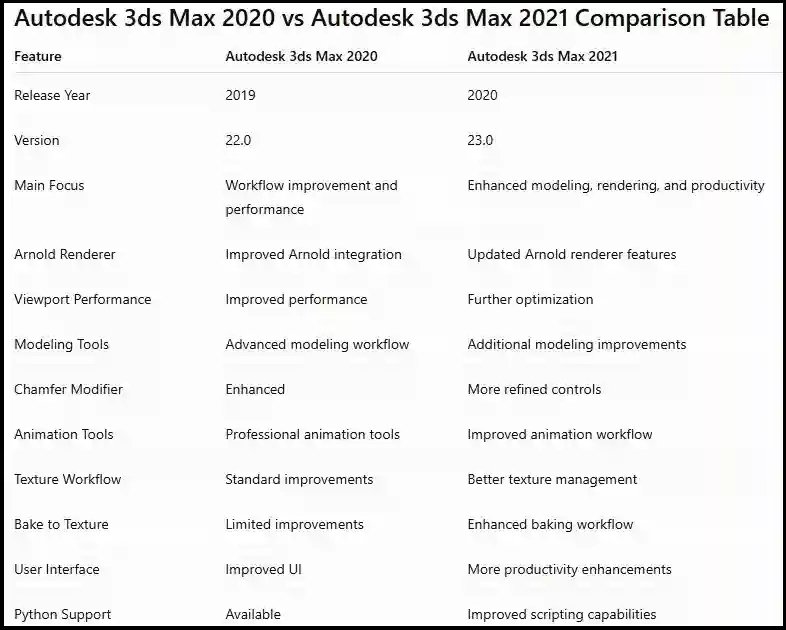
Key Improvements from 3ds Max 2020 to 2021
Autodesk 3ds Max 2021 introduced several improvements:
1. Enhanced Bake to Texture
The improved Bake to Texture workflow allows artists to create game-ready assets more efficiently.
Benefits:
- Faster texture baking
- Better workflow
- Improved output quality
2. Improved Viewport Performance
3ds Max 2021 optimized viewport performance for large scenes.
Users experience:
- Faster navigation
- Better responsiveness
- Improved stability
3. Better Modeling Experience
3ds Max 2021 improved several modeling workflows, making it easier to create complex objects.
Activation Methods
To use Autodesk 3ds Max 2020 legally, users need a valid Autodesk license or subscription.
Method 1: Activation Using Autodesk Account
Steps:
- Install Autodesk 3ds Max 2020.
- Open the Autodesk software.
- Sign in with your Autodesk account.
- Enter your valid subscription details.
- The software will automatically activate.
Method 2: Serial Number and Product Key Activation
For licensed versions:
- Launch Autodesk 3ds Max 2020.
- Select Activate.
- Enter your Autodesk serial number.
- Enter product key details.
- Complete activation.
Method 3: Network License Activation
For organizations:
- Install Autodesk Network License Manager.
- Configure the license server.
- Connect client systems.
- Activate through network licensing.
Common Activation Errors and Fixes
Error 1: Activation Failed
Causes:
- Internet connection problem
- Incorrect Autodesk account
- License issue
Fix:
- Check internet connection
- Sign out and sign in again
- Verify subscription status
Error 2: License Manager Not Working
Causes:
- Damaged Autodesk licensing service
- Incorrect installation
Fix:
- Restart Autodesk Licensing Service
- Repair Autodesk installation
- Install latest Autodesk licensing updates
Error 3: Product Key Error
Causes:
- Wrong product key
- Incorrect software version
Fix:
- Verify product information
- Use correct Autodesk license details
Error 4: Installation Failed
Causes:
- Insufficient storage
- Antivirus blocking files
- Corrupted installer
Fix:
- Free disk space
- Temporarily disable conflicting software
- Download installer again
Error 5: 3ds Max Crashes During Startup
Causes:
- Graphics driver problems
- Plugin conflicts
Fix:
- Update graphics drivers
- Reset preferences
- Disable problematic plugins
Who Should Use Autodesk 3ds Max 2020?
Architects
For:
- Building visualization
- Interior design
- 3D walkthroughs
Game Developers
For:
- Character creation
- Environment design
- Game assets
Designers
For:
- Product visualization
- Industrial models
Animators
For:
- Character animation
- Visual effects
Conclusion
Autodesk 3ds Max 2020 remains one of the most powerful professional 3D modeling and rendering solutions available. With advanced modeling tools, Arnold Renderer integration, improved viewport performance, animation capabilities, and professional workflows, it continues to be a preferred choice among designers, architects, and digital artists.
Compared with Autodesk 3ds Max 2021, the 2020 version provides a stable and reliable environment for professional 3D production. While newer versions introduce additional improvements, 3ds Max 2020 remains a capable solution for users who need powerful modeling, rendering, and animation tools.
For professionals looking for a complete 3D design platform, Autodesk 3ds Max 2020 offers the right combination of flexibility, performance, and creative possibilities.
Frequently Asked Questions (FAQs)
Autodesk 3ds Max 2020 is used for 3D modeling, animation, rendering, architecture visualization, game development, and visual effects.
Yes, beginners can learn 3ds Max 2020, although mastering advanced features requires practice and training.
Yes, Autodesk 3ds Max 2020 includes Arnold Renderer integration.
Yes, 3ds Max 2020 supports Windows 10 systems.
3ds Max 2021 includes additional workflow improvements, enhanced baking tools, and better optimization compared with 3ds Max 2020.
Yes, it is still useful for professional modeling, animation, rendering, and visualization projects.