

5 Windows Server 2012 License Key Options and Which to Use

The Windows Server 2012 license key you need depends on your goal. A standalone server needs a retail key to activate permanently (option 1). A test box can run on the evaluation edition (option 2). If a server is already licensed, you can recover its key (option 3).
Most pages on this topic dump a long list of keys and never say which ones activate. That is the real problem. Generic keys install the OS but do not activate it on their own, and keys for Windows Server 2012 will not work on 2012 R2. Microsoft also ended support for both releases on October 10, 2023, so every choice below is about keeping a legacy server legitimate, not starting a new build.
This article walks through five options in the same format: what the key is, how to use it, and who it suits. We sell license keys at Codesforever, so our own option comes first. Options 2 to 5 cost nothing or come from Microsoft, and for some readers they are the better answer.
1. Buy a lifetime retail key
What it is
A retail key is a unique 25-character key that activates one server with Microsoft’s activation servers. No KMS host is needed. Codesforever sells Windows Server 2012 R2 Standard for US$80. It covers one device and has no expiry date. It also includes up to two virtual machines per licensed physical server. The activation code and download link arrive by email, and most Codesforever products are delivered within 5 minutes.
Remember that a server license is not the whole bill. Windows Server 2012 R2 also needs client access licenses (CALs) for the users or devices that connect to it.
How to use it
Install from the download link, then enter the key and activate:
- Open an administrative command prompt.
- Run
slmgr /ipkfollowed by your key. - Run
slmgr /atoto activate online. - If the server has no internet, run
slui 4and follow the phone activation wizard.
Codesforever supports both online and phone activation and offers free 24/7 technical support if either step fails.
Who it suits
This option fits small businesses and IT pros who run a standalone server for an older application and have no volume agreement. Problems must be reported within 7 days of purchase. Troubleshooting steps follow within 24 hours. If those fail, you get a replacement key or a full refund. Products that are incompatible with your hardware or software are not refunded, so confirm your edition first.
A retail key is the only option here that activates a standalone server permanently without a KMS host or a volume contract.
2. Generic KMS client keys (GVLK)
What it is
A Generic Volume License Key (GVLK) is a public key that Microsoft publishes for KMS client activation. It only activates against a KMS host on your network. Windows Server 2012 and 2012 R2 use different keys, so match your release exactly.
How to use it
sOME editions already carry the right GVLK. You only need to add it when converting from MAK, retail, or a former KMS host. Point the server at your host and activate:
slmgr /ipk D2N9P-3P6X9-2R39C-7RTCD-MDVJX
slmgr /skms kms01.example.local:1688
slmgr /ato
Replace the key with the one for your edition and the host name with your own. The KMS host needs its own host key and a minimum number of activation requests, five for server operating systems, before it starts activating clients.
Who it suits
This option fits administrators in organizations that already run a KMS host under a volume agreement. It is the wrong choice for a standalone server with a retail copy, because KMS client keys will not activate retail editions. Skip “key generator” tools and keys pasted on forums. They are not licenses, and the comments on such pages often warn about malware.
A generic key gets Windows installed, but only a KMS host or a purchased key makes it activated.
3. The evaluation edition
What it is
The trail edition is a free, time-limited build of Windows Server 2012 R2 from Microsoft. After that it begins shutting down automatically until you license it. This is the only real answer to whether there is a free key for Windows Server 2012 R2: you get a free trial, not a free permanent license.
Some blogs publish the 2012 R2 GVLK as an “evaluation key.” It is not one. That key only activates against a KMS host.
How to use it
Install from evaluation media and check the days remaining with slmgr /dlv. To convert a running evaluation into a licensed server, use DISM, not slmgr /ipk:
DISM /Online /Get-TargetEditions
DISM /Online /Set-Edition:ServerStandard /ProductKey:XXXXX-XXXXX-XXXXX-XXXXX-XXXXX /AcceptEula
Use ServerDatacenter if that is the edition you bought. The server restarts during conversion, so plan for downtime.
Who it suits
This option fits lab builds, proof-of-concept migrations, and anyone who wants to test an application before paying. Convert before the 180 days run out. You can use a retail key from option 1 or a MAK from option 5. A GVLK works only if a KMS host is available.
The evaluation edition is a free trial with a hard stop, so budget for a real key before day 180.
4. Recover the key already on your server
What it is
Your server may already have a valid key. You just cannot read it back. Windows stores only a partial key, so the common commands show the last five characters and a license status, not the full key. Run slmgr /dli for a short summary or slmgr /dlv for detail. That is why people who “ran multiple commands” still come up empty.
How to use it
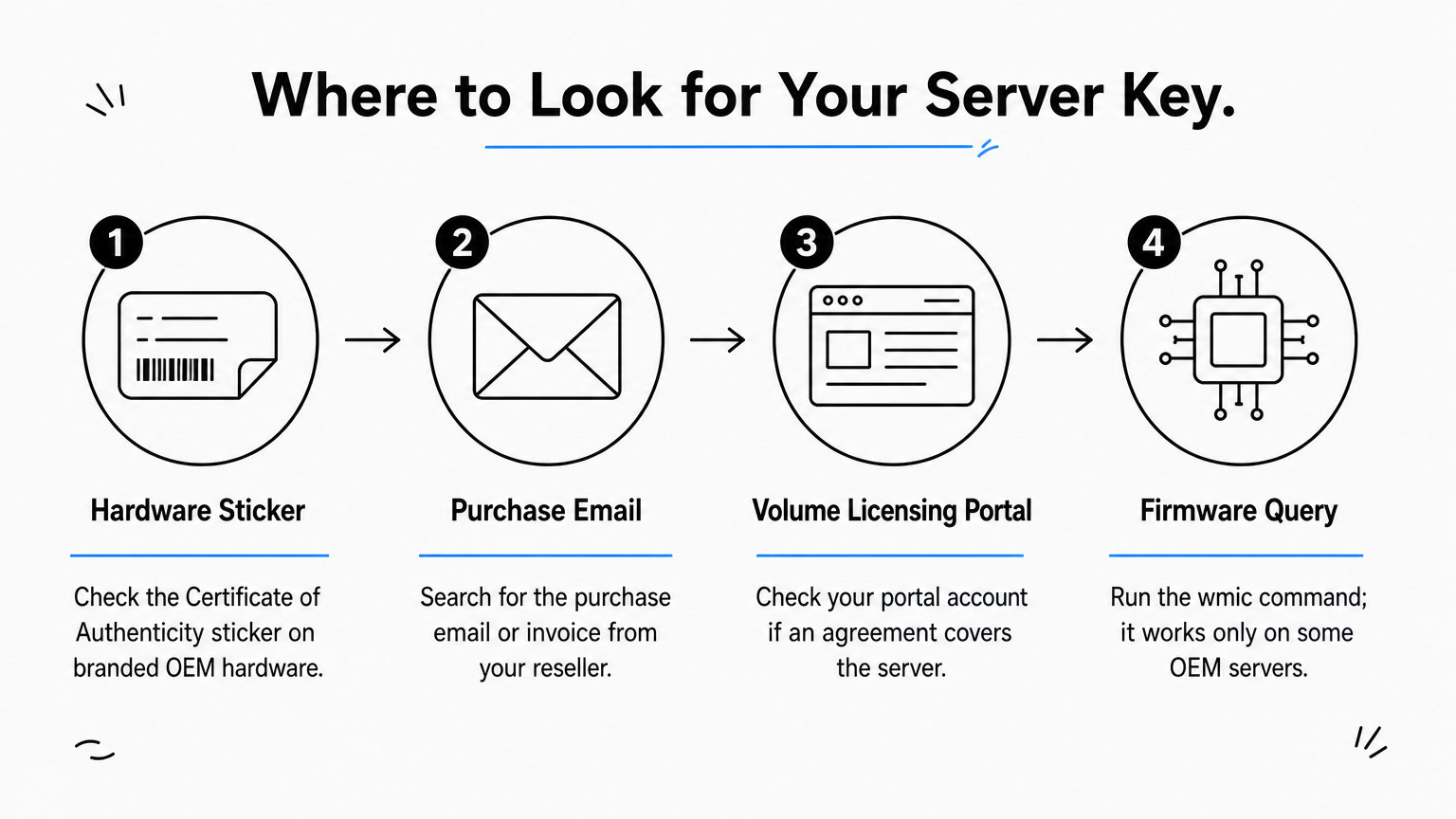
Check these places in order:
- The branded OEM hardware.
- The purchase email from your reseller.
- Your licensing portal account, if the server came under an agreement.
- The firmware, using
wmic path softwarelicensingservice get OA3xOriginalProductKey. This only returns a value on some OEM servers with an embedded key.
If the output is blank, no embedded key exists. If slmgr /dli shows “VOLUME_KMSCLIENT”, the server uses a generic key and there is nothing to recover.
Who it suits
This option fits admins who inherited a server and need the key for a rebuild or reinstall. If you find only the last five characters and no paperwork, you cannot prove the license. Treat the server as unlicensed and buy a key or use your agreement.
Windows shows only the last five characters of an installed key, so recovery depends on paperwork, not commands.
5. A MAK from Microsoft volume licensing
What it is
A Multiple Activation Key (MAK) is a volume key that activates directly with Microsoft, up to a set number of times. It is issued under volume agreements such as Open, Open Value, Select, and Enterprise. You do not need a KMS host. Unlike a GVLK, a MAK is tied to a real license purchase.
How to use it
Sign in to the Microsoft 365 admin center with the account tied to your agreement and find the key for your product. The Microsoft Activation Center can help if you cannot locate it. Install it the same way as a retail key with slmgr /ipk and slmgr /ato, online or by phone. Each activation counts against the key’s limit, so keep a record.
Who it suits
This option fits organizations that already hold agreements and have servers spread across sites that cannot reach a KMS host. Pricing depends on your agreement, so there is no single figure. If you have no agreement, opening one only to license an out-of-support server rarely makes sense. Option 1 is faster and cheaper.
A MAK is a valid answer only when you already own the volume license behind it.
Pick the key that matches your goal
Match the key to the job. Use a retail key for a standalone server, a GVLK only with a KMS host, the evaluation edition for testing, and a MAK when your agreement provides one. Recovering an old key only works if the paperwork exists. Whichever you choose, check that the key matches your release, 2012 or 2012 R2, and your edition before you enter it.
Since support for this release ended in 2023, consider whether a newer server fits your workload. If you are ready to move, Windows Server 2022 Datacenter with 50 user and device CALs is a lifetime license for US$76, delivered by email.