

Buying a Windows 10 Product Key: 5 Steps to Safe Activation

The safe way to go about buying a product key for Windows 10 is to match the edition to your PC, buy from a seller with written refund terms, and enter the 25-character key under Settings > Update & Security > Activation. A reputable discount seller charges a fraction of Microsoft’s published list prices of $139 for Home and $199.99 for Pro. The key usually arrives by email within minutes.
The search results make this harder than it should be. Forum threads ask whether any cheap key can be trusted, listings mix up product keys with digital licenses, and Home, Pro, and N editions look almost identical on a product page. Pick the wrong edition and the key will not activate. Pick a seller with no refund terms and you have no recourse when it fails.
This guide walks through five steps: check what you already own, compare where to buy, vet the seller, pay and store the key, and activate Windows. It ends with fixes for the most common activation errors. Codesforever has sold software license keys online for over ten years, so we include our own policies where they help you judge any seller you are considering.
What you are buying with a Windows 10 key
A Windows 10 product key, also called a license key, is a 25-character code that entitles you to activate one copy of Windows 10 on one PC. You are paying for the right to activate, not for the software itself, because Microsoft lets anyone download the installer for free.
Product key, license key, and digital license
Sellers use "product key," "license key," and "activation code" for the same thing. A listing for a Windows 10 license key and one for a product key sell the same type of item, a code shaped like XXXXX-XXXXX-XXXXX-XXXXX-XXXXX. The term that confuses people is the digital license, which Microsoft also calls a digital entitlement. It is the record Windows keeps after activation, so you never type a key again on that hardware.
| Term | What it is | Where you meet it |
|---|---|---|
| Product key | A 25-character code you type in | Box label, confirmation email, PC sticker |
| License key | Another name for a product key | Reseller listings and order emails |
| Digital license | Activation tied to your hardware and optionally your Microsoft account | Settings > Update & Security > Activation |
Entering a valid key creates a digital license for your hardware. Activation only confirms that the key is valid for that hardware configuration. Microsoft notes that activation does not by itself prove a copy is genuine, which is why vetting the seller matters later in this guide.
A product key is what you buy, and the digital license is what Windows keeps after you use it.
Whether a Windows 10 key is still worth buying
Microsoft ended support for Windows 10 on October 14, 2025. A key still activates Windows 10 and gives you a properly licensed system, but free security updates no longer arrive. Further security patches come only through Microsoft’s Extended Security Updates program, which has its own enrollment terms.
A Windows 10 key remains a sensible purchase in specific cases. These include an older PC that cannot meet Windows 11 requirements, a machine that must run legacy software, a virtual machine, or a test rig. If your hardware does support Windows 11, a Windows 11 key is the better long-term buy. Buy the key for the version you actually plan to run.
Step 1. Check your edition and activation status
Before you pay, open Settings > Update & Security > Activation and read the status line, then open Settings > System > About and note the Edition line. Five minutes here can save you the entire purchase or prevent buying the wrong edition.
Find out whether you already own a license
Many PCs already have a digital license and need no new key. A reinstall of the same edition activates automatically once you are online. The status message tells you where you stand.
| Message on the Activation page | What it means | Do you need to buy? |
|---|---|---|
| Windows is activated with a digital license linked to your Microsoft account | Fully set up | No |
| Windows is activated with a digital license | Active, but not linked to an account | No. Link your account |
| Windows is activated | Active, account not linked | No. Link your account |
| Windows is not activated | No valid license found | Yes, or fix the error first |
A "not activated" message does not always mean you must buy. After a motherboard swap or a failed update, the license may only need the Activation troubleshooter, covered at the end of this guide.
Pick the right edition
The edition printed on your key must match the edition you install. A Home key will not activate Pro, and the reverse is also true. To move from Home to Pro you need a Pro key.
| Edition | Choose it if | Notable details |
|---|---|---|
| Home | You use the PC for everyday home tasks | No domain join, Group Policy, Hyper-V, or hosting Remote Desktop |
| Pro | You are a freelancer, small business owner, or power user | BitLocker, Remote Desktop host, Hyper-V, Group Policy, domain join |
| Pro N | You want Pro without bundled media apps | Leaves out Media Player and related media features |
| Enterprise | You manage many devices | Built for organizations, often bought through volume licensing |
Under "System type" on the About page you will see 64-bit or 32-bit. The key works with either installer, so choose 64-bit unless your hardware or a legacy program requires 32-bit.
The edition on the key must match the edition you install, or Windows will not activate.
Step 2. Compare where to buy a Windows 10 key
You can buy a Windows 10 key from Microsoft, an authorized retailer, or a discount key seller. The right choice depends on how much you want to pay and how much support you want after the sale.
Your buying options side by side
| Where to buy | Typical price | How the key arrives | Main trade-off |
|---|---|---|---|
| Microsoft Store (Settings > Activation > Go to Store) | Published list prices of $139 Home, $199.99 Pro | Digital license on your Microsoft account | Highest price, and availability can change |
| Authorized retailer | Near list price, sometimes lower | Card in the box or email and digital locker | Still close to full price |
| New or refurbished PC | Included in the PC price | Preinstalled, on packaging, or on the COA label | Not sold alone, and a refurbisher must supply the key |
| Volume licensing or MSDN | Set by agreement | Program web portal | Built for organizations |
| Discount key seller | A fraction of list | Email, often within minutes | Quality varies, so vet it in Step 3 |
| Peer marketplace or classified ad | Lowest | Whatever the seller sends | Highest risk, little or no support |
Microsoft keeps a record of keys only for purchases made in its own online store. If you buy elsewhere, your order email is your proof of purchase, so keep it.
What a Windows 10 key costs, with an example
Plan on one key per PC, because a standard license covers one user on one machine. Suppose you are setting up three home-office PCs on Pro. At the $199.99 list price, the licenses cost $599.97. At an illustrative $20 per key from a discount seller, they cost $60, a difference of $539.97. Treat the $20 as a placeholder and read the live price on any listing before you decide.
Where Codesforever fits
Codesforever lists Windows 10 Home, Professional, Professional N, and Enterprise as lifetime keys for one user and one PC. Prices appear in USD or your local currency depending on your region, so check the product page for the current figure. If your PC can run the newer system, our Windows 11 Pro lifetime key for one PC is listed at US$14 with instant email delivery and 24/7 activation support.
Compare at least three sources by price, delivery method, and refund terms before you commit to one.
Step 3. Vet the seller and the listing
A legitimate seller states the edition, the device count, and a written refund policy, and it takes a payment method that protects you. If any of those are missing, walk away, whatever the price.
Why some keys are cheap and others are traps
A low price is not automatically a red flag. Resellers that buy surplus inventory and clearance stock in bulk can pass the savings on. Codesforever says it buys most licenses this way and works with authorized merchants and distributors. A Pro key for $2 or $3 is different. That price often means the key was generated, stolen, or pulled from a volume agreement, and Microsoft may block it weeks later.
A blocked key tends to surface as an activation error long after the refund window has closed. That delay is why the terms in the next checklist matter more than the sticker price.
A seven-point checklist before you pay
- Refund terms in writing. Look for a stated window and a replacement option. Codesforever accepts issue reports within 7 days of purchase and offers a replacement or full refund when troubleshooting fails.
- Complete listing details. The page should name the edition, language, license type, and "1 PC" or "1 user."
- Protected payment. PayPal or major credit cards give you a dispute path that wire transfers and crypto lack.
- A reachable human. Send a pre-sale question through live chat or WhatsApp and see how fast someone replies.
- Verified reviews. Read what buyers say about delivery speed and activation. Our customer reviews page is based on 16,055 reviews, and Codesforever is a Trustindex verified business.
- A clear delivery method. Know whether the key comes by email, and how long to wait.
- Special terms. Read any "Must Read" notes on the product page before you check out.
Microsoft also publishes guidance on how to tell whether software is genuine. Use it for physical copies and labels. For keys sold online, the seller’s guarantee is your main protection, and Codesforever offers a 100% money-back guarantee and a lifetime warranty on its product keys.
If a seller cannot show you a refund window in writing, the price is not a bargain.
Step 4. Pay and secure your key
Pay with a protected method, enter your contact details correctly, and save the key the moment it arrives. Most delivery problems come from a mistyped email address, not from the seller.
Checkout details to get right
At Codesforever, use a valid email and a WhatsApp number with the country code, because the key is sent to both. Checkout adds no extra fees. We accept Visa, Mastercard, American Express, Diners Club, and PayPal Checkout, and charges appear on your statement as Codesforever.com. If your card is in another currency, the conversion fee comes from your bank or card provider, not from us.
If you realize you picked the wrong edition, act fast. Codesforever accepts cancellation of a CD key order up to 2 hours after purchase, provided the key is still unredeemed. Products bought by mistake are not refundable after that, which is why Step 1 comes first.
Delivery times and where to store the key
Delivery is automated and runs around the clock. Most orders arrive within minutes, 97% within 15 to 30 minutes, and a few items can take up to 24 hours. Codesforever notifies you by email or WhatsApp if delivery will run past 24 hours. Check your spam folder before you contact support.

When the key arrives, do four things:
- Copy the key into a password manager or other private note.
- Save the order email and the Download Guide that came with it.
- Do not post the key in chats or forums, since a single-use key can be claimed by someone else.
- Keep the order number, because support will ask for it.
Save the key and order email the moment they arrive, before you try to activate.
Step 5. Activate Windows 10 with your key
You activate by entering the key at Settings > Update & Security > Activation > Change product key, or by typing it during a clean install. Your PC needs an internet connection, and Windows then activates online.
Enter the key in Settings
On a PC that already runs the matching edition, follow these steps:
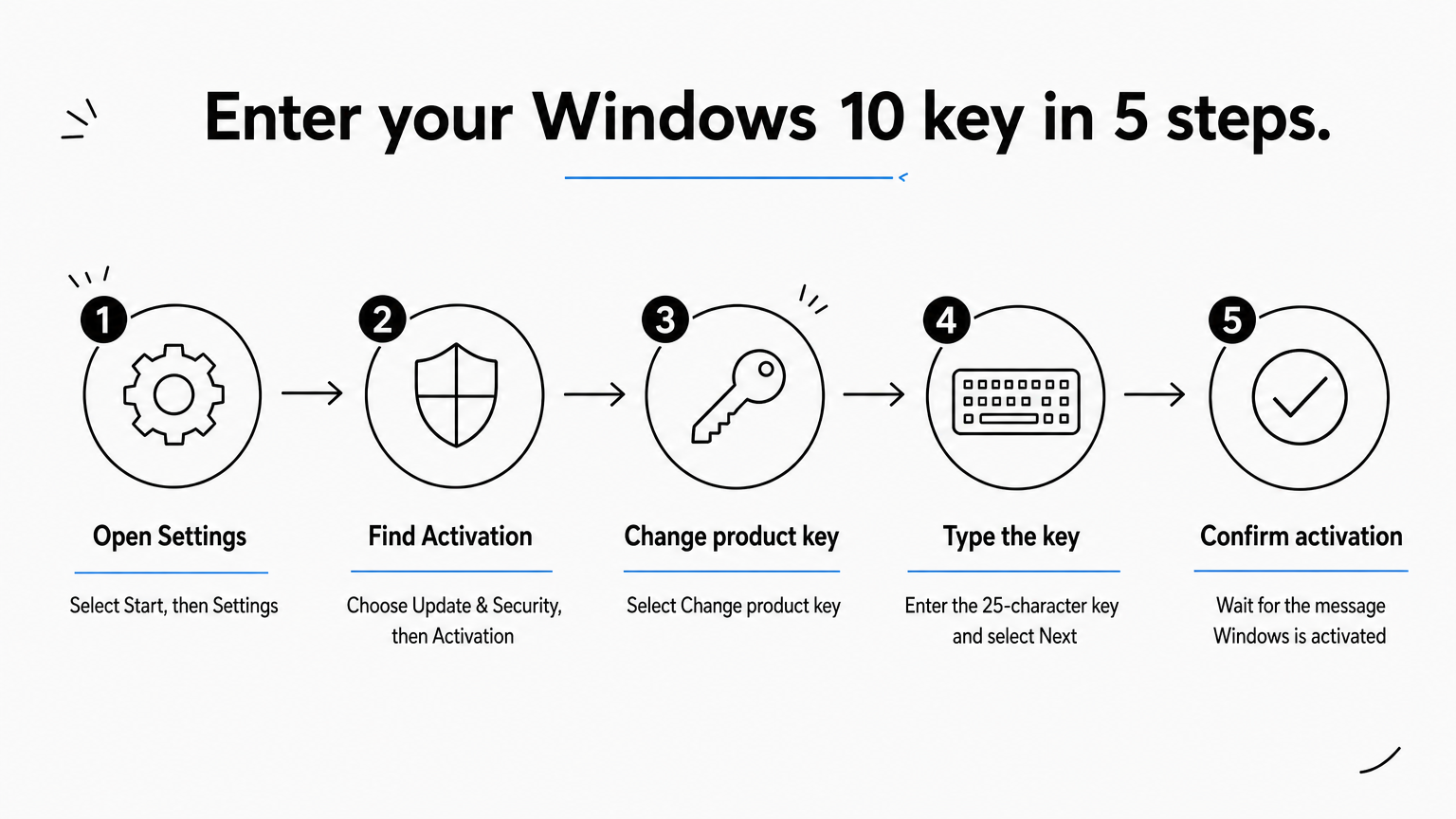
- Select Start, then Settings.
- Choose Update & Security, then Activation.
- Select Change product key.
- Type the 25-character key and select Next.
- Wait for the message "Windows is activated."
If Windows is running a different edition than your key, the process will fail. Check the edition on the About page first, as described in Step 1.
Activate during a clean install
For a fresh install or a new motherboard, build installation media from Microsoft’s Windows 10 download page using a USB drive. Choose the same edition as your key. During setup, type the key when prompted. If you skipped it, go to Settings > Update & Security > Activation afterward and use Change product key.
A key that was never used on the hardware before needs a valid entry during or after setup. On later reinstalls of the same edition on the same PC, you can select "I don’t have a product key" and Windows reactivates by itself.
Link your Microsoft account
Once Windows is activated, link your Microsoft account to the digital license. Sign in as an administrator, return to the Activation page, select Add an account, and enter your Microsoft credentials. The page should then read "Windows is activated with a digital license linked to your Microsoft account." This link lets the Activation troubleshooter restore your license after a major hardware change, such as a motherboard swap. Codesforever recommends registering your email with your Microsoft product key during online activation for this reason.
Command line and phone activation
Power users can enter and verify a key from an administrator Command Prompt. Replace the placeholder with your own key.
slmgr /ipk XXXXX-XXXXX-XXXXX-XXXXX-XXXXX
slmgr /ato
slmgr /xpr
The first line installs the key, the second attempts online activation, and the third shows whether the machine is permanently activated. If the PC has no internet access, press Windows key + R, type slui 4, and follow the prompts to activate by phone.
Link your Microsoft account right after activation so a future hardware change does not cost you the license.
If your key will not activate
Most failed activations trace back to one of three causes: the wrong edition, a mistyped key, or a key the seller should replace. Work through the quick checks first, because they fix the majority of cases in minutes.
Match the error to the fix
| Error or symptom | Likely cause | What to try |
|---|---|---|
| 0xC004F050 | Key invalid for this installed edition | Confirm the edition on the About page, then retype the key |
| 0xC004C003 | Key blocked by Microsoft’s activation servers | Contact the seller and request a replacement |
| 0x803F7001 | No valid license found for this device | Enter your key, or run the Activation troubleshooter |
| "Not activated" after a hardware change | License no longer matches the hardware | Run the Activation troubleshooter with your linked account |
Retype the key slowly, because 0 and O and 1 and I are easy to confuse. Then compare your installed edition with your key edition. Microsoft’s page on Windows activation errors lists further codes and fixes.
Contact support and use your guarantee
If the checks fail, contact the seller and quote your order number and the exact error. Codesforever offers support through WhatsApp chat, live chat, email, and an FAQ section, and the team typically replies in a few minutes. Troubleshooting steps arrive within 24 hours of your report, and if they do not resolve the issue, you get a replacement key or a full refund.
Support may ask for remote desktop help through a tool such as AnyDesk, TeamViewer, or UltraViewer. Use it only with a seller you have verified, and close the session when it ends. Note that a refund is not issued if you refuse remote support, or if the product is incompatible with your hardware. A confirmed refund goes out within 24 hours, though your card or bank can take up to 10 days to show it, and a 3.4% + $0.30 processing charge is deducted.
Report a problem inside the refund window, and keep your order number and error code ready.
Ready to buy with confidence
Buying a Windows 10 key comes down to a short sequence: check whether you already own a license, match the edition to your PC, compare sellers, confirm written refund terms, save the key when it arrives, and activate it in Settings. Skip any step and you risk paying for a key that will not work on your machine.
If you want a genuine key with instant email delivery, a money-back guarantee, and 24/7 activation help, browse the Windows keys at Codesforever and apply the checklist from Step 3 to any listing you consider.