

Autodesk 3ds Max 2021 Ultimate Guide | Everything You Need to Know About 3D Design Software

Introduction
In the rapidly growing world of 3D design, animation, visual effects, architecture, and digital visualization, Autodesk 3ds Max has become one of the most trusted and widely used professional 3D software solutions. Developed by Autodesk, 3ds Max provides powerful tools for creating realistic 3D models, animations, simulations, and high-quality rendered visuals.
Autodesk 3ds Max 2021 is an advanced version of Autodesk’s professional 3D modeling and animation software, designed to help artists, architects, game developers, engineers, and creative professionals transform their ideas into realistic digital experiences. With improved performance, enhanced modeling workflows, better viewport handling, advanced rendering capabilities, and productivity improvements, 3ds Max 2021 delivers a complete environment for professional 3D production.
From creating architectural walkthroughs and product designs to developing characters, game assets, and cinematic visual effects, Autodesk 3ds Max 2021 provides all the essential tools required for modern 3D workflows.
What is Autodesk 3ds Max 2021?
Autodesk 3ds Max 2021 is a professional 3D modeling, animation, and rendering application used by designers and artists worldwide. It allows users to create detailed 3D objects, realistic environments, animations, and visual effects.
The software provides a complete collection of tools for:
- 3D modeling
- Character design
- Architectural visualization
- Product rendering
- Animation production
- Game development
- Motion graphics
- Simulation effects
- Virtual reality content
3ds Max 2021 supports advanced workflows that allow professionals to create highly detailed models with realistic materials, lighting, and textures.
It is widely used in industries such as:
Architecture and Interior Design
Architects use 3ds Max 2021 to create:
- Realistic building models
- Interior walkthroughs
- Lighting simulations
- Furniture designs
- Landscape visualization
Game Development
Game developers use it for:
- Character modeling
- Environment creation
- Weapon and vehicle design
- Game-ready assets
Film and Animation Industry
Production studios use 3ds Max for:
- Visual effects
- Animation sequences
- Digital environments
- Motion graphics
Product Design
Companies use 3ds Max for:
- Product prototypes
- Industrial visualization
- Marketing renders
Why Choose Autodesk 3ds Max 2021?
Autodesk 3ds Max 2021 offers several improvements over earlier versions, making it a preferred choice for professionals who require speed, accuracy, and creative flexibility.
1. Professional 3D Modeling Environment
3ds Max 2021 provides powerful modeling tools that allow users to create simple and complex objects.
Users can work with:
- Polygon modeling
- Surface modeling
- Spline modeling
- Procedural modeling
- Boolean operations
The Editable Poly workflow provides complete control over:
- Vertices
- Edges
- Borders
- Polygons
- Elements
This allows artists to create highly detailed models for games, architecture, and visualization.
Autodesk 3ds Max 2021 Features
1. Enhanced Modeling Tools
One of the biggest strengths of Autodesk 3ds Max 2021 is its advanced modeling system.
Important modeling features include:
Editable Poly
Editable Poly allows precise object modification by controlling individual components.
Common uses:
- Character modeling
- Hard surface modeling
- Product design
- Architectural objects
Editable Spline
Spline modeling helps create:
- Curves
- Paths
- Decorative designs
- Architectural structures
Boolean Modifier
Boolean operations help combine objects quickly.
Examples:
- Cutting holes
- Joining objects
- Creating complex shapes
2. Improved Viewport Performance
Autodesk 3ds Max 2021 includes viewport improvements that help users manage complex scenes more efficiently.
Benefits include:
- Faster navigation
- Better scene interaction
- Improved display quality
- Smoother workflow
Large architectural projects and detailed models can be handled more efficiently.
3. Arnold Renderer Integration
3ds Max 2021 includes advanced integration with Arnold Renderer, allowing users to create realistic images and animations.
Arnold provides:
- Physically accurate lighting
- Realistic shadows
- Advanced materials
- Global illumination
- GPU rendering support
It is widely used in professional film and visualization industries.
4. Bake to Texture Improvements
One of the major improvements in Autodesk 3ds Max 2021 is the enhanced Bake to Texture workflow.
This feature helps artists create optimized textures for:
- Games
- Real-time applications
- Virtual environments
Benefits include:
- Faster texture baking
- Improved workflow
- Better asset preparation
5. Enhanced Animation Tools
Animation tools in 3ds Max 2021 allow artists to create realistic movements.
Features include:
- Keyframe animation
- Character rigging
- Motion controllers
- Animation layers
- Constraints
Users can create professional animations for:
- Characters
- Objects
- Camera movements
- Visual effects
6. Advanced Material Creation
Creating realistic materials is an important part of 3D visualization.
3ds Max 2021 supports:
- Physical materials
- Standard materials
- PBR materials
- Texture mapping
Materials can simulate:
- Metal
- Glass
- Wood
- Plastic
- Fabric
- Stone
7. Particle Flow System
The Particle Flow system allows users to create realistic effects.
Examples:
- Smoke
- Fire
- Rain
- Dust
- Explosions
- Environmental effects
It provides control over:
- Particle movement
- Size
- Speed
- Behavior
- Animation
8. Python Automation Support
Autodesk 3ds Max 2021 supports Python scripting for automation.
Python can be used to:
- Create custom tools
- Automate repetitive tasks
- Manage large projects
- Improve workflow efficiency
Formulas and Calculation Methods
Professional 3D artists often use mathematical concepts and formulas to create accurate models, realistic animations, and optimized scenes. Autodesk 3ds Max 2021 provides tools that use mathematical calculations internally to generate geometry, lighting, animation, and rendering effects.
Understanding basic formulas helps designers create precise 3D projects.
1. Distance Calculation Formula in 3D Space
When creating or positioning objects in 3D space, the distance between two points can be calculated using:
Formula:
Distance = √((X2-X1)² + (Y2-Y1)² + (Z2-Z1)²)
Where:
- X = Horizontal position
- Y = Depth position
- Z = Vertical position
Uses in 3ds Max:
- Object placement
- Architectural measurements
- Animation paths
- Camera positioning
2. Polygon Area Calculation Formula
For modeling surfaces, calculating polygon area helps determine object size and texture distribution.
Formula:
Area = Length × Width
For complex polygon shapes, 3ds Max calculates surface area automatically.
Uses:
- UV mapping
- Texture optimization
- Surface analysis
3. Scaling Formula
Scaling changes the size of an object.
Formula:
New Size = Original Size × Scale Factor
Example:
If an object size is 10 units and the scale factor is 2:
10 × 2 = 20 units
Uses:
- Architectural modeling
- Product design
- Object resizing
4. Frame Rate Calculation Formula
Animation timing depends on frame rate.
Formula:
Total Frames = Animation Duration × FPS
Example:
For a 10-second animation at 30 FPS:
10 × 30 = 300 Frames
Common Frame Rates:
- 24 FPS – Film
- 30 FPS – Standard video
- 60 FPS – Gaming and smooth animation
5. Rendering Time Calculation
Rendering depends on multiple factors:
- Resolution
- Polygon count
- Lighting
- Materials
- Samples
General estimation:
Total Render Time = Number of Frames × Average Render Time Per Frame
Example:
500 frames × 2 minutes per frame:
1000 minutes total rendering
Autodesk 3ds Max 2021 Installation Guide
Before activation, Autodesk 3ds Max 2021 must be installed correctly.
Step 1: Check System Requirements
Verify:
- Operating system compatibility
- Available storage
- RAM
- Graphics card support
Step 2: Download Installation Files
Download Autodesk 3ds Max 2021 from an official Autodesk source or Autodesk account.
Installation packages include:
- Main application files
- Autodesk licensing service
- Additional components
Step 3: Run Installer
Follow these steps:
- Open installer setup.
- Select installation location.
- Choose required components.
- Start installation.
- Restart computer after completion.
Autodesk 3ds Max 2021 Activation Methods
Autodesk products require a valid license to activate and use the software.
Below are official activation methods.
Method 1: Activation Through Autodesk Account
This is the most common activation method.
Steps:
- Launch Autodesk 3ds Max 2021.
- Select "Sign In".
- Enter Autodesk account credentials.
- The software verifies your subscription.
- Activation completes automatically.
Benefits:
- Simple setup
- Cloud license management
- Easy device management
Method 2: Serial Number and Product Key Activation
For eligible licensed installations:
Steps:
- Open Autodesk 3ds Max 2021.
- Choose activation option.
- Enter valid license information.
- Complete verification.
- Restart the application.
Method 3: Network License Activation
Used by companies and educational institutions.
Steps:
- Install Autodesk Network License Manager.
- Configure license server.
- Connect client computers.
- Activate through network licensing.
Advantages:
- Multiple users
- Centralized management
- Enterprise deploymen
Autodesk 3ds Max 2021 License Management Tips
For smooth operation:
- Keep Autodesk account information updated.
- Maintain internet connectivity during activation.
- Install Autodesk licensing updates.
- Avoid modifying license files manually.
- Keep software updated.
Common Autodesk 3ds Max 2021 Errors and Fixes
Error 1: Autodesk 3ds Max 2021 Activation Failed
Possible Causes:
- Incorrect login details
- Expired subscription
- Internet connection problems
Solutions:
✔ Check Autodesk account status
✔ Verify subscription details
✔ Restart Autodesk Desktop Licensing Service
✔ Try signing in again
Error 2: License Manager Not Functioning
Causes:
- Damaged licensing service
- Installation problems
Fix:
- Restart Autodesk Licensing Service.
- Repair Autodesk installation.
- Install latest Autodesk licensing updates.
Error 3: Product Key or Serial Number Invalid
Causes:
- Wrong license information
- Incorrect product version
Fix:
- Verify product details.
- Use correct license information.
- Contact Autodesk support if required.
Error 4: Autodesk 3ds Max 2021 Installation Failed
Causes:
- Insufficient storage
- Corrupted installation files
- Antivirus interference
Fix:
✔ Free disk space
✔ Download installer again
✔ Temporarily check security software settings
✔ Run installer with administrator permissions
Error 5: 3ds Max 2021 Crashes During Startup
Causes:
- Graphics driver problems
- Plugin conflicts
- Corrupted preferences
Fix:
Update Graphics Driver
Install the latest:
- NVIDIA drivers
- AMD drivers
Reset Preferences
Restore default 3ds Max settings.
Disable Plugins
Remove incompatible third-party plugins.
Error 6: Slow Rendering Performance
Causes:
- High polygon scenes
- Low RAM
- Incorrect rendering settings
Fix:
Improve performance by:
- Increasing RAM
- Optimizing models
- Using SSD storage
- Adjusting render settings
Updating GPU drivers
Professional Uses of Autodesk 3ds Max 2021
Autodesk 3ds Max 2021 is widely used across multiple industries because of its powerful modeling, animation, simulation, and rendering capabilities. Its flexible workflow makes it suitable for beginners, freelancers, studios, architects, and large production companies.
1. Architectural Visualization
One of the biggest applications of Autodesk 3ds Max 2021 is architectural visualization. Architects and designers use it to transform technical drawings and concepts into realistic 3D presentations.
With 3ds Max 2021, professionals can create:
- Residential building models
- Commercial projects
- Interior designs
- Landscape visualization
- Realistic walkthrough animations
Benefits for Architects:
- Realistic lighting simulation
- High-quality material creation
- Detailed furniture modeling
- Photorealistic rendering
- Client presentation visuals
Architectural studios often combine 3ds Max with software like AutoCAD and Revit to create complete visualization workflows.
2. Game Development
Autodesk 3ds Max 2021 plays an important role in the gaming industry.
Game developers use it to create:
- Characters
- Weapons
- Vehicles
- Buildings
- Game environments
- Animation assets
The software supports workflows required for game engines such as:
- Unreal Engine
- Unity
Game Development Workflow:
- Create 3D model in 3ds Max.
- Apply textures and materials.
- Create animations.
- Optimize polygon count.
- Export assets to game engines.
3. Film and Visual Effects Production
Professional studios use Autodesk 3ds Max 2021 for creating cinematic visuals.
Applications include:
- Digital environments
- Special effects
- Animated objects
- Camera movements
- Background scenes
The combination of:
- Modeling tools
- Arnold rendering
- Particle systems
- Animation features
helps artists create realistic movie-quality visuals.
4. Product Design and Manufacturing
Product designers use 3ds Max 2021 to create realistic prototypes before manufacturing.
Common applications:
- Automobile visualization
- Electronic products
- Furniture design
- Consumer products
Benefits:
- Realistic product renders
- Material testing
- Marketing images
- Design presentations
5. Interior Design
Interior designers use Autodesk 3ds Max 2021 to visualize spaces before construction.
Projects include:
- Homes
- Offices
- Hotels
- Restaurants
- Showrooms
Designers can experiment with:
- Colors
- Lighting
- Furniture arrangement
- Materials
- Decorative elements
6. Education and Training
Many educational institutions use Autodesk 3ds Max 2021 for teaching:
- 3D modeling
- Animation
- Game design
- Visualization techniques
Students learn professional skills required for careers in:
- Animation studios
- Design companies
- Architecture firms
- Gaming industries
Autodesk 3ds Max 2021 Important Workflow Tips
To achieve better results, professionals follow optimized workflows.
1. Plan Your Scene Before Modeling
Before creating objects:
- Analyze project requirements
- Create references
- Set correct measurements
- Organize layers
Proper planning saves time during production.
2. Maintain Proper Scene Organization
Large projects require proper management.
Recommended practices:
- Rename objects properly
- Use layers
- Group related objects
- Remove unused elements
Example:
Instead of:
Box001

Box002

Box003
Use:
Wall_Main

Window_Left

Door_Entrance
This improves project management.
3. Use Real-World Measurements
Accurate scale improves realism.
For architecture:
- Set correct units
- Use actual dimensions
- Maintain realistic proportions
Correct measurements improve:
- Lighting
- Materials
- Camera results
4. Use Reference Images
Professional artists use references for:
- Shape accuracy
- Material appearance
- Lighting setup
References improve final quality.
Autodesk 3ds Max 2021 Camera and Lighting Techniques
Realistic rendering depends heavily on proper camera and lighting setup.
Camera Techniques
Important camera controls:
- Focal length
- Field of view
- Depth of field
- Camera angle
Professional tips:
- Use realistic camera height
- Avoid extreme angles
- Match real photography techniques
Lighting Techniques
Common lighting setups:
Three-Point Lighting
Includes:
- Key Light
- Fill Light
- Back Light
Used for:
- Characters
- Product renders
- Studio scenes
HDR Lighting
HDR images provide realistic environmental lighting.
Benefits:
- Natural reflections
- Realistic shadows
- Better atmosphere
Autodesk 3ds Max 2021 File Formats
3ds Max supports various file formats for importing and exporting data.
Native Format
MAX File
Used for:
- Saving complete projects
- Maintaining scene information
- Preserving materials and animations
Import Formats
Supported formats include:
- FBX
- OBJ
- 3DS
- DWG
- DXF
- STL
Export Formats
Common exports:
- FBX for game engines
- OBJ for modeling exchange
- STL for 3D printing
Autodesk 3ds Max 2021 Plugins Support
One of the biggest advantages of 3ds Max is its extensive plugin ecosystem.
Popular plugin categories:
Rendering Plugins
Used for:
- Photorealistic rendering
- Advanced lighting
- Material creation
Examples:
- V-Ray
- Corona Renderer
- Arnold
Simulation Plugins
Used for:
- Physics effects
- Destruction
- Fluids
- Particles
Modeling Plugins
Used for:
- Faster modeling
- Architectural elements
Complex geometry
Conclusion
Autodesk 3ds Max 2021 is a powerful professional 3D design solution that provides everything required for modern modeling, animation, rendering, and visualization workflows. With advanced modeling tools, improved performance, Arnold Renderer integration, enhanced texture baking, and professional animation features, it remains one of the leading choices for creative professionals.
Compared with previous versions, Autodesk 3ds Max 2021 delivers better productivity, improved scene handling, and a more efficient workflow. Whether you are an architect creating realistic walkthroughs, a game developer building digital worlds, or an artist producing cinematic visuals, 3ds Max 2021 provides the tools needed to create high-quality results.
For professionals seeking a reliable, flexible, and industry-standard 3D software solution, Autodesk 3ds Max 2021 continues to be an excellent choice for turning creative concepts into realistic digital experiences.
Frequently Asked Questions (FAQs)
1. What is Autodesk 3ds Max 2021?
Autodesk 3ds Max 2021 is professional 3D modeling, animation, and rendering software used for architecture, gaming, visualization, and visual effects.
2. What are the main features of 3ds Max 2021?
Major features include:
- Advanced modeling tools
- Arnold rendering integration
- Improved viewport performance
- Animation tools
- Bake to Texture improvements
- Python scripting support
3. Is Autodesk 3ds Max 2021 good for architecture?
Yes. It is one of the most popular software solutions for architectural visualization because of its realistic rendering and modeling capabilities.
4. Can beginners learn Autodesk 3ds Max 2021?
Yes. Beginners can learn basic modeling and gradually move toward advanced animation and rendering workflows.
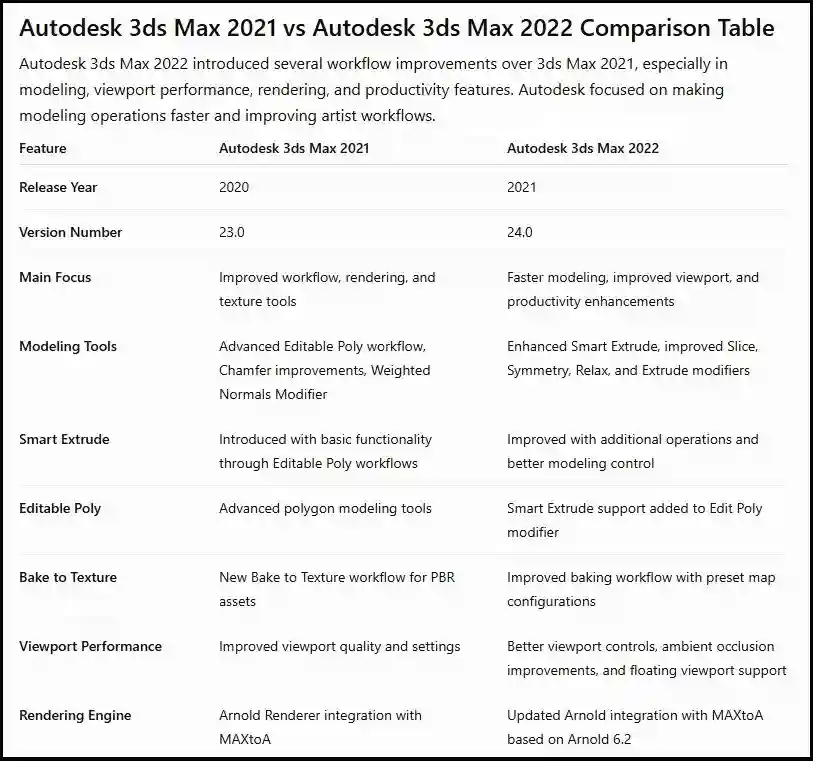
5. What is the difference between 3ds Max 2021 and 2020?
3ds Max 2021 provides improved workflow performance, better texture baking, enhanced viewport optimization, and additional productivity improvements.
6. Does Autodesk 3ds Max 2021 support Arnold Renderer?
Yes. Autodesk 3ds Max 2021 includes Arnold Renderer integration for professional-quality rendering.