

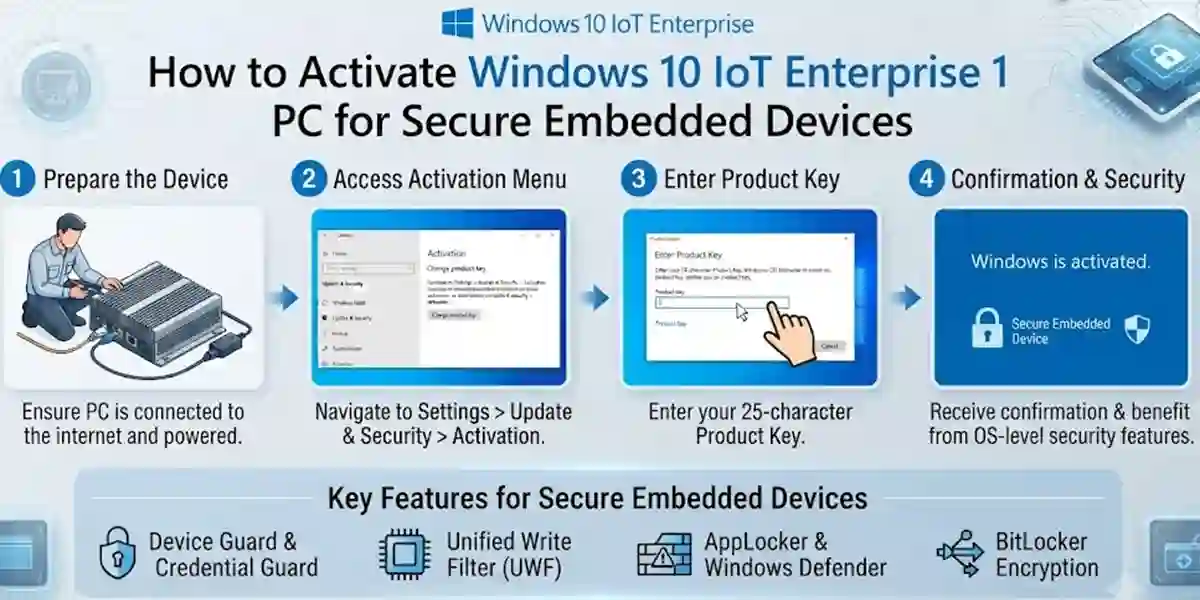
How to Activate Windows 10 IoT Enterprise 1 PC for Secure Embedded Devices

Introduction
Microsoft Windows 10 IoT Enterprise 1 PC is a specialized operating system designed for embedded devices, industrial systems, smart terminals, kiosks, digital signage, medical equipment, manufacturing machines, and dedicated business solutions. It provides the reliability, security, and flexibility required for organizations that need a stable Windows-based platform for connected devices.
Unlike traditional desktop operating systems, Windows 10 IoT Enterprise is optimized for fixed-purpose devices where long-term performance, security updates, and controlled user experiences are essential. Businesses can customize the operating system according to their hardware requirements and application needs.
To unlock the full capabilities of Windows 10 IoT Enterprise 1 PC, proper activation is required. Activation verifies that the software license is genuine and allows users to access the complete functionality of the operating system. A correctly activated system ensures better security, improved reliability, and smooth operation for embedded applications.
Many users face challenges while activating Windows 10 IoT Enterprise, including product key errors, activation failures, internet connectivity problems, and licensing issues. Understanding the correct activation process helps users avoid interruptions and maintain a secure embedded environment.
What is Windows 10 IoT Enterprise 1 PC?
Windows 10 IoT Enterprise is an enterprise-grade operating system designed specifically for embedded and specialized devices. It is based on the Windows 10 platform but includes additional features that allow manufacturers and organizations to create secure, customized, and reliable solutions.
Windows 10 IoT Enterprise 1 PC is designed for use on a single licensed device. It provides a familiar Windows environment while allowing businesses to control system behavior, applications, updates, and security settings.
Common use cases include:
Industrial Automation Systems
Manufacturing companies use Windows IoT Enterprise for:
- Factory machines
- Production systems
- Industrial controllers
- Monitoring devices
Retail and Commercial Devices
Businesses use it for:
- Self-service kiosks
- Point-of-sale systems
- Digital displays
- Information terminals
Healthcare Equipment
Healthcare organizations use Windows IoT solutions for:
- Medical devices
- Patient monitoring systems
- Diagnostic equipment
Smart Technology Solutions
It supports:
- IoT gateways
- Smart machines
- Connected devices
- Automated systems
Why Activate Windows 10 IoT Enterprise 1 PC?
Activation is an important step that confirms the authenticity of your Windows IoT license and enables complete operating system functionality.
Key Benefits of Activation:
1. Genuine Software Verification
Activation confirms that your Windows IoT Enterprise license is valid and properly registered.
2. Enhanced Security
Activated systems receive important security improvements and updates.
3. Reliable Device Operation
Proper activation ensures stable performance for dedicated devices.
4. Professional Deployment
Businesses can confidently deploy activated systems in commercial environments.
5. Access to Updates
Licensed systems can receive supported updates according to the licensing agreement.
Key Features of Windows 10 IoT Enterprise 1 PC
1. Enterprise-Level Security
Security is one of the most important features of Windows IoT Enterprise.
It includes:
- Advanced security controls
- Device protection features
- Secure boot support
- Access management options
These features help protect connected devices from unauthorized access.
2. Long-Term Stability
Embedded devices often operate continuously for years. Windows 10 IoT Enterprise provides a stable environment designed for long-term deployments.
Benefits include:
- Reliable performance
- Controlled updates
- Reduced downtime
- Extended device lifecycle
3. Dedicated Device Experience
Windows IoT Enterprise allows organizations to configure devices for specific purposes.
Examples:
- Single-purpose kiosks
- Industrial machines
- Digital signage systems
Administrators can restrict unnecessary functions and create a controlled user experience.
4. Windows Application Compatibility
One major advantage of Windows 10 IoT Enterprise is compatibility with existing Windows applications.
Businesses can run:
- Desktop applications
- Enterprise software
- Custom applications
- Management tools
This makes migration easier for organizations already using Windows-based solutions.
5. Device Customization Options
Manufacturers and developers can customize the operating system according to their requirements.
Customization options include:
- User interface settings
- System configurations
- Application control
- Device restrictions
6. Remote Management Capabilities
Windows IoT Enterprise supports remote management features for easier administration.
Organizations can:
- Monitor devices
- Configure settings
- Manage updates
- Maintain systems remotely
7. Improved Hardware Support
Windows 10 IoT Enterprise supports a wide range of hardware platforms.
It works with:
- Industrial computers
- Embedded systems
- Touchscreen devices
- Specialized equipment
8. Secure Boot and Device Protection
Secure boot helps ensure that only trusted software runs during startup.
Benefits:
- Improved security
- Protection against unauthorized software
- Safer device operation
9. Controlled Update Management
Embedded devices often require controlled update environments.
Windows IoT Enterprise allows organizations to:
- Schedule updates
- Test updates before deployment
- Manage system changes
10. IoT Device Integration
Windows 10 IoT Enterprise can connect with modern IoT ecosystems.
It supports:
- Connected devices
- Cloud services
- Enterprise applications
- Data management systems
System Requirements Before Activation
Before activating Windows 10 IoT Enterprise 1 PC, ensure your device meets the necessary requirements.
Hardware Preparation
Check:
- Compatible processor
- Sufficient RAM
- Available storage
- Supported hardware drivers
Software Preparation
Ensure:
- Windows IoT Enterprise is installed
- Valid license information is available
- Internet connection is stable
System date and time are correct
Conclusion
Microsoft Windows 10 IoT Enterprise 1 PC is a powerful and reliable operating system designed specifically for embedded devices, industrial systems, kiosks, smart terminals, and dedicated business solutions. With enterprise-grade security, long-term stability, application compatibility, and advanced customization options, it provides a strong foundation for organizations building modern IoT environments.
Proper activation of Windows 10 IoT Enterprise 1 PC is an essential step to ensure that the operating system works securely and efficiently. A correctly activated license verifies software authenticity, enables access to supported features, improves system reliability, and helps businesses maintain a stable device infrastructure. Whether you are managing industrial equipment, retail systems, healthcare devices, or smart automation solutions, activation ensures a smoother and more secure experience.
During the activation process, users may encounter challenges such as invalid product keys, connectivity issues, license verification problems, or update-related errors. However, most of these issues can be resolved by checking license details, maintaining a stable internet connection, updating system components, and following the correct activation procedure.
Frequently Asked Questions (FAQ)
Windows 10 IoT Enterprise 1 PC is a specialized operating system designed for embedded and dedicated devices such as industrial machines, kiosks, smart terminals, digital signage systems, and IoT solutions. It provides enterprise-level security, customization options, and long-term stability for professional device deployments.
To activate Windows 10 IoT Enterprise 1 PC, you need a valid license and follow the official activation process. The activation method may vary depending on your licensing type. Generally, users can complete activation through the system activation settings, approved licensing tools, or authorized deployment methods provided with their license.
Activation verifies that the Windows IoT Enterprise license is genuine and properly assigned to the device. It helps ensure software authenticity, enables supported features, improves security, and allows organizations to maintain reliable embedded device operations.
Common activation issues include:
- Invalid license information
- Product key verification failure
- Internet connectivity problems
- Incorrect system date and time
- Device licensing conflicts
- Activation service communication errors
Most issues can be resolved by checking license details, ensuring proper connectivity, and following official troubleshooting steps.
To fix activation problems:
- Verify the license information
- Check your internet connection
- Restart the device
- Ensure Windows updates are installed
- Confirm date and time settings
- Review licensing configuration
- Contact official support if the issue continues