

7 Microsoft Project License Options and What Each Costs

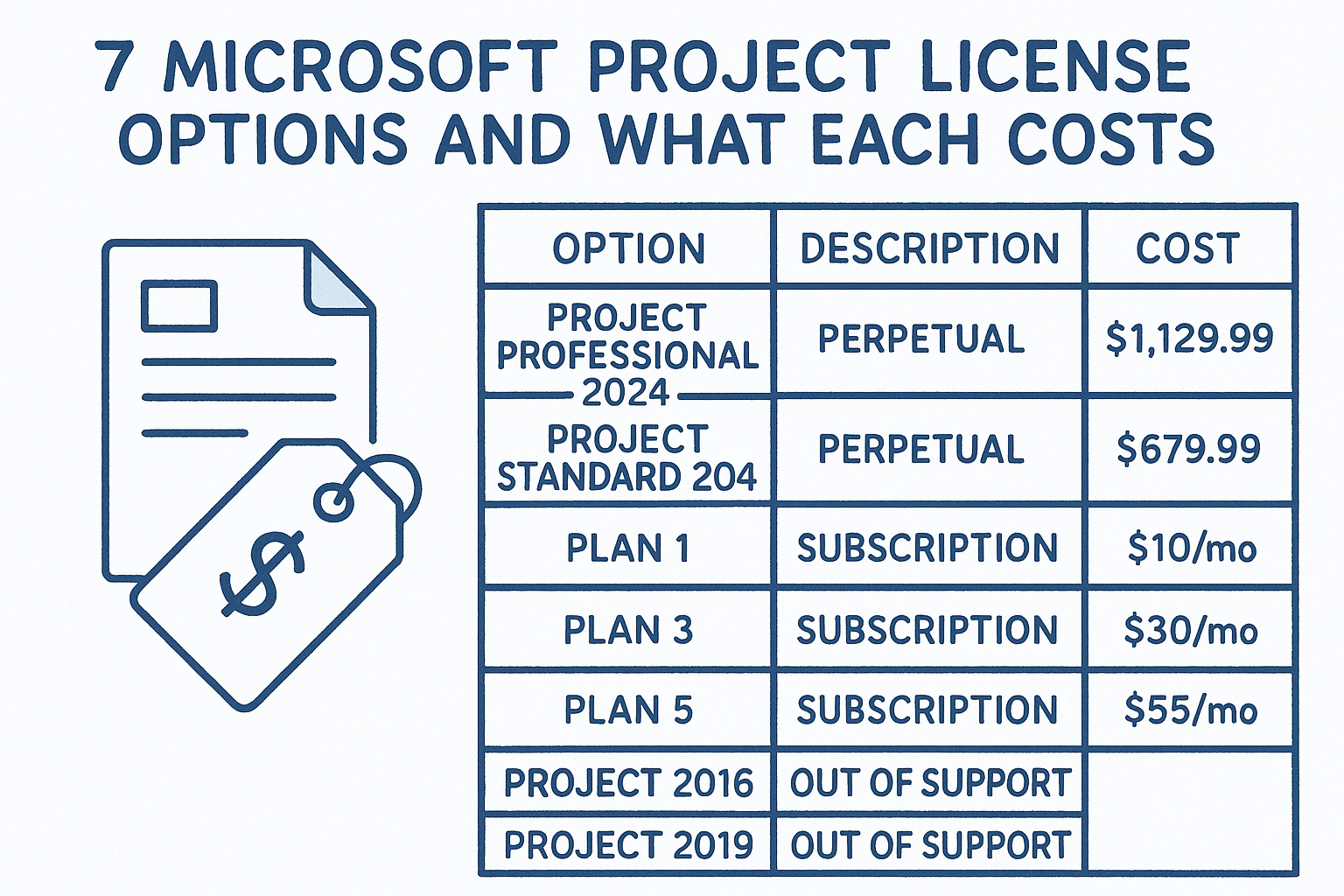
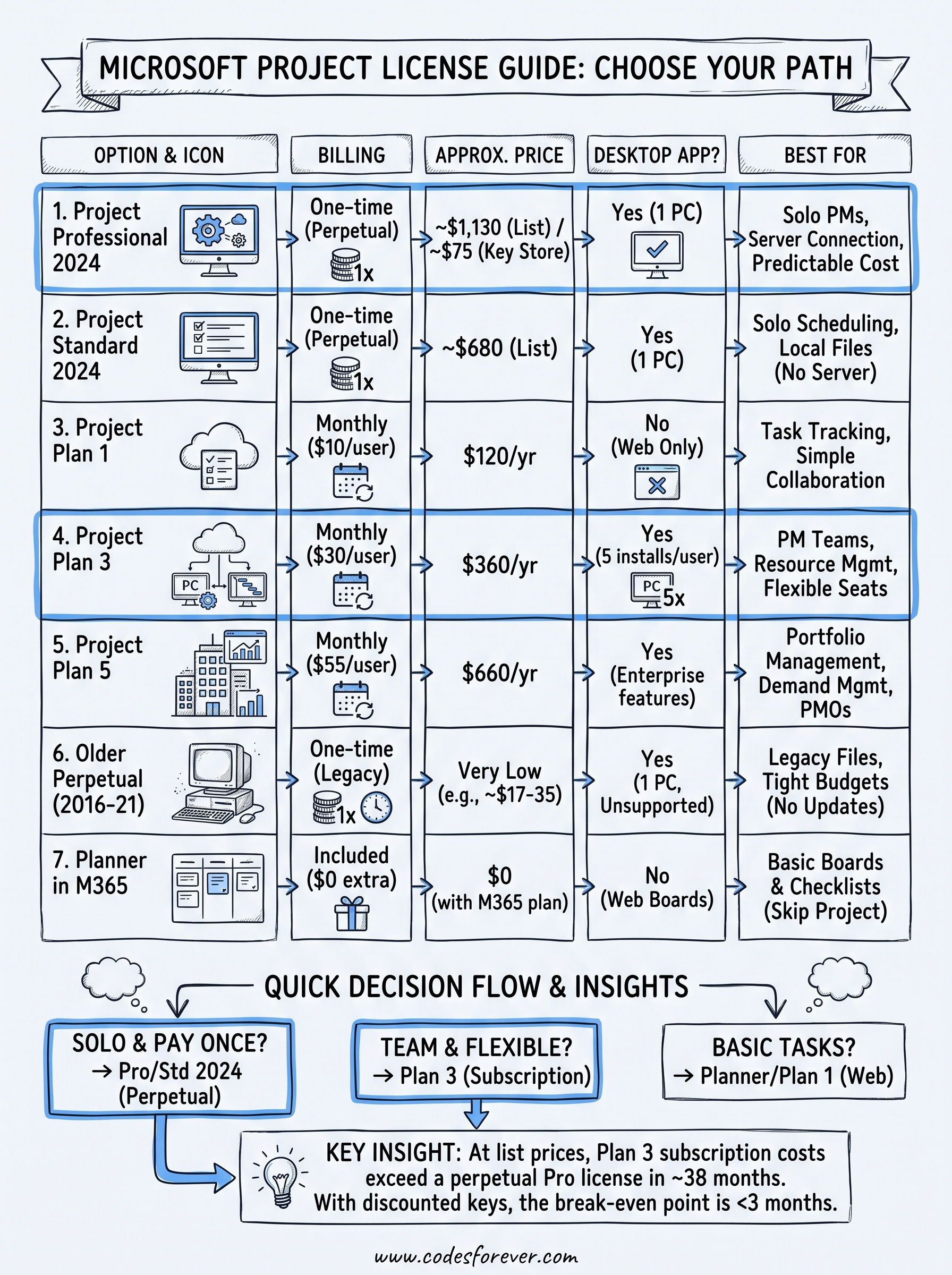
The right Microsoft Project license depends on one decision first: pay once or pay monthly. Project Professional 2024 and Project Standard 2024 are one-time purchases for a single Windows PC, listed by Microsoft at $1,129.99 and $679.99. Project Plan 1, Plan 3 and Plan 5 are subscriptions at $10, $30 and $55 per user per month, billed annually. If you plan projects alone, a perpetual Professional license is usually the best value. If a team needs desktop scheduling and resource management, Plan 3 is the standard pick. Plan 5 only makes sense for portfolio management.
Want a one-time license without Microsoft’s list price? Get Project Professional 2024 at Codesforever or Project 2021 Pro for US$29. Keys arrive by email within minutes, with free activation support and a replacement if a key fails. Each key covers one Windows PC.
The confusion here is real. Microsoft sells Project under several names, none of the Microsoft 365 business plans include the desktop app, and the price you see depends on whether you read the Planner page, the Project page or a reseller’s listing. It is easy to pay for features you never open, or to buy a license that cannot do what your team needs.
This guide ranks seven options, from perpetual keys to subscriptions to the Planner route. Each one gets the same three checks: what you get, who it suits and what it costs. Codesforever has sold software license keys online for over ten years, so the perpetual options also come with notes on buying and activating a key. A worked cost example and a buying checklist follow the list.
1. Project Professional 2024 perpetual license
What you get
Project Professional 2024 is the full desktop app, sold as a perpetual license you pay for once. Microsoft states that once activated, it does not expire. It installs on one Windows PC and carries no monthly fee.
- Gantt-based scheduling with task dependencies and baselines
- Resource management and reporting
- Connection to Project Server and Project Online for team collaboration
- Windows only, with no Mac version
Who it suits
Choose it if you plan projects alone or in a very small team and want a fixed, predictable cost. Freelance project managers, construction schedulers, consultants and IT leads fit this profile well.
Pick it over Standard when you need to connect to Project Server or Project Online, or when your colleagues already work in those systems.
What it costs
Microsoft lists Professional 2024 at $1,129.99. Codesforever sells a Microsoft Project Professional 2024 (WIN) key for €70 as a one-time purchase with lifetime access. The key covers one device running Windows 10 or later and arrives as a digital download.
- Microsoft list price: $1,129.99
- Codesforever key: €70, one device, lifetime access
At Microsoft’s list prices, a perpetual Professional license beats Plan 3 after about 8 months of subscription fees, and a discounted key beats it within three months.
2. Project Standard 2024 perpetual license
What you get
Project Standard 2024 is the single-user edition of the same desktop scheduler. It is also a perpetual license for one PC. Standard drops the server and collaboration features, not the scheduling engine, so you still build schedules, link tasks and track progress.
- Gantt scheduling, dependencies and task tracking
- Local work on one Windows PC
- No connection to Project Server or Project Online
- No expiry and no monthly fee
Who it suits
Standard fits individuals who keep their schedule in their own file and share it as a PDF or an export. Students, solo consultants and small contractors are typical buyers.
Skip it if your team shares resource pools or needs to publish plans to a server. You would have to upgrade later, which means buying twice.
What it costs
Microsoft lists Standard 2024 at $679.99, which is $450 less than Professional 2024 ($1,129.99 minus $679.99). Compare Professional at its actual selling price before you settle on Standard, because at discounted key prices the gap can shrink to almost nothing.
If you will never connect to a Project , Standard saves $450 at list price. If you might, buy Professional once instead of twice.
3. Project Plan 1 subscription
What you get
Project Plan 1 is the lightest paid subscription, and Microsoft lists it alongside Planner as Planner Plan 1. It gives you web-based task and project management with grid and timeline views, plus Microsoft Teams integration. It does not include the desktop app.
- Included: web access, task assignment, simple tracking, collaboration
- Not included: desktop app, advanced resource management, advanced reporting
Who it suits
Plan 1 suits small teams, startups and departments that assign and track tasks. If your question is "who is doing what by Friday," it answers that.
It is the wrong license if you need a desktop Gantt chart with resource leveling. People often buy it expecting the classic Project app and are disappointed.
What it costs
Plan 1 costs $10 per user per month, billed annually, which is $120 per user per year. A department of 10 pays $1,200 a year. Microsoft offers a one-month free trial, so you can test whether web-only is enough.
Plan 1 is a task tracker with a Project label, so confirm you can live without the desktop app before you pay.
4. Project Plan 3 subscription
What you get
Project Plan 3 is the license most people mean by "ms project plan 3 license." It adds the desktop app alongside web access, plus resource management, timesheets, Gantt charts and custom reporting. One license allows up to five concurrent installations of the desktop client.
It is a subscription, so the desktop app needs an active subscription. Stop paying and you lose access.
Who it suits
Plan 3 suits medium and large organizations with dedicated project managers who run several projects at once. Construction, software development and finance teams are the classic fit, according to the plans’ typical buyers.
It also suits you if you want the latest version without managing upgrades, or if you want to add and remove seats as the team changes.
What it costs
Plan 3 costs $30 per user per month, billed annually, or $360 per user per year. Five project managers pay $1,800 a year, or $5,400 over three years. Microsoft offers a one-month free trial. Seat flexibility is the main thing you pay for, since a perpetual key never lets you hand back unused licenses.
Plan 3 is the standard team license: pay per seat, always current, and cancel when the project load drops.
5. Project Plan 5 subscription
What you get
Project Plan 5 is the enterprise tier. It includes everything in Plan 3 and adds portfolio optimization, demand management and advanced analytics, including what-if scenarios across many projects. It is built for organizations that decide which projects to fund, not only how to schedule them.
Who it suits
Plan 5 suits project management offices, large enterprises and multi-program environments. If your leadership asks you to rank 40 project proposals against a limited budget, this is the tool for it.
A team of five project managers who just need good schedules does not need it. Most buyers who pick Plan 5 would have been fine with Plan 3.
What it costs
Plan 5 costs $55 per user per month, billed annually, or $660 per user per year. A four-person PMO pays $2,640 a year. Microsoft offers the trial through a partner rather than as a self-serve one-month trial. You can compare the full plan list on Microsoft’s Project pricing page.
Buy Plan 5 only when you manage a portfolio of projects, because the extra $25 per seat over Plan 3 pays for portfolio features.
6. Older perpetual versions: 2021, 2019 and 2016
What you get
Older Project Professional keys give you the same one-time model at a much lower price. Each is a perpetual desktop license for one PC. They cover the core scheduling and resource tools but lack newer features and updates.
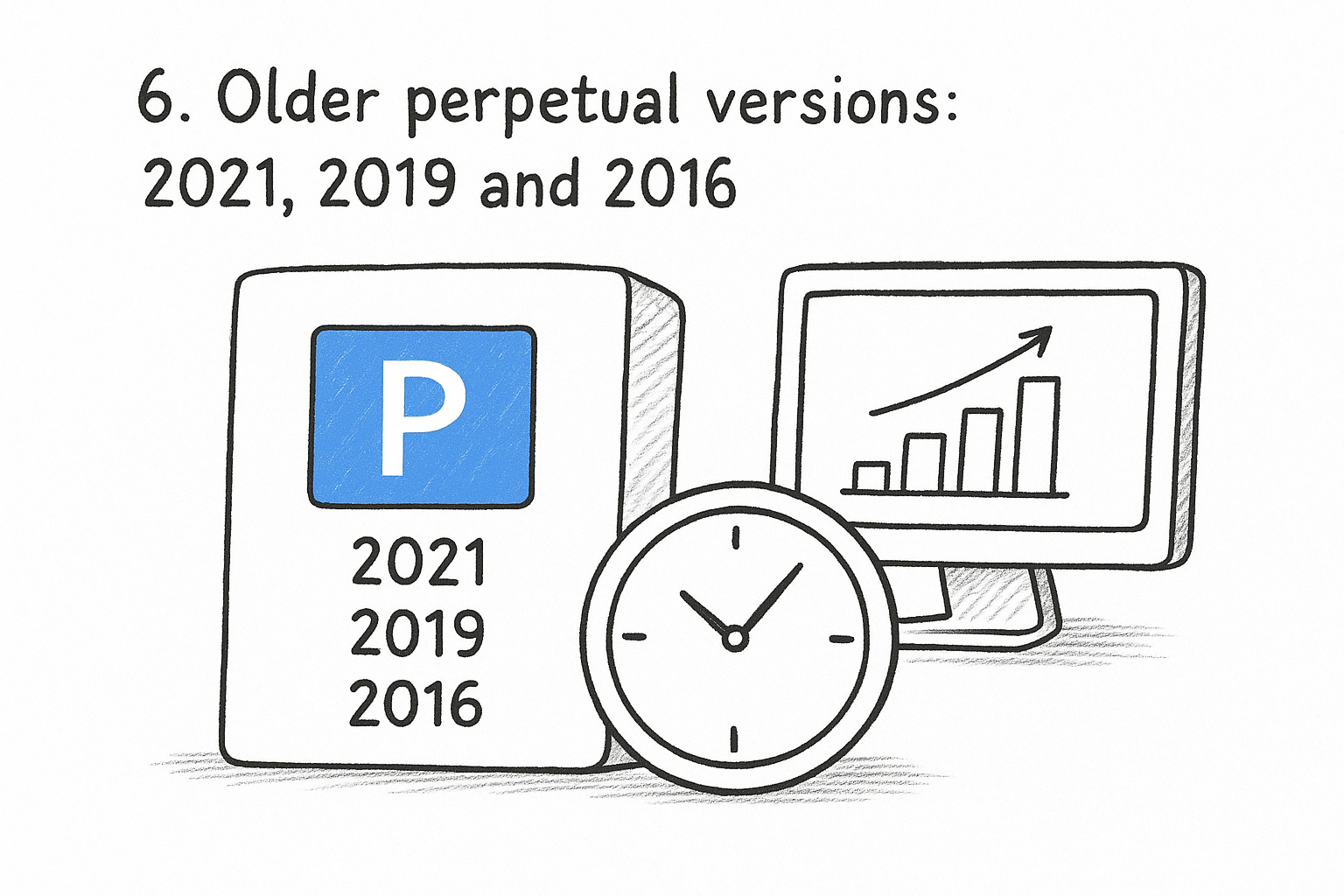
Microsoft ended support for 2016 and 2019 in October 2025, and 2021 reached the same point in October 2026. The software keeps working, but it no longer receives security updates.
Who it suits
Older versions suit people who must open files from clients on the same version, test labs, training use and very tight budgets. They are a poor fit for sensitive client data on an internet-connected machine.
If your work is routine and the budget is small, a 2021 key is the sensible middle ground. For anything long-term, 2024 is safer, as the Project 2021 vs 2024 comparison explains.
What it costs
Codesforever lists these keys at prices far below Microsoft’s list prices:
- Microsoft Project 2021 Pro, multilanguage, lifetime, 1 PC: US$29
- Microsoft Project Professional 2019: US$17
- Microsoft Project Professional 2016: US$35
An older key is a cheap bridge, a long-term plan, because support has already ended for these versions.
7. Microsoft Planner included in Microsoft 365
What you get
Microsoft Planner is the only Project-adjacent tool that comes included with most Microsoft 365 business plans. It gives you visual task boards, Teams integration and basic reporting. The Project desktop app is not part of Microsoft 365, so Project in Office 365 plans does not exist as a bundled feature.
Who it suits
Planner suits small teams, HR, marketing and education groups that need checklists and boards, not schedules with dependencies and resource leveling. If your tasks fit on a board, you may not need a Project license at all.
It stops being enough when you need Gantt charts with dependencies, resource pools or cost tracking. That is when Plan 1 or Plan 3 becomes the upgrade.
What it costs
Planner adds $0 on top of an eligible Microsoft 365 business subscription, and you need the Microsoft 365 plan itself. Upgrading later is simple because Planner and the paid plans share the same ecosystem, so existing tasks carry forward.
Check Planner first. If boards and checklists cover your work, you can skip a Project license entirely.
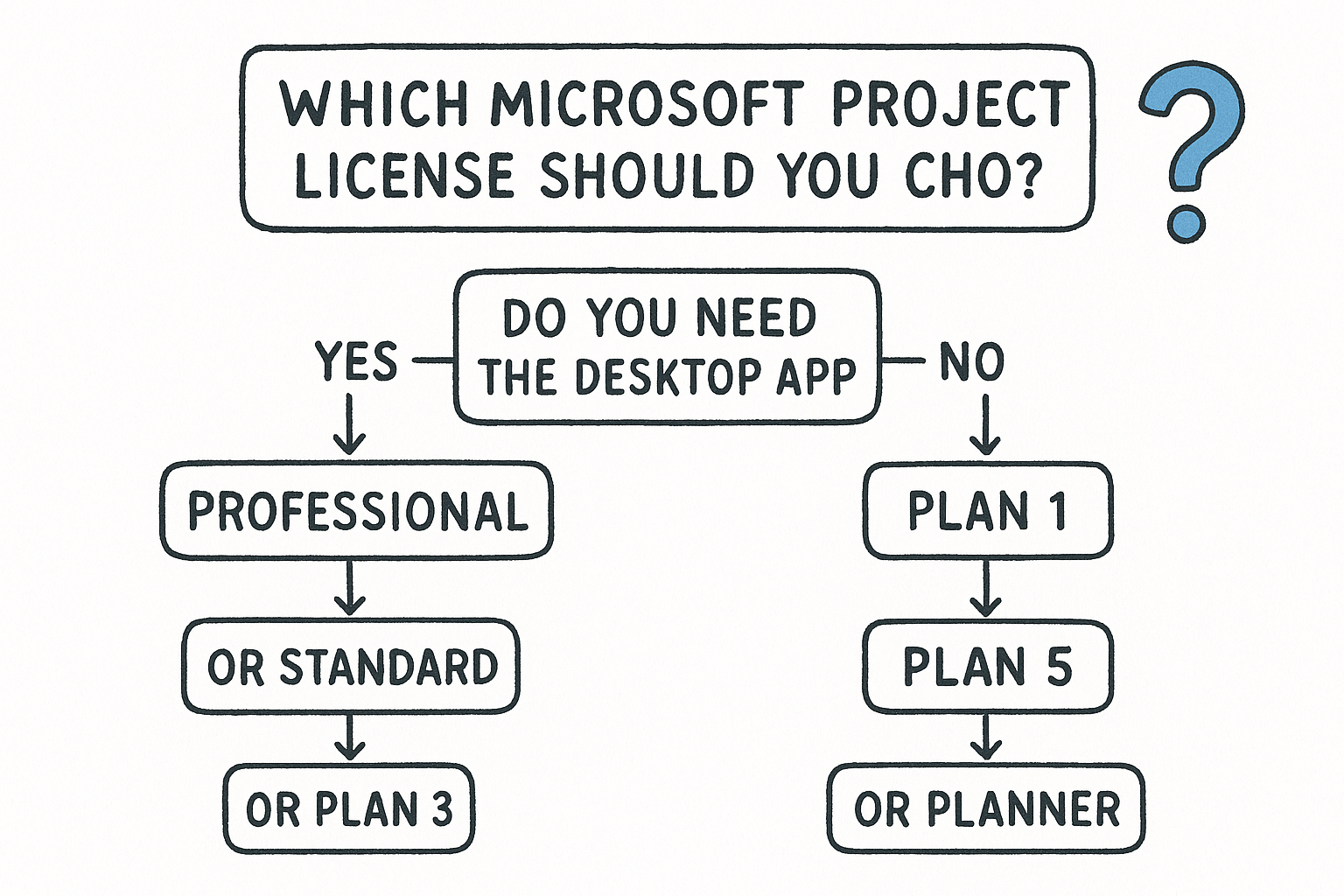
Which Microsoft Project license should you choose
Side-by-side comparison
Start with how many people need the desktop app and whether you can afford to pay monthly. This table puts every option on one line.
| Option | Billing | Price | Desktop app | Best for |
|---|---|---|---|---|
| Professional 2024 | One-time | $1,129.99 list | Yes, 1 PC | Solo PMs, server connection |
| Standard 2024 | One-time | $679.99 list | Yes, 1 PC | Solo scheduling |
| Plan 1 | Per user, annual | $10/month | No | Task tracking |
| Plan 3 | Per user, annual | $30/month | Yes, up to 5 installs | PM teams |
| Plan 5 | Per user, annual | $55/month | Yes | Portfolio management |
| 2016 to 2021 keys | One-time | US$17 to US$35 | Yes, 1 PC | Legacy files, small budgets |
| Planner in Microsoft 365 | Included | $0 extra | No | Basic boards |
A three-year cost for three project managers
Here is how the cost works out for three project managers over 36 months:
| Option | Calculation | Three-year total |
|---|---|---|
| Plan 3 | 3 × $30 × 36 | $3,240 |
| Professional 2024, list | 3 × $1,129.99 | $3,389.97 |
| Standard 2024, list | 3 × $679.99 | $2,039.97 |
| Professional 2024, Codesforever | 3 × €70 | €210 |
At list prices, Plan 3 passes Professional after about 38 months ($1,129.99 ÷ $30 = 37.7) and passes Standard after about 23 months. Plan 3 includes updates and seat flexibility, which a perpetual key does not.
Quick rules
- One person, one Windows PC, no server: Standard or Professional 2024
- Need Project Server or Project Online connection: Professional
- Several project managers who want updates and flexible seats: Plan 3
- A PMO ranking and funding projects: Plan 5
- Task tracking only: Plan 1 or Planner
- Opening old client files on a tight budget: a 2021 key
Buy the cheapest license that has the one feature you cannot work without, and ignore the rest of the feature list.
How to buy and activate a Microsoft Project license
Where to buy
You can buy straight from Microsoft, from resellers or from a codesforever. Buying direct costs the most and gives you list prices. codesforever sell the same kind of perpetual license for much less, so check the seller’s policies before you pay.
Subscriptions come only from Microsoft or its reseller, because they are tied to a tenant and billed per user. Perpetual keys are the ones sold by key stores.
Activation steps
For a perpetual key from Codesforever, the process is short:
- Confirm you have one Windows PC running Windows 10 or later.
- Buy the key. Most Codesforever products arrive by email within 5 minutes, and a few within 24 hours.
- Download and install Project from the link in the email.
- Enter the key to activate, online or over the phone.
- Contact support if activation fails. Free 24/7 support is available by live chat, WhatsApp and email.
What to check before you pay
- Edition and year: Professional versus Standard, and 2024 versus older.
- One device: the key covers a single PC, not a team.
- Compatibility: incompatible hardware or software is not refundable at Codesforever, so confirm your Windows version first.
- Refund terms: Codesforever offers a 100% money-back guarantee, and you must report an issue within 7 days. Troubleshooting steps follow within 24 hours, then a replacement key or a full refund if it cannot be fixed.
- No hidden fees: Codesforever adds no extra fees at checkout.
Verify the edition, the device limit and the refund window before you pay, since a wrong purchase is usually not refundable.
Quick answers before you buy
How much does a Microsoft Project license cost?
Microsoft lists Professional 2024 at $1,129.99 and Standard 2024 at $679.99 as one-time purchases. Subscriptions are $10, $30 and $55 per user per month. Discounted keys at Codesforever start at US$17 for older versions, and Project 2021 Pro is US$29.
Where can I buy a Project license key cheaper?
A key store is the cheapest route for a perpetual license. Buy from one that lists the version, delivers by email and offers a replacement or refund. Project Professional 2024 at Codesforever meets that standard, and you can read buyer reviews first.
Is Microsoft Project included in Microsoft 365?
No. Planner is included with most business plans, but the Project desktop app is a separate purchase.
Pick the license that matches how you work
Most buyers need one of three things. If you work alone and want to pay once, buy Project Professional 2024, or Standard 2024 if you will never touch a server. If a team of project managers needs desktop scheduling and flexible seats, Plan 3 is the right subscription. If your tasks fit on a board, start with Planner and skip Project.
Before paying, run the three-year numbers for your own headcount. The break-even point between a subscription and a perpetual license is what decides most cases.
When you are ready to buy a perpetual license, get a Project Professional 2024 license key at Codesforever, with instant email delivery and support for installation and activation.