What’s New in Office 2024 professional plus

Introduction
Microsoft Office 2024 Professional Plus is designed for organizations and professional users who need a reliable desktop productivity suite with modern features, improved performance, stronger accessibility, and a predictable licensing model.
For commercial and enterprise environments, the official Office LTSC Professional Plus 2024 edition provides classic desktop applications including Word, Excel, PowerPoint, Outlook, OneNote, and Access. Unlike Microsoft 365 Apps, Office LTSC 2024 is a fixed-version product that does not receive new feature releases after launch, although it continues to receive security and quality updates.
This makes Office 2024 Professional Plus particularly relevant for businesses, institutions, regulated environments, and organizations that prefer controlled software deployments rather than continuously changing subscription-based applications.
In this complete guide, we explore the Microsoft Office 2024 Professional Plus features, applications, Excel functions, performance improvements, collaboration capabilities, licensing considerations, installation strategy, pros and cons, and productivity tips.
1. What Is Microsoft Office 2024 Professional Plus?
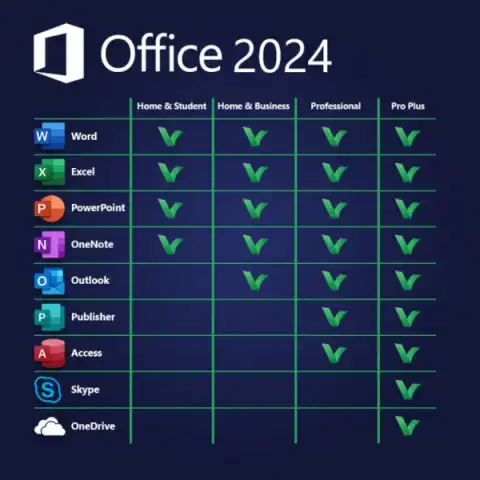
Office LTSC Professional Plus 2024 is Microsoft's commercial volume-licensing productivity suite for Windows. It includes classic desktop versions of:
- Microsoft Word 2024
- Microsoft Excel 2024
- Microsoft PowerPoint 2024
- Microsoft Outlook 2024
- Microsoft OneNote
- Microsoft Access 2024
Microsoft lists Professional Plus 2024 as a volume-licensed suite and confirms that it includes everything in Office LTSC Standard 2024 plus Microsoft Access for PC.
It is important not to confuse Office LTSC Professional Plus 2024 with Microsoft 365. Microsoft 365 is a subscription service that provides ongoing feature updates, cloud services, and additional capabilities, while Office LTSC 2024 is designed for organizations that need a stable, fixed feature set.
Why Choose Office 2024 Professional Plus?
Office 2024 Professional Plus can be a suitable choice when an organization needs:
- A controlled desktop Office environment
- Predictable application behavior
- Volume licensing
- Centralized deployment
- Long-term stability
- Security and quality updates
- Compatibility with established business workflows
- Applications that can operate in environments with restricted cloud connectivity
dvanced Features and Key Benefits of Office 2024 Professional Plus
Office 2024 Professional Plus combines the familiar Microsoft Office desktop environment with modern productivity improvements across Word, Excel, PowerPoint, Outlook, OneNote, and Access. For organizations that require a controlled and stable Office deployment, the Professional Plus edition provides a comprehensive productivity platform with advanced spreadsheet tools, presentation capabilities, database management, accessibility improvements, and enhanced application performance.
1. Advanced Excel Data Analysis
Excel 2024 provides a powerful environment for analyzing business data, financial information, forecasts, inventories, reports, and operational records. New text and array functions make it easier to reshape and manipulate complex datasets without relying entirely on lengthy manual formulas.
2. Dynamic Array and Formula Capabilities
Modern Excel functions such as VSTACK, HSTACK, FILTER, SORT, SORTBY, UNIQUE, TOROW, TOCOL, WRAPROWS, and WRAPCOLS provide flexible ways to reorganize and analyze data dynamically. These functions can significantly simplify advanced spreadsheet workflows.
3. Advanced IMAGE Function
The Excel IMAGE function allows supported images to be inserted directly into worksheets from web-based sources. This can be useful for product catalogs, inventory sheets, visual reports, employee records, and other data-driven documents where images need to accompany structured information.
4. Improved Excel Workbook Performance
Office 2024 improves the speed and stability of Excel workbooks, particularly when users work with multiple workbooks containing independent calculations. This can provide a more responsive experience during complex spreadsheet operations.
5. Professional Business Intelligence Workflows
Excel 2024 can support sophisticated workflows involving financial modeling, forecasting, budgeting, inventory management, project tracking, reporting, and data visualization. Its modern formula capabilities allow users to build more flexible analytical spreadsheets.
6. Professional Presentation Recording
PowerPoint 2024's Recording Studio allows users to capture presentation slides together with voice, video presence, and ink gestures, then export the completed presentation as a video. This expands PowerPoint from a slide-creation tool into a useful platform for recorded training and presentation content.
7. Live Camera Integration with Cameo
With PowerPoint Cameo, users can place their live camera feed directly onto a presentation slide. This can enhance webinars, training sessions, product demonstrations, corporate presentations, and educational content.
8. Enhanced Presentation Accessibility
PowerPoint 2024 supports accessibility improvements including closed captions and subtitles for video and audio content. This can make presentations easier to follow for audiences with different accessibility requirements.
9. Advanced Document Recovery in Word
Word 2024 includes improved document recovery capabilities. Better session recovery can help users return to documents after unexpected application closures, reducing disruption to important writing and documentation workflows.
10. Modern Office Fluent Design
Office 2024 introduces a refreshed interface based on Microsoft's Fluent Design principles. The updated visual system creates greater consistency between Word, Excel, PowerPoint, Outlook, and other Office applications while maintaining familiar menus and ribbons.
11. Enhanced Accessibility Tools
Accessibility improvements across Office 2024 help users create and interact with documents, spreadsheets, presentations, and emails more effectively. The improvements include accessibility checking, keyboard navigation, screen-reader support, and alternative-text capabilities.
12. OpenDocument Format 1.4 Support
Office 2024 supports OpenDocument Format 1.4, improving interoperability for users who work with ODF-based documents and workflows. Microsoft identifies ODF 1.4 support as one of the key changes in Office 2024.
13. Advanced Database Management with Access
Office LTSC Professional Plus 2024 includes Microsoft Access for Windows, providing database-management capabilities for structured business information such as customer records, inventory, orders, employee information, internal applications, and reporting systems.
14. Centralized Business Communication with Outlook
Outlook 2024 provides an integrated workspace for managing email, calendars, contacts, tasks, meetings, and business communication. This allows organizations to manage everyday communication and scheduling through a familiar desktop application.
15. Digital Knowledge Management with OneNote
OneNote provides a flexible workspace for organizing meeting notes, research, project information, training materials, checklists, business ideas, and other information. Users can combine text, drawings, images, tables, and additional content within digital notebooks.
16. VBA Support for Business Automation
Office 2024 and Office LTSC 2024 continue to support Visual Basic for Applications (VBA). This allows organizations with established macro-based workflows to continue using VBA for supported Office automation scenarios.
17. Expanded Office Add-In Capabilities
Office LTSC 2024 includes additional Office Add-in JavaScript APIs and requirement sets across applications such as Excel, Outlook, PowerPoint, and Word. This provides developers with additional options for extending Office applications through supported add-in technologies.
18. Controlled and Stable Deployment
Office LTSC Professional Plus 2024 is designed for organizations that require a fixed feature set and controlled software environment rather than continuously changing desktop applications. It is distributed through Microsoft's volume-licensing model and is intended for commercial and organizational deployments.
19. Long-Term Stability for Established Workflows
Because Office LTSC 2024 does not receive new feature releases after launch, organizations can maintain a more predictable application environment. Microsoft continues to provide security and quality updates throughout its supported lifecycle.
20. Comprehensive Professional Productivity Suite
Office LTSC Professional Plus 2024 brings together Word, Excel, PowerPoint, Outlook, OneNote, and Access in a single professional productivity suite for Windows. This combination covers document creation, advanced spreadsheets, presentations, communication, note-taking, and database management.
2. What's New in Microsoft Office 2024 Professional Plus?
Office 2024 introduces several improvements across its core applications. Microsoft highlights a refreshed Office design, improved accessibility, new Excel text and array functions, faster workbooks, better Word session recovery, and new PowerPoint presentation capabilities.
The most important Office 2024 new features include:
Modern Office Interface
Office 2024 introduces a more consistent visual experience based on Microsoft's Fluent Design principles. The updated interface provides a cleaner appearance across Word, Excel, PowerPoint, Outlook, and other applications.
Improved Accessibility
Microsoft has expanded accessibility capabilities to help users create and interact with documents, spreadsheets, presentations, and emails more effectively.
New Excel Functions
Excel 2024 introduces 14 new text and array functions designed to make it easier to manipulate, reshape, combine, and analyze data.
Dynamic Charts
Excel 2024 supports charts that can work with dynamic arrays, allowing visualizations to update as the underlying data changes.
Excel IMAGE Function
The new IMAGE function allows supported images to be inserted into Excel worksheets from web-based sources.
Faster Excel Workbooks
Microsoft has improved the performance and stability of Excel workbooks, particularly when working with multiple workbooks and independent calculations.
PowerPoint Cameo
PowerPoint 2024 lets users insert a live camera feed directly onto a presentation slide using Cameo.
PowerPoint Recording Studio
Recording Studio allows users to record presentations with voice, video presence, and ink gestures and export the recording as a video.
3. Microsoft Office 2024 Professional Plus Applications
One of the biggest advantages of the Professional Plus edition is its collection of familiar desktop productivity applications.
Word 2024
Microsoft Word remains one of the world's most widely used document-processing applications.
Office 2024 brings improvements such as:
- Modern comments
- Better document recovery
- Improved accessibility
- ODF 1.4 support
- Updated visual design
- Improved document workflows
Word 2024 for Business
Businesses can use Word for:
- Reports
- Contracts
- Proposals
- Business letters
- Documentation
- Research papers
- Policies
- Training materials
4. Excel 2024: Advanced Spreadsheet & Data Analysis
Excel 2024 is one of the most important applications in the Office 2024 Professional Plus suite.
It provides tools for:
- Data analysis
- Financial modeling
- Business reporting
- Budget management
- Forecasting
- Data visualization
- Inventory management
- Project tracking
- Business intelligence workflows
Microsoft has added new text and array functions, dynamic charts, the IMAGE function, and performance improvements in Excel 2024.
Excel 2024 New Text and Array Functions
Some useful functions include:
TEXTSPLIT
=TEXTSPLIT(A2,",")
Splits text into multiple cells using a specified delimiter.
VSTACK
=VSTACK(A2:A10,C2:C10)
Combines multiple ranges vertically into a single array.
HSTACK
=HSTACK(A2:A10,C2:C10)
Combines ranges horizontally.
TOROW
=TOROW(A2:C10)
Converts a range into a single row.
TOCOL
=TOCOL(A2:C10)
Converts a range into a single column.
WRAPROWS
=WRAPROWS(A2:A12,3)
Wraps a list into rows containing three values.
WRAPCOLS
=WRAPCOLS(A2:A12,3)
Wraps a list into columns containing three values.
FILTER
=FILTER(A2:D100,D2:D100="Completed")
Returns records that match a specified condition.
SORT
=SORT(A2:D100,2,1)
Sorts a range according to the selected column.
SORTBY
=SORTBY(A2:D100,D2:D100,-1)
Sorts data based on another range.
UNIQUE
=UNIQUE(A2:A100)
Returns unique values from a range.
LET
=LET(total,SUM(B2:B100),total*10%)
Creates named calculations within a formula, making complex formulas easier to manage.
XLOOKUP
=XLOOKUP(E2,A2:A100,B2:B100,"Not Found")
Searches for a value and returns the corresponding result.
IMAGE
=IMAGE("https://example.com/image.jpg")Inserts an image into a worksheet when the image source and format are supported.
Microsoft specifically identifies the new text and array functions and IMAGE functionality among the major Excel 2024 improvements.
5. PowerPoint 2024 for Professional Presentations
PowerPoint 2024 provides updated presentation capabilities for business meetings, training, education, marketing, and professional communication.
Key PowerPoint 2024 Features
Cameo
Cameo lets you place your live camera feed directly onto a PowerPoint slide.
This can be useful for:
- Online presentations
- Training
- Webinars
- Corporate meetings
- Product demonstrations
- Educational presentations
Recording Studio
Recording Studio can capture:
- Voice
- Video
- Ink gestures
- Presentation slides
The recording can then be exported as a video.
Closed Captions
PowerPoint 2024 also provides improved accessibility options, including captions for video and audio content.
Microsoft confirms these presentation improvements for PowerPoint 2024 and PowerPoint LTSC 2024.
6. Outlook 2024 for Email & Calendar Management
Outlook 2024 provides tools for managing:
- Calendars
- Contacts
- Tasks
- Meetings
- Business communication
For organizations, Outlook can serve as a central application for daily communication and scheduling.
However, the exact cloud-based functionality available depends on the Office edition, licensing model, account configuration, and connected Microsoft services.
7. Access 2024 for Database Management
Microsoft Access 2024 is included with Office LTSC Professional Plus 2024 for Windows.
Access can be used to build and manage databases for:
- Customer records
- Inventory
- Orders
- Employee information
- Business processes
- Reporting
- Internal applications
Access is particularly useful for organizations that maintain structured desktop database workflows.
8. OneNote 2024 for Digital Note-Taking
OneNote provides a flexible digital workspace for organizing:
- Meeting notes
- Research
- Project information
- Business ideas
- Training materials
- Checklists
- Personal notes
Users can combine text, drawings, images, tables, and other content in digital notebooks.
9. Modern Office User Interface
Office 2024 introduces a refreshed visual experience based on Microsoft's Fluent Design principles.
The updated design focuses on:
- Consistency between Office applications
- Cleaner navigation
- Modern visual elements
- Improved accessibility
- Familiar menus and ribbons
- Better integration with modern Windows environments
Microsoft describes the new Office theme as a more consistent experience across Office applications.
10. Office 2024 Performance Improvements
Performance is an important consideration when choosing business productivity software.
Office 2024 includes improvements designed to provide a more stable and responsive experience.
Key areas include:
- Faster Excel workbooks
- Improved application stability
- Better document recovery
- Improved handling of large datasets
- More efficient spreadsheet calculations
- Updated accessibility features
Microsoft specifically notes improvements to Excel workbook speed and stability in Office 2024.
11. Accessibility Improvements in Office 2024
Microsoft continues to improve Office accessibility so that documents, presentations, spreadsheets, and emails can be used by a wider range of users.
Office 2024 includes improvements related to:
- Screen readers
- Keyboard navigation
- Accessibility checking
- Presentation accessibility
- Document accessibility
- Alternative text and related content
Accessibility improvements are one of the documented changes in Office 2024 and Office LTSC 2024.
12. Office 2024 Professional Plus Licensing
Licensing is an important part of any Microsoft Office 2024 Professional Plus purchase.
Office LTSC Professional Plus 2024 is intended for commercial customers through volume licensing. Microsoft lists volume activation and centralized administration among the capabilities associated with the volume-licensed Office LTSC editions.
Organizations should verify:
- License edition
- Number of licensed devices
- Volume licensing agreement
- Deployment requirements
- Activation method
- User/device eligibility
- Microsoft licensing terms
Avoid Unauthorized Office Licenses
Extremely cheap product keys from unknown sellers can create licensing and security risks.
Before purchasing Office 2024 Professional Plus, verify that:
- The edition matches your requirements.
- The seller is legitimate.
- The license is authorized for your intended use.
- The activation method is supported by Microsoft.
- The license terms allow your organization's deployment model.
13. Office 2024 Professional Plus Deployment
Organizations deploying Office 2024 across multiple computers should plan the deployment before installation.
Microsoft provides enterprise deployment tools and documentation for Office LTSC environments.
A typical deployment strategy includes:
Step 1: Assess Your Environment
Check:
- Existing Office versions
- Windows versions
- Hardware
- Add-ins
- Business applications
- User requirements
- Licensing agreements
Step 2: Select the Correct Architecture
For many modern business environments, 64-bit Office is appropriate, particularly when users work with large datasets or memory-intensive files.
However, compatibility with existing add-ins and applications should be evaluated before deployment.
Step 3: Configure Deployment
Enterprise administrators can use Microsoft's deployment technologies to configure Office LTSC 2024 installations.
Step 4: Test Before Rollout
Test:
- Word documents
- Excel workbooks
- PowerPoint presentations
- Outlook profiles
- Access databases
- Third-party add-ins
- Macros
- Printers
- Business applications
Step 5: Deploy Gradually
A staged deployment can help identify compatibility issues before Office 2024 is installed across the entire organization.
14. Office 2024 Professional Plus System Requirements
For Office LTSC Professional Plus 2024 on Windows, Microsoft lists requirements including a 1.1 GHz or faster two-core processor, 4 GB RAM, 4 GB available disk space, and a minimum 1280 × 768 display resolution. Supported Windows versions include Windows 11 and certain supported Windows 10 LTSC and Windows Server editions.
Before installing Office 2024, organizations should always verify the current Microsoft requirements because supported operating systems and deployment policies can change.
15. Office 2024 Updates and Security
Office LTSC 2024 does not receive new features after release, but it continues to receive security and quality updates.
Microsoft explains that Office LTSC 2024 receives cumulative updates through the Office Content Delivery Network, helping organizations maintain security and stability without introducing new feature releases.
This model is particularly useful for organizations that want:
- Predictable software behavior
- Controlled change management
- Security maintenance
- Stable business applications
- Reduced disruption from frequent feature changes
16. Useful Excel 2024 Productivity Formulas
Beyond the new Excel 2024 functions, many classic formulas remain essential for everyday business analysis.
Calculate Total Sales
=SUM(B2:B100)
Adds values within the selected range.
Calculate Average Performance
=AVERAGE(C2:C100)
Calculates the average value.
Find the Highest Value
=MAX(D2:D100)
Returns the largest number in a range.
Find the Lowest Value
=MIN(D2:D100)
Returns the smallest number.
Count Completed Projects
=COUNTIF(E2:E100,"Completed")
Counts cells containing the specified status.
Calculate Completion Percentage
=COUNTIF(E2:E100,"Completed")/COUNTA(E2:E100)
Calculates the percentage of completed entries.
Create a Conditional Status
=IF(D2>=80,"High","Normal")
Returns a result based on a condition.
Combine Employee Information
=TEXTJOIN(" - ",TRUE,A2,B2,C2)Combines information from multiple cells into one text string.
17. Pros and Cons of Office 2024 Professional Plus
Advantages
One-Time Licensing Model
Office LTSC 2024 is designed as a fixed-version commercial product rather than a continuously updated subscription service.
Familiar Desktop Applications
Users receive established applications such as Word, Excel, PowerPoint, Outlook, OneNote, and Access.
Predictable Environment
Organizations can maintain a controlled Office environment without introducing new features after the initial release.
Improved Excel
The new Excel functions, dynamic charts, IMAGE function, and performance improvements make Office 2024 valuable for data-heavy workflows.
Better Accessibility
Improved accessibility tools help organizations create more inclusive digital documents.
Enterprise Deployment
Volume licensing and deployment capabilities make the edition suitable for managed business environments.
Limitations
No Ongoing Feature Releases
Office LTSC 2024 does not receive new features after launch.
Limited Cloud Services Compared With Microsoft 365
Organizations that require extensive cloud storage, web applications, and continuously updated cloud capabilities may prefer Microsoft 365.
Commercial Licensing
Office LTSC Professional Plus 2024 is not simply a consumer retail edition. Organizations should purchase and deploy it according to Microsoft's commercial licensing terms.
Different Licensing Requirements
Activation and deployment can differ from consumer Office products, so organizations should use the correct Microsoft licensing and deployment documentation.
18. Who Should Use Office 2024 Professional Plus?
Office 2024 Professional Plus can be a strong option for:
- Small and medium-sized businesses
- Large enterprises
- Government organizations
- Educational institutions
- Regulated industries
- Organizations with controlled IT environments
- Businesses requiring predictable software versions
- Companies maintaining specialized Office workflows
It may be less suitable for organizations that want the newest Office features, extensive cloud services, and continuous AI-powered improvements. Microsoft recommends Microsoft 365 for users who want ongoing feature updates and cloud-based functionality.
19. How to Get the Most From Office 2024 Professional Plus
Step 1: Review Your Current Office Environment
Identify:
- Existing Office applications
- User requirements
- Excel workflows
- Outlook dependencies
- Access databases
- Third-party add-ins
- Macros
- Cloud requirements
Step 2: Verify Licensing
Confirm that your organization has the correct Office LTSC Professional Plus 2024 volume license and deployment rights.
Step 3: Test Compatibility
Test important documents, databases, add-ins, macros, and business applications before organization-wide deployment.
Step 4: Deploy Using Microsoft's Recommended Tools
Use official Microsoft deployment and configuration tools rather than unofficial installers or modified packages.
Step 5: Keep Office Updated
Although Office LTSC does not receive new features, security and quality updates remain important.
Step 6: Train Users
Introduce employees to:
- Excel 2024 functions
- PowerPoint Cameo
- Recording Studio
- Accessibility tools
- Updated Office interface
- Document recovery features
20. Is Office 2024 Professional Plus Worth It?
For organizations that prioritize stability, predictable deployment, desktop applications, and controlled feature changes, Office LTSC Professional Plus 2024 can be a practical productivity suite.
Its strongest improvements include Excel's new text and array functions, dynamic charts, IMAGE functionality, improved workbook performance, updated accessibility tools, PowerPoint Cameo, Recording Studio, and the modernized Office interface.
However, businesses should carefully compare Office LTSC 2024 with Microsoft 365 before purchasing. Microsoft 365 provides continuous feature updates, cloud services, and additional capabilities that are not part of the fixed Office LTSC experience.
Conclusion
Microsoft Office 2024 Professional Plus, officially offered as Office LTSC Professional Plus 2024 for commercial volume licensing, provides a stable and professional desktop productivity environment for organizations that need predictable software deployment.
The release brings meaningful improvements to Excel, PowerPoint, Word, accessibility, performance, and the overall Office interface. Excel 2024 is particularly noteworthy because of its new text and array functions, dynamic charts, IMAGE functionality, and improved workbook performance. PowerPoint also gains useful presentation tools such as Cameo and Recording Studio.
The most important consideration is choosing the correct licensing model. Organizations that need a fixed Office environment may find Office LTSC Professional Plus 2024 appropriate, while businesses and users who want continuous feature updates, cloud services, and evolving AI capabilities may be better served by Microsoft 365.
For the best experience, always obtain Office through legitimate Microsoft licensing channels, verify system compatibility, use official deployment methods, and keep security and quality updates enabled.
Frequently Asked Questions (FAQs)
Advanced AI tools, streamlined UI, session recovery, new functions in Excel, live video in PowerPoint, better accessibility, and real-time collaboration
No, it’s a one-time purchase and perpetual license—ideal for users who dislike ongoing fees.
Yes, full compatibility with both operating systems and smooth performance with Windows 11 UI enhancements.
Office 2024 offers locked-in features with perpetual ownership. Microsoft 365 is a subscription that adds cloud tools, more frequent upgrades, and extra integrations.
Use only validated licenses from trusted vendors. For step-by-step activation, troubleshooting, and expert support
Yes—better commenting, co-authoring, meeting scheduling, and document sharing integrations support distributed work
Conclusion: Empower Your Workday with Office 2024
Office 2024 Professional Plus isn’t just an upgrade—it’s a reinvention of productivity, security, and seamless collaboration. With powerful, user-driven features, a crisp interface, and integrated AI, this edition is built to unlock your creative and professional best. From solo entrepreneurs to multinational teams, every user gains the tools needed to thrive in the modern age.