

AutoCAD Plant 3D 2019 Ultimate Guide | Professional Plant Design Software for Engineers


Introduction
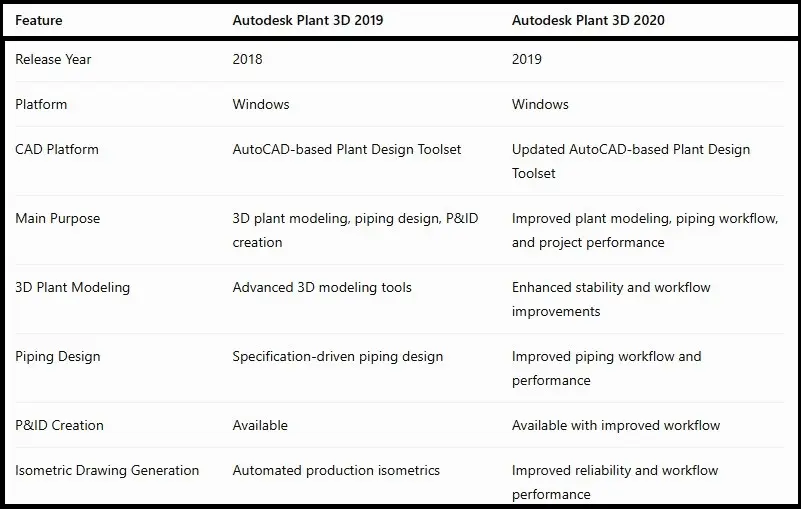
Autodesk Plant 3D 2019 is a professional plant design and engineering software solution developed for designers, engineers, and industries involved in process plant projects. It is built on the AutoCAD platform and provides specialized tools for creating intelligent 3D plant models, piping systems, equipment layouts, P&ID diagrams, and detailed engineering documentation. Autodesk Plant 3D 2019 was released with improved workflows, better project management features, and enhanced design capabilities to help engineering teams create accurate plant designs faster.
For professionals working in industries such as oil and gas, chemical processing, power generation, manufacturing, and industrial engineering, Autodesk Plant 3D 2019 provides a complete environment for designing and documenting complex plant systems. The software allows users to create specification-driven piping designs, generate isometric drawings, manage engineering data, and collaborate efficiently with project teams.
What Is Autodesk Plant 3D 2019?
Autodesk Plant 3D 2019 is an advanced CAD application designed specifically for plant designers and engineering professionals. It combines traditional AutoCAD drafting capabilities with specialized plant engineering tools.
Unlike standard AutoCAD, Plant 3D focuses on industrial plant design workflows. It provides tools for:
- 3D piping design
- Equipment modeling
- Structural layouts
- Piping and Instrumentation Diagrams (P&ID)
- Isometric drawing generation
- Orthographic documentation
- Engineering data management
The software helps engineering teams create intelligent plant models where components contain important engineering information such as specifications, sizes, materials, and equipment data.
Autodesk Plant 3D 2019 is commonly used by:
- Plant engineers
- Piping designers
- Mechanical engineers
- Process engineers
- Industrial consultants
- Manufacturing companies
The software improves project accuracy by reducing manual drafting work and providing automated documentation tools.
Main Features of Autodesk Plant 3D 2019
1. Advanced 3D Plant Modeling
One of the biggest advantages of Autodesk Plant 3D 2019 is its ability to create detailed 3D plant models. Engineers can design complete industrial facilities including pipes, equipment, structures, and components.
The intelligent modeling environment allows users to:
- Create accurate piping layouts
- Add equipment models
- Modify plant components quickly
- Maintain design consistency
- Manage large engineering projects
The 3D model becomes a central source of information for creating drawings and documentation.
2. Specification-Driven Piping Design
Autodesk Plant 3D 2019 uses specification-driven design, allowing engineers to create piping systems based on predefined standards.
Users can work with:
- Pipe specifications
- Valve catalogs
- Fittings
- Flanges
- Instrument components
- Custom parts
This feature helps maintain industry standards and reduces design mistakes.
3. P&ID Integration
Plant 3D 2019 includes tools for creating and managing Piping and Instrumentation Diagrams.
P&ID features allow users to:
- Create process diagrams
- Add equipment symbols
- Connect pipelines
- Manage engineering information
- Validate project data
The connection between P&ID and 3D models improves project coordination.
4. Automatic Isometric Drawing Creation
Generating piping documentation manually can take significant time. Autodesk Plant 3D 2019 simplifies this process by automatically creating isometric drawings from 3D models.
Benefits include:
- Faster documentation
- Accurate dimensions
- Automatic annotations
- Improved project delivery
Engineers can customize isometric styles according to project requirements.
5. Orthographic Drawing Generation
The software can generate orthographic views directly from 3D models.
Users can create:
- Plan views
- Elevation views
- Section drawings
- Equipment layouts
This reduces repetitive drafting work.
6. Engineering Data Management
Plant 3D 2019 includes tools for managing engineering information.
The Data Manager helps users:
- Review component information
- Edit properties
- Track project data
- Generate reports
- Manage documentation
This improves collaboration between engineering teams.
7. Project Collaboration Tools
Large engineering projects require multiple users working together. Autodesk Plant 3D 2019 provides project management features that help teams organize drawings, models, and data.
The project environment supports:
- Shared projects
- Multiple users
- Drawing management
Data consistency
Autodesk Plant 3D 2019 License Types
Before activating the software, it is important to understand Autodesk license options.
1. Autodesk Account Sign-In License
Modern Autodesk subscriptions usually activate through Autodesk Account.
Users simply:
- Install the software
- Open Plant 3D 2019
- Sign in with Autodesk credentials
- Verify assigned license
Autodesk states that many single-user subscriptions activate automatically after signing in with the assigned Autodesk ID.
2. Serial Number License
Some older Autodesk licenses use:
- Serial number
- Product key
Users enter valid license information during activation.
The serial number can typically be found inside the Autodesk Account product details section.
3. Network License
Organizations with multiple users may use network licensing.
This method requires:
- License server setup
- Network license information
- Administrator configuration
Network licensing is commonly used by engineering companies and educational institutions.
How to Activate Autodesk Plant 3D 2019
Method 1: Activate Using Autodesk Account
This is the recommended activation method for subscription users.
Steps:
- Install Autodesk Plant 3D 2019.
- Start the software.
- Select the sign-in option.
- Enter your Autodesk Account email.
- Enter your password.
- Autodesk verifies your license.
- The product becomes activated.
Make sure your Autodesk account has an assigned Plant 3D license before signing in.
Method 2: Activate Using Serial Number
For eligible standalone licenses:
- Launch Autodesk Plant 3D 2019.
- Select activation option.
- Choose serial number activation.
- Enter your valid serial number.
- Enter product information.
- Complete verification.
- Restart the application.
Only use valid license information provided with your Autodesk purchase.
Method 3: Network License Activation
For company environments:
- Install Plant 3D 2019 on client computers.
- Configure Autodesk Network License Manager.
- Enter the license server details.
- Launch the software.
- The application connects to the network license server.
Common Autodesk Plant 3D 2019 Activation Errors and Fixes
Error 1: Invalid Serial Number or Product Key
Possible Causes:
- Incorrect license details
- Typing mistakes
- Wrong Autodesk account
Fix:
- Check your Autodesk Account.
- Verify the license information.
- Re-enter details carefully.
- Contact Autodesk support if the issue continues.
Error 2: Sign-In Option Not Working
Causes:
- Internet connection problems
- Autodesk service interruption
- Incorrect account
Fix:
- Check internet connectivity.
- Restart Autodesk Desktop Licensing Service.
- Update Autodesk components.
- Confirm account permissions.
Error 3: License Manager Error
Causes:
- Corrupted licensing files
- Installation problems
- System changes
Fix:
- Restart the computer.
- Repair Autodesk installation.
- Update Autodesk licensing components.
- Reinstall licensing services if required.
Error 4: Activation Failed After Installation
Causes:
- Firewall restrictions
- Antivirus blocking communication
- Incomplete installation
Fix:
- Allow Autodesk services through firewall.
- Run Autodesk installer repair.
- Install available updates.
- Restart the system.
Error 5: Trial Period Expired
Causes:
- Trial period completed
- Previous license data stored
Fix:
- Sign in with a valid licensed account.
- Verify subscription status.
- Remove old licensing information using official Autodesk troubleshooting methods.
Error 6: Software Crashes After Activation
Causes:
- Outdated graphics drivers
- Unsupported hardware
- Corrupted installation
Fix:
- Update graphics drivers.
- Install Autodesk updates.
- Check system requirements.
Repair the installation.
Conclusion
Autodesk Plant 3D 2019 remains a powerful solution for engineers and designers who need professional plant design and piping documentation tools. With advanced 3D modeling, specification-driven piping, P&ID integration, automated isometric generation, and engineering data management features, it provides a complete environment for industrial plant projects.
Activating Autodesk Plant 3D 2019 is simple when using a valid Autodesk license. Users can activate the software through Autodesk Account sign-in, serial number activation, or network licensing depending on their license type. Understanding common activation errors and their solutions helps maintain a smooth workflow and prevents unnecessary downtime.
Whether you are designing process plants, managing piping systems, or creating engineering documentation, Autodesk Plant 3D 2019 provides reliable tools to improve productivity, accuracy, and collaboration.
Frequently Asked Questions (FAQs)
You can activate Autodesk Plant 3D 2019 by signing in with an assigned Autodesk Account, entering valid license details, or connecting to a network license server.
Yes, it is still useful for users who need professional plant modeling and piping design workflows.
No. A valid Autodesk license is required for full product activation.
AutoCAD provides general drafting tools, while Plant 3D includes specialized plant engineering features.
Yes, Plant 3D 2019 includes P&ID design and integration features.
Common reasons include incorrect account details, network problems, damaged licensing components, or installation issues.