

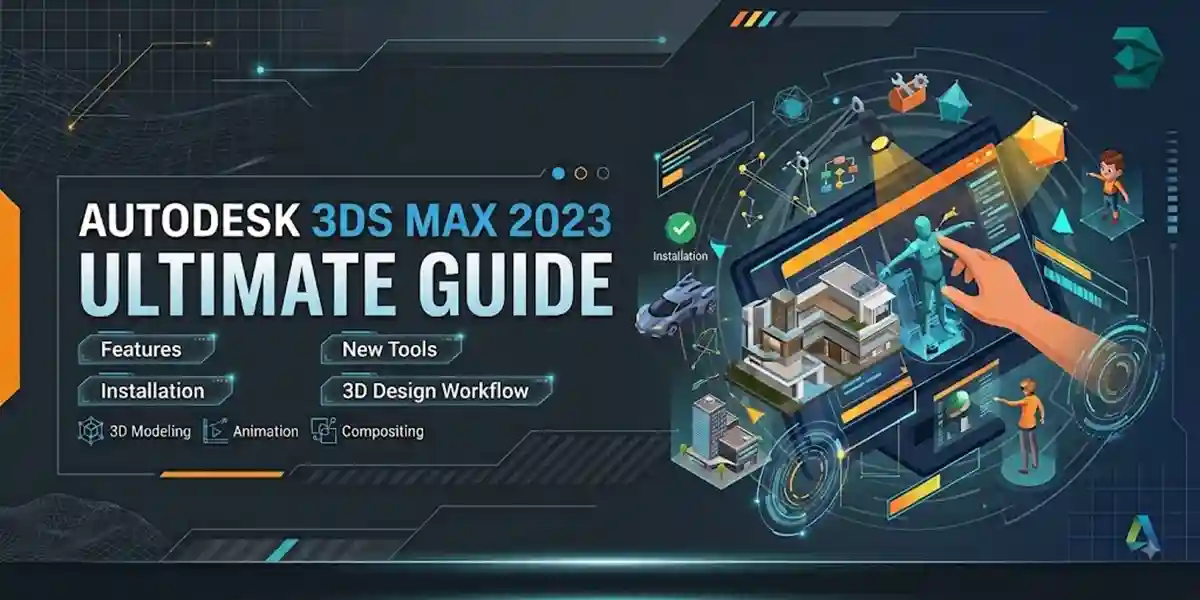
Autodesk 3ds Max 2023 Ultimate Guide | Features, New Tools, Installation & 3D Design Workflow

Introduction
The demand for realistic 3D visualization, animation, game assets, and digital content creation has increased rapidly in recent years. Professionals require powerful software that can transform creative ideas into highly detailed and realistic digital experiences. Autodesk 3ds Max 2023 is one of the leading professional 3D modeling, animation, and rendering applications designed for architects, game developers, designers, engineers, and visual effects artists.
Autodesk 3ds Max 2023 provides a complete environment for creating:
- Advanced 3D models
- Architectural visualizations
- Product designs
- Character animations
- Game assets
- Cinematic effects
- Realistic environments
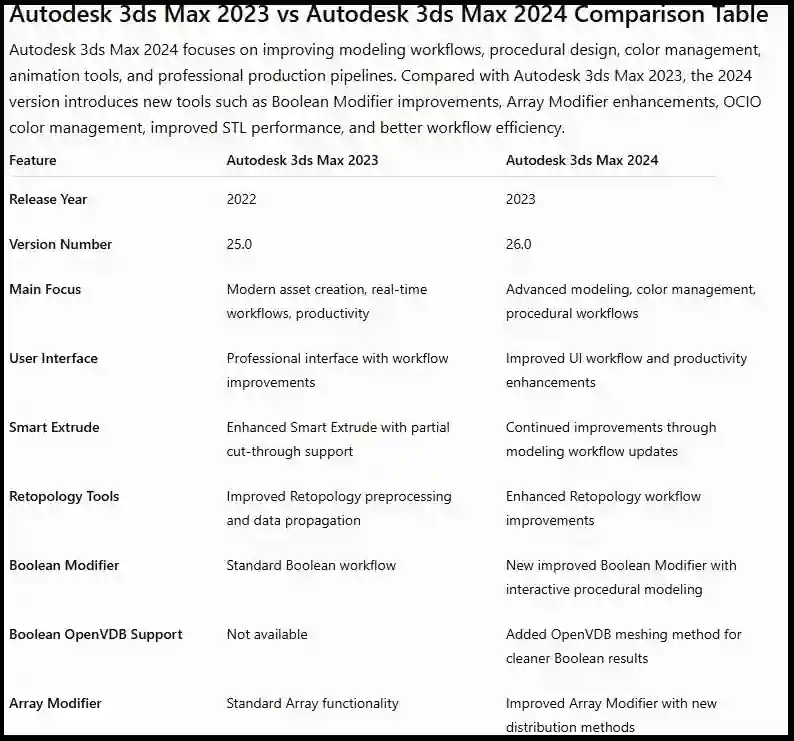
The 2023 version introduces several improvements focused on productivity, modern asset creation, and real-time workflows. Features such as improved Retopology processing, enhanced Smart Extrude, Snap Working Pivot, glTF export support, faster scene saving, improved Autobackup tools, and updated Arnold Renderer integration make Autodesk 3ds Max 2023 more efficient for professional workflows.
Whether you are an architect creating realistic building presentations, a game developer designing environments, or an animator producing cinematic scenes, Autodesk 3ds Max 2023 provides powerful tools to complete projects with accuracy and creativity.
What is Autodesk 3ds Max 2023?
Autodesk 3ds Max 2023 is professional 3D modeling, animation, and rendering software developed by Autodesk.
It is widely used in industries such as:
- Architecture
- Gaming
- Film production
- Product visualization
- Advertising
- Interior design
- Virtual reality
The software provides a complete set of tools for:
- Polygon modeling
- Surface creation
- Material design
- Lighting
- Rendering
- Animation
- Simulation
- Automation
Professionals use Autodesk 3ds Max 2023 to create realistic digital environments and high-quality visual content.
Why Choose Autodesk 3ds Max 2023?
Autodesk 3ds Max 2023 improves the creative workflow by combining powerful modeling tools with better productivity features.
1. Improved Asset Creation Workflow
Modern 3D projects require optimized models that work efficiently in games, animation, and visualization.
3ds Max 2023 improves asset creation through:
- Better Retopology workflow
- Improved mesh processing
- Faster scene handling
- Enhanced modeling tools
These improvements help artists manage complex models more effectively.
2. Professional Modeling Capabilities
Autodesk 3ds Max 2023 includes advanced modeling tools for creating detailed objects.
Users can create:
- Buildings
- Vehicles
- Characters
- Furniture
- Mechanical designs
- Game environments
The software supports both beginner-friendly modeling and advanced professional workflows.
3. Advanced Rendering Solutions
3ds Max 2023 includes Arnold Renderer integration for creating realistic images and animations.
Arnold provides:
- Realistic lighting
- Accurate shadows
- Advanced materials
- Professional rendering quality
It is commonly used in:
- Movies
- Advertisements
- Architecture visualization
- Product rendering
Autodesk 3ds Max 2023 includes MAXtoA updates with performance improvements and production enhancements.
4. Better Real-Time Workflow
Modern designers often require assets that can be used across multiple platforms.
Autodesk 3ds Max 2023 improves real-time workflows through:
- glTF export support
- Improved material compatibility
- Optimized asset preparation
This helps users prepare content for:
- Game engines
- Web-based 3D experiences
- Interactive applications
Autodesk 3ds Max 2023 Features
1. Enhanced Retopology Tools
One of the biggest improvements in Autodesk 3ds Max 2023 is the enhanced Retopology workflow.
Retopology helps convert complex high-polygon models into optimized geometry.
Benefits:
- Cleaner topology
- Reduced polygon count
- Better animation performance
- Improved game asset preparation
The improved preprocessing system helps handle larger amounts of mesh data with less preparation.
2. Retopology Data Propagation
Autodesk 3ds Max 2023 allows users to view input and output mesh results during retopology operations.
Advantages:
- Better control over final geometry
- Easier comparison
- Improved workflow accuracy
This feature is useful for:
- Character artists
- Game developers
- Asset creators
3. Improved Smart Extrude
Smart Extrude is an important modeling feature in Autodesk 3ds Max.
In 3ds Max 2023, Smart Extrude supports improved partial cut-through operations.
Benefits:
- Faster hard-surface modeling
- Easier object editing
- Reduced manual cleanup
Useful for creating:
- Mechanical parts
- Product models
- Game assets
4. Snap Working Pivot
Working Pivot improvements allow artists to adjust object pivots more efficiently.
Benefits:
- Better object positioning
- Faster modeling operations
- Improved animation workflow
Artists can easily modify pivot placement according to project requirements.
5. glTF Material and Export Support
Autodesk 3ds Max 2023 introduces improved glTF workflow support.
Users can export files into:
- .gltf
- .glb
formats.
Benefits:
- Better web compatibility
- Easier sharing
- Improved real-time workflows
6. Autodesk Standard Surface Compatible Materials
The Physical Material system receives improvements with Autodesk Standard Surface compatibility.
Benefits:
- Better material consistency
- Improved rendering results
- Professional shading workflow
7. Improved Autobackup System
Autodesk 3ds Max 2023 introduces an improved Autobackup Toolbar.
Benefits:
- Easier backup management
- Better project safety
- Improved workflow control
This helps reduce the risk of losing important project progress.
8. Faster Scene File Saving
Large 3D projects often contain thousands of objects and high-resolution textures.
3ds Max 2023 improves compressed scene saving performance.
Benefits:
- Faster saving process
- Better project management
- Reduced waiting time
Professional Uses of Autodesk 3ds Max 2023
Autodesk 3ds Max 2023 is used by professionals across multiple industries because of its powerful modeling, animation, and rendering capabilities.
1. Architectural Visualization
Architecture is one of the biggest industries where Autodesk 3ds Max is widely used.
Architects and visualization artists use 3ds Max 2023 to create realistic presentations of:
- Houses
- Apartments
- Commercial buildings
- Office spaces
- Interior designs
- Landscape projects
With advanced lighting, materials, and rendering tools, designers can create realistic images before construction begins.
Benefits for Architects:
✔ Realistic building presentations
✔ Interior walkthrough creation
✔ Accurate material visualization
✔ Client-friendly presentations
✔ Better design approval process
Autodesk 3ds Max is often combined with AutoCAD and Revit workflows for professional architectural projects.
2. Interior Design and Decoration
Interior designers use Autodesk 3ds Max 2023 to visualize complete spaces.
Common projects include:
- Bedrooms
- Kitchens
- Offices
- Hotels
- Restaurants
- Showrooms
Designers can experiment with:
- Furniture placement
- Lighting conditions
- Wall materials
- Floor textures
- Decorative objects
This helps clients understand the final appearance before implementation.
3. Game Development
The gaming industry uses Autodesk 3ds Max 2023 for creating professional-quality game assets.
Game artists create:
- Characters
- Vehicles
- Weapons
- Buildings
- Environment objects
- Props
A typical game development workflow includes:
- Creating 3D models.
- Optimizing geometry.
- Applying materials.
- Creating textures.
- Exporting assets to game engines.
Autodesk 3ds Max 2023 supports modern asset workflows through formats such as FBX and glTF.
4. Film Production and Visual Effects
Autodesk 3ds Max 2023 is used in animation studios and visual effects production.
Artists create:
- Digital environments
- Special effects
- Animated objects
- Cinematic scenes
The combination of modeling tools, animation features, and Arnold Renderer makes it suitable for professional production.
5. Product Design and Manufacturing
Companies use 3ds Max 2023 for realistic product visualization.
Applications include:
- Automotive design
- Electronics
- Furniture
- Industrial products
Designers can create realistic previews for:
- Marketing campaigns
- Product presentations
- Prototype evaluation
6. Advertising and Media
Advertising agencies use Autodesk 3ds Max 2023 to create attractive promotional content.
It helps create:
- Product advertisements
- Animated commercials
- Digital marketing visuals
- Brand presentations
High-quality renders improve customer engagement.
Installation Guide for Autodesk 3ds Max 2023
Installing Autodesk 3ds Max 2023 correctly helps avoid errors and performance issues.
Follow these general steps:
Step 1: Prepare Your System
Before installation:
- Update Windows
- Install latest graphics drivers
- Close unnecessary programs
- Check available storage space
Step 2: Download Autodesk 3ds Max 2023
Download the software through official Autodesk channels or your licensed Autodesk account.
Choose the correct:
- Operating system
- Language
- Installation method
Step 3: Start Installation
Run the installer and follow the setup instructions.
During installation:
- Accept the Autodesk license agreement.
- Select installation location.
- Choose required components.
- Start installation.
Wait until installation completes.
Step 4: Restart Your Computer
Restarting after installation ensures:
- Licensing services load correctly
- Required components activate
- System settings refresh
Methods to Activate Autodesk 3ds Max 2023
Autodesk provides official licensing methods for activating 3ds Max 2023.
Method 1: Autodesk Account Sign-In Activation
This is the most common activation method.
Steps:
- Open Autodesk 3ds Max 2023.
- Select Sign In.
- Enter your Autodesk account details.
- Autodesk verifies your subscription.
- Software becomes activated.
Advantages:
- Simple activation process
- Secure license management
- Easy subscription control
Method 2: Single User Subscription License
Individual users can activate Autodesk 3ds Max 2023 through an active subscription.
Process:
- Purchase an Autodesk subscription.
- Install 3ds Max 2023.
- Sign in using the licensed account.
- Complete verification.
Method 3: Network License Activation
Organizations can use network licensing for multiple users.
Benefits:
- Centralized license management
- Multiple workstation support
- Enterprise deployment
This method is suitable for:
- Companies
- Studios
- Educational institutions
License Management Tips
To avoid activation issues:
✔ Use valid Autodesk credentials
✔ Keep subscription information updated
✔ Maintain internet access during verification
✔ Update Autodesk Licensing Service
✔ Keep Windows updated
Common Autodesk 3ds Max 2023 Errors and Fixes
Although Autodesk 3ds Max 2023 is a powerful and stable professional 3D application, users may sometimes face issues related to installation, licensing, graphics drivers, plugins, rendering, and performance. Understanding common errors and their solutions helps maintain a smooth workflow. Autodesk provides official troubleshooting resources for issues such as startup crashes, licensing problems, and graphics device errors.
Error 1: Autodesk 3ds Max 2023 Activation or License Error
Problem:
Users may receive messages such as:
- "There is a problem with the software license"
- "The program cannot continue"
- "License verification failed"
Possible Causes:
- Autodesk Licensing Service issue
- Incorrect Autodesk account login
- Expired subscription
- Internet connection problem
- Damaged sign-in components
Autodesk identifies licensing service problems, incorrect license type, blocked Autodesk validation URLs, and sign-in component issues as common causes of license errors.
Fix Methods:
Solution 1: Verify Autodesk Account
Check:
- Correct email address
- Active subscription
- Assigned product access
Solution 2: Restart Autodesk Services
Steps:
- Press Windows + R.
- Type:
services.msc
- Locate Autodesk Licensing Service.
- Restart the service.
- Open Autodesk 3ds Max 2023 again.
Solution 3: Update Autodesk Components
Update:
- Autodesk Licensing Service
- Autodesk Identity Manager
- Autodesk Access
Keeping Autodesk components updated prevents many activation-related problems.
Error 2: Autodesk 3ds Max 2023 Cannot Start
Symptoms:
- Software closes immediately
- Startup screen freezes
- Application does not open
Possible Causes:
- Corrupted user preferences
- Outdated graphics drivers
- Plugin conflicts
- Missing updates
- Damaged installation files
Autodesk recommends checking user preferences, third-party plugins, updates, licensing components, and graphics drivers when 3ds Max becomes unstable after installation.
Fix Methods:
Reset User Preferences
Resetting user settings can solve corrupted configuration problems.
Steps:
- Close Autodesk 3ds Max.
- Open Autodesk user settings folder.
- Rename the existing preference folder.
- Restart 3ds Max.
The software will create fresh default settings.
Error 3: Graphics Device Initialization Error
Problem:
Users may see:
"Could not initialize the graphic device."
Causes:
- Outdated GPU drivers
- Incorrect display mode
- Graphics card compatibility issue
Autodesk recommends updating graphics drivers and checking display device settings when graphics initialization errors occur.
Solutions:
Update Graphics Drivers
Download the latest drivers for:
- NVIDIA GPU
- AMD GPU
- Professional graphics cards
Change Display Driver Mode
Try switching between supported graphics modes from Autodesk display settings.
Error 4: Autodesk 3ds Max 2023 Installation Failed
Causes:
- Insufficient storage space
- Corrupted installation files
- Permission restrictions
- Background applications
Fixes:
Run Installer as Administrator
Right-click installer:
→ Run as Administrator
Free Disk Space
Ensure enough storage is available before installation.
Disable Temporary Background Programs
Close:
- Antivirus scans
- Background installers
- Unnecessary applications
Error 5: Slow Performance in Autodesk 3ds Max 2023
Symptoms:
- Slow viewport navigation
- Delayed object selection
- Rendering slowdown
Causes:
- Large scenes
- High polygon models
- Low RAM
- Weak graphics card
Fix Methods:
Optimize Scene Files
Remove:
- Unused objects
- Duplicate models
- Hidden geometry
Use Proxy Objects
Proxy objects reduce memory usage in large scenes.
Upgrade Hardware
Recommended:
- 16GB+ RAM
- SSD storage
- Dedicated GPU
Error 6: Autodesk 3ds Max 2023 Crashes During Rendering
Causes:
- Heavy scenes
- Incorrect materials
- Insufficient memory
- Plugin conflicts
Solutions:
Optimize Rendering Settings
Adjust:
- Render resolution
- Samples
- Lighting complexity
Update Renderer
Keep Arnold Renderer and related components updated.
Error 7: Missing Textures and Assets
Problem:
When opening projects, users may find missing:
- Textures
- External files
- Materials
Causes:
- Changed file location
- Broken asset paths
- Deleted files
Fix:
Use:
- Asset Tracking
- Relink missing files
- Maintain organized project folders
Error 8: Plugin Compatibility Problems
Causes:
- Old plugins
- Unsupported versions
- Incorrect installation
Fix Methods:
✔ Update plugins
✔ Install compatible versions
✔ Remove unnecessary plugins
Popular plugins used with 3ds Max include:
- Rendering plugins
- Modeling extensions
Simulation tools
Conclusion
Autodesk 3ds Max 2023 is a powerful professional solution for 3D modeling, animation, rendering, and visualization. It introduces important improvements that make the creative process faster and more efficient.
With enhanced Retopology tools, improved Smart Extrude functionality, Snap Working Pivot, glTF workflow support, improved materials, and better rendering capabilities, Autodesk 3ds Max 2023 provides a complete environment for professionals.
Compared with Autodesk 3ds Max 2022, the 2023 version offers better modern asset creation workflows and improved productivity features. It is especially useful for professionals working in gaming, visualization, animation, and digital content creation.
For architects, designers, artists, and developers who need reliable professional 3D software, Autodesk 3ds Max 2023 remains one of the most capable solutions available.
Frequently Asked Questions (FAQs)
Autodesk 3ds Max 2023 is professional software for 3D modeling, animation, rendering, and visualization.
Major features include:
- Enhanced Retopology
- Improved Smart Extrude
- Snap Working Pivot
- glTF support
- Arnold rendering improvements
Yes. Beginners can start with basic modeling and gradually learn advanced tools.
It is used in:
- Architecture
- Gaming
- Film production
- Product design
- Advertising
Yes, it includes Arnold Renderer integration for professional rendering.
For professional work, 16GB or more RAM is recommended.