

Autodesk 3ds Max 2022 Advanced Guide | Powerful Tools for 3D Design and Visualization

Introduction
The world of 3D design, animation, architectural visualization, and digital content creation is continuously evolving. Professionals require powerful software that can deliver realistic results, faster workflows, and advanced creative control. Autodesk 3ds Max 2022 is one of the most advanced professional 3D modeling, animation, and rendering solutions developed by Autodesk for artists, architects, game developers, designers, and visualization specialists.
Autodesk 3ds Max 2022 provides a complete environment for creating high-quality 3D models, realistic environments, animations, visual effects, and professional renders. With improved modeling workflows, enhanced Smart Extrude functionality, better viewport performance, advanced modifiers, and improved rendering support, 3ds Max 2022 helps professionals complete complex projects more efficiently.
From architectural walkthroughs and interior visualization to game assets, product design, and cinematic animation, Autodesk 3ds Max 2022 offers powerful tools that support every stage of the 3D production pipeline.
What is Autodesk 3ds Max 2022?
Autodesk 3ds Max 2022 is a professional 3D modeling, animation, and rendering software used worldwide for creating realistic digital content.
It allows users to design:
- 3D models
- Architectural structures
- Game environments
- Characters
- Product designs
- Visual effects
- Motion graphics
- Realistic animations
The software combines powerful modeling tools, advanced rendering engines, animation systems, and scripting capabilities to provide a complete professional workflow.
Autodesk 3ds Max 2022 is mainly used by:
- Architects
- Interior designers
- Game developers
- Animation studios
- Product designers
- Engineers
Visual effects artists
Why Choose Autodesk 3ds Max 2022?
Autodesk 3ds Max 2022 improves productivity by introducing better modeling tools and workflow enhancements compared with previous versions.
The main reasons professionals choose 3ds Max 2022 include:
1. Faster Modeling Workflow
3ds Max 2022 introduces improved modeling tools that help artists create complex objects faster.
Features such as:
- Smart Extrude improvements
- Better polygon editing
- Enhanced modifiers
- Improved symmetry workflow
reduce manual modeling time.
2. Professional Rendering Capabilities
3ds Max 2022 works with advanced rendering technologies including Arnold Renderer.
Users can create:
- Photorealistic images
- Realistic lighting
- High-quality materials
- Cinematic visual effects
3. Better Viewport Experience
Viewport improvements help users handle large and complex scenes.
Benefits include:
- Faster navigation
- Better display performance
- Improved scene interaction
- Enhanced visual feedback
Autodesk 3ds Max 2022 Features
1. Enhanced Smart Extrude
One of the biggest improvements in Autodesk 3ds Max 2022 is the enhanced Smart Extrude feature.
Smart Extrude allows artists to create complex geometry quickly by automatically handling:
- Cutting operations
- Overlapping geometry
- Polygon adjustments
Benefits:
✔ Faster hard-surface modeling
✔ Reduced manual editing
✔ Improved creative workflow
✔ Easier object modification
Smart Extrude is especially useful for:
- Product modeling
- Mechanical designs
- Game assets
- Architectural objects
2. Improved Editable Poly Modeling
Editable Poly remains one of the most important modeling systems in 3ds Max.
3ds Max 2022 improves polygon workflows by providing better control over:
- Vertices
- Edges
- Borders
- Polygons
- Elements
Artists can create:
- Detailed characters
- Furniture models
- Buildings
- Industrial objects
with greater accuracy.
3. Improved Extrude Modifier
The Extrude Modifier receives workflow improvements in Autodesk 3ds Max 2022.
It allows users to:
- Create 3D geometry from shapes
- Adjust extrusion height
- Modify objects quickly
Common uses:
- Architectural modeling
- Logo creation
- Product design
4. Enhanced Symmetry Modifier
The Symmetry Modifier helps create balanced models efficiently.
Improvements include:
- Faster symmetrical modeling
- Better object alignment
- Easier character creation
It is useful for:
- Human characters
- Vehicles
- Furniture
- Mechanical objects
5. Improved Relax Modifier
The Relax Modifier helps smooth and optimize geometry.
Autodesk 3ds Max 2022 improves this workflow with better control options.
Benefits:
- Maintains object shape
- Reduces unwanted distortion
- Creates smoother surfaces
Used in:
- Character modeling
- Organic objects
- Sculpting workflows
6. Advanced Arnold Renderer Integration
Autodesk 3ds Max 2022 includes improved Arnold Renderer support.
Arnold provides:
- Physically accurate lighting
- Realistic shadows
- Advanced materials
- Global illumination
- GPU rendering support
It is widely used for:
- Movies
- Advertisements
- Architectural visualization
- Product rendering
7. Improved Bake to Texture Workflow
Bake to Texture helps artists create optimized textures for real-time applications.
Benefits:
- Faster texture baking
- Better workflow management
- Improved game asset preparation
Common uses:
- Game development
- Virtual reality projects
- Real-time visualization
8. Viewport Improvements
Viewport performance is important when working with large projects.
Autodesk 3ds Max 2022 provides:
- Improved navigation
- Better display quality
- Enhanced scene handling
- Smoother workflow
This helps professionals work with:
- Large architectural models
- Detailed environments
- Complex animations
9. Python and MAXScript Support
Automation is important for professional workflows.
Autodesk 3ds Max 2022 supports:
- Python scripting
- MAXScript automation
Users can:
- Create custom tools
- Automate repetitive tasks
- Manage complex projects
- Improve productivity
10. Material and Texture Improvements
Creating realistic surfaces requires advanced material tools.
3ds Max 2022 supports:
- Physical Materials
- PBR workflows
- Texture mapping
- Advanced shaders
Users can create realistic:
Glass
Metal
Wood
Fabric
Plastic
Stone materials
Installation Guide for Autodesk 3ds Max 2022
Before using Autodesk 3ds Max 2022, proper installation is required to ensure smooth performance and avoid software errors. The installation process includes preparing the system, installing required components, and configuring Autodesk services.
Step 1: Check System Compatibility
Before installation, verify:
- Windows version compatibility
- Available storage space
- RAM capacity
- Graphics card drivers
- Internet connection
A system that meets recommended requirements will provide better performance during modeling and rendering.
Step 2: Prepare Your Computer
Before starting installation:
✔ Close unnecessary applications
✔ Update Windows
✔ Update graphics drivers
✔ Disable temporary background processes
✔ Ensure enough storage space is available
This reduces installation failures.
Step 3: Start Autodesk 3ds Max 2022 Installation
Follow these general installation steps:
- Launch the Autodesk 3ds Max 2022 installer.
- Read and accept the Autodesk license agreement.
- Select installation location.
- Choose required components.
- Start the installation process.
- Wait until installation completes.
- Restart your computer.
After installation, launch Autodesk 3ds Max 2022 from the Start menu.
Step 4: Install Required Components
Autodesk 3ds Max 2022 may require additional components such as:
- Autodesk Licensing Service
- Autodesk Desktop App components
- Microsoft Visual C++ Redistributable
- Graphics driver updates
Keeping these components updated improves stability.
Autodesk 3ds Max 2022 Activation Methods
Autodesk products require valid licensing for activation. Autodesk provides different licensing methods depending on the user's subscription type and usage requirements.
Method 1: Activation Through Autodesk Account
The Autodesk Account method is the easiest activation process for subscription users.
Steps:
- Open Autodesk 3ds Max 2022.
- Select the sign-in option.
- Enter your Autodesk account credentials.
- The software verifies your subscription.
- Activation completes automatically.
Advantages:
✔ Simple setup
✔ Secure license management
✔ Works across supported devices
✔ Easy subscription management
Method 2: Subscription License Activation
Organizations and individual professionals can activate 3ds Max 2022 through an active Autodesk subscription.
Process:
- Purchase a valid Autodesk subscription.
- Install Autodesk 3ds Max 2022.
- Sign in with the licensed Autodesk account.
- Allow license verification.
- Start using the software.
Method 3: Network License Activation
Network licensing is designed for companies, studios, and educational institutions.
It allows multiple users to access Autodesk software through a centralized license server.
Benefits:
- Centralized management
- Multiple user support
- Easier enterprise deployment
Basic Setup:
- Install Autodesk Network License Manager.
- Configure the license server.
- Connect client computers.
- Verify licence availability.
Autodesk 3ds Max 2022 License Management Tips
To avoid activation problems:
- Use a valid Autodesk account.
- Keep subscription information updated.
- Maintain internet access during activation.
- Update Autodesk Licensing Service.
- Avoid modifying installation files.
- Keep Windows and drivers updated.
Common Autodesk 3ds Max 2022 Errors and Fixes
Even with correct installation, users may sometimes experience errors related to installation, licensing, performance, or compatibility.
Below are common issues and solutions.
Error 1: Autodesk 3ds Max 2022 Activation Failed
Possible Causes:
- Incorrect Autodesk account login
- Expired subscription
- Internet connection issue
- Licensing service problem
Solutions:
Check Autodesk Account
Verify:
- Subscription status
- Account credentials
- Assigned license
Restart Licensing Service
Steps:
- Open Windows Services.
- Find Autodesk Licensing Service.
- Restart the service.
- Open 3ds Max again.
Check Internet Connection
Activation requires communication with Autodesk servers.
Error 2: Autodesk Licensing Service Not Working
Symptoms:
- Software cannot verify license
- Sign-in window repeatedly appears
- Activation does not complete
Causes:
- Damaged licensing files
- Outdated Autodesk Licensing Service
- Installation conflicts
Fixes:
✔ Update Autodesk Licensing Service
✔ Repair Autodesk installation
✔ Restart the computer
✔ Reinstall licensing components if required
Error 3: Installation Failed or Stopped
Common Causes:
- Insufficient disk space
- Corrupted installer files
- Background software conflicts
Solutions:
Free Storage Space
Ensure enough space is available.
Run Installer as Administrator
Right-click installer:
→ Run as Administrator
Download Fresh Installation Files
Damaged files can cause installation failures.
Error 4: 3ds Max 2022 Crashes During Startup
Possible Causes:
- Graphics driver problems
- Plugin conflicts
- Corrupted user settings
Fix Methods:
Update Graphics Drivers
Install the latest:
- NVIDIA drivers
- AMD drivers
Reset User Preferences
Restore default settings to remove corrupted configurations.
Disable Third-Party Plugins
Outdated plugins may cause startup crashes.
Error 5: Slow Performance in Autodesk 3ds Max 2022
Causes:
- Heavy scenes
- High polygon models
- Low RAM
- Incorrect viewport settings
Solutions:
Optimize Scene
Remove:
- Unused objects
- Hidden geometry
- Duplicate assets
Upgrade Hardware
Recommended:
- 16GB+ RAM
- SSD storage
- Dedicated GPU
Error 6: Rendering Takes Too Long
Causes:
- High render resolution
- Excessive samples
- Complex lighting
- Large textures
Fixes:
Improve rendering by:
- Optimizing materials
- Reducing unnecessary lights
- Adjusting render settings
- Using GPU acceleration
Error 7: Missing Textures After Opening Project
Causes:
- Moved texture files
- Broken file paths
Solutions:
Use:
- Asset Tracking tools
- Correct texture paths
- Relink missing files
Error 8: Plugin Compatibility Issues
Causes:
- Old plugins
- Version mismatch
Fix:
- Install compatible plugin versions
- Update third-party tools
Check developer support
Conclusion
Autodesk 3ds Max 2022 is a powerful professional solution for 3D modeling, animation, visualization, and rendering. It provides advanced tools that help architects, designers, game developers, and creative professionals produce realistic digital content.
With improvements such as enhanced Smart Extrude, better modifiers, improved viewport performance, advanced Arnold rendering support, and efficient workflow tools, Autodesk 3ds Max 2022 delivers a more productive experience compared with previous versions.
The software provides everything required for professional 3D production, from creating simple models to developing complex environments and cinematic animations.
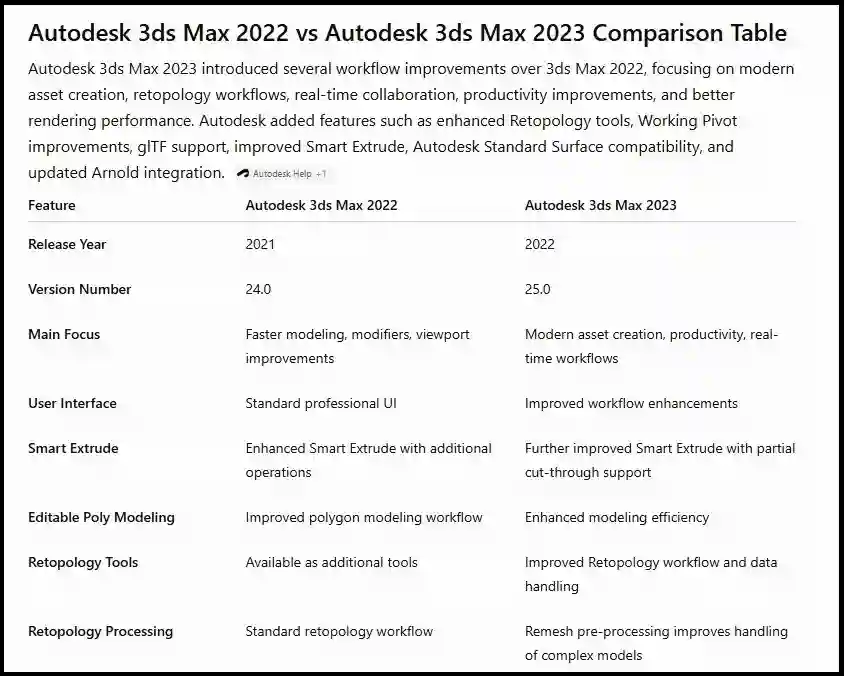
Compared with Autodesk 3ds Max 2021, the 2022 version offers better modeling efficiency, improved productivity features, enhanced modifier workflows, and a smoother creative process.
For professionals who need reliable 3D design software with powerful modeling and rendering capabilities, Autodesk 3ds Max 2022 remains a strong choice.
Frequently Asked Questions (FAQs)
Autodesk 3ds Max 2022 is professional 3D modeling, animation, and rendering software used for architecture, gaming, product design, and visual effects.
Main features include:
- Smart Extrude improvements
- Enhanced modeling tools
- Better viewport performance
- Arnold Renderer integration
- Improved modifiers
- Python automation support
Yes. Beginners can start with basic modeling and gradually learn advanced animation and rendering workflows.
3ds Max 2022 introduces:
- Better Smart Extrude
- Improved modifiers
- Enhanced viewport performance
- Better workflow efficiency
Yes. It supports:
- Character animation
- Object animation
- Camera animation
- Visual effects
Yes. Autodesk 3ds Max 2022 includes Arnold Renderer integration for professional-quality rendering.