

How to Purchase a Windows 10 Pro Product Key Safely

To purchase a Windows 10 Pro product key, confirm your edition and hardware first, buy a single-PC key from a seller with a written refund policy, then enter the 25-character key under Settings, Update & Security, Activation. A genuine key can cost anywhere from a few dollars at a discount key store to the $199.99 Microsoft has listed as the retail price. For that reason, the seller’s terms matter more than the sticker price.
The search is harder than it looks. Microsoft ended support for Windows 10 on October 14, 2025, and its own store now pushes Windows 11. Marketplaces fill the gap with listings of every kind. Some are legitimate, and some are recycled, blocked, or volume-license keys that die within weeks. Many buyers cannot tell the difference until activation fails.
This guide walks you through six steps: check your PC, pick where to buy, vet the seller, check out, activate, and fix errors. Codesforever’s team has been engaged in the online software field for more than ten years.
What to know before you buy a Windows 10 Pro key
You are buying a license for one PC and one edition, not a download. Windows 10 Pro keys differ by type, Windows 10 is past its support date, and these facts change which key is worth your money. Read this section first and the later steps will make more sense.
What a product key actually does
A Windows 10 Pro product key is a 25-character code, written as five groups of five characters, that activates the Pro edition on one PC. After Windows accepts it, Microsoft records a digital license tied to your hardware. You can usually reinstall the same edition later without typing the key again.
Two details trip up buyers. Windows 10 is a free download, so you pay for the license, not the files. The key must also match the edition, because Windows will not activate when the license and the installed edition differ. A Home key will not activate Pro, and a Pro key will not activate Pro N.
Where Windows 10 stands in 2026
Microsoft stopped regular support for Windows 10 on October 14, 2025. A PC running Windows 10 Pro still installs and activates. It no longer receives regular security updates, though, unless it is enrolled in a paid Extended Security Updates program.
That changes why you would buy a Windows 10 Pro license key today. Good reasons include a PC that cannot run Windows 11, software that needs Windows 10, or a low-cost Pro license that you later upgrade to Windows 11 Pro on eligible hardware. If you only want the newest system and your PC qualifies, skip ahead to the Windows 11 note in Step 2.
Retail, OEM, and volume keys
Keys come in three license types, and the type decides what you can do with the key later.
| Key type | What it is | Moves to a new PC? | Fit for an individual buyer? |
|---|---|---|---|
| Retail | Sold as a boxed or digital copy | Yes, one PC at a time | Yes |
| OEM | Supplied with a PC or sold for system builders | No, tied to the first device | Yes, for a single PC |
| Volume (MAK, KMS) | Issued under agreements to organizations | Not designed for it | No, a common source of failed activations |
For a single home or office PC, retail or OEM both work. Check that the listing says which one you get, and be wary of any seller who will not say. A volume key sold to an individual is where activation trouble usually starts.
A Windows 10 Pro key licenses one PC and one edition, so every buying decision starts with confirming both.
Step 1. Check your PC and current edition
Before spending anything, find out which Windows edition you run and whether your hardware supports what you plan to install. This takes five minutes and prevents the two most common wasted purchases: the wrong edition and a key for a PC that already has a license.
Find out which edition you run
Open Start, Settings, Update & Security, Activation. The page shows your edition (Home, Pro, or Pro N) and your activation status. If it says Windows is activated with a digital license, you may already own what you need and can reinstall without any key.
If you see Windows 10 Home and want Pro features, you buy a Pro key and enter it with Change product key on the same page. You do not need a clean install for that. Pro adds BitLocker drive encryption, Remote Desktop hosting, Hyper-V virtual machines, Group Policy, and domain join.
Confirm the hardware can run it
Windows 10 needs modest hardware. Windows 11 asks for more, and the gap decides whether you should buy a Windows 10 key at all.
| Requirement | Windows 10 Pro (64-bit) | Windows 11 Pro |
|---|---|---|
| Processor | 1 GHz or faster | 1 GHz, 2 or more cores, 64-bit compatible |
| RAM | 2 GB | 4 GB |
| Storage | 32 GB | 64 GB |
| Firmware | BIOS or UEFI | UEFI with Secure Boot |
| Security chip | Not required | TPM 2.0 |
Run Microsoft’s PC Health Check app to see whether your PC qualifies for Windows 11. If it does, you have a choice between the two systems. If it does not, a Windows 10 Pro key is the sensible purchase.
Decide between Pro and Pro N
Pro N is the same edition without Windows Media Player and several bundled media apps, a version created to meet European rules. Most US buyers want standard Pro. Choose N only if you plan to use third-party media software, and know that a Pro key will not activate a Pro N install or the reverse.
Check your edition and hardware before you pay, because a key for the wrong edition is the cheapest mistake to avoid.
Step 2. Pick where to buy the key
You can buy a Windows 10 Pro key from Microsoft, a large retailer, a discount key store, or a peer marketplace. Each trades price for protection differently. The right pick is the cheapest source that still gives you a written refund route and real support.
Compare the places to buy
| Source | Price level | Protection if the key fails | Main risk |
|---|---|---|---|
| Microsoft Store or Settings, Go to Store | Highest, with $199.99 as the historical list price | Microsoft support | Standalone Windows 10 keys are largely gone, and the Store promotes Windows 11 |
| Large online retailers | Search listings run roughly $50 to $100 and up | Retailer return policy | Many third-party sellers, so check who actually sells the key |
| Discount key stores | Far below retail, often 60% to 98% off | The store’s refund and warranty terms | Quality varies by store, so you must vet the terms |
| Auction sites and key marketplaces | Cheapest | Often none | Unverified sellers, recycled or blocked keys, and no one to call |
Microsoft’s own activation page still describes buying a Windows 10 license after installation through Go to Store. What the Store offers there has varied, so look at the current screen before you rely on it.
What a fair price looks like
A fair price is one that matches the protection you get. Take a freelancer who needs three Windows 10 Pro PCs, one key each. At the $199.99 list price that is $599.97. At the $50 floor of the retail listings it is $150. A key from a discount store costs far less, but only if the seller will replace a dead key.
Codesforever lists Windows 10 Professional, a lifetime single-PC license, at 685.00 INR against a regular price of 5,990.00 INR. That is about 89% off. Three of them come to 2,055.00 INR. Prices show in USD or your local currency depending on your region. The store buys most of its licenses in bulk through inventory and clearance sales, which is how it keeps prices low.
Free keys and cheap legitimate routes
There is no legitimate free Windows 10 Pro key. "Free key" generators and activator tools are pirated and often carry malware, so do not use them. The honest ways to pay less are limited to four:
- Reuse the digital license your PC already has.
- Buy a discounted key from a seller you have vetted.
- Buy an OEM key for a single PC.
- Skip Pro if you do not need BitLocker, Remote Desktop hosting, or Hyper-V.
If your PC passed the Windows 11 check, Codesforever’s Windows 11 Pro lifetime license key is listed at US$14 and may be the simpler purchase.
Pay the lowest price that still comes with a written refund route, because a dead key costs more than the discount saved.
Step 3. Vet the seller and the listing
Vetting means reading what the seller promises in writing before you pay. A trustworthy seller states the edition, the number of PCs, the delivery time, and exactly what happens if the key fails. A vague listing is the strongest warning sign.
Six checks before you pay
Run every seller, including us, through this list.
- The listing names the edition and quantity. It should say Windows 10 Professional, 1 PC, lifetime, not just "Windows key."
- Refund or replacement terms are in writing. Look for a time window and what the seller does when a key fails.
- A lifetime or long warranty exists. Codesforever states a lifetime warranty on its product keys and a 100% money-back guarantee.
- Delivery is explained. You want a stated time and a delivery channel, not "soon."
- Support is reachable. Ask a pre-sale question by live chat or email and see how fast a person answers.
- Independent reviews exist. Codesforever is Trustindex verified, and its reviews page is based on 16,055 customer reviews.
A seller that passes all six has earned your order. A seller that fails two or more has not, however low the price.
Read the fine print, ours included
Every refund policy has limits, and reading them takes two minutes. Here are the ones at Codesforever, as an example of what to look for elsewhere:
- You can report a key problem within 7 days of purchase, and troubleshooting steps arrive within 24 hours.
- If troubleshooting fails, you get a replacement key or a full refund.
- No refund applies to wrong products bought by mistake or to products incompatible with your hardware or software.
- You can cancel within 2 hours if the key is still unredeemed. Cancellations deduct a 3.4% plus $0.30 processing charge.
- Support may ask for remote desktop help through a tool such as AnyDesk, and a refund request is declined if you refuse that help.
- Special terms for certain items appear in the "Must Read" tab on the product page.
Red flags that mean walk away
Leave the listing if the key arrives as a photo of a sticker, if the seller says no refunds after delivery, or if the key is described as volume or KMS. Also leave if the seller asks you to disable antivirus to "activate," or if the product is an activator tool instead of a key. None of these belong to a genuine single-PC license sale.
Judge a seller by its written refund terms and verifiable reviews, because the price alone tells you nothing about whether the key will work.
Step 4. Check out and store your key
Checkout is the short part, and a few small choices here prevent delivery trouble. Enter accurate contact details, pay with a method that has dispute protection, and save the key the moment it arrives.
Complete the purchase
Follow these steps on the product page:
- Select the Windows 10 Professional listing that matches your edition and add it to the cart.
- Enter a valid email address. Codesforever also asks for a correct WhatsApp number with country code, because it sends the key by both channels.
- Pay by card or PayPal. No extra fees are added at checkout, and the charge shows on your statement as Codesforever.com.
- Wait for delivery. Most products arrive within 5 minutes, 97% of orders arrive within 15 to 30 minutes, and a select few take up to 24 hours.
Check your spam folder if the email is slow. If delivery will run past 24 hours, the store notifies you by email or WhatsApp. The delivery includes the product key, a download link, and an install guide.
Record and protect the key
Save the key the moment it arrives. Take a screenshot, copy it into a password manager, and keep the order email. Never post the key publicly, because a key used on another PC can be blocked.
Also decide which Microsoft account to link. Register the email you actually use with the Microsoft online activation process, as Codesforever recommends. That link lets the Activation troubleshooter restore your license after a hardware change.
Save the key, the order email, and the delivery messages the moment they arrive, because support can only help when you can prove the purchase.
Step 5. Install and activate Windows 10 Pro
Activation takes a few minutes: enter the key on a running PC, or use it during a clean install. Then confirm that Windows reports a permanent activation. Back up your files before changing editions.
Activate on a PC that already runs Windows 10
- Connect the PC to the internet.
- Select Start, Settings, Update & Security, Activation.
- Select Change product key.
- Type the 25-character key and select Next.
- Follow the prompts and restart if asked.
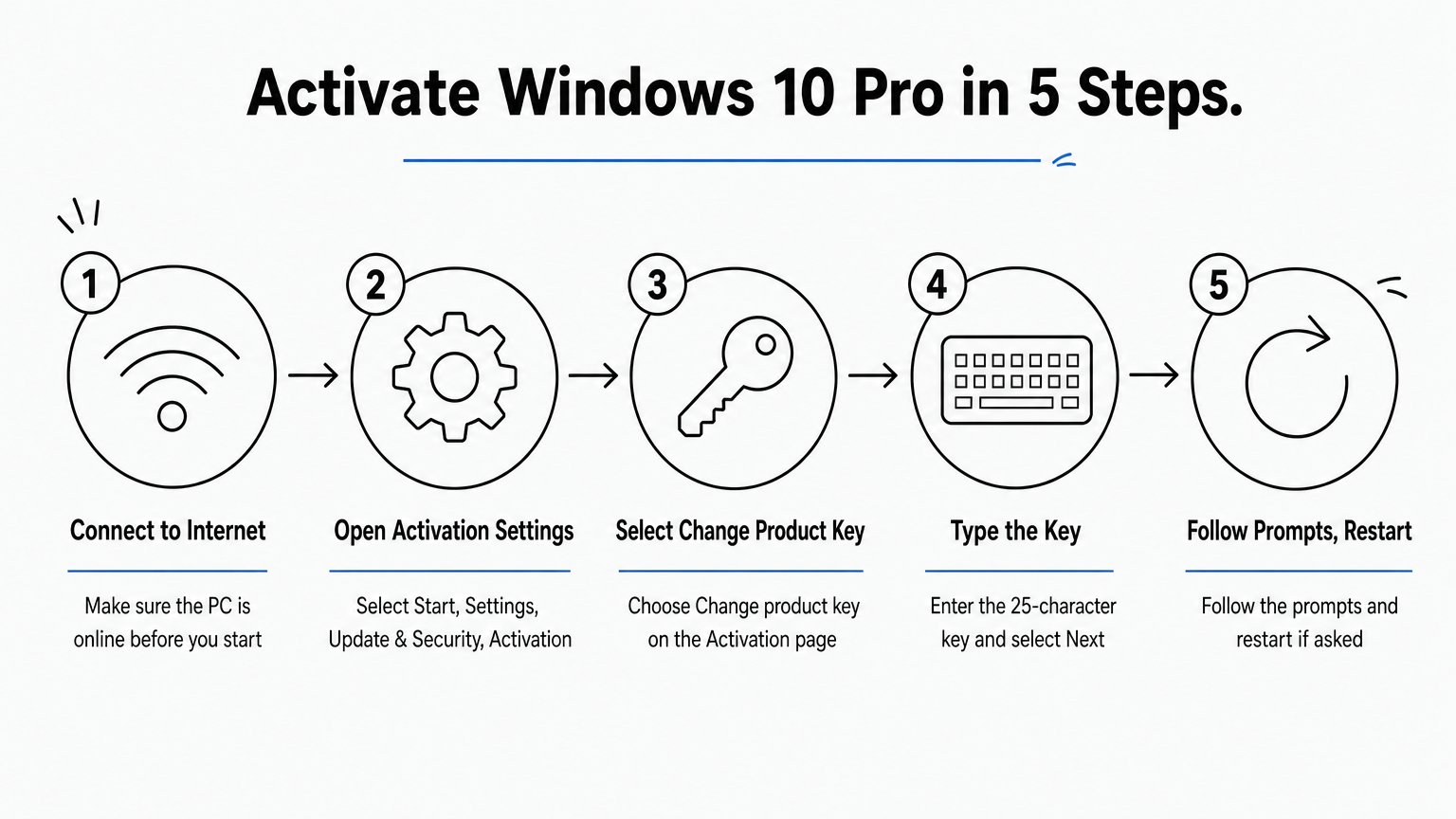
A Home PC upgrading to Pro restarts once or twice and keeps your files and apps. Windows then activates online, and the Activation page should show Windows 10 Pro.
Clean install or reinstall
Create installation media from Microsoft’s software download site and choose the same edition you bought. When setup asks for a product key, enter yours. If you do not have it yet, select I don’t have a product key and activate later from the Activation page. A PC with an existing digital license for the same edition activates by itself after reinstalling.
If you would rather not do this yourself, Codesforever sells a Product Download and Install Service that connects with you online and completes the install and activation. Its 24/7 support also handles activation questions at no charge.
Verify and link the license
Open Command Prompt and run these commands to confirm the result:
winver
slmgr /dli
slmgr /xpr
winver shows the Windows version. slmgr /dli shows license details, and slmgr /xpr should report that the machine is permanently activated. Then, on the Activation page, select Add an account and sign in with your Microsoft account to link the digital license.
Activation is finished only when
slmgr /xprsays the machine is permanently activated and your Microsoft account is linked.
Step 6. Fix activation errors and plan your next move
Most activation failures trace back to a short list of causes. Match your error to the cause, fix it, and contact the seller inside the refund window if the key itself is dead. Do this early, because refund windows are short.
Match the error to the cause
| What you see | Likely cause | What to do |
|---|---|---|
| 0xC004F050 | Mistyped key, or key for another edition | Re-enter the key carefully and confirm it is for Windows 10 Pro |
| 0xC004C003 | Key was blocked | Contact the seller for a replacement or refund |
| 0x803F7001 | No digital license found for this device | Enter the key again, or run the Activation troubleshooter |
| Not activated after a hardware change | New motherboard changed the device identity | Use the troubleshooter and choose that you changed hardware |
| Activation fails but the key is correct | No internet or an edition mismatch | Reconnect, then check your edition on the Activation page |
Microsoft’s activation error help lists further codes. If online activation keeps failing, run slui 4 to open the phone activation option.
Contact the seller the right way
If the key is invalid or blocked, tell the seller at once. Send the order number, a screenshot of the full error message, and the exact key you entered. At Codesforever, issues reported within 7 days get troubleshooting steps inside 24 hours, followed by a replacement key or full refund if the problem cannot be solved. Reach the team by WhatsApp at +1 631 505 3545, by live chat, or by email.
Move up to Windows 11 Pro when your PC qualifies
Once Windows 10 Pro is activated, you can move to Windows 11 Pro for free if your hardware qualifies. Open Settings, Update & Security, Windows Update, and select the upgrade offer if it appears. Your digital license carries over. Do this only on a PC that passed the Step 1 check, and back up first.
Contact the seller within the refund window, with the order number and the full error screen, because dead keys are easiest to fix early.
Ready to buy your key?
Buying a Windows 10 Pro key comes down to six steps. Check your edition and hardware, pick a source that matches your risk tolerance, vet the written refund terms, save the key when it arrives, activate it and confirm with slmgr /xpr, and use the error table if anything fails. A fair price is the lowest one that still comes with a replacement or refund route.
If you want a single-PC lifetime license with instant email delivery, a 100% money-back guarantee, and live support through activation, you can see the Windows 10 Pro license keys at Codesforever. Check the listing’s edition, read the "Must Read" tab, and keep your order email until Windows shows a permanent activation.