

What Is MS Office 2024 Professional Plus? A Buyer’s Guide

MS Office 2024 Professional Plus is the business edition of Microsoft’s one-time-purchase Office suite for Windows. You pay once and install Word, Excel, PowerPoint, Outlook, OneNote and Access on one PC. There is no subscription. Microsoft sells Professional Plus mainly through licensing for organizations, and a discounted single-PC key costs US$28 at Codesforever.
Codesforever sells license keys, so these are the questions worth answering. Is the key genuine? What does “lifetime” really mean? Is Professional Plus the same as Home & Business? The answers are short, but most pages on this topic skip them or blur them.
This guide covers why the edition matters, how it differs from the other Office 2024 editions, what it costs, and how to buy and activate a legitimate copy. When you finish, you should know whether Professional Plus fits your PC and your budget.
Why Office 2024 Professional Plus matters if you want to own Office
Professional Plus matters because it is the only Office 2024 edition that combines a permanent license with Access and the business deployment tools. You buy version 2024 once and keep using it. Microsoft 365 charges you every year for the same apps plus cloud features.
What “lifetime” means for this license
Lifetime means you can use this version as long as it runs on your PC. It does not mean free upgrades. You get the apps as they shipped in October 2024, plus security updates during Microsoft’s support window, which runs about five years from launch. You get no new features and no Copilot subscription benefits.

The license covers one device. It runs on Windows 10 and Windows 11, and it does not work on Mac, Android or Chromebook. If you replace your PC, you need a new key.
A lifetime license owns you a fixed version of Office, not a stream of new features.
Who should choose it
Pick Professional Plus if you work offline, want predictable costs and need Access for databases. It also suits small offices that want one stable version across several Windows PCs. IT staff like the volume-style edition because it is built for managed deployment.
Skip it if you use a Mac, want Copilot features, or edit documents with colleagues in the cloud all day. Those users are better off with a subscription.
How to choose between Professional Plus and other 2024 editions
Compare editions by the apps you need, not by the names. Professional Plus adds Access and OneNote on top of the four core apps. Home & Business drops Access, and Standard drops Access and OneNote.
Apps and prices side by side
The prices below are Codesforever’s current key prices for one user on one device.
| Edition | Apps included | Codesforever price | Devices |
|---|---|---|---|
| Standard | Word, Excel, PowerPoint, Outlook | US$88 | 1 device |
| Home & Business | Word, Excel, PowerPoint, Outlook, OneNote | US$198 | 1 Windows PC |
| Professional Plus | Word, Excel, PowerPoint, Outlook, OneNote, Access | US$28 | 1 device, Windows 10 and later |
Do not read price as rank. Key prices follow sourcing and supply, so the top edition can cost less than a lower one. Compare the app lists first, then compare prices.
Cleaning up the naming confusion
Searches for “Office Professional 2024” or “Microsoft Office 2024 Professional” land on the same product. Microsoft did not release a separate retail Professional edition for 2024. Professional Plus is the one that exists, and the commercial version is also labeled Office LTSC Professional Plus 2024.
Publisher is also gone from the 2024 line. Some sellers still list it, but the 2024 suite does not include it. If you need Publisher, look at Office 2021 Professional Plus, which also costs US$28 at Codesforever.
If a listing promises Publisher in Office 2024, check it again before you pay.
What Office 2024 Professional Plus costs
Expect to pay between roughly US$28 and the high hundreds of dollars, depending on the channel. Microsoft prices Professional Plus through volume agreements, and individuals do not see a public retail price. Key resellers sell single-PC licenses at deep discounts.
List price versus discounted keys
Microsoft’s retail Home & Business 2024 lists at $249.99, and Professional Plus has no matching shelf price for individuals. Codesforever sells Professional Plus at US$28 for one user and one device, which is well below that Home & Business retail price. Delivery by email and WhatsApp arrives within 24 hours of purchase. There are no extra fees at checkout.
Cheap keys are not automatically safe, so the next section explains how to check a seller. Price alone should never decide the purchase.
A worked example for five PCs
Say you run a five-person office and each person needs Office on one Windows PC. Each license covers one device, so you need five keys.
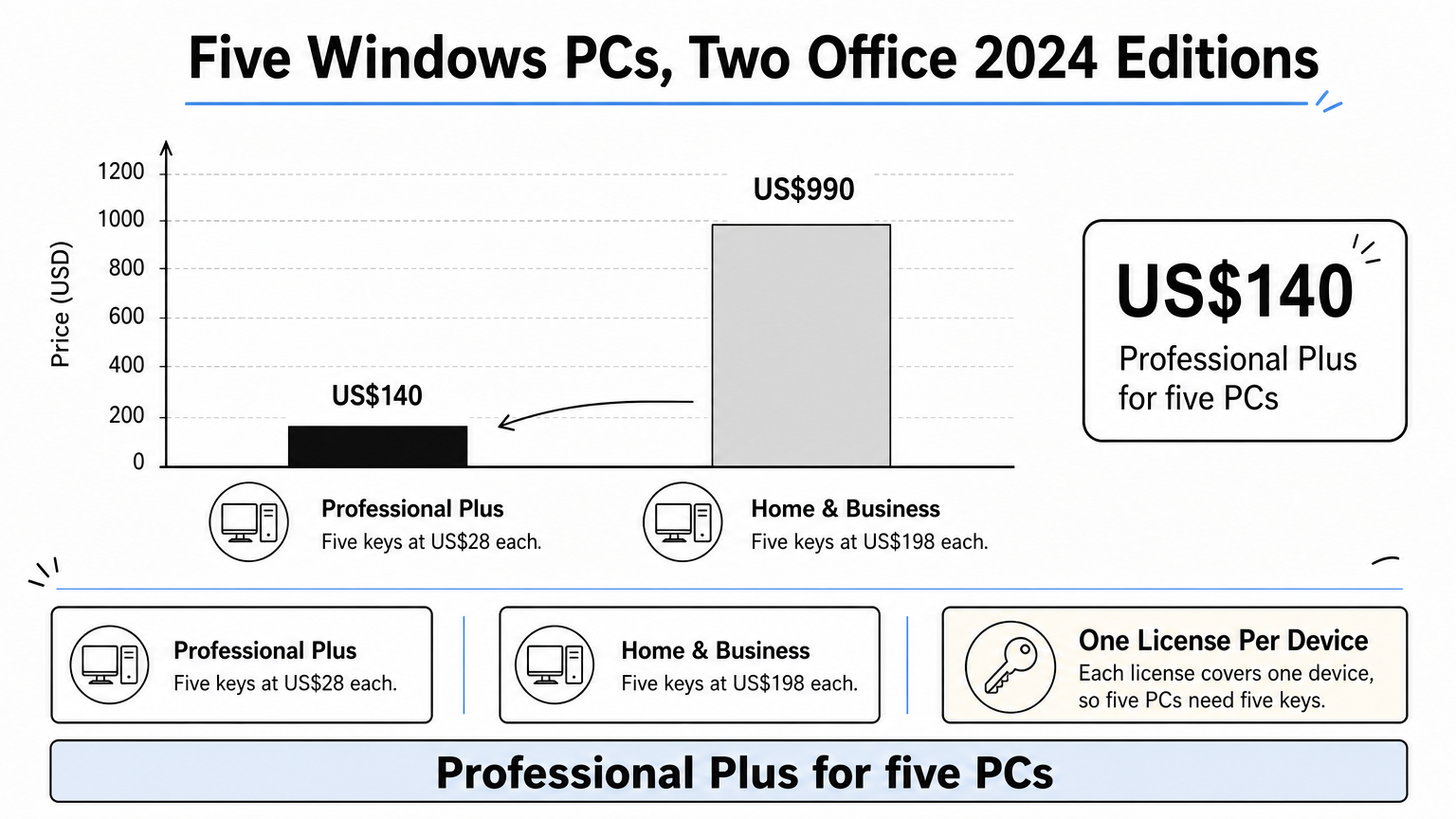
| Option | Math | Total |
|---|---|---|
| Professional Plus at Codesforever | 5 × US$28 | US$140 |
| Home & Business at Codesforever | 5 × US$198 | US$990 |
A one-year Office 365 key at Codesforever costs US$14, so two years of that plan equals one Professional Plus key. The subscription covers up to five devices and adds cloud storage, which makes it better value if you need several devices or sync features.
Buy Professional Plus when you need a few stable Windows PCs. Choose a subscription when you need many devices or cloud features.
How to buy and activate a legitimate copy
Buy from a seller that explains where its keys come from, offers a written refund policy and answers support questions at any hour. Then install Office from Microsoft’s own download and enter the key. Do not accept cracked installers or “activators” from anyone.
What to check before you pay
Microsoft does not sell Professional Plus to individuals at retail, so every single-PC key comes from a reseller channel. That makes the seller’s policies your protection. Check these points:

- Refund window. Codesforever takes reports of key problems within 7 days of purchase and answers with troubleshooting steps within 24 hours.
- Resolution. If troubleshooting fails, you get a replacement key or a full refund. Incompatible hardware and wrong-product purchases are not refunded.
- Cancellation. You can cancel up to 2 hours after purchase if the key is still unredeemed.
- Support and proof. Look for 24/7 help and reviews you can read. Codesforever’s customer reviews page is based on 16,055 reviews.
Steps to install and activate
- Confirm your PC runs Windows 10 or Windows 11 and has no other Office version you want to keep.
- Order the key and wait for delivery by email and WhatsApp.
- Download the Office installer from Microsoft.
- Run the installer and enter your key when prompted.
- Open Word and check that the product shows as activated.
If activation fails, contact support before retrying repeatedly. Codesforever offers help by live chat, WhatsApp and email at su*****@**********er.com.
Is Professional Plus the right Office 2024 edition for you?
MS Office 2024 Professional Plus is a permanent Windows license that adds Access and OneNote to the core Office apps. It suits people who want fixed costs, offline work and managed deployment. It does not suit Mac users or anyone who needs Copilot and cloud sync.
Compare the app lists, not the prices. Then buy only from a seller with a clear refund policy and live support. If Professional Plus fits, you can get the Microsoft Office 2024 Professional Plus lifetime license for Windows from Codesforever for US$28.