

Microsoft Office 365 Business Plans: 6 Options Compared

The right pick among Microsoft Office 365 business plans comes down to three questions: do you need installed desktop apps, do you need security beyond the basics, and will you have more than 300 users. For most small businesses, Business Standard at $14 per user per month is the answer. Choose Business Basic ($7) if your team works in a browser, Business Premium ($22) if you hold client data and need device and threat protection, and Apps for business ($10) if you only want the Office apps. Move to an enterprise plan once you pass 300 users.
The confusion is understandable. Microsoft renamed Office 365 to Microsoft 365 for most business plans, kept the Office 365 name for a set of enterprise plans, then added Teams and no-Teams versions, Copilot bundles and a July 2026 price increase. One product family can now mean a dozen different price tags.
This guide covers six plan groups in the order most buyers move up the ladder. Each one gets the same breakdown: what you get, who it suits, and what it costs. A decision framework and a worked cost example follow. Codesforever has sold software licenses online for over ten years, so the focus is on what you actually need to decide. All prices are US list prices per user per month, billed yearly.
Microsoft 365 business plans compared at a glance
Six plan groups cover nearly every business, and the table below shows how they differ on price, desktop apps, email and user limits. Read it first, then jump to the plan that matches your team.
Prices and features side by side
The Business plans (Basic, Standard, Premium, Apps for business) cap out at 300 users. The enterprise plans have no cap. Desktop apps and hosted business email are the two features that separate the plans most often.
| Plan | List price (user/month, paid yearly) | Desktop apps | Business email | User limit |
|---|---|---|---|---|
| Business Basic | $7.00 ($5.40 without Teams) per month | No, web and mobile only | Yes | 300 |
| Business Standard | $14.00 ($10.79 without Teams) per month | Yes | Yes | 300 |
| Business Premium | $22.00 ($32.00 with Copilot) per month | Yes | Yes | 300 |
| Apps for business | $10.00 per month | Yes | No | 300 |
| Office 365 E1 / E3 / E5 | $10 / $26 / $38 per month | E1 no, E3 and E5 yes | Yes | None |
| Microsoft 365 E3 / E7 | $39 / $99 per month | Yes | Yes | None |
Every figure is a monthly per-user rate on an annual subscription that auto-renews. Microsoft’s current pricing page leads with the Copilot bundles, so check it for the plain Premium listing in your market before you buy.
What changed in 2026
Microsoft raised prices on Business Basic, Business Standard and several enterprise plans on July 1, 2026. Business Premium and Apps for business did not change. If you budgeted from an older price list, your Basic and Standard numbers are out of date.
The second change is Copilot. Microsoft now sells Copilot bundles of Standard ($23.50) and Premium ($32.00), which add AI inside Word, Excel, PowerPoint, Outlook and Teams. That is about $9.50 to $10 more per user than the same plan without Copilot. Existing subscribers can instead add Microsoft 365 Copilot Business, which currently starts at $18 per user per month.
Compare plans on the monthly per-user price, and add Copilot only for the people who will use it.
1. Microsoft 365 Business Basic
Business Basic is the cheapest full business plan at $7.00 per user per month. It gives you cloud services and browser-based Office, but no installed desktop apps.
What you get
Basic covers the communication and storage side of Microsoft 365. Each user gets a custom-domain mailbox, Teams and 1 TB of OneDrive storage. Word, Excel, PowerPoint and Outlook run as web and mobile versions only.
- Exchange mailbox at yo*@**********ss.com, with 100 GB primary and 50 GB archive storage
- Teams chat, calls and meetings
- SharePoint team sites and OneDrive file sharing
- Bookings, Planner, Forms and 10+ other apps
- Core identity management and spam and malware filtering
- Copilot Chat, a secure AI chat with web grounding
Who it suits
Basic fits teams whose day lives in email, chat and shared documents. Think front-desk staff, field crews on phones, and small offices that mostly send messages and edit simple files. It is also a smart way to cut licensing costs for part of your team.
Basic works when nobody on the user’s team needs desktop Word or Excel.
Skip it for anyone who builds large Excel models, uses macros, or needs Outlook installed on a laptop. The web versions of Word and Excel have fewer features than the desktop apps, and that gap frustrates power users quickly.
Price and limits
Basic costs $7.00 per user per month with Teams, or $5.40 without Teams. The cap is 300 users. A team of 12 pays $84 a month, or $1,008 a year. That is the lowest entry price for a branded business mailbox plus Teams and storage.
2. Microsoft 365 Business Standard
Business Standard is the best fit for most small businesses. At $14.00 per user per month, it adds installed desktop apps to everything in Basic.
What you get
Standard keeps the mailbox, Teams, SharePoint and 1 TB of OneDrive from Basic, then adds the full desktop versions of Word, Excel, PowerPoint, Outlook and OneNote, plus Access on PC. Each user can install on up to five PCs or Macs, five tablets and five phones. It also adds Microsoft Loop and Clipchamp for shared workspaces and video editing.
- Desktop, web and mobile apps
- Custom business email and Teams
- Loop and Clipchamp
- 10+ business apps including Bookings, Planner and Forms
- Automatic spam and malware filtering
Who it suits
Standard suits any business where people write long documents, work in big spreadsheets or live in Outlook. It is the default for offices of 5 to 100 people with no special security requirements. If you only remember one plan from this list, remember this one.
Standard is the plan you pick when you have no strong reason to pick another.
It falls short when you need managed devices or stronger threat protection, because Standard only includes core identity management and basic filtering. Move to Premium if laptops leave the building with sensitive files on them.
Price and limits
Standard costs $14.00 per user per month with Teams, or $10.79 without Teams. The Copilot bundle is $23.50, or $20.30 without Teams. A team of 12 pays $168 a month, or $2,016 a year. The user cap is 300.
3. Microsoft 365 Business Premium
Business Premium adds security and device management on top of Standard. It is the plan to choose when a lost laptop or a phishing click would be a real problem.

What you get
Premium includes every Standard app and service. On top of that you get Microsoft Defender for Business for ransomware and malware protection, Intune for device management, and Microsoft Entra ID for policy-based identity and access control. You also get Defender for Office 365 Plan 1 against phishing, Purview Information Protection and data loss prevention for emails and files, and a Windows 11 Pro upgrade. Archive mailbox storage rises to 1.5 TB.
- Device management and threat protection
- Policy-based access control for user accounts
- Sensitive data discovery, classification and protection
- Email phishing and malware defense
Who it suits
Premium suits firms that hold client data: accounting, legal, consulting, healthcare-adjacent and financial practices. It also suits any business with remote staff on laptops and phones. The extra $8 per user over Standard buys controls that are hard to assemble separately.
If your business would struggle after a breach, Premium costs less than the risk.
Do the math before you upgrade everyone. Standard plus the $3 Defender for Business add-on costs $17, so Premium’s extra $5 covers device management, identity controls, information protection and the Windows upgrade. If you only need endpoint protection, the add-on alone may be enough.
Price and limits
The base Premium price is $22.00 per user per month. The Copilot version is $32.00 with Teams, or $28.80 without Teams. The user cap is 300, and the price did not change in the July 2026 increase.
4. Microsoft 365 Apps for business
Apps for business is the plan for desktop Office without the rest. It costs $10.00 per user per month and includes no hosted email, Teams or SharePoint.
What you get
You get desktop and web versions of Word, Excel, PowerPoint and Outlook, plus OneNote and OneDrive with 1 TB of storage per user. It is available for up to 300 employees. The key point is what is missing. There is no Exchange mailbox, so you cannot host yo*@**********ss.com mail, and there is no Teams or SharePoint.
Who it suits
This plan suits businesses that already run email elsewhere, such as Google Workspace or a hosting provider, but want Microsoft’s desktop apps. It also fits contractors and consultants who need Office on their own machines.
Apps for business pays off only when email and chat live somewhere else.
Compare it to Standard first. Standard costs $4 more per user, and that $4 adds a business mailbox, Teams, SharePoint, Loop and Clipchamp. For most buyers that is the better deal.
Price and limits
Apps for business is $10.00 per user per month, unchanged in July 2026. That is $120 a year per user. If one person needs Office on one Windows PC and no cloud services, a one-time license is cheaper. Office 2024 Professional Plus is US$28 once at Codesforever, for one device, with Word, Excel, PowerPoint, Outlook, OneNote and Access. You give up the subscription’s cloud storage and ongoing feature updates.
5. Office 365 E1, E3 and E5
Office 365 is now the name for Microsoft’s enterprise-tier Office suites. They cost $10, $26 and $38 per user per month for E1, E3 and E5, and they have no 300-user cap.
What you get
E1 is the web-and-mobile tier: online Office apps, Exchange email, SharePoint and OneDrive. E3 adds desktop Office apps and more compliance and management features. E5 adds advanced security and analytics. Microsoft lists storage from 1 TB to 5+ TB per user across the tiers.
- E1 for $10: online apps, email, file storage
- E3 for $26: desktop apps and stronger compliance tools
- E5 for $38: advanced security and analytics
Who it suits
These plans suit organizations above 300 users, or smaller ones with compliance or reporting needs that Business plans do not meet. Microsoft positions them as offering more compliance and security management, plus business intelligence and analytics, than the Business tiers.
Under 300 users, check Business Premium before you pay for Office 365 E3.
The reason is price. Premium costs $4 less than Office 365 E3 and already includes device management and advanced threat protection.
Price and limits
E1 costs $10, E3 costs $26 and E5 costs $38 per user per month. Annual billing is the standard route. Enterprise agreements with 250 or more licenses may qualify for volume discounts through Microsoft or a partner.
6. Microsoft 365 E3, E5 and E7
The Microsoft 365 enterprise plans go beyond Office. Microsoft 365 E3 is $39 per user per month, and the new E7 bundle is $99.
What you get
Microsoft 365 E3 bundles the Office 365 suite with Windows Enterprise licensing and device and identity management. E5 adds advanced security, compliance and analytics, and is priced above E3. Check Microsoft for the current E5 rate. E7, available since May 1, 2026, bundles E5, Microsoft Entra Suite, Microsoft 365 Copilot and Agent 365 at $99. Agent 365 is also sold alone at $15 per user per month.
- E3: apps, Windows Enterprise and management tools
- E5: adds advanced security and compliance
- E7: E5 plus Entra Suite, Copilot and Agent 365
Who it suits
These plans suit large or regulated organizations with IT staff, and those that want one agreement for apps, Windows, security and AI. E7 targets companies that need governance over AI agents as well as employees.
Pay for enterprise tiers only when you can name the specific compliance or governance gap they close.
Most small businesses will never need them.
Price and limits
E3 costs $13 more per user than Office 365 E3. For 400 users on Microsoft 365 E3, that is 400 × $39 = $15,600 a month, or $187,200 a year. Neither E3 nor E7 has a seat cap, so the real limit is your budget and your admin capacity.
How to choose the right plan for your business
Pick by working through four questions, then price the result user by user. Mixing plans in one organization is allowed, and it is usually the cheapest approach.
A four-question decision path
Answer these in order and stop at the first plan that fits.
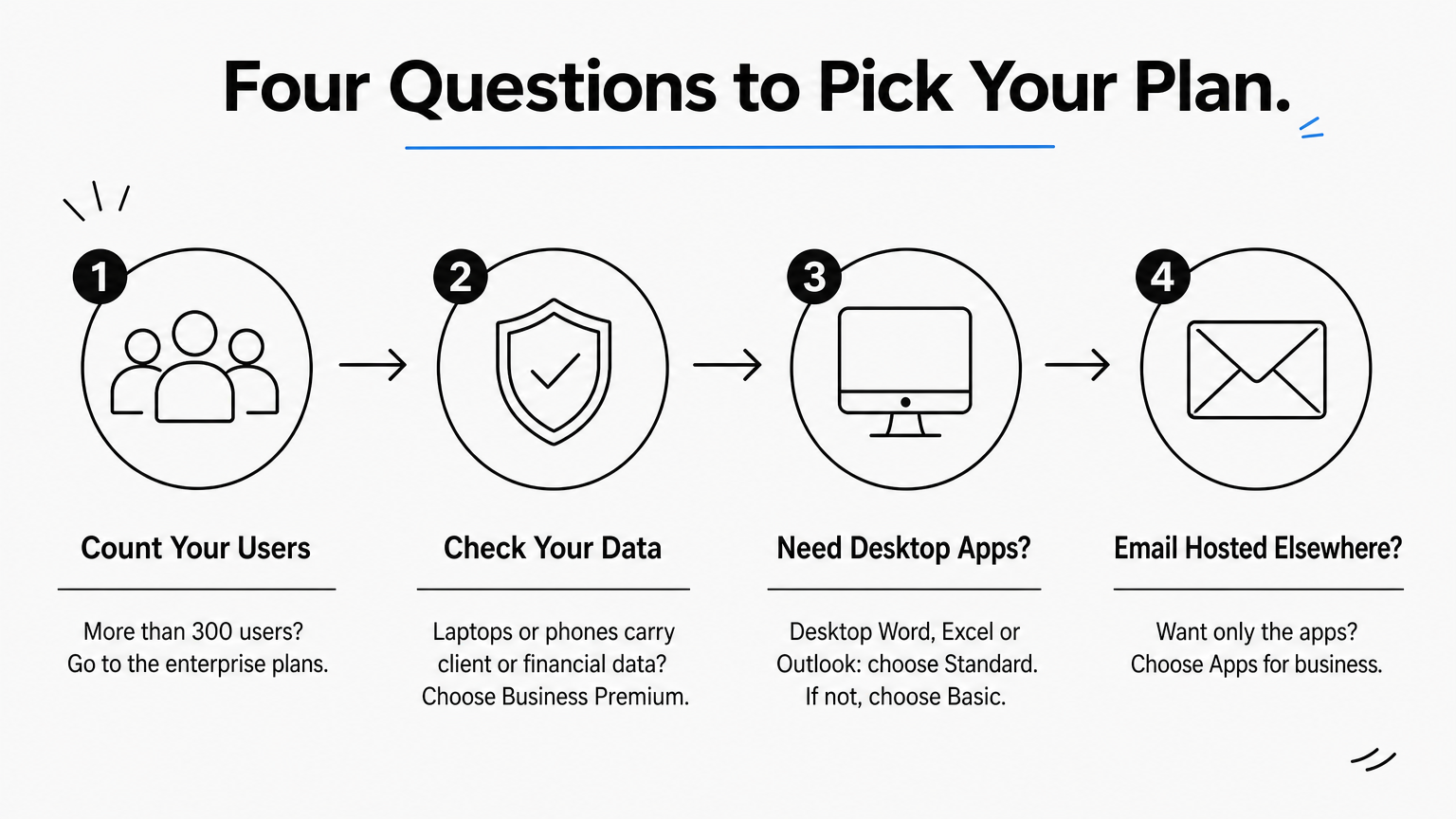
- Do you have more than 300 users? If yes, go to the enterprise plans in sections 5 and 6.
- Do laptops or phones carry client or financial data? If yes, choose Business Premium.
- Does anyone need desktop Word, Excel or Outlook? If yes, choose Standard. If no, choose Basic.
- Is email hosted elsewhere and you only want the apps? Choose Apps for business.
A worked example for 12 people
Say you run a 12-person firm: 8 office staff who need desktop apps and 4 field staff who use phones and webmail. Put the 8 on Standard (8 × $14 = $112) and the 4 on Basic (4 × $7 = $28). The total is $140 a month, or $1,680 a year. Putting all 12 on Standard costs $168 a month, or $2,016 a year. Mixing plans saves $336 a year.
Teams, billing and Copilot choices
Teams is optional on most Business plans, and no-Teams versions are cheaper. A team already on Zoom or Google Meet saves about $3.21 per user on Standard ($14.00 minus $10.79). You can also pay yearly, or commit annually and pay monthly. Monthly commitments exist but usually cost more.
For Copilot, buy the bundle or add-on only for people who will use it daily. Frontline staff have separate plans, Microsoft 365 F1 at $3 and F3 at $10 per user per month.
Ways to pay less
Microsoft offers nonprofit grants and discounts, and volume discounts for enterprise agreements, typically 250 or more licenses. Do not pay for licenses you do not need. Aliases and shared mailboxes such as info@ or billing@ do not need their own paid license while they stay under 50 GB. For single users who only need Office apps, Codesforever sells Office 365 app subscriptions, and these are app subscriptions for individuals, not managed business tenants. Check the product page for what each includes.
Which plan to pick
Start with Business Standard unless you have a clear reason not to. Drop to Basic for browser-only staff, move up to Premium when security matters, and use Apps for business only when email lives elsewhere. Enterprise plans make sense above 300 users or with compliance duties. Pricing per user, and mixing plans, keeps the bill honest.
If you are a freelancer or solo owner who just wants the Office apps without a business tenant, see Codesforever’s Office 365 subscription with 1 TB storage and Copilot. It delivers by email, and support is available around the clock for activation.