

Windows 11 Pro Product Key: 5 Legit Ways to Buy One

That “Activate Windows” watermark in the corner of your screen isn’t going away on its own, and running Windows 11 Pro without a valid license means missing out on BitLocker, Remote Desktop, and other features that activation unlocks. If you’re hunting for a windows 11 professional product key, you’ve probably noticed the search results are a mess of sketchy forums, expired codes, and resellers you’ve never heard of.
This guide skips the guesswork. You’ll get five verified ways to get a genuine windows 11 pro product key, ranked by price, speed, and how much hassle each one involves. We’ll cover everything from Microsoft’s official store to discounted license marketplaces that sell legitimate, unused keys at a fraction of retail cost.
We’ll also flag the methods to avoid, including free key generators and pirated activation scripts that can flag your copy as counterfeit or expose your PC to malware. By the end, you’ll know exactly where to buy a windows 11 pro product key that activates cleanly and stays activated, without overpaying for it.
1. Buy a discounted key from Codesforever
Codesforever sells genuine software license keys, including the windows 11 pro license key, at prices that undercut Microsoft’s retail store by a wide margin. It’s built specifically for people who want a legitimate activation without paying full sticker price, and it’s usually the fastest option on this list once you factor in checkout and delivery time.
How it works
You pick the Windows 11 Pro listing on Codesforever, check out through PayPal’s Level 1 PCI-compliant payment system, and the key lands in your inbox within minutes thanks to automated, 24/7 fulfillment. There’s no shipping wait and no manual approval step holding up your order. Once you have the code, you redeem the Windows 11 product key in system settings under Settings > System > Activation on a fresh or existing Windows 11 install, and the OS activates over the internet against Microsoft’s servers just like a retail key would. If you hit a snag during installation or run into Windows 11 activation errors, Codesforever’s live chat and WhatsApp support team walks you through it in real time.
Pricing
Discounts on Codesforever typically run 60% to 98% off Microsoft’s list price, depending on the edition and any current promotion. A boxed windows 11 pro product key from Microsoft runs close to $200, while the same lifetime key through Codesforever often lands well under $50. Here’s how the math generally shakes out:
| Source | Typical Price | License Type |
|---|---|---|
| Microsoft Store | ~$199.99 | Lifetime, retail |
| Codesforever | Under $50 | Lifetime, one-time purchase |
A legitimate Windows 11 Pro activation shouldn’t cost you $200 when a genuine key is available for a fraction of that price.
Who it’s for
This route suits price-conscious buyers who still want a real, working license rather than a cracked or pirated workaround. Freelancers building out a new workstation, students setting up a personal laptop for CAD or design coursework, small business owners equipping a handful of machines, and IT admins provisioning several PCs at once all get the same benefit: full functionality (BitLocker, Remote Desktop, Hyper-V) without the enterprise price tag. If you already shop Codesforever for Office or Adobe licenses, adding a Windows 11 Pro key to the same order keeps everything in one place.
What to watch out for
Discounted keys work because they’re genuine, unused licenses sold in bulk, not because they’re stolen or shared. Still, buy only from a seller that backs the sale with a real guarantee. Codesforever offers a money-back guarantee or free replacement if a key turns out to be invalid or defective, which is the protection you should demand from any reseller, not just this one. Skip any site that won’t state its return policy clearly, doesn’t offer support after the sale, or sells keys so cheap they seem detached from any real licensing math. If a deal looks too good to explain, it usually is.
2. Buy directly from the Microsoft Store
Microsoft’s own store is the benchmark every other option gets measured against. If you want a windows 11 activation key straight from the source, with zero third-party involvement, this is where you go, though it’s worth weighing buying direct from Microsoft against trusted third-party resellers first. It’s the slowest and most expensive route on this list, but it removes any question about where the key came from.
How it works
Head to the Microsoft Store online or open the app on an existing Windows device, search for Windows 11 Pro, and check out with a credit card, debit card, or PayPal. Microsoft emails your microsoft windows 11 pro product key along with a download link for the installation media. You run the setup, enter the key when prompted, or activate later through Settings > System > Activation if you’re upgrading an existing install. No third-party account, forum download, or reseller invoice enters the picture at any point.
Pricing
Expect to pay Microsoft’s full retail rate, which sits around $199.99 for a standalone Windows 11 Pro license as of this writing. Occasional seasonal sales knock a modest percentage off, but Microsoft rarely discounts this product the way third-party resellers do.
Buying straight from Microsoft guarantees authenticity, but you’re paying full price for that guarantee.
Who it’s for
Quality-conscious buyers who want zero ambiguity about sourcing, along with businesses that need a Microsoft invoice for accounting or compliance reasons, tend to prefer this channel. Enterprise IT departments already tied into Microsoft’s ecosystem for support tickets often default here for the paper trail alone, even knowing it costs more.
What to watch out for
Outside the price tag itself, watch for upsell prompts steering you toward bundles with Microsoft 365 or extra storage you didn’t ask for. Region locking can also trip you up: a key purchased through one country’s storefront sometimes won’t activate cleanly if you’re traveling or relocating, so match your billing region to where you’ll actually use the machine.
3. Buy from an authorized retailer like Amazon or Best Buy
Big-box retailers occupy a middle ground between Codesforever and Microsoft’s own storefront. You get a recognizable brand name backing the sale, but the pricing rarely reflects any real discount, since these retailers buy at close to wholesale and pass most of the retail price straight through to you.
How it works
Searching either retailer’s site for a windows 11 pro license key pulls up listings from Microsoft directly or from third-party sellers vetted under the platform’s marketplace rules. Boxed copies ship with a physical card holding the key, while digital versions deliver the code by email shortly after checkout. Activation works the same way regardless of source: enter the code under Settings > System > Activation and let Windows verify it online.
Pricing
Expect prices close to Microsoft’s own $199.99 retail rate, occasionally dipping during Black Friday or back-to-school sales. Marketplace sellers on Amazon sometimes list a windows 11 pro key purchase slightly under that mark, but discounts rarely exceed 10-15%, nowhere near what the trusted websites to buy Windows 11 keys offer.
A retailer’s name on the box doesn’t guarantee a better price, only a familiar checkout experience.
Who it’s for
Shoppers who already have store credit, reward points, or a preference for one platform’s return process gravitate here. It also suits buyers who want a physical box on a shelf rather than an emailed code, or who’d rather return a bad purchase through a familiar customer service line than deal with a smaller company.
What to watch out for
Third-party marketplace listings vary in reliability even under a trusted retailer’s roof. Check the seller rating, confirm the listing specifies “Pro” and not “Home,” and learn how to spot a fake product key by reading recent reviews for complaints about invalid or reused codes before you click buy.
4. Get one through Microsoft volume or business licensing
Businesses with more than a handful of machines often skip retail keys entirely and license Windows 11 Pro through Microsoft’s volume programs instead, so it helps to know how OEM, retail, and volume Windows licenses differ. This route trades per-key convenience for centralized management, which matters once you’re activating dozens or hundreds of machines rather than one laptop.
How it works
Companies enroll through the Microsoft 365 admin center or work with a Microsoft reseller to set up a Volume Licensing Service Center account. Instead of a single microsoft windows 11 pro key tied to one device, you get access to Multiple Activation Keys (MAK) or Key Management Service (KMS) activation, which lets IT staff activate machines in bulk over the local network without entering a code on each one individually. Deployment usually runs through imaging tools that push Windows 11 Pro out to new hardware automatically.
Pricing
Volume licensing pricing scales with seat count and contract length, and it rarely publishes a flat per-unit price the way retail does. Organizations typically negotiate rates through a Microsoft partner, and costs can run higher per seat than a windows 11 pro product key purchase from a discount marketplace once you factor in support and management overhead.
Volume licensing buys centralized control, not a lower price per machine.
Who it’s for
This option fits IT administrators managing fleets of company-owned PCs, along with mid-size and enterprise organizations that need compliance reporting and centralized deactivation when hardware retires. It’s overkill for anyone buying a key for one home or personal device.
What to watch out for
Volume licenses aren’t transferable to individual employees, and KMS activations expire periodically, requiring the host server to stay online and reachable. Smaller teams sometimes sign contracts sized for far more seats than they need, so confirm your actual device count before committing to a minimum purchase.
5. Buy a new PC with an OEM key pre-installed
Sometimes the simplest path to a licensed copy of Windows 11 Pro is buying hardware that already has it baked in. Every prebuilt desktop or laptop sold with Windows 11 Pro carries an OEM product key embedded in the motherboard firmware, so you never type a code or wait on an email at all.
How it works
Manufacturers like Dell, Lenovo, and HP license Windows 11 Pro directly from Microsoft and burn a digital license into the device’s firmware before it ships. Powering the machine on for the first time triggers automatic activation over the internet, no manual entry required. Because the key lives in hardware rather than on a sticker or invoice, you can reinstall Windows 11 Pro from scratch years later and it reactivates itself the moment you connect to the internet, provided you’re using the same motherboard.
Pricing
You’re not paying for a windows 11 pro product key purchase as a separate line item here since the license cost gets folded into the machine’s total price. Comparable business laptops running Windows 11 Pro typically cost $150 to $300 more than the identical model configured with Windows 11 Home, which roughly matches Microsoft’s retail upgrade pricing anyway.
An OEM key saves you the activation step entirely, but you’re still paying full license cost hidden inside the hardware price.
Who it’s for
Anyone replacing aging hardware anyway benefits most from this route, since the license essentially rides along for free with a purchase you were already planning. Small business owners standardizing on new fleet hardware and IT admins provisioning machines for new hires also lean on OEM licensing because it removes a manual activation step from every deployment.
What to watch out for
OEM keys are tied permanently to the original motherboard, so you can’t transfer the license to a different machine if you upgrade components later or the board fails, which makes reactivating Windows 11 after a hardware change a real headache. Confirm the listing specifies “Pro” and not “Home” before buying, since retailers sometimes bury the edition detail deep in the spec sheet, and the differences between Windows 11 Home and Pro matter more than the price gap suggests.
Finding the right fit for your setup
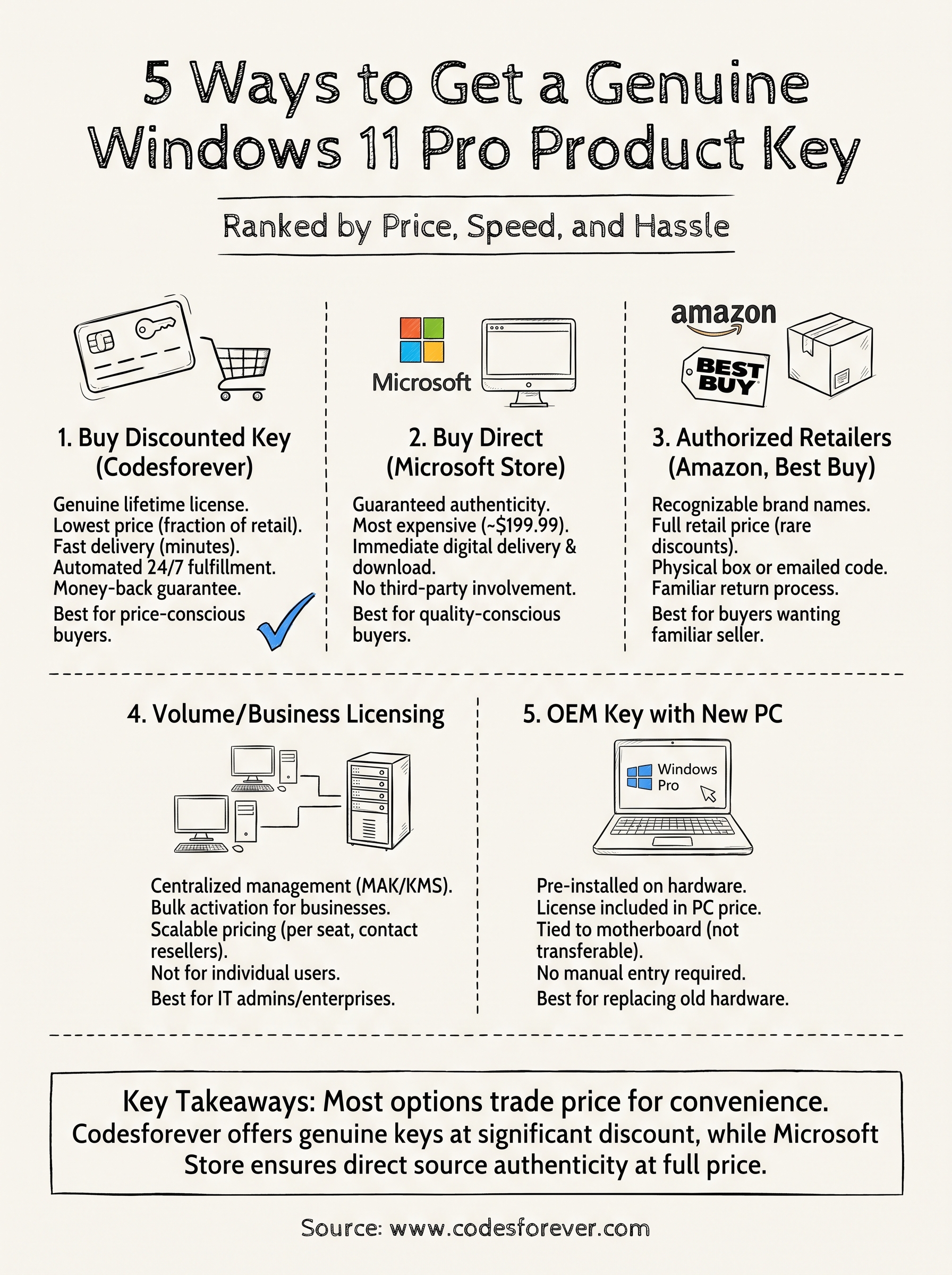
Most of the five options here boil down to a tradeoff between price, speed, and how much paperwork you’re willing to deal with. Volume licensing and OEM machines make sense if you’re already buying hardware or managing a fleet, while Microsoft’s own store and big-box retailers suit buyers who want a familiar name on the receipt and don’t mind paying full price for it. For everyone else, a windows 11 pro product key from a discount marketplace delivers the same genuine activation without the $200 markup.
If you just need Windows 11 Pro running today, at a fair price, with support standing by if something goes wrong, skip the enterprise contracts and retail lines entirely. Grab a Windows 11 Pro lifetime license for 1 PC from Codesforever and you’ll be activated within minutes, backed by a real guarantee instead of crossed fingers.