

Microsoft Office for Home and Business 2024: What’s Inside

Microsoft Office for Home and Business is the 2024 edition of Office that you pay for once and keep. It installs on one PC or Mac and includes Word, Excel, PowerPoint, Outlook, and OneNote. Microsoft lists it at $249.99. It has no subscription, no cloud storage, and no feature upgrades. If you want the next major Office release, you buy it again at full price.
This article explains what the edition includes, how it differs from Office Home 2024 and Microsoft 365, and how to buy and install it on Windows or Mac. It also covers the points buyers usually miss: commercial use, Outlook, platform-specific licenses, and the real cost over several years. You will know which edition fits your setup before you spend anything.
Codesforever sells discounted Office 2024 license keys for both platforms, delivered by email. Our team has been engaged in the online software field for over ten years, and the checklist near the end covers what to check before you buy.
Why a one-time Office purchase still makes sense
Office Home & Business 2024 makes sense when you use one computer, want the classic desktop apps including Outlook, and prefer paying once to paying every year. The license is permanent for that version, and you keep using the apps after Microsoft stops adding features.
What the edition includes
The edition gives you five desktop apps for work and home. Microsoft built it for families and small businesses who want classic Office apps and email.
| App | What you use it for |
|---|---|
| Word | Documents, letters, reports |
| Excel | Spreadsheets, budgets, data analysis |
| PowerPoint | Presentations |
| Outlook | Email, calendar, contacts |
| OneNote | Notes and planning |
The apps run fully on your computer. You need internet to install and activate them, but not to use them afterward. The suite also works with Microsoft Teams. Access is not part of the package, and it does not exist on Mac at all.
Home & Business 2024 is five classic desktop apps, one computer, and one payment.
What "one-time purchase" really means
A one-time purchase means you can permanently own that version. Microsoft states that Office 2024 has no upgrade path, so a future major release costs full price. You get security updates, but not the steady stream of new features that subscribers receive. Microsoft’s lifecycle for Office 2024 runs to around October 2029, which gives you roughly five years of supported use.
The edition also leaves out several things that subscriptions bundle. You get no cloud storage, no ongoing feature upgrades, and no AI assistant built into the apps. For many home and small business users that is fine. Most people open Word and Excel to write and calculate, not to chat with an assistant.
How to choose between Home & Business, Home, and 365
Pick Home & Business 2024 if you need desktop Outlook or use Office for work on a single computer. Pick Office Home 2024 if you only need Word, Excel, and PowerPoint for personal use. Pick Microsoft 365 if you want several devices, cloud storage, or continuous updates.
Side-by-side comparison
This table uses Microsoft’s list prices in US dollars. They can change, so check the current figure before you buy.
| Home & Business 2024 | Home 2024 | Microsoft 365 Personal | Microsoft 365 Family | |
|---|---|---|---|---|
| Price | $249.99 once | $179.99 once | $99.99 per year | $129.99 per year |
| Users and devices | 1 PC or Mac | 1 PC or Mac | 1 person, 5 devices at once | Up to 6 people, 5 devices each |
| Word, Excel, PowerPoint | Yes | Yes | Yes | Yes |
| Desktop Outlook | Yes | No (free web version with ads) | Yes | Yes |
| OneNote | Yes | Yes | Yes | Yes |
| Cloud storage | None included | None included | 1 TB | 2 TB shared |
| New features over time | Security updates only | Security updates only | Ongoing | Ongoing |
| Copilot AI | No | No | Yes, with usage limits | Subscription owner only |
Home vs Business: the $70 question
The two one-time editions differ by $70 at Microsoft’s list prices, $249.99 against $179.99. For that money you get desktop Outlook and a license that fits work use. Microsoft positions Home for families and students, so if you earn money with the software, buy Home & Business and check the license terms on the product page.
If you need Outlook or use Office for work, the extra $70 for Home & Business is the right call.
Worked cost example
Say you run a one-person consultancy on one laptop. Home & Business costs $249.99 once. Microsoft 365 Personal at the regular $99.99 per year totals $299.97 after three years and $499.95 after five. The subscription passes the one-time price during year three. You gain 1 TB of storage, updates, and AI features for that extra money. If you do not need those, the one-time edition wins on cost. If you share Office across a household of five, Family at $129.99 per year can still be the cheaper route per person.
How to buy, download, and install Office 2024
Buying and installing takes about 20 minutes. You choose the right platform, redeem a 25-character product key on your Microsoft account, and install from that account. The same steps apply to Windows and Mac.
Check your computer first
Office Home & Business 2024 runs on Windows 11, Windows 10, and recent versions of macOS. Microsoft lists these minimums.
| Windows | Mac | |
|---|---|---|
| Processor | 1.6 GHz, 2 cores | Recent macOS |
| RAM | 4 GB (64-bit) | 4 GB |
| Free disk space | 4 GB | 10 GB |
| Display | 1024 x 768 | 1280 x 800 |
| Graphics | DirectX 10 | Not specified |
You also need internet access and a Microsoft account. Windows 8.1 and older systems are not supported.
Install in five steps
Follow these steps for the installer and activation:
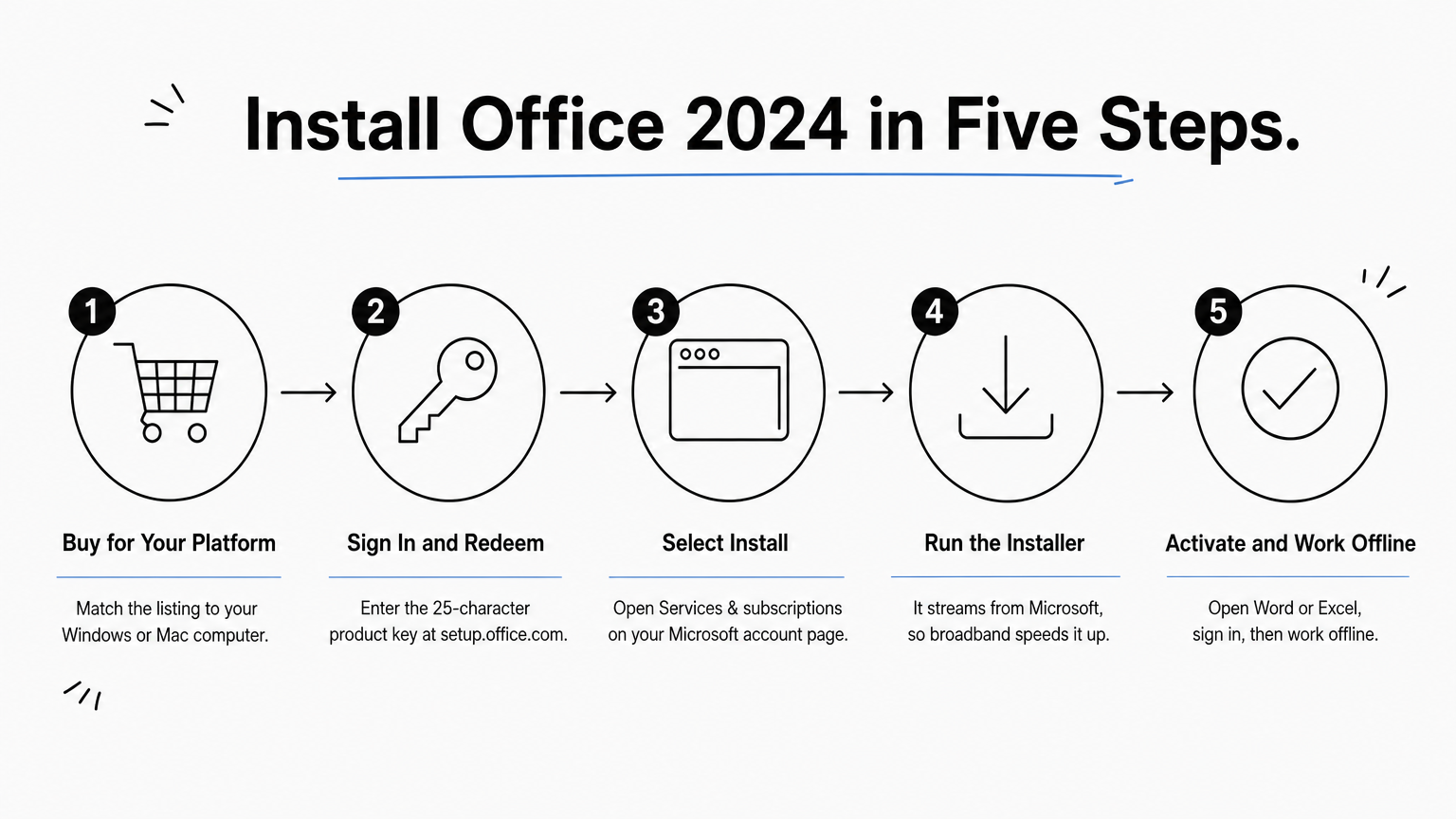
- Buy the edition for your platform. Windows and Mac are separate products, so match the listing to your computer.
- Sign in with a Microsoft account at setup.office.com and enter the 25-character product key. Use an account you will keep, because it holds your license.
- Open Services & subscriptions on your Microsoft account page and select Install.
- Run the installer. It streams from Microsoft, so a broadband connection speeds it up. You can start using apps before the process finishes on Windows.
- Open Word or Excel and sign in to complete activation. After that you can work offline.
If you see "Office Standard" in search results, know that Office LTSC 2024 Standard is a volume-licensed edition for organizations. Individuals and small businesses buy Home & Business instead. Mac and Windows copies each cover one computer. If you replace your machine, deactivate the old install through your Microsoft account first.
Register your key to your own Microsoft account on day one, and reinstalling later takes two minutes.
Where to buy it and what to check first
You can buy Office Home & Business 2024 directly from Microsoft or retailers at list price, or from a licensed key seller at a discount. The safest choice is the seller that guarantees the key, delivers fast, and lets you get help if activation fails.
Cheaper ways to get Office
The cheapest legitimate option is Microsoft’s free web apps. They give you browser versions of Word, Excel, and PowerPoint and 5 GB of storage, but no desktop apps or Outlook. The next step up is a discounted license key for the one-time edition, which costs far less than the $249.99 list price. Microsoft also runs first-year promotions on subscriptions, but they renew at the regular price.
What to check before you pay
Before you buy a key from any seller, confirm these points:
- The listing names the exact edition, platform, and "1 PC" or "1 user" limit.
- The seller states that keys are genuine and gives a refund or replacement policy with a clear reporting window.
- Delivery is by email and fast, and live support exists if activation fails.
- You get an install guide and a download link.
Codesforever sells Home & Business 2024 for Windows and for Mac as lifetime keys with instant email delivery. It states a 100% money-back guarantee, and you can report a key problem within 7 days of purchase. It offers free 24/7 support by live chat, WhatsApp, and email, and prices can appear in USD or your local currency. If you want to see how other buyers rate the process, read the customer reviews.
Is this the right Office for you?
Office Home & Business 2024 suits you if you work on one PC or Mac, need Outlook, and want to pay once. Choose Home 2024 if you can live without Outlook and commercial use. Choose Microsoft 365 if you need many devices, cloud storage, or new features each year. Over three or more years, the one-time edition usually costs less.
Whichever path you take, match the edition to your platform and register the key to your own Microsoft account. If you decide on a one-time license, you can see Office 2024 license keys at Codesforever, delivered by email with activation help.